


Cheap Computers only make sense when they still fit real life: a class schedule, a home office, a checkout counter, or a couch-side browsing setup. You want enough speed for the work you actually do, not a machine that feels stranded after a few tabs.
The eight picks below lean on clear hardware differences, from compact Chromebooks to full-size desktops with more headroom. Some are better for basic web tasks, others suit long typing sessions, and a few give you a cleaner upgrade path without pushing into high-end territory.
Quick Look At The Shortlist
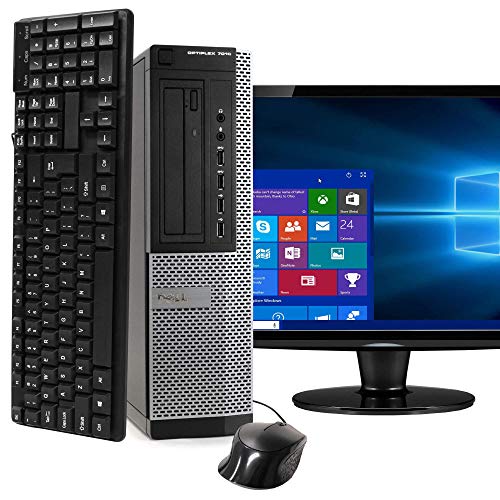
Dell Optiplex 7010 Desktop Package

Lenovo 100E Chromebook 2ND Gen 81QB000AUS


HP Chromebook 11.6 3NU57UT#ABA

ICONLINK Android 16 Tablet 10 Inch

Dell Chromebook 3100 11.6 Inch

Dell OptiPlex 5040 SFF Desktop PC
acer Gateway Chromebook 314 CBO314-1H-C476
More Details On Our Top Picks
A tower package like this fits a desk where you want a monitor, keyboard, and mouse ready on day one. The 19-inch LCD and included peripherals matter more than they look on paper, because that cuts down on extra shopping and setup friction.
The Core i5 class processor and 8GB of RAM give it more breathing room than the smaller Chromebook options in this list, while the 500GB hard drive offers plenty of room for documents and local files. The trade-off is plain: it’s less compact and less quick to wake than SSD-based picks.
Strong Points
- All-in-one desk package saves you from piecing together basics.
- 8GB RAM supports everyday multitasking with less stutter.
- 500GB storage suits local files, school work, and media.
- Windows 11 Pro is a better fit for office-style use than Chrome OS.
Things To Consider
- Large desktop footprint takes more room than the compact laptops here.
- HDD storage is slower than the SSD-based OptiPlex 5040 below.
- Refurbished condition can mean minor cosmetic wear from prior use.
Feature Snapshot
Who It Suits Best
It suits you best for a stationary home office, front desk, or study setup where size matters less than a complete bundle.
A Better Fit Elsewhere
Dell OptiPlex 5040 SFF Desktop PC suits you better when you want a smaller tower with SSD speed and a cleaner desk layout.
This Lenovo keeps things narrow and simple, which is exactly why it belongs in a low-cost roundup. The 11.6-inch HD screen and lightweight Chromebook format suit note taking, class portals, and email without much fuss.
Its MediaTek processor and 4GB of RAM are enough for basic browser work, but they set a clear ceiling once you open too many tabs or lean into heavier web apps. Compared with the Dell desktop package, you give up horsepower and screen size, yet you gain a machine that slips into a backpack with ease.
Upsides
- Small chassis travels well and takes little desk space.
- Chrome OS keeps the setup lean for web-first tasks.
- 11.6-inch display is handy for classroom carry and quick errands.
- Refurbished pricing tier makes sense for basic school use.
Small Caveats
- 4GB RAM and the modest processor suit light use more than multitasking.
- 11.6-inch panel feels tight for long spreadsheet sessions.
Who Should Grab It
It suits students and commuters who want a lightweight Chromebook for documents, video calls, and everyday browsing.
Look Elsewhere When
acer Gateway Chromebook 314 CBO314-1H-C476 is a better match for anyone who wants a larger 14-inch screen without leaving Chrome OS.
For simple home tasks, this HP lands in a sensible middle ground. The 14-inch screen gives you more working room than the 11.6-inch Chromebooks, and the included webcam makes it easier to handle calls without extra gear.
The 64GB SSD is the quiet advantage here, because solid-state storage usually feels faster than a hard drive during boot and file opening. The catch is that 4GB of RAM still keeps this in the light-use lane, so it works best for browsing, documents, and streaming rather than heavy multitasking.
Highlights
- 14-inch panel is easier on the eyes than smaller school-first laptops.
- SSD storage helps everyday responsiveness.
- Built-in webcam supports remote classes and simple video calls.
- Windows 11 gives you broader app compatibility than Chrome OS.
Points To Note
- 4GB RAM limits how many demanding tabs or apps you can juggle.
- Celeron silicon is fine for basics, not for heavier workloads.
Made For
It suits you best for household use, homework, and light office tasks where a full Windows desktop is unnecessary.
Another Choice May Suit
Dell OptiPlex 5040 SFF Desktop PC is the stronger match for a permanent desk setup that needs more storage speed and expansion comfort.
This HP Chromebook keeps the formula stripped down: a compact 11.6-inch screen, Chrome OS, and just enough memory for basic browser work. That makes it easy to carry and easy to understand, which matters more than flashy hardware in a category like this.
The 16GB of storage is the clear constraint, so cloud storage and browser-based apps do most of the heavy lifting. Compared with the Lenovo 100E Chromebook, the hardware profile is similarly modest, and the real decision comes down to your comfort with Chrome OS and how much you keep online.
Best Bits
- Small footprint fits narrow desks and bags.
- Chrome OS keeps everyday use straightforward.
- Light hardware is enough for browsing and school portals.
Areas To Watch
- 16GB storage leaves little room for local files.
- It suits web-based work better than offline-heavy routines.
Right Fit For
It suits you best for simple school assignments, messaging, and web browsing in a small-space setup.
Swap It Out When
acer Gateway Chromebook 314 CBO314-1H-C476 is the better pick when you want a larger 14-inch display for longer sessions.
This tablet leans into versatility rather than raw desktop-style power. You get the tablet body, plus keyboard case, mouse, and stylus, so it can shift from couch browsing to note taking without buying extra accessories.
The 10-inch 1280 by 800 IPS screen is workable for reading and casual media, while the 5G WiFi 6 and Bluetooth 5.3 specs point to a more current wireless package than the older laptop options here. The honest read is that it still feels like a tablet first, so the keyboard setup helps more with convenience than with replacing a true laptop.
What We Like
- Accessory bundle adds immediate typing and pointing options.
- IPS panel gives you a wider, more consistent viewing angle than basic panels.
- WiFi 6 helps on busy home networks.
- Portable format works well for travel or bedside use.
Room For Improvement
- 10-inch size is handy, but cramped for long document work.
- Tablet keyboards rarely match the comfort of a real laptop deck.
Whose Shelf It Belongs On
It suits casual users who want a light tablet for notes, streaming, and quick typing sessions.
Where A Sibling Pick Shines
HP 14 Inch HD Laptop is a better fit for someone who wants a more traditional clamshell layout for long typing days.
The Dell Chromebook 3100 is built for short hops, shared desks, and everyday browser work. Its 11.6-inch size keeps the footprint small, and the Celeron N4020 is aimed at basic tasks rather than ambitious multitasking.
That profile makes sense for students or commuters who want something easy to carry and easy to hand off to a younger user. Compared with the HP Chromebook 11.6 above, it follows the same lean logic, but the Dell name and 32GB of storage give you a touch more breathing room for local files.
Bright Spots
- Small chassis slips into backpacks without much bulk.
- 32GB storage gives you more room than the HP Chromebook 11.6.
- Chrome OS keeps boot-up and everyday access simple.
- Good fit for school portals and light browser tasks.
Softer Spots
- 11.6-inch display is compact for longer writing sessions.
- 4GB RAM keeps the workload firmly in the basics lane.
- Routine cleaning matters on travel gear because ports and keys pick up dust quickly.
Perfect Match For
It suits students, commuters, and families who want a compact Chromebook for easy carry.
Reach For A Different Pick When
acer Gateway Chromebook 314 CBO314-1H-C476 is the better call for anyone who wants a larger, more comfortable 14-inch display.
This small-form-factor OptiPlex is the desk machine in the group that feels most ready for everyday work. The 256GB SSD matters here, because it gives you faster startup and snappier file access than the hard-drive desktop earlier in the list.
WiFi, Bluetooth, HDMI, and Windows 11 Pro make it easy to slot into a modern home office without a pile of add-ons. The trade-off is that the SFF case leaves less room for expansion than a larger tower, so it suits practicality more than tinkering.
Reasons To Buy
- SSD storage makes the whole system feel more responsive.
- Small-form-factor case fits under or beside a desk neatly.
- WiFi, Bluetooth, and HDMI cover common office connections.
- Core i5 class CPU handles spreadsheets, browsers, and office suites with ease.
- 8GB RAM gives you a solid floor for daily multitasking.
Worth Noting
- SFF cases can be less flexible for upgrades than fuller towers.
- It’s a desktop setup, so it needs a fixed work area.
The Right Fit
It suits you best for a permanent office desk, remote work corner, or family computer station.
Skip It When
Lenovo 100E Chromebook 2ND Gen 81QB000AUS is the easier pick for someone who wants a lighter machine to carry all day.
The Gateway Chromebook 314 stands out here because the 14-inch Full HD screen gives you more room and sharper text than the smaller 11.6-inch Chromebooks. Add the 3.31-pound body, and you get a machine that still makes sense for bags, commutes, and moving between rooms.
The anti-glare panel helps in bright offices or near windows, and the HD camera plus Wi-Fi support keep it practical for calls and cloud work. One thing worth considering is that 4GB of memory still keeps it aimed at light-to-moderate browser use, not heavy multitasking.
Best Bits
- 14-inch Full HD display is the most comfortable screen in the Chromebook group.
- Lightweight build is easy to carry for school or work.
- Anti-glare finish helps in bright spaces.
- HD camera supports everyday video calls.
Minor Gripes
- Chrome OS keeps the experience focused on web apps.
- 4GB RAM sets a limit on heavy tab loads.
Built With In Mind
It suits you best for students, commuters, and home users who want a larger Chromebook screen without a bulky body.
Consider Something Else When
Dell OptiPlex 5040 SFF Desktop PC is the better route for anyone who wants a sturdier desk machine with SSD speed and more workspace permanence.
What Matters Most Before Choosing Cheap Computers
Where Shoppers Go Wrong
The easy mistake is chasing the cheapest spec sheet and ignoring storage type, screen size, and memory. A tiny SSD, a larger HDD, and 4GB of RAM each change the day-to-day feel in different ways.
The Upgrade Payoff
More money usually buys a faster SSD, a stronger processor, a better display, or a more complete accessory bundle. That extra spend makes sense for daily office use, long typing sessions, or shared family setups.
A Quick Reality Check Before You Buy
Hidden Buying Traps
Check operating system fit before anything else, because Chrome OS and Windows do different jobs well. Also keep an eye on storage, since 16GB or 32GB fills up much faster than it sounds.
What The Higher Tier Buys
The step up often means smoother multitasking, more comfortable screens, and less waiting on startup. For workstations or a main household computer, that usually matters more than saving a little room in the budget.
Frequently Asked Questions
What matters most in cheap computers?
Processor class, memory, storage type, and screen size shape the experience more than a long feature list. A well-matched entry-level machine feels calm, while an under-specced one feels cramped fast.
Are Chromebooks a smart choice for basic use?
Yes, they make sense for web browsing, school portals, email, and streaming. They are a weaker fit for offline-heavy routines or software that expects Windows.
Is 4GB of RAM enough?
It works for light browsing and simple documents. It becomes restrictive once you stack up tabs, video calls, and office apps at the same time.
Why do some desktops feel faster than laptops with similar specs?
Desktops often run cooler and have more room for full-size parts, which can improve consistency. They also avoid the portability trade-offs that make thin laptops harder to expand.
What should you check before a renewed purchase?
Look closely at the listed condition, included accessories, and whether the device matches your software needs. A clear return path and honest hardware details matter more than flashy wording.
