


Cheap home computers need to do a lot without getting fussy: schoolwork, web browsing, video calls, streaming, and the odd spreadsheet session. You also want a setup that fits the room you actually have, not a desk that disappears under a tower and cables. The eight picks below focus on sensible specs, space-conscious designs, and the kind of hardware that still makes sense for daily home use. Some lean compact, some include a monitor and accessories, and a few give you more storage headroom for family use.
The Shortlist At A Glance
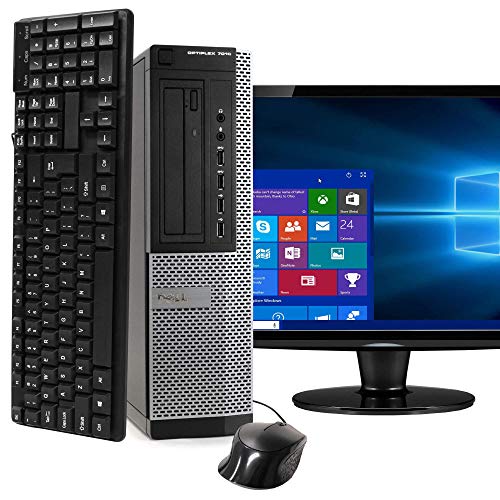
Dell Optiplex 7010 Desktop Package

Dell OptiPlex 5060 Desktop, i5-8500, 16GB RAM, 500GB SSD + 1TB HDD

Dell Optiplex 3050 SFF Desktop, i5-6500, 16GB RAM, 256GB SSD

HP ProDesk 600 G3 SFF with 21.5-inch FHD Monitor, i5-6500, 16GB RAM, 256GB SSD

HP 2025 22-inch FHD All-in-One Desktop Computer
Lenovo IdeaCentre All-in-One Desktop, 8GB RAM, 512GB SSD, 24-inch FHD IPS

HP Windows 11 Desktop Computer, i5, 16GB RAM, 500GB SSD, 24-inch LCD
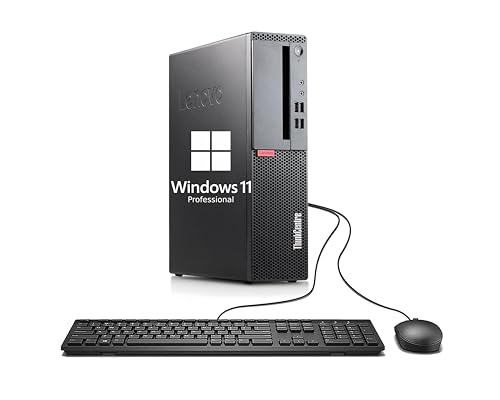
Lenovo ThinkCentre M710 SFF Desktop, 3.70GHz, 8GB RAM, 256GB SSD
More Details On Our Top Picks
The first Dell package makes sense for a household that wants a full desktop setup without assembling pieces one by one. You get a 19-inch LCD, keyboard, mouse, WiFi, and Windows 11 Pro in the box, so the setup burden stays low. That matters in a spare room, a dorm, or any desk that needs to be productive fast.
The Core i5 at 3.2GHz, 8GB of memory, and 500GB hard drive point to basic everyday work rather than heavy multitasking. A hard drive is slower than an SSD, so boot times and app launches won’t feel as sharp as the next few picks. Still, for email, browsing, and office work, this is a straightforward package with little fuss.
Strong Points
- All the core pieces are included, which cuts down on extra shopping.
- The 19-inch screen keeps the footprint manageable for a smaller desk.
- Windows 11 Pro gives you a familiar business-style desktop setup.
- WiFi, keyboard, and mouse make this easier to place in a basic home office.
Things To Consider
- The 500GB hard drive is the slowest part of the bundle.
- The 8GB memory ceiling is fine for routine work, but it won’t feel roomy under heavy browser tab loads.
- The monitor size suits compact spaces more than immersive media use.
Who It Suits Best
You fit this best if you want a ready-to-go desktop for homework, email, and household admin. It also works well in a room where keeping the setup simple matters more than chasing speed.
Where A Sibling Pick Shines
Dell OptiPlex 5060, Desktop, i5-8500, 16GB RAM, 500GB SSD + 1TB HDD suits you better if you want a faster-feeling storage setup for busier multitasking.
This OptiPlex 5060 pushes past the first Dell with a six-core i5-8500, 16GB of DDR4 memory, and a split storage layout. The 500GB SSD handles the fast side of the routine, while the 1TB hard drive gives you room for files that do not need instant access. For a home office that keeps documents, photos, and downloads in one place, that mix is very practical.
DDR4 is a current-style memory type that helps the system stay responsive during everyday multitasking. The trade-off is simple, SSD speed is doing the heavy lifting here, so the machine will still feel more alert than the first Dell package, but not as tidy as a single-drive all-flash setup. That’s the honest read: you get flexibility, not elegance.
Highlights
- The six-core processor gives you more room for multitasking than the earlier Dell bundle.
- SSD plus hard drive storage is handy for separating fast-need apps from larger files.
- 16GB of memory suits heavier browser use and office work with multiple open windows.
- WiFi and Bluetooth support make peripheral setup easier in a mixed-device home.
Worth Noting
- The mixed storage layout takes a little planning to keep files organized.
- The hard drive section adds capacity, but it won’t feel as quick as SSD storage.
- This is more desktop-centric than portable, so it belongs on a fixed workspace.
Who Should Grab It
You get the most from this one in a home office or family space where several people share the PC across the week. It suits you especially well when file storage matters as much as launch speed.
Look Elsewhere When
Lenovo IdeaCentre All-in-One Desktop, 8GB RAM, 512GB SSD, 24-inch FHD IPS fits you better if you want a cleaner all-in-one layout with fewer separate parts on the desk.
Space-conscious desks get a cleaner fit with the Optiplex 3050 SFF, because the small-form-factor case is built to stay out of the way. It still gives you 16GB of DDR4 memory and a 256GB SSD, which is a much snappier pairing than the first Dell’s hard-drive setup. For browsing, schoolwork, and routine office apps, that makes the machine feel appropriately current.
The 4K support, DisplayPort, and HDMI output are the useful extras here. They matter most if you plan to connect a sharper external display or keep your options open later. You may find the 256GB storage a bit tight for large media libraries, but for a lean household computer, the trade is easy to understand.
Positives
- The compact chassis fits neatly on small desks or shelves.
- The SSD helps boot and app loading feel more responsive than hard-drive-based options.
- DisplayPort and HDMI give you flexible monitor connection choices.
- 16GB of memory is a useful floor for everyday multitasking.
Areas To Watch
- 256GB storage is enough for basics, but it fills faster with photos and downloads.
- The SFF case keeps size down, though internal expansion tends to be more limited than on a larger tower.
- It is a better fit for focused daily work than for heavy media hoarding.
Whose Shelf It Belongs On
You should look at this model first when desk space is tight and you still want an SSD-backed system. It suits students, remote workers, and anyone who values a smaller case more than extra drive room.
A Better Fit Elsewhere
HP ProDesk 600 G3 SFF with 21.5-inch FHD Monitor, i5-6500, 16GB RAM, 256GB SSD works better if you want a desktop bundle with a display already included.
This HP bundle takes the guesswork out of setup by pairing the desktop with a 21.5-inch full-HD monitor, plus a keyboard and mouse. That makes it a cleaner answer for a guest room office, student desk, or any place where you want one purchase to cover the basics. The black finish keeps the look plain and easy to live with.
The i5-6500, 16GB of DDR4 memory, and 256GB SSD are all sensible for everyday work, and the included DisplayPort helps with monitor connection flexibility. The screen size is modest rather than expansive, so it suits email, paperwork, and browsing more than wide-screen multitasking. Still, for most compact home setups, the bundle is easy to justify.
Upsides
- The monitor, keyboard, and mouse reduce extra setup steps.
- 16GB of RAM is a comfortable base for daily home and office tasks.
- The SSD gives the system a more responsive feel than hard-drive-only options.
- The 21.5-inch screen fits neatly on smaller desks without crowding the surface.
Small Caveats
- The monitor is useful, though the size stays in the smaller range.
- 256GB storage asks you to manage larger files with some discipline.
- As with most bundled desktops, cable placement takes a minute of tidy planning.
Perfect Match For
You fit this bundle best if you want a simple desk setup for school tasks, household admin, or casual browsing. It also works well in a room where you want fewer separate purchases to manage.
Another Choice May Suit
Lenovo IdeaCentre All-in-One Desktop, 8GB RAM, 512GB SSD, 24-inch FHD IPS is a cleaner fit if you want a single-screen unit with a larger display and less visible cabling.
All-in-one machines make the most sense in rooms where you want the desktop to disappear into the display, and this HP does that neatly. The 22-inch FHD panel, 13th Gen Intel N100, 8GB of DDR5 memory, and 128GB SSD point squarely at everyday computing rather than heavy creative work. For a kitchen desk, study corner, or shared family space, the footprint is the main attraction.
DDR5 is newer memory than DDR4, so the hardware is built around current basics, even though the storage stays modest. That small SSD is fine for browser-based use and routine files, but you won’t want to treat it like an archive machine. It feels most natural as a clean, compact desktop for everyday accounts, calls, and documents.
Bright Spots
- The all-in-one format reduces cable clutter and keeps the desk tidy.
- The 22-inch screen gives you enough room for side-by-side windows without a separate tower.
- DDR5 memory is a sensible modern touch for an entry-level home setup.
- HDMI, Type-C, Wi-Fi, and the webcam make the package easier to live with.
Points To Note
- 128GB storage is tight once you leave basic apps and documents behind.
- The desktop leans hard toward convenience, so expansion headroom is naturally limited.
- It suits day-to-day use better than bulky file libraries.
Built With In Mind
You should look here if you want a neat, low-clutter home PC for browsing, school portals, and family admin. It also fits people who care more about desk simplicity than internal upgrade room.
Skip It When
Lenovo IdeaCentre All-in-One Desktop, 8GB RAM, 512GB SSD, 24-inch FHD IPS makes more sense for households that want a larger screen and more built-in storage.
The Lenovo IdeaCentre shifts the all-in-one formula upward with a larger 24-inch display, 512GB SSD, Wi-Fi 6, and Bluetooth 5.2. That makes it easier to recommend for a family room or shared desk where the screen gets used by more than one person. The anti-glare IPS panel also matters, because it keeps reflections from taking over in bright rooms.
IPS means in-plane switching, a display type known for steadier color and wider viewing angles than basic panels. You notice that most when two people sit beside each other or the desk faces a window. The trade-off is that it still stays in the everyday-computing lane, so it’s a smart home machine rather than a power user’s workstation.
Best Bits
- The 24-inch display gives you more room for documents and split windows.
- 512GB of storage is more forgiving for apps, files, and family downloads.
- Wi-Fi 6 and Bluetooth 5.2 help the system fit into newer home networks and accessories.
- The anti-glare IPS panel is helpful in brighter rooms and open layouts.
Room For Improvement
- The all-in-one shape saves space, but it also narrows upgrade paths.
- It works best as a main household PC rather than a heavy-duty editing box.
- Like most integrated desktops, it rewards a tidy cable plan around the desk.
The Right Fit
You fit this model best if you want a larger screen for shared family use, school tasks, or everyday administration. It also suits you if storage room matters more than having a separate tower.
Reach For A Different Pick When
HP Windows 11 Desktop Computer, i5, 16GB RAM, 500GB SSD, 24-inch LCD is the better choice when you want a full bundle with speakers, RGB accessories, and a webcam.
This HP package is built for the person who wants the accessories to arrive with the computer, not after a second shopping round. You get a 24-inch LCD, WiFi 6 AX200, Bluetooth, RGB keyboard and mouse, speakers, and a webcam, which turns it into a ready desk setup for school, video calls, or a small home office. That bundling makes the value easier to judge than specs alone.
With 16GB of RAM and a 500GB SSD, the machine should feel plenty brisk for everyday multitasking. The larger screen helps too, especially when you keep documents open beside a browser window. The catch is obvious: the extras are handy, but they also lock the setup into a more complete desktop footprint than the smaller SFF picks.
Reasons To Buy
- The included accessories save you from matching parts separately.
- A 24-inch screen gives you a comfortable workspace for side-by-side tasks.
- The 500GB SSD offers a much more responsive feel than hard-drive-based home PCs.
- WiFi 6 support is useful in homes with newer routers.
Honest Caveats
- The bundle takes up more room than a compact small-form-factor desktop.
- RGB styling is a matter of taste, so the look may feel busier than the rest of this list.
- You still need to place and manage several included accessories on the desk.
Who Will Love This
You suit this model best if you want a complete desktop package for a bedroom office, homework station, or general family use. It makes the most sense when you want fewer missing pieces on day one.
Swap It Out When
HP ProDesk 600 G3 SFF with 21.5-inch FHD Monitor, i5-6500, 16GB RAM, 256GB SSD is the cleaner fit if you want a simpler, less accessory-heavy setup.
The Lenovo ThinkCentre M710 keeps things lean, with a small-form-factor case, keyboard, mouse, WiFi, Bluetooth, and Windows 11 Pro in the mix. For a study desk, a basic office corner, or a spare room computer, that kind of no-nonsense bundle is easy to place. The VGA output also gives older monitor users a familiar connection path.
The 3.70GHz processor speed, 8GB of RAM, and 256GB SSD are enough for everyday browsing, documents, and streaming. You won’t get the extra headroom of the 16GB machines above it, but the system should still feel tidy for lighter use. It is a sensible pick for simple tasks, not a machine that tries to be more than it needs to be.
What We Like
- The SFF case helps it fit into cramped setups.
- Keyboard, mouse, WiFi, and Bluetooth reduce the number of add-ons you need.
- The SSD is a practical match for basic daily use.
- Windows 11 Pro keeps the desktop aligned with standard home office routines.
Minor Gripes
- 8GB of memory is serviceable, though it is the lightest spec here.
- 256GB storage is fine for modest needs, but it asks for regular file housekeeping.
- It suits lighter computing more than multitask-heavy households.
Made For
You fit this model best if you want a compact desktop for writing, browsing, and basic home admin. It also makes sense for a second computer in a room where space stays tight.
A Different Pick Fits Better
Dell OptiPlex 5060 Desktop, i5-8500, 16GB RAM, 500GB SSD + 1TB HDD suits you better if you want more memory and more storage room for a busier home setup.
What Matters Most Before Choosing Cheap Home Computers
Size And Layout
A small-form-factor tower fits under a desk and keeps the surface cleaner, while an all-in-one trims cable clutter even further. For shared rooms or studio apartments, that difference matters as much as raw speed.
Storage And Memory
8GB works for basic browsing and documents, but 16GB is the safer floor for busier households. SSD storage gives you a faster-feeling machine than an old hard drive, and that usually matters more than a slight processor bump.
Bundles Versus Bare Towers
A package with a monitor, keyboard, and mouse saves time and planning. A bare desktop gives you more freedom to choose the screen and accessories you already want.
Everyday Use Fit
Schoolwork, email, streaming, and home admin place different demands on a machine. Match the PC to your real routine, not to the longest spec list on the page.
A Quick Reality Check
Common Shopping Slip Ups
The easiest mistake is focusing on processor names while ignoring storage type and memory. A cheap home computer with a hard drive can feel slower than a newer-looking model with an SSD and enough RAM.
Where The Extra Money Goes
More expensive home PCs usually buy you faster storage, more memory, a larger display, or a cleaner all-in-one design. That upgrade is worth it when several people use the PC or you keep many files, tabs, and apps open at once.
Frequently Asked Questions
What specs matter most in a cheap home computer?
SSD storage and at least 8GB of RAM usually make the biggest difference in day-to-day feel. A decent processor matters too, but storage speed often shapes how responsive the machine feels.
Is an all-in-one desktop a good fit for home use?
Yes, especially in small rooms or shared spaces where you want fewer visible cables. The trade-off is less flexibility for future upgrades.
How much storage is enough for basic home tasks?
256GB handles light use, while 500GB gives you more breathing room for files and apps. A 1TB hard drive adds bulk storage, but it won’t feel as quick as an SSD.
Should you choose a bundled desktop or a bare tower?
A bundled desktop suits you if you want a simple setup right away. A bare tower suits you if you already own a display or want to pick every accessory yourself.
Are renewed desktops a sensible choice for home use?
They can be, especially when the specs line up with your daily needs and the seller clearly lists the included parts. The key is matching the machine to your routine instead of chasing the most hardware on paper.
