


You want a laptop that can handle Minecraft without turning a simple session into a lag hunt. That usually means enough memory for smooth play, a display that’s easy to live with, and storage that leaves room for the launcher, updates, and a few school apps.
The eight picks below stay in the budget lane and split the difference between compact Chromebooks and small Windows laptops. That mix gives you real options for homework, travel, and casual play, even though none of these machines is built for heavy mod packs or demanding 3D games.
Quick Shortlist For Minecraft Basics

Lenovo 100E Chromebook 2ND Gen 81QB000AUS

HP 14″ HD Laptop, Windows 11, Celeron Dual-Core, 4GB, 64GB SSD

Dell Latitude 3190 Celeron N4100, 4GB, 64GB, 11.6in

HP 14″ HD Chromebook Laptop for Students, N4120, 4GB, 64GB eMMC

Dell Chromebook 3100 11.6″, Celeron N4020, 4GB, 32GB eMMC
acer Gateway Chromebook 314 CBO314-1H-C476, 14″ FHD, N4500, 4GB LPDDR4X
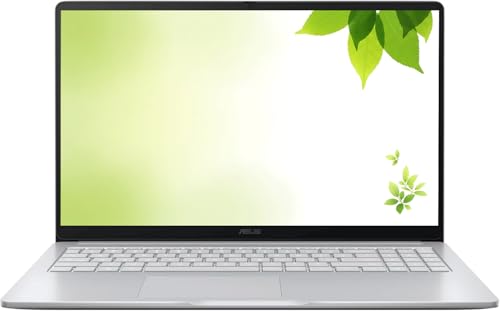
ASUS 2026 15″ FHD IPS Chromebook, Intel Processor, 4GB DDR4, 128GB
ASUS 14″ Laptop for Business & Student, Celeron N4500, 4GB, 64GB eMMC
More Details On Our Top Picks
Small-screen Chromebooks like this keep the focus on the basics, which suits Minecraft players who spend more time in lightweight worlds than in heavy mod packs. The 11.6-inch HD panel and 4GB of memory point to a tight, portable machine rather than a lounge-on-the-couch powerhouse.
That trade-off works in a backpack, on a school desk, or on short trips where you want something simple to carry. The 16GB eMMC storage is the main constraint, so you’ll want to keep the setup lean and avoid piling on extra files.
What We Like
- 11.6-inch size stays easy to tuck into a bag.
- Chrome OS keeps the interface light and uncluttered.
- 4GB RAM fits basic browsing, schoolwork, and casual play.
- Low storage footprint encourages a tidy setup.
Minor Gripes
- 16GB storage leaves little room for extras.
- The HD panel is fine for basics, not a sharpness showcase.
- Small keyboards can feel cramped during long homework sessions.
Who It Suits Best
Students and casual gamers who want the smallest machine in this list will get the most from it.
Where A Sibling Pick Shines
HP 14″ HD Chromebook Laptop for Students, N4120, 4GB, 64GB eMMC suits you better for a roomier screen and less cramped typing.
Windows 11 gives this HP a broader app story than the Chromebooks above, which matters for school tools that still live outside a browser. The 14-inch HD BrightView screen, 64GB SSD, and built-in webcam make it a straightforward everyday machine for class notes, video calls, and light game time.
The SSD, or solid-state drive, helps the laptop feel less sluggish than older spinning drives, though 4GB of memory still sets the ceiling low. In most dorm rooms or shared spaces, that balance feels sensible rather than flashy.
Upsides
- Windows 11 opens the door to a wider software mix.
- 64GB SSD gives you more breathing room than 32GB options.
- USB-C, USB-A, and SD slot support practical everyday use.
- Webcam and integrated mic suit class calls.
Points To Note
- 4GB RAM can feel tight with too many tabs open.
- HD resolution keeps the display basic, not especially crisp.
- Renewed condition means cosmetic variation is part of the picture.
Who Will Love This
Budget-minded students who want Windows compatibility without jumping to a larger machine fit this HP well.
Another Choice May Suit
ASUS 14″ Laptop for Business & Student, Celeron N4500, 4GB, 64GB eMMC is the better match for you if Microsoft 365 and a FHD screen matter more.
Compared with the consumer-facing HP models, this Dell Latitude leans more toward school and office habits. The 11.6-inch body, Windows 11 Pro, and TrackPoint-style control layout make it feel like a machine built for typing, logging in, and moving through routine tasks.
Minecraft use should stay on the modest side, but that profile suits short play sessions between assignments. The 64GB storage and 4GB memory are enough for a tidy setup, though the small chassis will not feel spacious during long stretches.
Bright Spots
- Windows 11 Pro suits school or work accounts.
- 11.6-inch size stays highly portable.
- TrackPoint control can help in tight spaces.
- Latitude build style usually favors daily carry use.
Softer Spots
- The compact format leaves little room for large hands.
- 4GB RAM and 64GB storage keep ambitions modest.
- Refurbished units can arrive with mixed cosmetic wear.
Made For
Students or office users who like a small Windows notebook with a no-nonsense layout will get the best fit here.
Look Elsewhere When
acer Gateway Chromebook 314 CBO314-1H-C476 Laptop is the better match for you if a sharper 14-inch FHD screen matters more than Pro software.
This HP stands out for practical school use, because it keeps the parts list focused and the battery story front and center. A 14-inch HD micro-edge panel, Wi-Fi, webcam, HDMI, and USB-A plus USB-C all fit the routine of logging into classes, moving files, and opening Minecraft between lessons.
The N4120 quad-core chip helps more than the older dual-core parts in this roundup, especially for multitasking with tabs and chat windows open. The result is a sensible middle ground for home desks and backpacks, though the 64GB eMMC storage still asks you to stay organized.
Reasons To Buy
- Four-core processor is a step up from basic dual-core laptops.
- 14-hour battery rating fits long school days.
- HDMI and both USB types help with accessories.
- Chrome OS stays light for everyday tasks.
- HD webcam supports classes and check-ins.
Small Caveats
- eMMC storage is slower and smaller than an SSD.
- HD resolution keeps the screen serviceable, not premium.
- Chrome OS suits web-first use more than desktop software stacks.
Feature Rundown
Right Fit For
Students who want a roomy Chromebook with better port selection and a long school-day battery fit this model well.
A Better Fit Elsewhere
HP 14″ HD Laptop, Windows 11, Celeron Dual-Core, 4GB, 64GB SSD is the smarter choice for you if Windows matters more than Chrome OS.
Among the smallest Chromebooks here, this Dell keeps costs of attention low as well as hardware demands. The 11.6-inch body and 32GB eMMC storage make sense for a stripped-down setup, especially for schoolwork, cloud files, and light Minecraft sessions.
The honest read is that the limited storage forces discipline. That said, for a backpack machine or a family spare, it’s a tidy shape with very little to distract from the job.
Highlights
- 11.6-inch format is easy to pack and carry.
- Chrome OS keeps maintenance simple for basic use.
- 32GB storage works for a cloud-first setup.
- Refurbished pricing tier usually appeals to cautious spenders.
Areas To Watch
- 32GB storage fills quickly once extras pile up.
- Small screen size can feel tight for split-window work.
- The machine rewards a very light app load.
Best Suited To
Cloud-first students and families who need a tiny Chromebook for core tasks will appreciate this one most.
Swap It Out When
Lenovo 100E Chromebook 2ND Gen 81QB000AUS is the better fit for you if you want a similar size with a different refurbished option.
This Gateway line lands in a useful middle zone, because it gives you a 14-inch Full HD panel without jumping to a heavier class of laptop. The 3.31-pound body, Wi-Fi 5, and HD camera make it easy to picture in a dorm, library, or a daily carry bag.
Compared with the HD screens above, the sharper 1920 x 1080 display is the real draw here. For Minecraft and streaming side by side, that extra clarity matters more than a plain spec sheet might suggest, though 4GB of memory still keeps the ceiling modest.
Best Bits
- Full HD display gives you more detail than the HD entries.
- 3.31-pound build stays manageable for daily carry.
- Wi-Fi 5 is well suited to routine home and campus use.
- HD camera handles calls and quick check-ins.
Room For Improvement
- 4GB memory still limits heavier multitasking.
- Chrome OS keeps the software approach web-first.
- The screen upgrade helps most when your eyes notice sharpness.
Core Details
The Right Fit
Students and commuters who want a sharper screen in a manageable body will get strong value from this Gateway.
Where Shoppers Go Wrong
ASUS 2026 15″ FHD IPS Chromebook, Intel Processor, 4GB DDR4, 128GB is the better fit for you if you want a larger display and more storage headroom.
This ASUS feels more spacious than the 11.6-inch options, and that’s the point. A 15-inch FHD IPS panel, 128GB of storage, HDMI, and fast Wi-Fi make it a better desk companion for homework, streaming, and Minecraft sessions that stay casual.
The IPS screen, or in-plane switching panel, usually keeps viewing angles steadier than basic displays, so the picture holds up better when you shift position. The trade-off is plain enough: with only 4GB of memory, the machine still asks you to keep multitasking reasonable.
Standout Traits
- 15-inch screen gives you more room for split windows.
- 128GB storage is generous in this group.
- HDMI helps connect to a monitor or TV.
- Fast Wi-Fi suits stream-heavy home use.
- IPS panel improves the viewing experience from angles.
Honest Caveats
- 15-inch size is less convenient in a small bag.
- 4GB RAM still narrows the multitasking ceiling.
- Chrome OS keeps the software focus web-first.
Whose Shelf It Belongs On
You’ll like this one most as a home-based Chromebook with more screen space and storage than the compact picks.
Reach For A Different Pick When
acer Gateway Chromebook 314 CBO314-1H-C476 Laptop is the better fit for you if you want a smaller, lighter alternative with a sharper display than the HD models.
ASUS built this one for mixed home and school use, and the 14-inch FHD screen gives it an easier everyday shape than the smaller Chromebook models. The Celeron N4500, 4GB of memory, and 64GB eMMC keep it in the light-use category, but the bundle of Windows 11, webcam, HDMI, Wi-Fi, and NumberPad adds real utility.
NumberPad turns the touchpad into a numeric pad, which helps with quick number entry without adding a larger chassis. For spreadsheets, homework, and light Minecraft play, that little detail can feel surprisingly useful, though the storage size still rewards a tidy file habit.
Positives
- 14-inch FHD screen gives you a cleaner workspace.
- Windows 11 supports a broad set of everyday apps.
- NumberPad helps with quick number entry.
- Webcam, HDMI, and Wi-Fi cover core needs.
Worth Noting
- 64GB eMMC is modest once updates and files stack up.
- 4GB memory limits bigger multitasking sessions.
- The included software value matters most for school and office basics.
At A Glance
Who Should Grab It
Students and home office users who want a Windows laptop with a numeric touchpad helper will get the best match here.
Skip It When
HP 14″ HD Laptop, Windows 11, Celeron Dual-Core, 4GB, 64GB SSD is the better fit for you if a cheaper Windows path matters more than the bundled software extras.
What Matters Most Before You Choose
Core Hardware Choices
Minecraft stays happier on a laptop that has at least 4GB of memory and a processor that can keep tabs, chat, and the launcher moving together. A solid-state drive or roomy eMMC storage helps the machine feel less cramped once updates arrive.
Screen Size and Resolution
An 11.6-inch machine travels well, but a 14-inch or 15-inch panel gives you more room for inventory, browser tabs, and schoolwork. Full HD is the cleaner view, while HD remains fine for a simple, low-cost setup.
Operating System Fit
Chrome OS works well for web-first use, school portals, and cloud storage. Windows gives you broader software access, which helps when your setup needs apps that live outside the browser.
Storage Discipline
Smaller storage pushes you toward cloud files and a lighter software load. That’s fine for casual Minecraft and homework, but a bigger drive gives you more breathing room for extras.
A Quick Reality Check
Common Shopping Slip Ups
Shoppers often fixate on screen size and forget memory, storage, and the operating system. A bigger display doesn’t help much if the laptop gets crowded after a few tabs and updates.
What The Higher Tier Buys
Spending more usually gets you a sharper display, more storage, or a roomier chassis. It also tends to buy a little more comfort for daily typing, streaming, and split-screen work.
Frequently Asked Questions
Can Cheap Laptops For Minecraft run the game smoothly?
Yes, for basic worlds and modest settings, these laptops can handle the job. Heavy mods, large servers, and long background app lists ask for more hardware than this roundup focuses on.
Is Chrome OS a good fit for Minecraft?
Chrome OS works well for browser-based school use and simple day-to-day tasks. Your Minecraft plan needs to match the version and setup available to you.
How much memory matters most?
4GB is the floor for this category, and it keeps the machines in the light-use lane. More memory helps when you juggle class tabs, chat, and game windows at the same time.
Is 32GB or 64GB storage enough?
32GB works best for a very lean Chromebook setup. Sixty-four gigabytes gives you more breathing room for updates, files, and a less cramped routine.
Should you choose a 11.6-inch or 14-inch screen?
11.6-inch models carry more easily and take less desk space. Fourteen-inch models usually feel better for typing, split windows, and longer sessions.
