


Cheap midi keyboards make sense when you want hands-on control without crowding a desk, backpack, or home studio corner. The right pick depends on key count, pad layout, software control, and how much space you can spare next to a laptop. For daily writing, beat sketching, or late-night idea capture, a small controller can keep the workflow moving.
That’s the real value here, you get a practical bridge between your fingers and your DAW, not a full piano replacement. Some options lean simple and travel-friendly, while others add pads, knobs, or tighter software integration. The list below separates those roles clearly so you can match the controller to the way you actually make music.
Quick Shortlist For Small Studio Setups
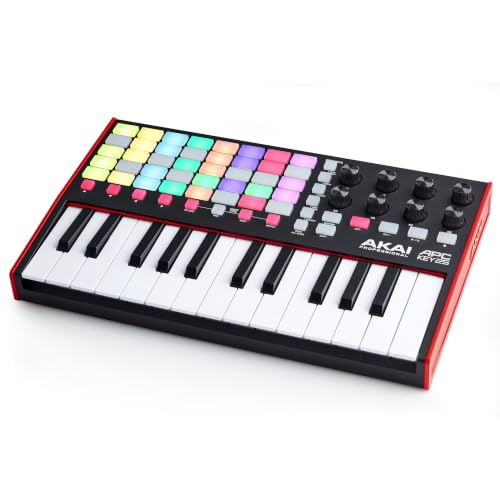
Akai Professional APC Key 25 MK2 25-Key USB MIDI Keyboard Controller
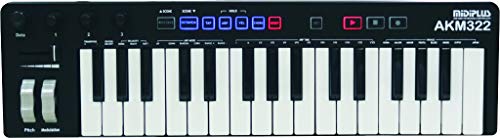
midiplus AKM322 mini size 32 keys USB MIDI Keyboard Controller
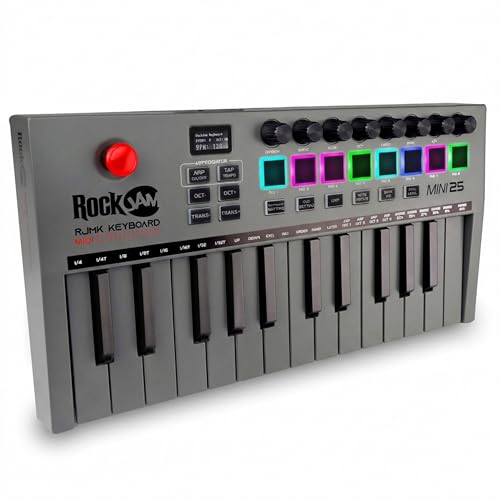
RockJam RJMK25 25 Key USB MIDI Keyboard Controller with Drum Pads

Donner Mini MIDI Keyboard N-25, 25 Key MIDI Controller Gifts for Beginners with Velocity-Sensitive Mini Keys Light-up Ro

M-VAVE 25 Key USB MIDI Keyboard Controller With 8 Backlit Drum Pads, Bluetooth Semi Weighted Professional dynamic keybed

Donner USB-C MIDI Keyboard Controller, 25 Key Portable Mini MIDI Keyboard with 8 Drum Pads, OLED Display, 16 Smart Scale

Nektar SE61 – USB MIDI Controller Keyboard with Nektar DAW Integration, Black

midiplus AKM320 32 key MIDI Keyboard Controller, white
More Details On Our Top Picks
Among cheap midi keyboards, this one stands out for players who live inside a DAW rather than at a piano bench. The 25-key layout stays compact, while the Ableton-focused mapping style gives you direct control over clips and workflow without a lot of menu hunting.
That matters in a cramped studio or a bedroom setup where every inch counts. The trade-off is plain: 25 notes will feel tight for two-handed parts, so it suits loop building and sketching better than full arrangements. For Ableton users, that narrow focus is the point.
Strong Points
- Compact 25-key format keeps your desk clear.
- Built for clip launching and hands-on DAW control.
- Good match for quick beat ideas and sketches.
- Small footprint helps in travel-friendly setups.
Things To Consider
- 25 keys leave less room for full two-hand playing.
- Software-centric control makes the learning curve steeper for some users.
Feature Snapshot
Who It Suits Best
You get the most from this pick if your work centers on Ableton Live, loop-based writing, or tight desktop production.
Where A Sibling Pick Shines
Nektar SE61 suits keyboard-first producers better, since its larger keybed gives you more room for chords and melodic phrasing.
After the Akai’s DAW-heavy focus, this midiplus model leans toward simple mobility with a little more key room. The 32-key layout gives you a small but useful step up from 25-note controllers, which helps for bass lines, hooks, and short chord shapes.
Owners who move between a desk, couch, and travel bag usually care about that balance most. The custom MIDI editor is the real draw here, since it lets you tailor controls to your own software habits. The catch is that more customisation also means a little more setup time up front.
Highlights
- 32 keys give you more room than a 25-note board.
- Compact frame suits tight desks and carry bags.
- Custom editor helps shape the control layout.
- Good fit for light composing and software control.
Room For Improvement
- The software setup asks for a bit of patience.
- Mini keys suit quick input better than expressive piano-style playing.
Made For
You’ll get the best fit here if you want a light controller for portable writing, casual production, or a compact home desk.
A Better Fit Elsewhere
Donner USB-C MIDI Keyboard Controller, 25 Key Portable Mini MIDI Keyboard with 8 Drum Pads, OLED Display, 16 Smart Scale suits you better if you want more onboard visual feedback and pad-based control.
RockJam takes a more hands-on route than the leaner midiplus AKM322, and that makes sense for beat-driven setups. Eight backlit pads, note repeat, and eight assignable knobs give you more to touch than a plain keyboard, so you spend less time mousing through software.
The rechargeable battery is a useful touch for mobile sessions, especially on a couch, in a hotel room, or anywhere USB power is awkward. The trade-off is that the control surface invites more tweaking, which can feel busy if you only want a bare-bones typing surface. For beatmakers, though, that extra hardware earns its place.
Upsides
- Eight pads help with drum programming and finger drumming.
- Assignable knobs give you immediate mix or instrument control.
- Rechargeable power supports mobile writing sessions.
- Compact body still stays easy to carry.
- USB MIDI support keeps software hookup straightforward.
Softer Spots
- More controls mean a busier learning curve.
- Pad-heavy layouts are less useful for pure melody work.
Details At A Glance
Who Will Love This
You suit this best if beats, samples, and live triggering matter as much as note entry.
Swap It Out When
Donner Mini MIDI Keyboard N-25 fits better for first-time users who want a simpler layout and a gentler start.
Donner keeps this one aimed squarely at first-time controller use, and the simple layout backs that up. Velocity-sensitive mini keys respond to playing force, so you can shape notes with a little more expression instead of everything landing at one fixed level.
The included teaching-course angle lowers the barrier for someone setting up a first music desk in a bedroom or dorm. Compared with RockJam’s heavier control surface, this pick feels cleaner and less crowded. The honest read is that fewer hardware extras can be a plus when you’re still learning what each control should do.
What We Like
- Beginner-friendly layout keeps the learning curve gentle.
- Velocity-sensitive keys add more expressive input.
- Light-up controls help with visual orientation.
- Small size suits first setups and tight desks.
Small Caveats
- Mini keys can feel cramped for larger hands.
- Simple design leaves less room for advanced control work.
Core Details
Right Fit For
You fit this controller best if you’re just starting out and want a simple way to learn MIDI basics.
Another Choice May Suit
Akai Professional APC Key 25 MK2 25-Key USB MIDI Keyboard Controller suits Ableton-focused users who want deeper clip-launch control.
M-VAVE shifts the focus toward wireless use, which is handy for sketching ideas on a tablet or moving around a room without a cable tether. The semi-weighted dynamic keybed gives the keys a firmer feel than the lightest mini controllers, so you get a little more resistance under your fingers.
The eight backlit pads and eight knobs add a strong beatmaking layer, making this feel broader than the Donner N-25. The trade-off is that more features usually mean more decisions, and that can slow a beginner who only wants fast note input. For songwriters and loop builders, though, the extra control is easy to justify.
Bright Spots
- Bluetooth support reduces cable clutter during mobile work.
- Semi-weighted feel gives the keybed a firmer response.
- Eight pads and eight knobs widen control options.
- Compact format still fits small studios.
Points To Note
- Wireless pairing can add setup steps depending on your device.
- Feature density may feel crowded for simple practice sessions.
- Black finish can show dust, so quick wipe-downs help.
At A Glance
The Right Fit
You’ll like this most if you want portable control with wireless convenience and more than basic keyboard input.
Look Elsewhere When
midiplus AKM320 32 key MIDI Keyboard Controller, white makes more sense for a simpler, more minimal controller with a slightly broader key range.
This Donner model feels more like a control hub than a plain keyboard, and the OLED display is the first clue. An OLED, or organic light-emitting diode screen, gives you a clear on-device readout, which helps when you want visual feedback without staring at software menus all day.
Sixteen smart scales, arpeggio, and replay push it into more advanced territory than the N-25, especially for people building parts quickly. You also get USB-C, which is a welcome modern touch for newer laptops and mobile rigs. The downside is simple, more onboard tools usually mean more to learn before the workflow feels natural.
Best Bits
- OLED display gives quick visual feedback.
- Smart scales help with faster melodic work.
- Arpeggio and replay expand idea-building options.
- USB-C fits current laptop setups well.
- Eight pads add extra triggering control.
Areas To Watch
- More functions can feel dense at first.
- Mini keys still limit broad two-hand playing.
Feature Rundown
Best Suited To
You suit this controller best if you want more onboard guidance while shaping melodies, beats, and quick sketches.
Reach For A Different Pick When
RockJam RJMK25 25 Key USB MIDI Keyboard Controller with Drum Pads is the easier call for users who want a simpler pad-first layout.
The SE61 is the answer for anyone who thinks 25-key mini boards feel too cramped. Its full-size keybed gives you more room for chords and phrasing, and the Nektar DAW integration helps pull the keyboard into your software workflow instead of leaving it as a plain note trigger.
That larger surface makes it better for longer writing sessions, especially on a desk where space is available. It does ask for more room than the earlier compact picks, so it’s less convenient in a tiny corner setup. For producers who think in keyboard parts first, that trade-off usually makes sense.
Positives
- Full-size keys feel less cramped than mini boards.
- DAW integration supports faster workflow control.
- Good match for chord work and melodic practice.
- Simple USB setup keeps installation straightforward.
Worth Noting
- The larger footprint needs more desk space.
- Less portable than the compact 25-key options.
Whose Shelf It Belongs On
You suit this pick best if keyboard feel matters more than keeping the controller tiny.
Another Choice May Suit
Akai Professional APC Key 25 MK2 25-Key USB MIDI Keyboard Controller fits better for Ableton users who want tighter clip and session control.
The AKM320 lands in a very practical middle ground, with 32 mini keys, pitch and modulation wheels, octave and transpose buttons, plus a volume slider. That combination gives you more control than the bare-bones controllers without taking over your desk.
For everyday composing, those extra hardware controls matter because they reduce how often you need to reach for software panels. The sustain pedal input is especially useful in home studios where expressive parts are more common than full keyboard runs. The white finish keeps the look clean, though it can show grime sooner than darker shells.
Reasons To Buy
- 32 keys give a little more range than 25-note models.
- Pitch and modulation wheels improve expression.
- Octave, transpose, and volume controls add useful shortcuts.
- Sustain pedal input supports more natural playing.
Honest Caveats
- Mini keys still feel smaller than full-size boards.
- White surfaces usually need more regular cleaning.
Feature Card
Built With In Mind
You fit this controller best if you want a simple, everyday keyboard with enough controls to stay useful across many sessions.
Skip It When
Nektar SE61 is the stronger choice for pianists and writers who want a full-size keybed with more room to play.
What To Weigh Before Choosing Cheap Midi Keyboards
Common Shopping Slip Ups
A lot of people fixate on key count and ignore control layout. A 25-key board can work well, but pads, knobs, and octave buttons matter just as much in a busy production setup.
The Upgrade Payoff
Higher-tier models usually cost more because they add better key response, more direct controls, and clearer on-device feedback. That extra spend makes sense for long sessions, faster workflow changes, and less menu digging.
A Quick Reality Check
Mistakes Worth Dodging
Mini keys save space, though they can slow down players used to larger keyboards. Full-size boards suit more expressive playing, but they ask for more desk room.
Where The Extra Money Goes
OLED screens, Bluetooth, DAW mapping, and more pads all push up the value ladder. You only need those extras when your workflow actually uses them.
Frequently Asked Questions
Do cheap midi keyboards work with most music software?
Most of the controllers here are built for standard USB MIDI use, so they can talk to common DAWs. Nektar SE61 adds its own DAW control layer for a tighter workflow.
Is 25 keys enough for production?
Twenty-five keys work fine for short riffs, bass ideas, and clip-based writing. Full chord passages feel tighter, which is why 32-key and full-size options stay appealing.
Do mini keys make a big difference?
Mini keys save space and travel well, but they feel smaller under the fingers. Players with larger hands often prefer 32-key or full-size layouts.
Why choose pads and knobs on a midi keyboard?
Pads help with drum programming and sample triggering, while knobs let you adjust software controls faster. That combination is useful in beat-focused setups.
Is wireless control worth it?
Wireless operation helps reduce cable clutter and makes mobile sketching easier. The trade-off is an extra setup step and a stronger dependence on battery management.
