


Cheap monitor arms are most useful when your desk feels crowded before the workday even starts. A good arm lifts the screen, clears room for notebooks or a keyboard tray, and lets you fine-tune height without stacking books under a base.
This roundup focuses on practical fit, weight limits, VESA compatibility, and mounting style, because those details decide whether an arm feels steady or fussy in daily use. You’ll see solid single-monitor options, dual-screen setups for workstations, and a few design-led picks for anyone who wants a cleaner desk without paying for extras you won’t use.
Quick Look at the Shortlist

HUANUO FlowLift™ Pro Monitor Arm

HUANUO Single Monitor Mount 16″ Max Height

Pholiten Dual Monitor Stand Heavy Duty

Pholiten Dual Monitor Stand White

NB ERGONOMIC F80 Series Monitor Mount Lake Blue

NB ERGONOMIC F80 Series Monitor Mount Lava Yellow
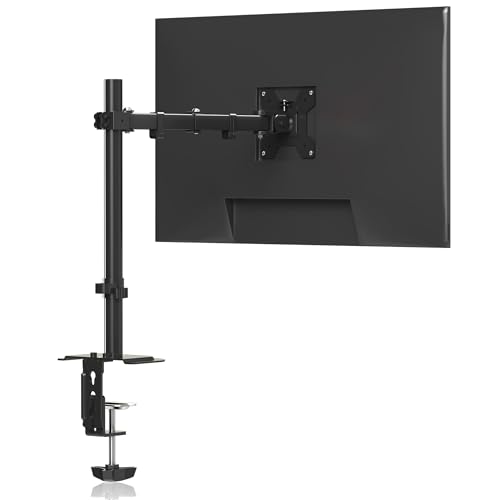
Pholiten Single Monitor Stand Desk Mount

BFTOU Black Single Monitor Arm
More Details On Our Top Picks
HUANUO’s FlowLift arm sits in the sweet spot for desks that need real adjustability without turning setup into a project. The tool-free VESA mount matters because VESA, the square hole pattern on the back of many monitors, is where compatibility starts or stops, and this one supports 75 x 75 mm and 100 x 100 mm layouts.
The arm also accepts C-clamp or grommet mounting, so you can match it to a thicker wood desk or a cleaner through-hole install. Compared with the simpler HUANUO single-arm pick below, this one gives you more room to tailor viewing angle and placement, which helps in a home office that doubles as a gaming corner. The honest trade-off is that the better adjustment range only helps when your monitor stays within the listed size and weight window.
What We Like
- Tilt, swivel, and rotation make fine positioning easier during long work sessions.
- Tool-free mounting cuts down on setup fuss for a desk that changes often.
- C-clamp and grommet options let you match different desk layouts.
- Supports a common VESA pattern, which helps with broad monitor compatibility.
Things To Consider
- The fit rules are strict, so oversized or heavier screens sit outside its comfort zone.
- Clamp-based installs still depend on a desk edge that can take the pressure.
- More joints mean more parts to keep aligned during regular desk cleaning.
Feature Snapshot
Who It Suits Best
Desk users who want a single arm with broad adjustment and a tidy footprint should feel at home here.
A Better Fit Elsewhere
The HUANUO Single Monitor Mount is the simpler call for a smaller setup that does not need as much arm articulation.
This HUANUO mount keeps the single-monitor formula lean, which is exactly what many smaller desks need. Aluminum die-cast construction gives it a more substantial feel than thin-budget arms, and the 16-inch max height helps you lift the screen without stealing as much vertical room.
It also uses the familiar C-clamp or grommet layout, plus cable clips to tame cords that would otherwise hang in view. Compared with the FlowLift arm above, this one feels more straightforward and a bit less ambitious, which is often the right trade for a compact office, dorm setup, or a desk that already holds a laptop stand and speakers.
Positives
- 16-inch height helps clear desk clutter and raise eye level.
- Aluminum die-cast construction should suit daily use better than lighter-feeling builds.
- Cable clips keep charging and display leads from spilling across the workspace.
- C-clamp and grommet support cover the two most common desk mount styles.
Points To Note
- The 17.6-pound ceiling narrows compatibility with larger or heavier panels.
- Full reach depends on how much room sits behind your desk edge.
- Its cleaner design leaves less room for extra accessories around the arm.
At A Glance
Made For
Compact desks and single-monitor workstations benefit most from this cleaner, simpler layout.
Another Choice May Suit
HUANUO FlowLift™ Pro Monitor Arm suits you better when you want a little more motion and a more adjustable viewing setup.
Dual-monitor setups usually need a sturdier backbone, and this Pholiten arm is built around that problem. Each side supports up to 22 lbs, which gives you more headroom than the single-screen options above, and the steel build adds the sort of firmness you want on a shared workbench or an editing desk.
The cable clips are a small but useful detail, especially when two display leads would otherwise tangle behind the desk like fishing line. Against the white Pholiten dual mount later in the list, this silver version has the same functional angle but a more industrial look, so the better choice often comes down to your desk color and how much screen mass you plan to hang.
Highlights
- Two arms help separate work and reference screens cleanly.
- 22-pound support per arm covers many mid-size monitors.
- Steel construction should feel steadier on a busy desk.
- Tilting, swiveling, and rotating help you align both panels side by side.
- Cable clips reduce the usual cord clutter behind dual displays.
Softer Spots
- Dual arms take more desk depth and a more careful install.
- Heavier construction can be less forgiving on fragile tabletops.
- The plain silver finish may feel utilitarian in a design-focused office.
Who Will Love This
Content workstations, spreadsheet-heavy desks, and multi-app setups benefit most from the extra support and twin-screen layout.
Where A Sibling Pick Shines
Pholiten Dual Monitor Stand for 2 Screens up to 38Inches, White is the nicer fit for a brighter desk and a cleaner visual scheme.
The white version of Pholiten’s dual-arm mount is for desks where visual clutter matters as much as function. It still supports the same 13 to 38 inch screen range and the same 22-pound-per-arm ceiling, so you are not giving up capability just to get a lighter look.
That makes it a smart match for a bright office, a studio corner, or a shared space where black metal would stand out too sharply. The trade-off is simple, the finish looks cleaner, but the mount still demands the same careful measurement and a desk sturdy enough for two arms.
Bright Spots
- White finish blends more easily with light desks and pale walls.
- Dual-screen support helps keep both displays organized at the same height.
- 22-pound capacity per arm handles many everyday monitor pairings.
- Steel construction points to solid day-to-day support.
Minor Gripes
- White finishes can show dust sooner than darker hardware.
- Dual mounts still need enough desk space behind the edge.
- Screen fit checks matter just as much here as on the silver model.
Built With In Mind
Style-conscious desks that still need a practical twin-monitor layout are the best match here.
Look Elsewhere When
Pholiten Dual Monitor Stand Heavy Duty makes more sense for heavier use, especially in a room that leans dark or industrial.
The NB ERGONOMIC F80 Series takes a broader size range than the smaller HUANUO single-arm options, which is useful for many mid-sized screens. The listed 4.4 to 19.8 pound weight window means the arm is aimed at a fairly common slice of desktop monitors, not oversized panels that need a different class of support.
The lake blue finish gives it more personality than plain black or silver hardware, and that matters on desks where the mount stays visible all day. It still relies on the standard VESA 75 x 75 mm or 100 x 100 mm pattern, so the real decision point is fit, not color alone.
Reasons To Buy
- Broad 17 to 30 inch guidance covers many mainstream monitors.
- Tilt, swivel, and rotation help you adjust viewing height and angle.
- Lake blue color adds some visual character to the desk.
- VESA support keeps setup compatible with common monitor backs.
Areas To Watch
- The fit range still excludes heavier or unusually shaped displays.
- Color adds style, but it does not change mount dimensions or load limits.
- Without exact desk hardware details here, installation planning stays important.
Whose Shelf It Belongs On
Desk users who want a single arm with a bit more visual personality and broad compatibility should look here first.
Skip It When
HUANUO FlowLift™ Pro Monitor Arm fits better for shoppers who want a more tool-free, adjustable build around a 13 to 32 inch display.
The lava yellow version keeps the same F80 structure but adds a louder finish, which suits desks that could use a little energy. Like the lake blue model, it targets monitors from 17 to 30 inches in the typical weight range, so the practical difference is mostly appearance and how that color sits in your room.
That makes it a nice choice for a creative studio, a home desk, or a setup that feels too plain in standard black hardware. The caveat is familiar, style doesn’t soften the fit rules, so the same VESA and weight checks still decide whether it belongs on your desk.
Best Bits
- Bright finish gives the mount more personality than muted alternatives.
- Tilt, swivel, and rotation support flexible screen placement.
- Suitable for many mid-size monitors in the stated weight range.
- Shares the same familiar VESA pattern as the rest of the F80 line.
Small Caveats
- The bold color may not suit a very formal office.
- It still needs a compatible monitor back and an appropriate weight.
- Without desk hardware specifics here, installation comfort depends on your setup.
The Right Fit
Creative work areas and colorful desks benefit most from this version’s brighter finish.
Reach For A Different Pick When
NB ERGONOMIC F80 Series Monitor Mount Lake Blue suits you better if you want the same layout with a quieter color.
Pholiten keeps this one plain and useful, which is often what a home office needs most. The arm handles 13 to 32 inch screens and supports up to 22 lbs, so it covers a broad slice of everyday monitors without drifting into the heavier dual-arm territory.
Cable clips help tidy the back of the desk, a detail that matters more than people expect once a charging cable and display lead start crossing paths. Compared with the BFTOU mount later in the list, this one leans into simple single-screen support rather than extra desk-mount flexibility, which makes it a straightforward fit for a no-nonsense workstation.
Upsides
- Broad screen support helps with many common office displays.
- 22-pound capacity gives useful headroom for larger single monitors.
- Cable clips help keep the workspace looking orderly.
- Single-arm design keeps the desk layout compact and easy to manage.
Worth Noting
- It is built for a single screen, so multi-monitor users need a different route.
- The exact mounting hardware details are not expanded here, so setup planning matters.
- Clean cable routing still depends on how you run leads behind the desk.
Perfect Match For
Work-from-home desks and simple one-monitor setups are the clearest fit for this mount.
Where Another Pick Suits Better
BFTOU Black Single Monitor Arm Adjustable Stand Monitor Mount up to 32 inches and 17.6 lbs suits you better when you want both clamp and grommet mounting in one package.
BFTOU gives you the familiar single-arm formula with a few practical touches that matter at desk level. It supports 13 to 32 inch screens, handles up to 17.6 lbs, and works with both C-clamp and grommet mounting, so it lands well for desks that already have a preferred hardware setup.
The two-stage locking system is the detail that stands out most, because it suggests a more secure install on desks between 0.4 and 3 inches thick. Compared with the simpler Pholiten single mount above, this one feels a bit more tailored to mixed desk conditions, though the lower weight limit means heavier monitors need to stay elsewhere.
Standout Traits
- Two mounting routes make it easier to match different desks.
- Two-stage locking adds confidence on a thicker tabletop.
- Supports common VESA patterns for broad monitor compatibility.
- The black finish stays visually quiet beside most monitor frames.
Honest Caveats
- Its 17.6-pound limit is tighter than some other single-arm options.
- Desk thickness still needs to fall inside the stated range.
- Moving parts will need occasional tightening as the desk changes over time.
Best Suited To
Shoppers with a mid-size single monitor and a desk that supports either clamp or grommet mounting should feel comfortable here.
Swap It Out When
HUANUO FlowLift™ Pro Monitor Arm is the better route for a user who wants more motion and a wider load ceiling.
What To Weigh Before Choosing Cheap Monitor Arms
Screen Fit Comes First
Monitor size, weight, and VESA pattern decide whether an arm is useful or frustrating. A monitor that sits outside the listed range can sag, tilt poorly, or fail to mount cleanly.
Desk Hardware Matters Too
C-clamp mounts suit many edge-supported desks, while grommet hardware works better when you already have a hole or want a cleaner pass-through install. Measure thickness before you assume the arm will sit securely.
Motion Should Match Your Routine
Tilt helps with glare, swivel helps with side-to-side sharing, and rotation helps when you move between landscape and portrait tasks. More joints help, but they also add more parts to manage.
Think About Cable Paths
Cable clips and routing channels do not look glamorous, yet they keep a workstation usable. That matters in a busy kitchen desk, a student setup, or anywhere charging cords tend to multiply.
A Quick Reality Check Before You Spend Up
Hidden Buying Traps
Many shoppers focus on arm style and overlook weight limits or desk thickness. That’s the fastest way to end up with a mount that looks right but fits badly.
The Upgrade Payoff
Higher-tier arms usually bring stronger materials, smoother joints, and better tension control. That extra cost makes sense for larger screens, heavier displays, or desks that need steady positioning every day.
Frequently Asked Questions
What VESA size do most cheap monitor arms use?
Many of the mounts here support 75 x 75 mm and 100 x 100 mm patterns. That covers a large share of modern monitors.
Is a C-clamp or grommet mount better?
A C-clamp is simpler for most desk edges, while a grommet mount suits a drilled pass-through hole. The better choice depends on the desk you already own.
Can one arm handle a heavy monitor?
Only within the stated weight limit, and that limit varies by model. A heavier screen calls for the arm with the higher capacity listed by the manufacturer.
Why do some arms list tilt, swivel, and rotation?
Those movements let you shift the screen angle without moving the whole desk setup. That helps with glare, shared viewing, and portrait work.
Are dual monitor arms harder to set up?
Usually, yes, because there are two screens to balance and more desk space to manage. The trade-off is a cleaner workstation once both arms are adjusted well.
