


Cheap Windows 11 computers make sense when you want dependable basics without paying for extra flash. You’re usually looking for enough RAM for browser tabs, an SSD for fast startup, and a form factor that fits the desk, shelf, or study corner you already have. The right model depends less on raw speed and more on how much space you have, how many ports you need, and whether you want a tiny tower, an all-in-one, or a compact laptop.
Quick Shortlist For Everyday Windows Setups

Dell OptiPlex 5060 Desktop 16GB RAM

Dell OptiPlex 3050 SFF 16GB RAM

Dell Latitude 3190 11.6in Black

Dell OptiPlex 5040 SFF 8GB RAM
Lenovo IdeaCentre All-in-One 24in

Dell OptiPlex 3040 SFF 8GB RAM
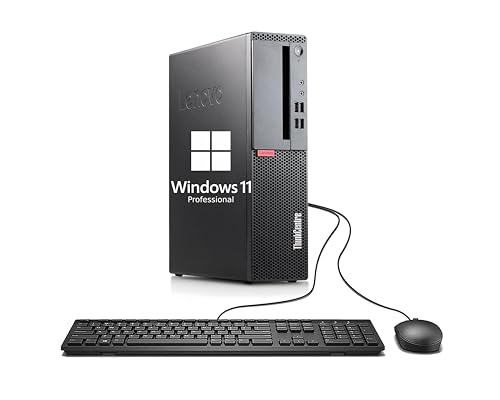
Lenovo ThinkCentre M710 SFF 8GB RAM
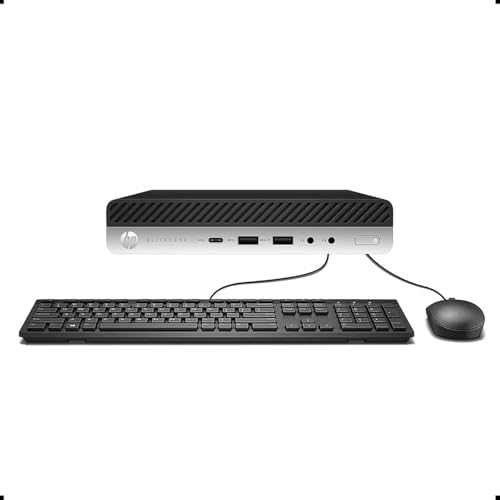
HP EliteDesk 800 G3 Mini 16GB RAM
More Details On Our Top Picks
The OptiPlex 5060 sits in the sweet spot for a home office that has to do more than one thing at a time. Six-core processing, 16GB of DDR4 memory, and a two-drive setup with both SSD and HDD storage give you speed for Windows plus room for documents, media, and backups.
The honest read is that this shape favors desk-bound use over portability, which is fine for a small office or study. Compared with the OptiPlex 3040 and 5040 below, this one gives you the most breathing room for multitasking, so it fits better for people who keep several apps open and want a little less friction.
Strong Points
- 16GB RAM helps the desktop handle multiple browser tabs, office apps, and background sync without feeling cramped.
- The SSD and HDD combination keeps startup snappy while giving you extra local storage for files and media.
- WiFi and Bluetooth reduce cable clutter for a cleaner workspace.
- It suits day-long desk use, especially in a home office that doubles as a study station.
Things To Consider
- Renewed hardware can vary in cosmetic condition, so expect some signs of prior use.
- The tower style takes more room than the mini PCs in this roundup.
- Anyone planning a travel setup will find the Latitude 3190 easier to carry.
Feature Card
Who Should Grab It
Busy home-office users who want a desktop that feels steadier than entry-level hardware will get the most out of it.
Reach For A Different Pick When
Dell OptiPlex 3050 SFF is a better match for tighter desks, since its smaller footprint is easier to place in compact work areas.
The 3050 keeps the formula tight, and that’s the point. You get 16GB of DDR4 memory, a 256GB SSD, and support for 4K output through the included video outputs, which makes it a sensible fit for a tidy desk or a basic media station.
Compared with the OptiPlex 5060, this one trims storage and overall room to keep things simpler. That trade-off works well for spreadsheet work, web use, and office software, though a heavy local file library may feel a little snug on the 256GB drive.
Highlights
- The small form factor keeps desktop clutter down.
- 16GB RAM gives you enough headroom for standard workday multitasking.
- WiFi makes setup easier in rooms where Ethernet isn’t practical.
- 4K support adds flexibility for sharper external displays.
Worth Noting
- The 256GB SSD is fine for essentials, but a big media archive needs more space.
- Renewed units can arrive with cosmetic wear, which is common in this category.
- Anyone wanting a cleaner all-in-one look may prefer the Lenovo IdeaCentre.
Feature Rundown
Best Suited To
Desk users who want a compact Windows machine for daily work will find the size and memory well matched to routine tasks.
Look Elsewhere When
Dell OptiPlex 5060 makes more sense for heavier multitasking, since its larger storage setup leaves you more room to spread out.
The Latitude 3190 is the portable outlier in this roundup, and you can tell from the 11.6-inch screen and 4GB memory. It suits note-taking, light browsing, and school-day carry better than full desk duty, especially because the smaller body keeps the bag weight down.
That compact shape is the advantage, but it also sets the limit. Compared with the OptiPlex desktops above, the 64GB storage and 4GB RAM make this a lighter-use option, so it fits best as a secondary machine rather than a do-everything main computer.
Positives
- The 11.6-inch size is easy to slip into a backpack.
- Windows 11 Pro gives you a current business-oriented desktop environment.
- The black finish keeps the look simple and low-profile.
Points To Note
- 4GB RAM and 64GB storage suit lighter workloads better than full-time multitasking.
- The small screen can feel cramped for long spreadsheet sessions.
- Portable hardware deserves a case or sleeve to keep the renewed finish tidy.
Who It Suits Best
Students, frequent movers, and anyone who values a compact carry-friendly machine will get the most from it.
A Better Fit Elsewhere
Lenovo ThinkCentre M710 SFF is the stronger desk-first pick for office users who want more screen size and less compromise.
The 5040 leans more conservative than the 5060, and that matters in a good way for basic office work. An i5-6500T, 8GB of memory, and a 256GB SSD form a sensible trio for email, documents, and a few browser tabs without turning the machine into a space hog.
You may find it especially useful in a shared office where WiFi, Bluetooth, and HDMI simplify setup. Compared with the OptiPlex 3050, this one gives you similar compact placement with a slightly leaner memory package, so it works best for lighter multitasking and routine admin.
Upsides
- The small footprint keeps a desk clear for papers or a second monitor.
- WiFi and Bluetooth make peripheral setup straightforward.
- 256GB SSD storage is enough for core apps and common files.
- HDMI support helps it slot into modern monitor setups.
Softer Spots
- 8GB RAM is fine for basics, though heavy multitasking asks for more.
- The renewed finish may show prior handling.
- Users who want a fuller accessory bundle may prefer the ThinkCentre M710.
The Right Fit
Office workers who want a no-nonsense desktop for routine tasks and limited desk space will appreciate it.
Swap It Out When
Dell OptiPlex 5060 is the smarter move for heavier multitaskers who want more storage headroom and a stronger overall setup.
The IdeaCentre takes a different path from the boxy Dells, because the computer and display live together in one unit. A 24-inch full HD IPS panel with anti-glare treatment gives you a cleaner desk and a larger, calmer work surface for home office tasks, classes, and family use.
It also brings 8GB of memory, a 512GB SSD, Wi-Fi 6, and Bluetooth 5.2, so the spec mix is practical rather than ornamental. The trade-off is placement, since all-in-one machines are less flexible to move or upgrade than the small desktops, but that same simplicity is exactly why some setups feel less cluttered.
Bright Spots
- The 24-inch display reduces the need for a separate monitor.
- IPS panel tech helps maintain consistent viewing from normal seated angles.
- Wi-Fi 6 and Bluetooth 5.2 support modern wireless accessories.
- The 512GB SSD gives you more room than the smaller 256GB systems here.
Areas To Watch
- The all-in-one design is less flexible than a separate tower and monitor.
- Moving it between rooms takes more effort than moving a mini desktop.
- Anyone who likes easy part swaps may prefer a small form factor unit.
Core Details
Perfect Match For
Families, students, and home-office users who want a tidy all-in-one setup will feel right at home here.
Where A Sibling Pick Shines
Dell OptiPlex 5060 is better for anyone who wants the freedom to swap monitors later or build a more modular desk.
The 3040 keeps things plain, and that can be a good thing for a first desktop or a simple household station. A Core i3-6100, 8GB of memory, and a 256GB SSD cover web work, school portals, and document editing without asking for much desk space.
Compared with the 5040, this one sits a bit lower on processor class, so it makes more sense for lighter routines than heavier multitasking. The RJ45 port adds a wired networking option, which is handy in offices where a stable cable connection matters more than wireless convenience.
Best Bits
- The entry-level price tier is usually where this kind of hardware makes the most sense.
- The SSD helps it feel quicker than older hard-drive desktops.
- HDMI and RJ45 cover both display and wired network needs.
Room For Improvement
- The Core i3 platform is fine for basics, but it’s not built for heavier load balancing.
- 8GB RAM is serviceable, though multitask-heavy setups may want more.
- The ThinkCentre M710 is a more complete bundle for a first-time setup.
Who Will Love This
Students, home users, and small offices that mainly need a browser-and-documents machine will be comfortable with it.
Another Choice May Suit
Lenovo ThinkCentre M710 SFF suits a shopper who wants a ready-to-go package with keyboard and mouse included.
This ThinkCentre stands out because the bundle is ready to go out of the box with a keyboard and mouse included. Add the 8GB of RAM, 256GB SSD, WiFi, and Bluetooth, and you’ve got a compact office desktop that removes a few setup chores from the start.
That makes it appealing for a dorm, starter office, or front-desk station where convenience matters more than chasing higher specs. Compared with the Dell OptiPlex 3040, this Lenovo gives you a more complete starter package, so it suits the person who wants fewer extra purchases and a simpler first-day setup.
Standout Traits
- Keyboard and mouse are included, which simplifies the first setup.
- The small form factor leaves room for papers, notebooks, or a second screen.
- WiFi and Bluetooth reduce the need for extra cables.
- 256GB SSD storage is enough for office tools and common files.
Minor Gripes
- The 8GB memory ceiling is fine for everyday use, but not a match for heavier multitasking.
- VGA is useful for older displays, though newer monitors will still need the right adapter or input.
- Anyone wanting a bigger display surface may prefer the Lenovo IdeaCentre all-in-one.
Built With In Mind
New desktop users, office setups, and anyone who wants the accessory bundle handled in one box will benefit most.
Where A Sibling Pick Shines
Dell OptiPlex 5060 is the stronger choice for users who need more processing headroom and storage flexibility.
The HP EliteDesk 800 G3 Mini is the compact one to watch, especially for a desk that already feels crowded. You get 16GB of DDR4 memory, a 256GB SSD, WiFi, Bluetooth, and a tiny chassis that tucks behind a monitor or onto a shelf without taking over the room.
Compared with the larger OptiPlex desktops, this mini format gives up upgrade room but wins on footprint. The honest read is that it’s a smart fit for a minimal setup, a receptionist station, or a household corner where space is tighter than desire.
Positives
- The mini chassis is easy to hide in a clean desk layout.
- 16GB RAM is generous in this group and helps with daily multitasking.
- WiFi and Bluetooth support a tidy wireless workspace.
- The included keyboard and mouse shorten the setup process.
Small Caveats
- The very small case limits future internal changes compared with a standard SFF tower.
- Some users prefer a full-size front panel and more ports within arm’s reach.
- The Lenovo IdeaCentre is a better match for anyone who wants a built-in display.
Whose Shelf It Belongs On
Space-conscious desk users who still want strong everyday memory will appreciate the compact layout.
Where Another Pick Fits Better
Dell OptiPlex 5060 suits heavier multitaskers who want more internal room and a fuller storage setup.
What Matters Most Before Choosing Cheap Windows 11 Computers
Match The Form Factor To Your Space
A small form factor desktop fits a tight desk, while an all-in-one clears clutter by combining the screen and computer in one unit. A compact laptop makes sense for moving between rooms or classes, but it usually gives you less screen space and fewer upgrade options.
Don’t Ignore Memory And Storage Balance
8GB of RAM is enough for basic browser work and documents, while 16GB feels steadier for multitasking and long work sessions. SSD storage matters just as much because it affects startup and app loading, and 256GB fills faster than most people expect.
Check Port And Connection Needs
HDMI, DisplayPort, WiFi, Bluetooth, and RJ45 serve different setups, so your desk layout should decide which ones matter most. A wired port helps in stable office installs, while wireless options make furniture placement simpler.
A Quick Reality Check
Common Shopping Slip Ups
Shoppers often focus on the processor name and skip memory, storage, and physical size. That mistake usually leads to a machine that sounds fine on paper but feels cramped in daily use.
The Upgrade Payoff
Higher-tier units usually cost more because they pair stronger processors with more RAM, larger SSDs, better displays, or a cleaner accessory bundle. For work-from-home routines, shared family use, or heavier multitasking, the extra headroom is often worth it.
Frequently Asked Questions
Are Cheap Windows 11 Computers Good For Daily Office Work?
Yes, many of them handle email, documents, browsing, and video calls without much trouble. A model with 8GB or 16GB RAM and an SSD is the safer place to start.
Is A Desktop Better Than A Laptop In This Price Range?
A desktop usually gives you more value for the money and easier placement on a desk. A laptop wins on portability, but you usually give up screen size and some expandability.
How Much Storage Should You Look For?
256GB works for light use, but it fills faster once you add photos, downloads, and office files. 512GB or a dual-drive setup is more comfortable for long-term use.
Do Renewed PCs Make Sense?
They can make sense when you want a lower-cost path into Windows 11 and you’re comfortable with prior use. The trade-off is cosmetic wear and less certainty about the outside condition.
Which Style Fits Small Spaces Best?
Mini desktops and all-in-ones usually fit the tightest setups. The mini desktop keeps the footprint tiny, while the all-in-one removes the need for a separate monitor.
