


Coding desktops live or die on the boring details, and that’s good news for you. Fast storage, enough memory for multiple tools, and a processor that can keep compilers, browsers, and local servers moving matter more than glossy styling. This roundup focuses on compact mini PCs and full-size towers that fit real work habits, from a dorm desk to a small office bench.
You’ll also see where each machine fits best, because the right pick for a solo developer is not always the right pick for a shared workspace. Some options favor portability and low desk clutter, while others earn their place through heavier memory, stronger graphics, or a roomier tower layout.
Quick Shortlist for Coding Desktops

GEEKOM IT15 AI Mini PC, Intel Ultra 9 285H, 32GB DDR5, 1TB SSD

BOSGAME E5 11 Pro Mini PC, AMD Ryzen 5300U Business Home Office PC
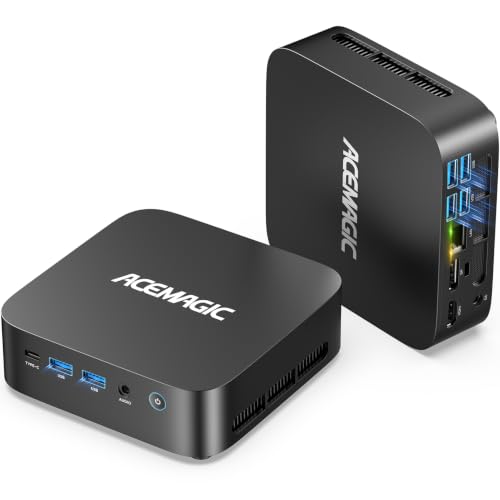
ACEMAGIC K1 Mini PC Windows 11 Pro, AMD Ryzen 5 7530U, 16GB RAM, 512GB SSD

HP ProDesk 600 Desktop Computer, i5-10400F, 64GB RAM, 1TB SSD

Gaming PC Desktop Computer, GeForce RTX 3050 8GB GDDR6, Ryzen 7 4700LE

HP Pro Mini 400 G9 PC, i7-12700T, 16GB DDR4 RAM, 512GB SSD

Dell Pro Tower Desktop Computer, Intel Core i3-14100, 16GB DDR5, 512GB SSD
More Details On Our Top Picks
Headroom is the point here. With 32GB of DDR5 memory, a 1TB SSD, and Intel Ultra 9 285H class processing, this mini PC suits coding work that keeps a browser, IDE, terminal, and local tools open at once. The Arc 140T graphics also make sense for development tasks that need more than bare-bones display output.
Compared with the BOSGAME and ACEMAGIC mini PCs, this GEEKOM leans into heavier workloads rather than basic office speed. In a multi-monitor setup, the compact chassis keeps the desk clear, though the trade-off is that you’re paying for capacity you may not fully use for lightweight scripts or school projects.
Strong Points
- 32GB DDR5 helps with heavier multitasking and larger project stacks.
- 1TB SSD gives you room for source trees, tools, and cached builds.
- Arc 140T graphics add flexibility for display-rich workflows.
- Mini PC sizing suits crowded desks and small office shelves.
Things To Consider
- Its power makes more sense for demanding development than simple note-taking.
- The compact format can mean tighter space around ports and cables.
Feature Snapshot
Who It Suits Best
Developers juggling large codebases, virtual environments, and multiple monitors will get the most from this one.
Where A Sibling Pick Shines
ACEMAGIC K1 Mini PC Windows 11 Pro fits better for lighter home coding, where you want a calmer spec mix and less emphasis on top-end headroom.
This BOSGAME keeps the formula simple, and that’s the appeal. A Ryzen 5300U with 4 cores and 8 threads is suited to coding basics, web apps, documentation work, and a fair amount of tab-heavy browsing without turning your desk into a furnace-sized setup. For a home office, that mix feels sensible rather than flashy.
Compared with the GEEKOM IT15, it is the calmer option, and compared with the HP Pro Mini 400 G9, it asks for less of your budget in horsepower terms. The honest read is that it makes the most sense for routine development, not for someone compiling huge projects all day.
Positives
- Four cores and eight threads cover everyday dev tasks cleanly.
- Mini PC size keeps a work corner uncluttered.
- Radeon graphics are enough for standard desktop output.
Minor Gripes
- It suits lighter workloads more than intensive builds.
- Compact cases often leave less breathing room for cable management.
- Storage expansion details are not shown in the source data, so long-term planning takes extra care.
Whose Shelf It Belongs On
You’ll get the best fit here as a home office coder who wants a modest, tidy machine for daily work.
Reach For A Different Pick When
HP Pro Mini 400 G9 PC, i7-12700T, 16GB DDR4 RAM, 512GB SSD is the stronger step up for you need more threads for heavier multitasking.
For many desk setups, this is the middle-ground machine that makes sense. Ryzen 5 7530U, 16GB of RAM, and a 512GB SSD give you a balanced base for coding in an editor, handling local documentation, and keeping test browsers open without the bulk of a tower. It’s the sort of spec sheet that feels comfortable for a main home computer.
Against the BOSGAME E5, it brings a fresher Ryzen 5 platform and a more rounded memory and storage mix. Against the GEEKOM IT15, it gives up sheer muscle, but most solo developers will find the lower-key setup easier to live with day to day.
Highlights
- Ryzen 5 7530U gives a comfortable step up from entry-level chips.
- 16GB RAM is a sensible floor for modern coding work.
- 512GB SSD keeps boot times and app launches snappy.
- Mini form factor fits neatly beside a monitor or dock.
Points To Note
- Heavier containers or large local builds will push it harder.
- Storage may feel tight once you add tools, caches, and media.
Core Details
Perfect Match For
You’ll appreciate this most as a solo developer or home office worker who wants a compact, balanced desktop.
Swap It Out When
GEEKOM IT15 AI Mini PC, Intel Ultra 9 285H, 32GB DDR5, 1TB SSD is the stronger fit for heavier multitasking and larger local workloads.
This HP leans into memory first, and that changes the feel of daily work. With 64GB of RAM and a 1TB SSD, it is built for bulky project folders, container work, and the kind of tab stacks that make lighter machines feel cramped. The i5-10400F is not the flashiest chip here, but the overall balance suits a serious desk setup.
Compared with the mini PCs above, you lose some compactness and gain a much broader working margin. That trade-off matters in a busy office or shared workspace, where keeping several tools and browser windows open can matter more than saving a little space.
Best Bits
- 64GB RAM is the standout for large multitasking loads.
- 1TB SSD gives a generous base for projects and assets.
- Desktop format can be easier to service than many minis.
- Well suited to heavier work sessions that run all day.
Areas To Watch
- It takes more desk space than the compact machines.
- The source data does not spell out graphics class, so visual-heavy use needs a closer look.
Details At A Glance
Who Should Grab It
You’ll get the most from this desktop as a developer who keeps large projects, many tabs, and several apps active together.
Look Elsewhere When
Dell Pro Tower Desktop Computer, Intel Core i3-14100, 16GB DDR5, 512GB SSD fits better for a simpler office setup that values a newer memory standard in a more straightforward tower.
This one stands apart because of the RTX 3050 with 8GB of GDDR6 memory, which means the desktop has a lot more graphics ability than the plain office-focused machines. Pair that with the Ryzen 7 4700LE, and you get a setup that makes sense for coding plus visual work, game dev experimentation, or workloads that lean on the GPU. In a dual-use room, that matters.
Compared with the Dell tower later in the list, this pick puts more emphasis on graphics than a tidy office footprint. The catch is that the extra capability only helps when your workflow needs it, so purely text-based development won’t tap the full value.
Plus Points
- RTX 3050 graphics help with GPU-leaning development tasks.
- 8GB GDDR6 memory gives the graphics side more breathing room.
- Ryzen 7 4700LE brings strong multi-threaded support.
- Good fit for coding and visual projects on the same desk.
Softer Spots
- Pure programming work may not need this much graphics focus.
- Extra capability often means more heat, noise, or power draw in real rooms.
Feature Rundown
Who Will Love This
Developers who also work in game tools, creative software, or GPU-linked projects will get the most from this desktop.
Where A Sibling Pick Shines
ACEMAGIC K1 Mini PC Windows 11 Pro, AMD Ryzen 5 7530U, 16GB RAM, 512GB SSD is the cleaner match for straightforward coding and a smaller footprint.
Small desk, serious chip, that’s the story here. The i7-12700T brings 12 cores and 20 threads, so it suits coding sessions that involve builds, conferencing, browser-heavy research, and background tools all at once. In a reception desk, compact studio, or tight home office, the low-profile format matters just as much as the processor.
Compared with the HP ProDesk 600, this mini keeps the footprint much smaller while still offering a very capable CPU. The trade-off is the usual one for minis, less physical expansion space and more attention needed for airflow around the case.
Bright Spots
- 12 cores and 20 threads give broad multitasking comfort.
- Mini design frees up desk space beside displays and peripherals.
- 16GB DDR4 RAM is a practical starting point for everyday dev use.
- Good match for offices that need a discreet machine.
Worth Noting
- DDR4 is a step behind the newer DDR5 memory standard used by the Dell tower.
- Mini cases typically make upgrades and cable routing more constrained.
Feature Card
Built With In Mind
You’ll appreciate this most as a compact-office coder who wants strong CPU performance without a big chassis.
Another Choice May Suit
HP ProDesk 600 Desktop Computer, i5-10400F, 64GB RAM, 1TB SSD is the better call for you need far more memory for giant project sessions.
Dell’s tower format makes an immediate point: this is built for straightforward desktop use, not for squeezing into a monitor stand. The Core i3-14100, 16GB of DDR5 memory, and 512GB SSD fit office coding, web apps, and routine development work with a more modern memory base than the HP Pro Mini 400 G9. For many desks, that combination is plain and dependable.
Compared with the mini PCs, the tower body gives you more room to work around the machine and generally easier access for service. The honest read is that it’s a better fit for someone who values clarity, serviceability, and a clean office layout over chasing the strongest CPU on the sheet.
Upsides
- DDR5 memory keeps the platform current on the memory side.
- Tower layout is easier to place beside a desk or under it.
- 512GB SSD supports quick startup and file access.
- Well suited to day-to-day office and coding tasks.
Small Caveats
- Core i3 performance is fine for routine work, but it’s not built for heavy parallel loads.
- Tower size takes more room than the mini PCs in this list.
At A Glance
Right Fit
You’ll like this most as an office coder who wants a straightforward tower and easy access around the machine.
Where Another Pick Suits Better
GEEKOM IT15 AI Mini PC, Intel Ultra 9 285H, 32GB DDR5, 1TB SSD is the stronger match for demanding multitaskers who need much more processing overhead.
What To Weigh Before Choosing Coding Desktops
Mistakes Worth Dodging
Memory and storage get ignored too often. For coding, 16GB RAM is a practical floor, while a small SSD fills up fast once you add SDKs, containers, and a few project archives.
Where The Extra Money Goes
Higher-tier coding desktops usually pay for stronger processors, more memory, larger SSDs, and better graphics hardware. That upgrade matters most when you keep many apps open, work with local builds, or split your time between development and visual tools.
Things Worth Knowing First
Common Shopping Slip Ups
Shortlist the machine for your actual workload, not the biggest chip name on the page. A compact mini PC can be enough for everyday web development, while a tower or graphics-heavy desktop makes more sense for heavier multitasking.
The Upgrade Payoff
Money also goes toward breathing room. A desktop with a roomy chassis, newer memory, or a discrete GPU can feel calmer under load, especially in a busy office or a home setup that doubles as a workbench.
Frequently Asked Questions
How much RAM suits coding work?
16GB handles many daily development setups well. 32GB or more helps when you keep multiple browsers, editors, and tools open at the same time.
Is a mini PC enough for development?
Yes, for many home office and web development tasks. A mini PC becomes less comfortable once your work leans into heavy builds, larger local projects, or multiple display demands.
Do you need a discrete GPU for coding?
Most coding tasks do not require one. A discrete GPU helps more when you also work on game development, visual tools, or graphics-aware workloads.
Why choose DDR5 over DDR4?
DDR5 is the newer memory standard in this list, and it fits modern desktop platforms well. DDR4 still works fine for everyday development, especially in more compact systems.
Is a tower better than a mini PC?
A tower usually gives you more room around the machine and easier service access. A mini PC wins on desk space, so the better choice depends on your layout and workload.
