


Compact Bluetooth keyboards earn their keep in cramped desks, shared rooms, and travel setups where every inch matters. You get a smaller typing footprint without giving up a real keyboard feel, which helps when your mouse needs room or your tablet setup stays on the move. The trade-off is obvious, though, because compact layouts can trim keys, shortcuts, or number-pad comfort. The list below focuses on shape, device support, travel practicality, and the kind of daily use each one handles well.
Quick Look At Our Shortlist

Microsoft Designer Compact Keyboard Matte Black

Logitech K250 Compact Wireless Bluetooth Keyboard Graphite

Arteck Compact Wireless Bluetooth Keyboard Black

Logitech Pebble Keys 2 K380s Tonal Graphite

TECKNET Bluetooth Keyboard Rechargeable 4-Device
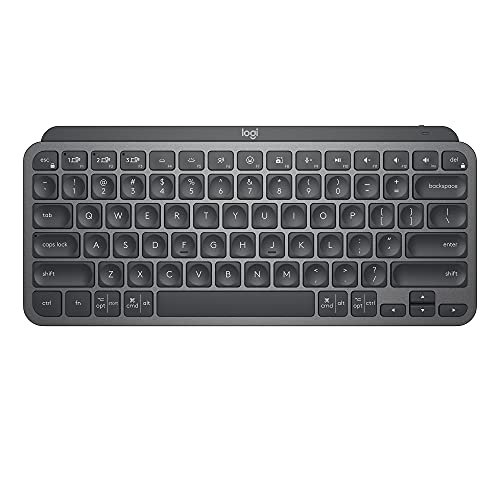
Logitech MX Keys Mini Minimalist Wireless Illuminated Keyboard Graphite

ProtoArc XK04 Foldable Compact Keyboard Black

OMOTON Ultra-Slim Bluetooth Keyboard for iPad iPhone
More Details On Our Top Picks
Microsoft’s slim board makes the most sense on a clean desk where you want the mouse close and the typing zone uncluttered. The low-profile shape suits long work sessions better than flashy gadget keyboards, and the separate emoji and snipping keys add practical shortcuts without crowding the layout.
That balance puts it ahead of more travel-first models like the ProtoArc XK04, though you give up the fold-up convenience that commuters may prefer. The honest read is that it fits best in a stationary setup, especially for someone who likes a compact board that still feels like a proper desktop tool.
Strong Points
- Compact footprint keeps mouse space open.
- Low-profile keys support steady day-long typing.
- Emoji and snipping keys save menu hunting.
- Matte finish fits a tidy desk setup.
Things To Consider
- It is less travel-ready than folding options.
- Without a number pad, spreadsheet work feels tighter.
Feature Snapshot
Who It Suits Best
Desk-based professionals and students who want a small board with a polished, low-profile feel will get the most from it.
A Better Fit Elsewhere
Logitech Pebble Keys 2 K380s Tonal Graphite suits someone who wants a more portable shape and multi-device switching instead of a more desktop-leaning feel.
The built-in number pad changes the story here, because it gives you a compact keyboard that still handles spreadsheets, invoices, and data entry without a separate pad on the side. Logitech also leans into easy Bluetooth pairing, so a home office desk stays less tangled and more usable.
Compared with the Microsoft Designer model, this one gives up some sleek minimalism in exchange for more input space. That trade-off makes sense for household tasks and work-from-home routines, though a full-size feel can still be more comfortable for number-heavy work.
Bright Spots
- Number pad helps with entries and totals.
- Bluetooth connection avoids USB clutter.
- Deep-profile keys feel familiar for typing.
- Spill-resistant build suits busy households.
Worth Noting
- The wider layout takes more desk space than the most stripped-down picks.
- Deep keys are familiar, though they are not as low-profile as the slimmest boards.
- Spill resistance helps in everyday use, but regular cleaning still matters.
Who Should Grab It
Home office users who still want a number pad will find the layout easier to live with than most compact boards.
Look Elsewhere When
Arteck Compact Wireless Bluetooth Keyboard Black suits tablet-first setups better, especially when your desk is small and the number pad would just get in the way.
Arteck keeps the format simple, and that works well for tablet use, café typing, or a laptop bag that already feels packed. Bluetooth support for tablets, phones, and PCs gives it broad utility, and the ten-meter operating distance from the source details points to flexible desk placement.
It sits closer to the portable end of the group than Logitech K250, which makes it easier to carry but less appealing for number-heavy office work. The honest read is that it shines as a no-fuss typing companion rather than a feature-rich desk anchor.
Upsides
- Light, simple format suits travel use.
- Works across tablets, phones, and PCs.
- Wireless setup keeps ports open.
- Useful for quick typing on the move.
Small Caveats
- No dongle is included, so Bluetooth support matters.
- The bare-bones layout leaves less room for shortcut extras.
Built With In Mind
Mobile-first users who jump between tablets and laptops will appreciate the straightforward shape and easy carry.
Another Choice May Suit
Logitech MX Keys Mini Minimalist Wireless Illuminated Keyboard Graphite makes more sense for someone who wants a more premium desktop typing feel and can live with a less travel-centric shape.
Logitech’s Pebble Keys 2 keeps the shape light and the look restrained, which fits a mixed-device desk where style matters but clutter matters more. The ability to switch between up to three wireless devices is the key reason it belongs on this list, because you can move between laptop, tablet, and phone without changing keyboards.
That makes it more versatile than the Arteck, though it still stays compact enough for a shoulder bag or a small workspace. The trade-off is straightforward: you’re paying for convenience and polish, not a full-size layout or a broad set of dedicated controls.
Best Bits
- Switching among three devices is useful.
- Lightweight shape suits portable work setups.
- Recycled plastic content may appeal to practical-minded shoppers.
- Rounded profile keeps the desk look clean.
- Compact size still feels easy to carry.
Areas To Watch
- Three-device switching helps, but setup still takes a little learning.
- The minimalist layout leaves out the extra keys some office users want.
Details At A Glance
Perfect Match For
People who bounce between several devices during the day will get the most value from its switching behavior.
Where A Sibling Pick Shines
Microsoft Designer Compact Keyboard Matte Black is the better fit for a more desk-bound setup that favors a cleaner typing zone over multi-device hopping.
TECKNET is the busiest pick in the group, because it goes beyond plain Bluetooth and adds a 2.4G wireless option with four connection modes total. That matters in mixed-device homes, especially where one laptop, one tablet, and a desktop or smart TV all need attention.
Compared with the Pebble Keys 2, it asks for a little more attention up front, but it rewards you with broader connection flexibility. The rechargeability and included USB receiver make it easier to keep in rotation, although the extra modes are more useful for organized setups than for casual one-device typing.
Positives
- Four connection modes add flexibility.
- Works with many device types, including TVs.
- USB receiver helps where Bluetooth is absent.
- Rechargeable design fits regular desk use.
Points To Note
- More modes mean more setup decisions.
- The feature set feels more useful for organized multi-device homes than for minimal carry setups.
Who Will Love This
Households that move between several screens will get the most from the connection choices and receiver support.
Skip It When
OMOTON Ultra-Slim Bluetooth Keyboard for iPad iPhone is the cleaner fit for a simpler tablet-only setup with less connection juggling.
This is the board for people who want a compact size without giving up a more serious typing feel. Logitech’s design aims at efficiency and stability, and the shoulder-aligned layout matters in long desk sessions because it lets the mouse sit closer to the keyboard.
Compared with the Pebble Keys 2, MX Keys Mini feels more work-focused and less casual. That makes it a stronger fit for creators, writers, or anyone spending hours in front of a screen, though it will feel like more keyboard than a traveler really needs.
Reasons To Buy
- Compact format still targets heavier desk work.
- Shoulder-friendly layout helps reduce wide reaches.
- Bluetooth pairing keeps the setup simple.
- Illuminated keys help in dim rooms.
- Stable feel suits longer writing sessions.
Softer Spots
- It sits above simpler travel boards in complexity and price.
- Illumination is useful, but it adds another feature to manage.
Core Details
Whose Shelf It Belongs On
People who type for work most days will appreciate the more polished, focused feel.
Reach For A Different Pick When
Logitech K250 Compact Wireless Bluetooth Keyboard Graphite is the simpler match for number-heavy household tasks and a more straightforward everyday layout.
ProtoArc is the only foldable model here, and that changes the whole appeal. At 7.8 ounces with a PU leather cover, it’s built for bags, flights, and desk setups that need to disappear fast after use.
That travel-first shape puts it well ahead of the non-folding boards for portability, though the mobile-device-focused layout means it makes less sense as a daily office keyboard. You may find it especially useful alongside a phone or tablet stand, where the physical keys turn a cramped screen setup into something far easier to type on.
Positives
- Two-fold design makes packing simple.
- Light 7.8-ounce build suits carry-on use.
- PU leather cover adds a more finished travel feel.
- Made for phones and tablets, so it suits mobile typing.
Trade Offs
- Foldable hardware adds moving parts to store and handle.
- Its mobile layout is less natural for full desk work.
Who Should Grab It
Frequent travelers and tablet users who type away from a desk will benefit most from the fold-up form.
Swap It Out When
Microsoft Designer Compact Keyboard Matte Black is the better fit for a stable home desk where the keyboard can stay open all day.
OMOTON leans hard into tablet and phone use, which makes it a neat fit for iPad-focused setups and light typing on the go. The 78-key QWERTY layout gives you a familiar typing pattern, and the source details note broad compatibility with many iPad and iPhone generations.
That focus keeps it simpler than TECKNET’s multi-mode approach and easier to live with for single-device use. The catch is that the function keys do not fully support every other system, so cross-platform shoppers should read that limitation carefully before treating it as a universal board.
Highlights
- Ultra-slim shape saves bag space.
- 78-key layout feels familiar to type on.
- Strong iPad and iPhone compatibility.
- Bluetooth setup keeps things wire-free.
Room For Improvement
- Function key support is not fully universal.
- It is most useful in Apple-focused setups.
- Thin boards usually reward careful storage in sleeves or pockets.
The Right Fit
Apple device owners who want a slim keyboard for everyday typing will find the layout easy to trust.
Where Shoppers Go Wrong
Logitech K250 Compact Wireless Bluetooth Keyboard Graphite is the better call for mixed-platform home use, especially when a number pad matters.
What Matters Before You Choose A Compact Bluetooth Keyboard
Common Shopping Slip Ups
Layout matters more than it first appears. A tiny board without a number pad can feel efficient for typing, then awkward for spreadsheets or routine entry work.
Device support matters too, especially for tablet and phone setups. Cross-platform use needs careful checking, because shortcut behavior can vary across systems.
Where The Extra Money Goes
Higher-tier models usually pay for better key feel, smarter device switching, and more polished materials. Backlighting, multi-device memory, and sturdier housings can all raise the cost.
That upgrade makes sense for daily desk use, long writing sessions, or shared workspaces where the keyboard stays in rotation. Casual tablet typing usually does not need that much hardware.
Things Worth Knowing First
Common Shopping Slip Ups
People often chase the smallest shape and forget the typing job. A foldable board works well in a bag, but a desk keyboard with more stable keys can feel better for long sessions.
What The Higher Tier Buys
More expensive compact keyboards tend to bring better materials, illumination, and faster switching between devices. Those features matter most when you type every day and want less friction.
Spending up is easier to justify for desk work than for occasional travel. For short tablet notes, a simpler board usually does enough.
Frequently Asked Questions
What size works best for small desks?
A tenkeyless or slim compact board usually fits best on tight desks. A number pad only helps when your work really needs it.
Do Bluetooth keyboards work well with tablets?
Yes, many do, especially models built for mobile devices. Compatibility still varies, so system support matters.
Is a foldable keyboard practical for daily use?
It can be, but the hinge design adds moving parts. That makes it more travel-friendly than desk-focused.
Why do some compact keyboards cost more?
Better materials, illumination, and multi-device switching often raise the price. Those features matter most in heavy daily use.
Can a compact keyboard replace a full-size one?
For writing, email, and most general tasks, yes. For number-heavy work, a full-size layout still feels easier.
