


Compact desktops fit the spaces where full towers feel clumsy, from a crowded home office desk to a reception counter or dorm setup. The real question is not size alone, it’s whether the machine gives you enough ports, storage, and display support for the way you actually work.
This roundup focuses on small systems that make sense for everyday tasks, light multitasking, and cleaner desk setups. You’ll also see where each one asks you to compromise, because a mini chassis is only useful when the trade-off matches your routine.
Quick Look At The Shortlist
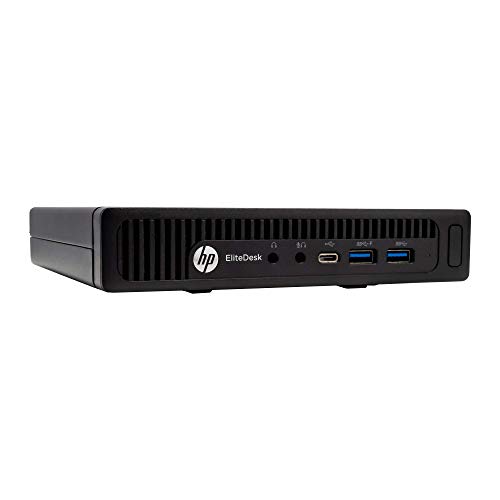
HP EliteDesk 800 G2 Desktop Mini Business PC

Dell OptiPlex 7050 Micro Computer

BOSGAME E5 11 Pro Mini PC

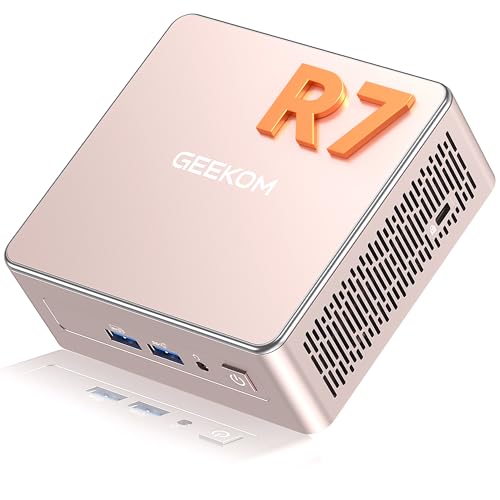
GEEKOM A5 2027 Edition Mini PC
Mini PC with 1 Year Office 365

HP Pro 400 G9 Mini PC Desktop Computer
More Details On Our Top Picks
The B1 Plus makes sense for a desk that only needs web apps, documents, and a second screen or two. Its Celeron J3355 processor is modest, so the value comes from the small footprint and the option to expand storage with an M.2 SSD, which matters more than raw speed in a simple home setup.
That trade-off is clear, though: 6GB of RAM and 128GB of built-in eMMC storage leave you with a tighter ceiling than the stronger picks below. For a student corner, point-of-sale station, or family PC used for streaming and schoolwork, that’s still enough to keep things tidy without a tower under the desk.
Strong Points
- Small chassis fits where a full desktop feels awkward.
- M.2 SSD expansion gives you room to grow later.
- Dual-display support helps at a shared work spot.
- 2.4G and 5G WiFi plus Bluetooth 5.0 cover common wireless gear.
Things To Consider
- The base storage is fine for light use, but it fills faster once files and updates stack up.
- The entry-level processor is not the match for heavier multitasking.
Feature Card
Who It Suits Best
Small offices, students, and casual home users with simple app needs will get the most from it.
Where A Sibling Pick Shines
For heavier spreadsheets or more browser tabs, the BOSGAME E5 11 Pro Mini PC gives you more headroom.
The EliteDesk 800 G2 feels more like a repurposed office tool than a consumer gadget, and that’s a strength. An Intel quad-core i5-6500T and 16GB of DDR4 memory give it a more serious multitasking stance than the Bmax, while the 240GB SSD keeps everyday loading times sensible.
In a bookkeeping desk, a front counter, or a spare family workstation, the VGA and DisplayPort outputs make older and newer monitors easier to mix. The honest read is that this renewed unit is attractive for utility first, not for fresh hardware polish, so the condition of the refurb matters as much as the spec sheet.
Upsides
- Quad-core CPU handles office apps with more breathing room.
- 16GB of DDR4 helps with layered browser sessions and spreadsheets.
- VGA and DisplayPort widen monitor compatibility.
- Small business form factor saves desk space neatly.
Points To Note
- Renewed hardware can arrive with a more utilitarian finish than a new retail box.
- The SSD size is adequate for office files, but large media collections will push it quickly.
- Legacy video ports are useful, though they signal an older platform.
Who Will Love This
Administrators, home office users, and anyone replacing an older desktop without needing a flashy chassis will appreciate it.
A Better Fit Elsewhere
For a newer-feeling workstation with more headroom, the HP Pro 400 G9 Mini PC Desktop Computer is the cleaner step up.
Dell’s 7050 Micro lands in the middle of the pack in a useful way, because it combines the same i5-6500T class processor as the HP refurb with 16GB of DDR4 and a slightly larger 256GB SSD. That extra storage cushion matters once you start keeping local project files, downloads, and routine updates on the machine.
For a school lab, side desk, or compact remote-work station, it feels like a straightforward fit with fewer compromises than the entry-level Bmax. You still get the older CPU generation, so it’s better as a dependable office box than a machine for heavy creative software.
Bright Spots
- 256GB SSD gives a more forgiving storage base than the 240GB option above.
- 16GB RAM supports smoother everyday multitasking.
- Micro chassis keeps cable clutter contained.
- Windows 11 Pro suits managed work environments.
Areas To Watch
- The processor belongs to an older generation, so newer rivals feel more current.
- Renewed units reward a quick check of ports, fans, and cosmetics before you settle them into service.
Core Details
Best Suited To
Office workers, students, and desk-based tasks with predictable software loads fit this machine well.
Another Choice May Suit
For a newer platform with stronger processor headroom, the BOSGAME E5 11 Pro Mini PC is the more capable step.
The E5 11 Pro shifts the conversation from basic office duty to smoother multitasking. Its Ryzen 3 5300U brings 4 cores and 8 threads, so a busy browser session, spreadsheets, and communication apps are a more natural fit than they are on the Celeron-based Bmax.
That extra thread count is useful in a shared home office or a front desk that keeps multiple windows open all day. One thing worth considering is that the source details point to power, but not to the port mix here, so the layout is easier to like than to map in detail from the spec sheet alone.
Reasons To Buy
- Ryzen 3 5300U gives it a stronger multitasking profile.
- 4 cores and 8 threads help with active office routines.
- Feels better suited to long browser sessions than entry-level chips.
- Good match for users who keep several apps open together.
Softer Spots
- Source details leave the connection layout less explicit than on some rivals.
- It aims at practical work first, so it is not the pick for demanding media work.
Feature Rundown
Whose Shelf It Belongs On
Home office users and small teams that value a stronger everyday processor will get the most from it.
Look Elsewhere When
For more polished connectivity details and a quieter desktop profile, the HP Pro 400 G9 Mini PC Desktop Computer feels more complete.
The Pinova P1 stands out for connection flexibility more than sheer bragging rights. With HDMI, DisplayPort, and USB-C video support, you can shape a dual-monitor or mixed-monitor desk without needing to work around a single output type, and that’s useful in compact offices where old and new displays live side by side.
The Ryzen R2544 also gives it a stronger everyday stance than the slowest entry models in this roundup. In a small business office or student setup, the 16GB of RAM and 256GB SSD keep the experience straightforward, although the real benefit is the balanced port mix rather than any one headline spec.
Highlights
- HDMI, DisplayPort, and USB-C cover mixed monitor setups.
- 16GB RAM supports smoother app switching.
- 256GB SSD is a sensible starting point for everyday files.
- Ryzen R2544 gives it more pace than low-end chips.
Minor Gripes
- The feature set is practical, not especially luxurious.
- Desk users who need extensive expansion may still want a larger chassis class.
Right Fit For
People who want a small desktop with flexible display connections will appreciate this one most.
Swap It Out When
For a quieter, more enterprise-leaning package, the HP Pro 400 G9 Mini PC Desktop Computer is the more polished fit.
The A5 steps above the midrange crowd with a Ryzen 7 7730U, 16GB of RAM, and a 512GB SSD, so the layout already feels more generous than the Dell or HP refurb options. That combination matters in real use, because larger project folders, local media, and several work apps have more room to breathe.
For a home office that handles heavier spreadsheets or a developer desk that keeps multiple tools open, this is the sort of compact unit that behaves like a fuller workstation without taking over the surface. The trade-off is simple, it asks more from your budget than the basic models, so the upgrade only makes sense when you’ll use that headroom.
Best Bits
- Ryzen 7 7730U gives it serious everyday headroom.
- 512GB SSD is friendlier to larger local libraries.
- 16GB RAM supports broader multitasking without feeling tight.
- Well suited to work setups that stay busy all day.
Room For Improvement
- The stronger hardware profile makes it less suited to the lightest budget-only setups.
- It makes the most sense when your workload will actually use the extra capacity.
At A Glance
Perfect Match For
Power users who want a compact desktop with more breathing room for daily multitasking are the best match.
Where The Extra Money Goes
For a simpler office desk, the Dell OptiPlex 7050 Micro Computer keeps the spend lower while still covering standard work.
This QAZIPO setup leans hard into convenience, because the Office 365 bundle is front and center alongside 16GB of RAM and a 256GB SSD. For students, remote workers, or a spare household desk, that means you get a ready-made productivity lane instead of assembling software later.
The triple-display support through USB-C, HDMI, and DP is the other practical hook. It gives you more freedom than the simpler Bmax and HP refurb models, though the Intel 6500Y still places it firmly in the everyday work category rather than the heavy-duty class.
Positives
- Office 365 bundle adds immediate productivity convenience.
- Triple 4K display support suits multi-screen desks.
- USB-C, HDMI, and DP make setup planning easier.
- 16GB RAM keeps normal office routines comfortable.
Worth Noting
- The bundled software helps most when you plan to use Microsoft apps regularly.
- It fits routine work better than demanding media or engineering tasks.
Made For
Students, home office users, and remote workers who want a ready-to-run desk setup will get the most value here.
Reach For A Different Pick When
For a stronger processor platform without the software bundle angle, the GEEKOM A5 2027 Edition Mini PC is the better step up.
The Pro 400 G9 is the cleanest all-round package in this group, especially for a work desk that values quiet hardware and a tidy footprint. The DDR5 memory is a newer memory type than DDR4, and the 256GB PCIe SSD brings a faster storage class than older SATA-style drives, so the platform feels more current on paper.
Triple 4K display support, USB-C, Bluetooth 5.2, WiFi 6, and the included keyboard and mouse round out the appeal without asking you to piece together a full setup. It is the kind of mini PC that works well in a small office or home command center, although the real upside is the balanced hardware mix rather than one dramatic spec.
Strong Points
- DDR5 memory gives it a newer platform profile.
- PCIe SSD supports brisk day-to-day loading.
- Triple 4K display support helps with layered workstations.
- Included keyboard and mouse simplify first setup.
- Quiet design fits shared spaces and late-night desks.
Small Caveats
- The source details highlight the package well, but deep expansion guidance is thinner than on some business-oriented units.
- It makes the most sense for users who will use its modern connectivity and multi-display strength.
Details At A Glance
Built With In Mind
Business desks, quiet home offices, and anyone who wants a compact setup with modern connections fit this machine well.
Where A Sibling Pick Shines
For a more budget-aware office box, the Dell OptiPlex 7050 Micro Computer is the simpler route.
What Matters Most Before Choosing Compact Computers
Common Shopping Slip Ups
Small desktops can look similar while hiding very different limits. Pay close attention to RAM, storage type, and display outputs, because a tiny case does not compensate for a weak configuration.
The Upgrade Payoff
Higher-tier models usually spend more on newer processors, faster SSDs, and better connectivity like USB-C or WiFi 6. That premium makes sense for busy workdays, multi-monitor desks, or households that keep a machine active for hours at a stretch.
A Quick Reality Check
Wrong Turns To Avoid
Do not treat an older CPU and 128GB of storage as long-term comfort for every use case. Basic browsing and documents are fine, but bigger files and many open tabs push entry models fast.
What Separates Premium From Basic
Money usually goes toward smoother multitasking, quieter operation, and more generous storage or display support. For office work that stays busy, that extra headroom often feels more useful than a flashy chassis.
Frequently Asked Questions
Are compact desktops good for everyday office tasks?
Yes, they handle email, documents, video calls, and browser work very well. The main limit is how much multitasking and local storage you need.
Do compact computers work with two or three monitors?
Many do, but the port mix varies a lot by model. Check the display outputs first, because that feature decides how easy the setup will be.
Is a renewed mini PC worth considering?
A renewed unit can make strong sense for office use, especially when the processor and memory are still solid. The trade-off is that cosmetic condition and included accessories can vary more than on new hardware.
How much storage should you look for?
256GB is a safer starting point than 128GB for most desk work. Heavier file libraries, photo folders, and software installs benefit from more room.
What matters more, processor or RAM?
Both matter, but RAM affects how comfortably you keep multiple apps open. The processor matters more once the machine starts juggling heavier tasks or more demanding workflows.
