


Compact desktop computers suit desks that never seem to have enough room, office setups that need fewer cables, and households that want a full PC without tower bulk. The right mini desktop can handle email, spreadsheets, video calls, browser-heavy work, and media streaming without taking over the workspace.
That balance depends on processor class, memory, storage, and port mix. Some picks lean toward everyday office work, while others are built for heavier multitasking, multiple displays, or a cleaner long-term setup.
The Shortlist At A Glance

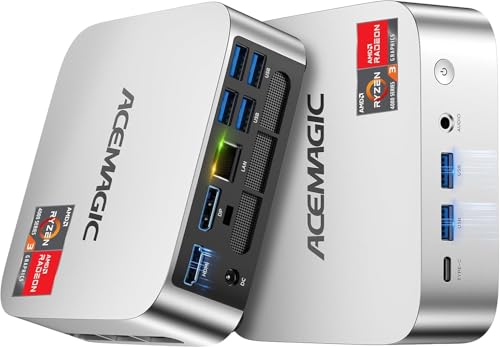
ACEMAGIC Mini PC Windows 11 Pro AMD Ryzen 7330U

HP EliteDesk 800 G4 Mini Tiny Business PC

BOSGAME P4 Ultra Mini PC Ryzen 7 7730U
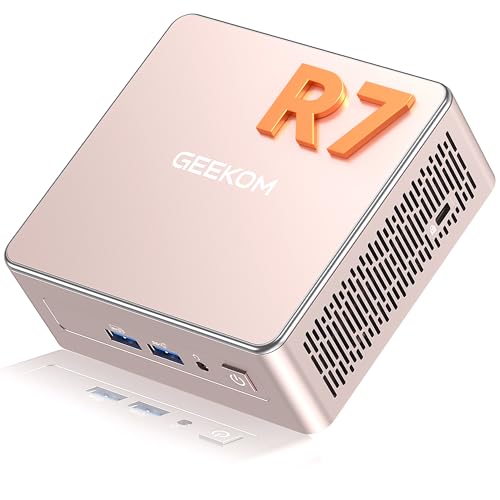
GEEKOM A5 2027 Edition Mini PC

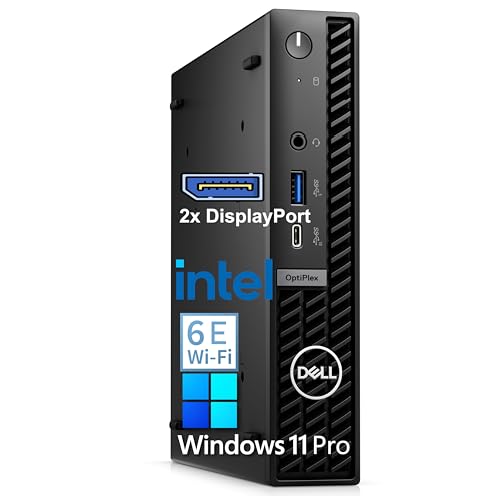
Dell 2026 OptiPlex 7010 Compact Mini Desktop
Dell 2026 OptiPlex 7010 Compact Mini Desktop Computer
More Details On Our Top Picks
The BOSGAME E5 11 Pro keeps the formula simple: a 4-core, 8-thread Ryzen 5300U platform for everyday office work, browser-heavy sessions, and document chores. For a home desk that needs to stay uncluttered, that spec mix usually lands in the sweet spot between lightness and useful headroom.
Compared with the E2 Plus later in this list, this one gives you more breathing room for tabs and spreadsheet work, though it still belongs in the practical, not the extravagant, camp. The honest read is that it fits a steady workday better than a flashy workstation role.
Strong Points
- Four cores and eight threads help daily multitasking feel less cramped.
- The mini footprint suits a tight desk or a tucked-away study nook.
- It lines up well with browser tabs, email, and office apps.
- That Ryzen 5300U class is a sensible step above entry-level chips.
Things To Consider
- Storage and memory details are not provided here, so upgrades need a closer look on the listing.
- For photo editing or heavier creative work, the P4 Ultra is the stronger path.
- The compact shell may limit easy internal changes for some setups.
Core Details
Who It Suits Best
You get the most from this model when your day revolves around email, spreadsheets, web tools, and video calls.
A Better Fit Elsewhere
BOSGAME P4 Ultra Mini PC Ryzen 7 7730U suits heavier multitaskers who want a faster ceiling for demanding office work.
This ACEMAGIC model leans into efficient day-to-day speed with a Ryzen 7330U, 16GB of DDR4 memory, and a 256GB SSD. DDR4, or double data rate 4 memory, is still a common memory type, and the 16GB capacity helps keep office apps and browser windows from feeling crowded.
Its 28W power figure also hints at a restrained power profile, which suits a quiet desk setup or a shared room where fan noise matters. Compared with the BOSGAME E5, this pick feels a bit more feature-forward on paper, especially for a user who wants multiple display support in a compact shell.
Highlights
- 16GB of memory supports smooth multitasking for work and school routines.
- The Ryzen 7330U gives you a stronger class of everyday performance.
- 256GB SSD storage keeps boot times and file access snappy.
- The compact format suits desks that need more open space.
- A lower-power design is a sensible match for quieter work areas.
Softer Spots
- 256GB storage fills quickly once you keep large media files locally.
- The listing leans on efficiency, so it is not the pick for heavy creative workloads.
Feature Card
Who Will Love This
You fit this model well when you want a quiet, compact office machine for documents, calls, and regular multitasking.
Where Another Pick Suits Better
GEEKOM A5 2027 Edition Mini PC suits you better when a more polished long-term desktop setup matters as much as raw everyday speed.
Renewed business desktops like this HP EliteDesk usually make sense when you want a small footprint and a familiar office layout more than a brand-new consumer aesthetic. The i5-8500T is a six-core, low-power desktop chip, and that makes it a steady fit for spreadsheets, office suites, and a dual-monitor desk.
Unlike the AMD picks above it, this one trades newer platform flavor for a more straightforward business-class shape with WiFi, Bluetooth, HDMI, and DisplayPort on the sheet. In a busy office corner, that sort of no-drama setup often matters more than flash.
Upsides
- Six physical cores give office multitasking a practical lift.
- 16GB of DDR4 memory supports everyday productivity without much fuss.
- The NVMe SSD format helps the system feel responsive.
- Dual-monitor support suits workers who keep mail and spreadsheets open side by side.
- WiFi and Bluetooth reduce cable clutter around the desk.
Minor Gripes
- As a renewed unit, cosmetic wear can vary from unit to unit.
- The older processor class is fine for office work, not for heavier creative loads.
- You may want to confirm the exact accessory bundle before ordering.
At A Glance
Made For
You suit this HP best when you want a compact workhorse for a traditional office desk or a renewed business setup.
Look Elsewhere When
BOSGAME P4 Ultra Mini PC Ryzen 7 7730U fits power-hungry multitaskers who want more headroom for demanding home office work.
The P4 Ultra pushes harder than the first three picks, starting with a Ryzen 7 7730U, 16GB of DDR4 memory, and a 1TB PCIe SSD. PCIe, or peripheral component interconnect express, is the storage interface that helps the drive move data quickly, which matters once you keep larger project files on the machine.
For a home office that leans into heavier multitasking, that 1TB drive is the kind of capacity that keeps a desktop feeling less cramped. Compare it with the ACEMAGIC unit, and this one looks like the steadier bet for users who want more storage headroom without moving to a full tower.
Reasons To Buy
- Ryzen 7 7730U gives the system more muscle for busy multitasking.
- 1TB of SSD storage leaves room for larger local files.
- 16GB of DDR4 memory keeps common office workflows comfortable.
- The compact chassis still saves space on a crowded desk.
Areas To Watch
- The higher-spec setup can be more than casual web users need.
- You may want to think through port needs before choosing a display setup.
Details At A Glance
Best Suited To
You fit this P4 Ultra best when you want a compact machine with enough storage and speed for heavier daily workloads.
Where A Sibling Pick Shines
Dell 2026 OptiPlex 7010 Compact Mini Desktop with 16GB DDR5 RAM suits office users who want a more mainstream business setup.
The GEEKOM A5 sits in the more polished part of this roundup, with a Ryzen 7 7730U, 16GB of RAM, and a 512GB SSD. That combination lands in a useful middle ground, giving you more room than the 256GB systems without going all the way to the P4 Ultra’s larger drive.
In a home office that stays in use all week, that balance feels sensible. The note about supply pressure around DDR memory also hints that this configuration is the sort of spec mix you want to lock in when it matches your needs, not after you’ve already outgrown the lighter options.
Best Bits
- Ryzen 7 7730U gives you strong everyday desktop performance.
- 512GB SSD storage is a comfortable size for office files.
- 16GB of RAM supports open apps and multiple browser sessions.
- Its overall balance suits a long-term desk setup very well.
- The footprint stays compact despite the more capable parts.
Small Caveats
- It may be more machine than a very light user needs.
- Storage is ample for many people, though creators may still want more.
Feature Rundown
Whose Shelf It Belongs On
You fit this model best when you want a compact desktop that feels more polished than entry-level mini PCs.
Swap It Out When
BOSGAME E2 Plus Mini PC suits lighter users who just want a simpler office desktop with less to manage.
The E2 Plus keeps the formula straightforward with a Ryzen 5 3501U, 8GB of RAM, and a 256GB SSD. For light office work, web browsing, video calls, and streaming, that spec stack gives you the basics without drifting into overbuilt territory.
Compared with the E5 11 Pro, this is the leaner choice, and that matters most for casual users who want a compact desktop that does its job without asking for much space. In a guest room, dorm setup, or shared family desk, that restraint is part of the appeal.
Positives
- 8GB of RAM covers basic work and browsing routines.
- 256GB SSD storage gives you quick access to everyday files.
- The Ryzen 5 chip is a sensible fit for light multitasking.
- The small chassis keeps desk clutter under control.
Points To Note
- 8GB memory can feel tight once you keep many tabs open.
- The storage capacity suits basic use, not a large local media library.
- You may find it less comfortable for heavier multitasking than the Ryzen 7 options above.
Who Should Grab It
You suit this mini PC best when your work stays light and you want a simple desktop for everyday home use.
Another Choice May Suit
ACEMAGIC Mini PC Windows 11 Pro AMD Ryzen 7330U is a better fit for commuters, students, and home workers who keep more apps open at once.
The Dell OptiPlex 7010 lands in that dependable middle zone where office hardware usually makes the most sense. With 8GB of DDR5 RAM and a 256GB PCIe SSD, it gives you a newer memory standard, and DDR5 is the faster-generation RAM that helps a compact PC stay responsive in ordinary work.
That mix fits students, home offices, and small teams that want a straightforward desktop without extra clutter. Compared with the HP EliteDesk, this model feels more current on the memory side, though the rest of the setup still stays intentionally modest.
What We Like
- DDR5 memory gives the system a newer platform feel.
- The 256GB PCIe SSD helps the PC respond quickly at startup.
- Its size works well on a crowded desk or shared workspace.
- Dell’s business styling tends to fit office setups cleanly.
Worth Noting
- 8GB memory is fine for basics, though heavier multitaskers will want more.
- 256GB storage is practical, but it leaves little room for large local archives.
The Right Fit
You get the best match here when your workday revolves around email, documents, conferencing, and light multitasking.
Reach For A Different Pick When
BOSGAME P4 Ultra Mini PC Ryzen 7 7730U is the better call for shoppers who want more storage and stronger multitasking headroom.
This Dell version goes further than the 8GB model by pairing 16GB of DDR5 RAM with a 512GB PCIe SSD, plus WiFi 6E and support for three 4K displays. WiFi 6E is the newer wireless standard that can ease congestion on busy networks, which matters in a home office where several devices fight for attention.
That extra display support makes it especially practical for office users who like one screen for mail, one for documents, and one for reference material. Compared with the base OptiPlex above, this is the one that feels ready for a busier desk from day one.
Standout Traits
- 16GB of DDR5 RAM gives you more breathing room for multitasking.
- 512GB PCIe SSD storage suits larger work files and software.
- WiFi 6E helps on newer, busier wireless networks.
- Triple 4K display support is useful for multi-window productivity.
- Windows 11 Pro and the included office software shape a work-ready package.
Honest Caveats
- The fuller feature set may be more than a basic home user needs.
- Triple-display setups work best when your desk space and cables are already organized.
Built With In Mind
You fit this Dell best when you want a compact office desktop with display flexibility and more storage to spare.
Skip It When
BOSGAME E2 Plus Mini PC is the simpler route for casual users who just want a lean desktop for light daily tasks.
What Matters Most Before Choosing Compact Desktop Computers
Processor And Memory Shape Daily Comfort
Start with the chip and RAM, because those two parts decide how well the desktop handles tabs, spreadsheets, video calls, and light creative work. A 4-core model can be enough for basic office use, while a Ryzen 7 or a newer Intel desktop chip gives you more breathing room.
Storage Size Changes How Long The System Stays Useful
256GB works for a lean setup, though it fills fast once you keep files locally. 512GB or 1TB gives you more room for documents, downloads, and software without constant housekeeping.
Ports And Display Support Matter More Than People Expect
Compact desktops often sit behind one or two monitors, so HDMI, DisplayPort, and multi-display support deserve a close look. The right port mix keeps your workspace tidy and avoids adapter clutter.
Think About Noise, Placement, And Access
A mini PC on a shelf or tucked beside a monitor should still leave you room for cables, airflow, and easy maintenance. Quiet cooling helps in shared rooms, while a cramped spot can make even a good machine awkward to live with.
A Quick Reality Check Before You Commit
Mistakes Worth Dodging
Don’t judge compact desktops by size alone. A small case with weak memory or tiny storage can feel cramped faster than a slightly larger unit with better internals.
The Upgrade Payoff
Higher-tier models cost more because they usually bring stronger processors, more RAM, larger SSDs, and better display support. That extra spend makes sense for heavy multitasking, long office days, or setups that need to stay useful longer.
Frequently Asked Questions
Are compact desktops good for everyday office work?
Yes, they handle email, documents, web browsing, and video calls well. A model with at least 8GB of memory and an SSD is the safer starting point.
How much storage should you aim for?
256GB is fine for light use and cloud-first workflows. 512GB or 1TB gives you more room for local files, software, and backups.
Do compact desktops work with multiple monitors?
Many do, but the port layout matters a lot. Check for HDMI, DisplayPort, or explicit multi-display support before you commit.
Is DDR5 worth choosing over DDR4?
DDR5 is the newer memory type and can help with responsiveness in current systems. DDR4 still works well for standard office tasks and may be the more practical choice on some mini PCs.
Which compact desktop suits a shared family space?
Look for a quiet, small model with enough storage for shared files and general use. A balanced unit like the ACEMAGIC Mini PC Windows 11 Pro AMD Ryzen 7330U is a sensible place to start.
