


Compact desktops earn their keep in tight offices, shared workstations, and home setups that need a smaller footprint without giving up a full keyboard, monitor, and cable setup. You’re looking at this list because desk space matters, noise matters, and the machine still has to handle daily work without turning the room into a tangle of wires.
That’s where these seven picks separate themselves. Some lean toward basic browsing and office tasks, others are better suited to multi-display desks, upgrades, or refurbished business hardware that gives you more machine for the footprint.
Quick Look At Our Shortlist
Bmax Mini PC B1 Plus, Intel Celeron J3355 6GB 128GB eMMC
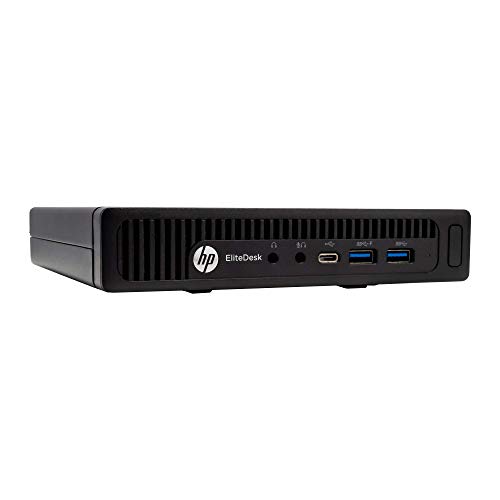
HP EliteDesk 800 G2 Desktop Mini Business PC 16GB 240GB SSD

Dell OptiPlex 7050 Micro Computer 16G DDR4 256G SSD

GEEKOM IT12 Mini PC i3-12300HE 16GB 512GB SSD
Queekay 16 Pcs Mini Compact Mirror Travel for Women Girls
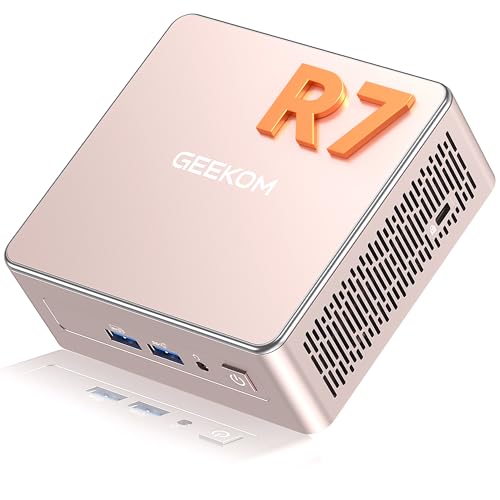
GEEKOM A5 2027 Edition Mini PC Ryzen 7 7730U 16GB 512GB SSD

HP Pro 400 G9 Mini PC Desktop Computer 16GB DDR5 256GB PCIe SSD
More Details On Our Top Picks
For a desk that mainly handles email, documents, web tabs, and streaming, this Bmax keeps the hardware simple and the footprint small. The Celeron J3355 sits in entry-level territory, so the trade-off is clear, but that’s also why it suits a secondary office corner, dorm setup, or a family station that doesn’t need heavy software.
The 6GB memory and 128GB eMMC storage are modest, and the real value comes from the M.2 SSD expansion path, which gives you room to grow without replacing the whole machine. Dual-display 4K support, WiFi, and Bluetooth 5.0 round out a tidy little desktop that feels best where space is tight and expectations stay grounded.
Strong Points
- Compact chassis leaves more room for a monitor stand, notebook, or docking gear.
- M.2 expansion helps you move past the built-in storage ceiling later.
- Dual-display support works well for light office multitasking.
- WiFi and Bluetooth reduce cable clutter on a small desk.
Things To Consider
- Entry-level processing power fits basic workloads better than demanding apps.
- 128GB eMMC fills quickly, so storage planning matters.
- 6GB memory is serviceable, but not roomy.
Who It Suits Best
You’re a strong match for this pick if your work stays light and you want a small desktop that stays out of the way.
Where Another Pick Suits Better
HP Pro 400 G9 Mini PC Desktop Computer suits you better when your desk needs stronger display support and a more current business-class setup.
This refurbished HP leans into practical office use, with a quad-core i5-6500T and 16GB of DDR4 memory giving it a far more comfortable multitasking profile than the Bmax above. DDR4, or fourth-generation desktop memory, matters here because it generally suits everyday business work, browser-heavy sessions, and light spreadsheet use with less strain.
The 240GB SSD keeps boot and app loading snappy, and the VGA plus DisplayPort mix is useful in older offices that still run mixed monitor fleets. The honest read is that refurbishment can mean cosmetic variation, but for a compact workstation replacement, this kind of hardware reuse usually makes sense.
What We Like
- 16GB memory gives you more breathing room than entry-level mini desktops.
- SSD storage helps the system feel responsive in daily use.
- VGA and DisplayPort improve compatibility with older monitors.
- Business-focused hardware suits office software and repeat daily sessions.
Room For Improvement
- Refurbished units can arrive with cosmetic differences.
- 240GB storage is fine for office work, but not roomy for media libraries.
- It lacks the newer connectivity options found on the GEEKOM picks.
Best Suited To
You’re the right fit for this mini PC if you want a compact office machine with stronger memory and familiar business ports.
A Better Fit Elsewhere
GEEKOM IT12 Mini PC works better for you if you want a newer platform with USB4 and a more modern expansion story.
Compared with the HP refurb, this Dell follows the same business-mini formula but shifts the storage balance upward with a 256GB SSD. That extra headroom matters more than the number suggests, especially for a work machine carrying documents, browser caches, and a few installed tools.
Its 16GB of DDR4 memory and Windows 11 Pro make it a sensible fit for desks that need a stable, compact endpoint rather than a flashy centerpiece. In a busy office, the 7050 Micro tends to make the most sense when you want familiar Dell business hardware and a little more local storage than the HP EliteDesk.
Highlights
- 256GB SSD gives a bit more breathing room than the HP refurb.
- 16GB DDR4 supports comfortable day-to-day multitasking.
- Small form factor keeps the machine easy to tuck under a monitor.
- Windows 11 Pro suits work-focused desktop setups.
Points To Note
- The platform is still based on older-generation Intel silicon.
- Refurbished condition can vary in appearance.
Feature Rundown
Who Should Grab It
You’re a good match if you want a compact office PC that feels familiar and can handle routine workloads without fuss.
Swap It Out When
GEEKOM A5 2027 Edition Mini PC suits you better if you want a newer Ryzen platform for heavier multitasking.
GEEKOM takes a noticeably more modern path here, starting with the Core i3-12300HE and adding USB4, which is a high-bandwidth port standard that matters for fast accessories and future expansion. That combination puts it well ahead of the older Intel-based refurb picks for anyone building a long-term desk setup.
The 16GB memory and 512GB SSD feel better matched to heavier browser loads, office suites, and a little creative work, while the metal chassis should suit shared environments where equipment gets handled daily. The catch is that this tier makes more sense for people who will actually use the extra headroom, not for a machine that just sits there running one tab and a spreadsheet.
Upsides
- USB4 opens the door to faster peripheral and display workflows.
- 512GB SSD gives comfortable local storage for work files and apps.
- Metal chassis adds a more substantial feel for daily handling.
- Upgradable design gives you room to extend its useful life.
Small Caveats
- Its stronger hardware makes more sense when you need the extra capacity.
- The business-oriented design is practical, not decorative.
Core Details
Whose Shelf It Belongs On
You’re the best match for this mini PC if you want a compact business desktop with modern connectivity and room to grow.
Look Elsewhere When
Bmax Mini PC B1 Plus makes more sense if your priorities are lighter workloads and a gentler entry point.
This one sits outside the desktop theme, but it fits the compact category in a very literal way. Each mirror is about 2 by 3 inches, so it disappears into a makeup pouch, jacket pocket, or carry-on organizer without asking for much room.
Sixteen pieces make more sense for group bags, event prep, travel kits, or a small retail stash than for a single-person vanity setup. The honest read is that these are simple utility mirrors, so you’re paying for quantity and portability rather than anything decorative or heavy-duty.
Best Bits
- Very small size makes each mirror easy to tuck into tight storage.
- Pack of sixteen works well for shared use, events, or backups.
- Lightweight format suits travel bags and purse organizers.
- White finish keeps the look plain and easy to coordinate.
Areas To Watch
- The tiny size suits portability more than a table-top routine.
- Simple utility construction leaves little room for premium touches.
Made For
You’re the right fit if you want small, easy-to-carry mirrors for travel kits, gifts, or event use.
Another Choice May Suit
HP EliteDesk 800 G2 Desktop Mini Business PC suits you better when your priority is a compact computer rather than a pocket accessory.
Among the mini PCs here, this GEEKOM moves closest to a true all-rounder for heavier daily work. The Ryzen 7 7730U and 16GB of RAM point to better multitasking than the older Intel refurb units, and the 512GB SSD helps keep apps and files close at hand.
For a home office that juggles tabs, spreadsheets, calls, and occasional editing, that extra headroom matters. The future shift in its memory market is worth keeping in mind, though the current configuration looks well suited to people who want a compact machine that doesn’t feel cramped right away.
Reasons To Buy
- Ryzen 7 platform gives it a stronger daily-work ceiling.
- 512GB SSD is a comfortable size for most office installs.
- 16GB memory supports smoother switching between tasks.
- Feels better matched to a long service life than basic entry models.
Minor Gripes
- The stronger hardware only pays off when you’ll use it.
- Business-like styling keeps the focus on function rather than flair.
Perfect Match For
You’re a strong fit for this mini PC if your workdays involve more than light browsing and basic documents.
Where A Sibling Pick Shines
HP Pro 400 G9 Mini PC Desktop Computer fits better if you want triple-display support and a quieter business-style desk setup.
This HP looks built for a desk that needs order as much as speed. The combination of DDR5 memory, PCIe SSD storage, USB-C, WiFi 6, Bluetooth 5.2, and support for three 4K displays gives it the most polished office profile in the lineup.
The ultra-quiet design helps in open-plan rooms or quiet home offices, and the included keyboard and mouse make setup feel less piecemeal. One thing worth considering is that this configuration makes the most sense for multi-screen users, because that’s where it clearly separates itself from the simpler Bmax and the older refurb options.
Positive Notes
- Triple 4K display support suits workstations with multiple monitors.
- DDR5 memory brings a newer platform feel than the refurb picks.
- USB-C, WiFi 6, and Bluetooth 5.2 support a cleaner desk layout.
- Quiet operation helps in shared or low-noise spaces.
- Keyboard and mouse in the box reduce setup friction.
Softer Spots
- Triple-display capability matters most when you already use several screens.
- 256GB storage is usable, but not expansive for large local libraries.
At A Glance
Built With In Mind
You’re the best fit for this mini PC if your desk centers on multiple monitors and you want a compact business machine that stays quiet.
Reach For A Different Pick When
GEEKOM IT12 Mini PC suits you better if USB4 and a more upgradable business chassis matter more than triple-display support.
What Matters Before You Choose A Compact Desktop
Memory And Storage First
Mini PCs look similar on the outside, so memory and storage usually decide whether a machine feels roomy or cramped. A small SSD with too little RAM can make everyday work feel tighter than the size suggests.
Ports And Display Support
Check the back panel before you commit. Dual or triple display support, USB-C, and older connectors like VGA or DisplayPort matter more than marketing language once your monitor and dock are on the desk.
Workload Fit
Light browsing, office tasks, and streaming are one lane. Heavier multitasking, multiple monitors, and long work sessions call for newer processors, more memory, and a storage size that won’t force constant cleanup.
A Quick Reality Check Before You Commit
Common Shopping Slip Ups
Shoppers often focus on size alone and miss the part where storage, memory, and port mix decide daily comfort. A tiny machine with weak internals can feel full faster than expected.
What The Higher Tier Buys
Higher-tier compact PCs usually pay for newer chips, faster memory, better video output options, and more flexible expansion. That upgrade makes sense for multi-screen workstations, heavier multitaskers, and desks you plan to keep in service for years.
Frequently Asked Questions
Are compact PCs good for office work?
Yes, compact PCs fit office work very well when you want a tidy desk and a full desktop setup. The better models in this list also support multi-display workflows.
Do refurbished mini PCs make sense?
They can, especially for standard business tasks. The trade-off is older hardware and possible cosmetic variation.
How much storage should you look for?
For light use, smaller SSDs can work, but they fill up quickly. Around 256GB or 512GB gives you more room for apps and documents.
Is RAM upgradeability important?
It matters a lot for long-term use. More memory headroom helps a mini PC stay comfortable as your workload grows.
Can a mini PC handle multiple monitors?
Some can, and that’s where the spec sheet matters most. Check display outputs and supported resolutions before you buy.
