


Computer algebra system calculators matter most when your math stops being tidy and starts becoming symbolic, graphical, and course-specific. You need a tool that matches your class, your workflow, and the level of detail your work demands, whether that means graphing, programming, or handling financial functions. The seven picks below cover school use, exam-driven work, and more specialized study paths without blurring those differences. That separation matters more than glossy feature lists.
Quick Shortlist for Fast Comparison

NEWYES Rechargeable Scientific Calculators 991ES MAX, 4-Line Written Display

Texas Instruments TI-34 MultiView Scientific Calculator Teacher Kit 10 pack

TI-84 Evo Graphing Calculator Texas Instruments Raspberry
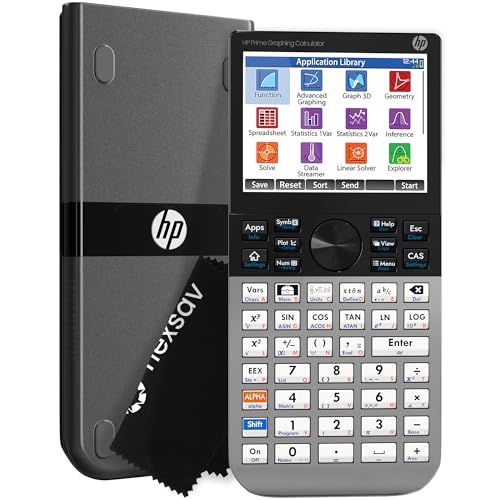
HP Prime G2 Graphing Calculator Multi-Touch 3.5″ Color Display CAS

Casio fx-9750GIII Graphing Calculator Python Programming Pink

Casio fx-9750GIII Graphing Calculator Python Programming White

HP 10bII+ Financial Calculator 100+ Functions Statistics & Algebra
More Details On Our Top Picks
The writing pad changes the feel of this NEWYES pick, especially for homework sessions where you keep a running trail of formulas, notes, and corrections. The 417-function layout and 4-line display suit students who need more than a bare-bones scientific calculator, while the foldable hard case gives it a more carry-friendly profile than the usual classroom slab.
The trade-off is that this is still a study-focused calculator, not a graphing heavyweight like the TI-84 Evo. That makes it a smart fit for middle school through early college math, along with anyone who wants to keep scratch work attached to the calculator instead of scattered across loose paper.
Strong Points
- 417 functions cover a wide spread of school math tasks.
- The writing pad lets you capture derivations beside the problem.
- The foldable case helps with everyday bag carry.
- Dual power is useful for long class days and study sessions.
Points To Note
- The pad adds convenience, but it also adds another surface to keep clean.
- It suits scientific work better than full graphing needs.
Feature Snapshot
Who It Suits Best
You fit this best as a student who writes out steps by hand while moving through algebra, science, or early engineering work.
Where A Sibling Pick Shines
TI-84 Evo Graphing Calculator Texas Instruments Raspberry suits you better for full graphing assignments and heavier classroom use.
This TI-34 MultiView kit speaks to classrooms, not individual desk setups. Ten calculators, a storage caddy, a poster, and instruction materials in English and Spanish make it practical for teachers who need a consistent set ready for shared use.
The yellow EZ Spot finish with “School Property” on the front helps with identification in busy rooms, and that matters more than it sounds. Compared with the single-user picks above, this one is about control, consistency, and keeping a class stocked without hunting for missing units.
What We Like
- Ten calculators make classroom distribution straightforward.
- The caddy supports organized storage between lessons.
- English and Spanish materials help mixed-language settings.
- Clear school labeling suits shared equipment policies.
Small Caveats
- The kit format makes sense for schools, less so for a single desk.
- It asks for storage space that a lone calculator doesn’t.
Who Will Love This
You benefit most as a teacher, tutoring center, or department lead handling a set of calculators for regular classroom rotation.
A Better Fit Elsewhere
NEWYES Rechargeable Scientific Calculators 991ES MAX, 4-Line Written Display fits a single student who wants a built-in writing pad and a personal study setup.
The TI-84 Evo lands in the part of the category where graphing matters more than quick arithmetic. The newer processor and larger graphing space point to smoother day-to-day use in algebra, calculus, and science classes, especially when you need to move through graphs without feeling boxed in by a cramped screen.
For a student carrying the same calculator from middle school into college, that continuity can be a real advantage. It still feels like a classroom tool, though, so anyone who only needs basic scientific functions may find it more machine than they need.
Bright Spots
- Graphing-focused hardware suits upper-level math.
- The larger graphing area helps visual work feel less crowded.
- Faster processing supports smoother screen changes.
- Useful across a long school run, from middle school onward.
Areas To Watch
- It sits above simple scientific models in complexity.
- Students who only need core functions may not use all of it.
- A larger graphing calculator takes more backpack space than compact scientific picks.
Core Details
Best Suited To
You fit this pick best when your schedule includes graph-heavy math or science and you want one calculator to carry forward for years.
Swap It Out When
Casio fx-9750GIII Graphing Calculator Python Programming White suits a student who wants graphing plus a more textbook-style display and Python support.
The HP Prime G2 feels aimed at work that goes beyond graphing alone. Its 3.5-inch color display, multi-touch control, and computer algebra system support make it a strong match for symbolic math, geometry, spreadsheets, and RPN, which is the reverse Polish notation method some advanced users prefer for compact input.
That flexibility is exactly why it stands apart from the TI-84 Evo and the Casio pair. It asks for more familiarity, though, so it makes the most sense for advanced students who are comfortable moving between symbolic, graphical, and numerical views.
Highlights
- Color screen improves visibility for layered math work.
- Multi-touch control can speed up navigation.
- CAS support broadens symbolic problem solving.
- Includes case and cloth for storage and handling.
Worth Noting
- Higher capability also means a steeper learning curve.
- The interface is more advanced than a basic scientific model.
At A Glance
Whose Shelf It Belongs On
You fit this best as an advanced high school, AP, IB, or college student who needs symbolic math alongside graphing.
Look Elsewhere When
Texas Instruments TI-34 MultiView Scientific Calculator Teacher Kit 10 pack makes more sense for classroom groups and shared school supply rooms.
The pink Casio fx-9750GIII keeps the same math-first bones as the white version, but the color gives it a little more personality on a crowded desk. More important, it pairs graphing with MicroPython, so coding-minded students can move from equations into simple programming without changing devices.
USB connectivity and 3MB flash memory add practical storage and transfer value, especially for classes that move between school and home computers. Compared with the HP Prime G2, it feels less intimidating, which helps in broad math and science courses where you want capability without a steep setup headache.
Best Bits
- MicroPython support opens the door to coding practice.
- USB connectivity makes transfer to a computer straightforward.
- 3MB flash memory gives you room for stored work.
- The pink finish makes it easy to spot in a bag.
Softer Spots
- The color finish is mostly about style, not function.
- Students who want symbolic CAS depth may prefer the HP Prime G2.
Feature Rundown
Perfect Match For
You fit this best as a student who wants graphing, coding, and a lighter learning curve in the same device.
Another Choice May Suit
HP Prime G2 Graphing Calculator Multi-Touch 3.5″ Color Display CAS fits you better for deeper symbolic math and more advanced interface features.
The white fx-9750GIII is the steadier, more neutral-looking sibling in Casio’s pair, and that matters in labs, classrooms, and mixed-use school settings. Its Natural Textbook Display shows expressions the way they appear on paper, which helps reduce transcription mistakes and makes dense formulas easier to read.
It also covers a broad course range, from pre-algebra through AP Statistics, with graph plotting, vectors, probability distributions, spreadsheets, eActivities, and integrals in the mix. For many students, that spread is enough without drifting into the more complex feel of the HP Prime G2.
Positives
- The textbook-style display helps you read expressions more naturally.
- Graphing and spreadsheet tools cover a wide academic span.
- Python support makes it useful for programming practice.
- The white finish is easy to identify without being flashy.
Areas To Watch
- The interface still asks for some practice before it feels second nature.
- Students focused on finance or business may want a different style of calculator.
Details At A Glance
The Right Fit
You fit this well as a student who wants a broad graphing calculator for math and science without moving into an advanced CAS interface.
Skip It When
HP Prime G2 Graphing Calculator Multi-Touch 3.5″ Color Display CAS suits you better for symbolic work and a more feature-dense platform.
The HP 10bII+ shifts the focus away from graphing and toward finance, statistics, and algebra. That makes it the most specialized pick in the group, with 100-plus functions aimed at time value of money, loan work, interest calculations, and cash-flow tasks that show up in business and accounting classes.
For students and professionals who spend time on spreadsheets and formula-based financial work, the layout is likely to feel efficient rather than cluttered. The trade-off is obvious, though, it’s not trying to cover the broad school graphing path that the TI-84 Evo and Casio models handle.
Upsides
- Finance-focused tools suit accounting and business study.
- Statistics and algebra support widens its classroom value.
- The function set helps reduce repeated manual setup.
- Works well for quick problem solving in office-style tasks.
Things To Consider
- It is specialized, so it won’t replace a graphing calculator for most math courses.
- The best fit depends on whether your coursework leans financial or symbolic.
Made For
You fit this best as a finance, business, or accounting student who needs a calculator tuned to those subjects.
Where Another Pick Suits Better
Casio fx-9750GIII Graphing Calculator Python Programming White suits you better for broader graphing and science coursework.
What Matters Most Before Choosing Computer Algebra System Calculators
Mistakes Worth Dodging
The easiest slip is choosing by screen size alone. Course requirements matter more, because a finance class, a graphing-heavy calculus track, and a general scientific math course all reward different tools.
Where The Extra Money Goes
Higher-tier models usually pay for color displays, deeper symbolic handling, programming support, and more memory. That upgrade makes sense when your classes use those features every week, not just once in a while.
Feature Fit Beats Feature Count
A calculator with more functions is not automatically the better pick for you. The cleaner match is the one that fits your syllabus, your storage habits, and how much setup you want before homework starts.
Things Worth Knowing First
Common Shopping Slip Ups
Some shoppers overshoot and end up with more calculator than the course demands. Others underbuy and discover too late that graphing, Python, or CAS support was required for class.
The Case For Spending Up
You pay more for larger displays, stronger symbolic tools, and broader subject coverage. That step up is worth it for advanced STEM classes, business coursework, or long-term use across several school years.
Frequently Asked Questions
What does CAS mean in a calculator?
CAS stands for computer algebra system. It lets the calculator work with symbols, not just numbers.
Do all graphing calculators include CAS?
No, many graphing calculators handle plots without symbolic algebra features. The HP Prime G2 is the clearest CAS-focused pick in this list.
Which option fits a general math class best?
The Casio fx-9750GIII models and the TI-84 Evo fit many standard math and science tracks well. The right one depends on whether you want textbook-style display, stronger graphing, or Python support.
Is a financial calculator useful for school?
Yes, for business, finance, and accounting courses it can save time on routine problems. The HP 10bII+ is the most focused match for that work.
Do you need Python on a calculator?
Not for every course, but it helps in coding-linked math or science classes. The Casio fx-9750GIII models are the clearest fit for that need.
