


Home desktops need to do a lot without taking over the room. Some of these picks suit a shared family desk, others fit a quiet office nook, and a few are better when you want a tidy all-in-one with fewer cables.
You’ll find a mix of towers, small-form-factor systems, mini PCs, and all-in-ones here. That range matters, because the right machine depends as much on your space and screen setup as on processor speed.
The Shortlist At A Glance
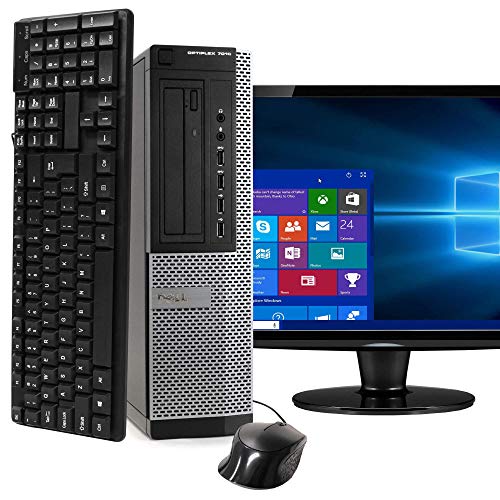
Dell Optiplex 7010 Desktop Package

Dell Optiplex 7050 SFF Desktop PC

Dell Optiplex 3050 SFF Desktop PC

GEEKOM NEW IT12 Mini PC

HP Pro Tower 290 G9 Business Desktop

Dell 23.8-inch All-in-One Desktop

HP 2025 22-inch All-in-One Desktop Computer
Lenovo IdeaCentre All-in-One Desktop Computer
More Details On Our Top Picks
This package works like a ready-made starter desk, since it bundles the tower, 19-inch LCD, keyboard, mouse, WiFi, DVD drive, and Windows 11 Pro. For a homework station, casual browsing, and email-heavy routines, that bundled approach saves you from piecing everything together one part at a time.
The 8GB memory and 500GB hard drive point to everyday use rather than heavy creative work, while the Core i5 platform gives it more breathing room than the smallest entry systems. The honest trade-off is age, because the HDD is slower than solid-state storage, so large file loads won’t feel as quick as the newer picks below.
Strong Points
- Includes the display and input gear, so setup is straightforward for a first desk.
- The 19-inch monitor keeps the footprint modest on a small table.
- Windows 11 Pro helps it fit a home office routine with standard productivity tools.
- DVD support still helps households with discs or older media libraries.
Worth Noting
- The mechanical drive is the main speed limiter.
- The screen size suits compact desks better than wide multitasking layouts.
- Renewed gear can be a smart value path, though cosmetic variation is part of the category.
Feature Snapshot
Who It Suits Best
Households that want a complete, no-fuss desktop setup for basic daily use will get the most from this one.
Where A Sibling Pick Shines
Dell Optiplex 3050 SFF Desktop PC makes more sense for you if you want newer storage speed in a similarly compact body.
This one sits closer to a power user’s desk than the Dell package above. The Intel i7-7700, 32GB DDR4 memory, and 1TB SSD point to a machine that can juggle browser tabs, documents, and media libraries without the usual small-desktop bottlenecks.
Dual-monitor support matters more than it sounds, especially for home offices where one screen holds email and the other carries your main work. The trade-off is simple: this is still a renewed small-form-factor desktop, so you get serious capability in a compact shell, not a workstation tower with endless expansion room.
Upsides
- 32GB RAM gives you generous room for multitasking.
- The 1TB SSD should feel much quicker than the HDD-based option in Pick 1.
- Compact SFF design keeps desk clutter in check.
- HDMI, Bluetooth, WiFi, and dual-display support cover common home setups.
Areas To Watch
- The compact case leaves less room for future internal upgrades.
- Its stronger spec mix makes it more machine than casual households need.
- Renewed units are usually a good path for value, though condition can vary by listing.
Whose Shelf It Belongs On
You’ll appreciate this most in a busy home office where spreadsheets, tabs, and video calls all run in the same day.
Skip It When
Lenovo IdeaCentre All-in-One Desktop Computer fits better for a family room setup that needs the screen built in and the cables kept to a minimum.
Compared with the 7050, this Optiplex trims the price-shape of the spec sheet without feeling bare. You still get 16GB DDR4, a 256GB SSD, WiFi, and both DP and HDMI, which makes it a solid fit for a desk that handles daily work and some light media use.
The small-form-factor case keeps it neat beside a monitor, and 4K support helps it pair with a sharper display later on. The trade-off is storage capacity, because 256GB fills up faster once you start keeping photos, installers, and media files on the machine.
Best Bits
- The SSD gives you quicker boot and app loading than the HDD-based Dell package.
- 16GB RAM is enough for typical home-office multitasking.
- DP and HDMI broaden monitor compatibility.
- The compact footprint suits smaller work corners.
Small Caveats
- 256GB storage calls for tidier file habits.
- It feels less roomy than the 7050 when you keep many apps open at once.
- Renewed desktops can be a practical buy, though external wear is part of the deal.
Core Details
Made For
Home-office users who want a compact desktop with quicker storage and standard display outputs should feel at home here.
A Better Fit Elsewhere
HP Pro Tower 290 G9 Business Desktop suits you better if you want more internal storage and a tower layout that feels less space-restricted.
The tiniest footprint in this group is also one of the most interesting. GEEKOM’s IT12 mini PC puts an Intel i3-12300HE, 16GB RAM, and 256GB SSD into a shell that leaves most of your desk to the monitor, keyboard, and paperwork.
That setup makes sense for a living room TV cabinet, a dorm desk, or any spot where a tower feels like overkill. One thing worth considering is expansion and port needs, because mini PCs usually ask you to plan your storage and accessories more carefully than a tower does.
Reasons To Buy
- The small case is easy to place almost anywhere.
- 16GB RAM gives it room for everyday multitasking.
- The 256GB SSD keeps common tasks responsive.
- It suits media streaming setups where low visual clutter matters.
Points To Note
- You give up the roomy interior of a standard tower.
- Storage capacity is modest for large photo or video collections.
- Mini systems often depend on a tidy cable plan, so placement takes a little thought.
Feature Card
Right Fit For
You’ll get the most from this mini PC in a small room, especially where desk depth is limited.
Another Choice May Suit
Dell Optiplex 7050 SFF Desktop PC is better for you if you want more internal room and a stronger all-around multitasking spec sheet.
This tower takes a more traditional route than the smaller Dell systems, and that’s useful if you prefer a desktop that feels easier to live with long term. The 16GB RAM combo with a 256GB PCIe SSD and 1TB HDD gives you both speed for everyday use and extra room for files, media, and backups.
Two-monitor support, HDMI, VGA, WiFi, and DVD-RW make it practical for a desk that still handles old and new gear together. The catch is size, because a tower asks for a little more floor or desk space than the Optiplex SFF models.
Highlights
- The SSD and HDD pairing balances fast startup with larger storage.
- Two-monitor support helps with spreadsheets and multitasking.
- DVD-RW and VGA broaden compatibility with older peripherals.
- WiFi and HDMI cover the usual household setup needs.
Things To Consider
- The tower footprint is larger than the compact Dell picks.
- Mixed storage is useful, though the HDD section is still slower than solid-state storage.
- You’ll likely want a dedicated spot rather than a crowded side table.
Details At A Glance
Built With In Mind
You’ll like this most if you want a home desktop that can handle office tasks, family file storage, and older accessories in one box.
Look Elsewhere When
Dell 23.8-inch All-in-One Desktop fits better for you if the priority is a cleaner setup with the screen built into the machine.
An all-in-one like this makes sense for households that want fewer wires and a cleaner desk line. The 23.8-inch Full HD screen gives you a broad working surface, and the Intel Core 3 100U is a sensible fit for browsing, schoolwork, documents, and streaming.
Compared with the tower-style HP above, this Dell is easier to place in a kitchen nook, guest room, or shared family space. The trade-off is simple: all-in-one machines are neat and easy to live with, but they usually give you less internal flexibility than a tower.
Bright Spots
- The integrated screen keeps cable clutter down.
- 23.8 inches is a comfortable size for everyday tasks.
- The Core 3 100U suits mainstream home computing well.
- Windows 11 Home fits common household use without extra complexity.
Room For Improvement
- You do not get the upgrade room of a tower.
- All-in-one designs are less convenient for separate component swaps.
- The clean design is great on a desk, though it asks you to keep the display area tidy.
Best Suited To
This is a smart fit for family rooms, shared desks, and anyone who values a clean setup more than hardware tinkering.
Swap It Out When
HP Pro Tower 290 G9 Business Desktop suits you better if you want more storage room and a classic tower layout.
This HP keeps the footprint compact and the feature set focused on everyday household computing. The 13th Gen Intel quad-core chip, 8GB DDR5 memory, and 128GB SSD are a practical trio for web use, documents, and streaming in rooms where desk space is tight.
The inclusion of HDMI, Type-C, WiFi, and an HD webcam adds real convenience for school calls or quick peripheral hookups. The honest read is that 128GB storage is modest, so you’ll want to stay disciplined with files and app installs.
Positives
- DDR5 memory gives it a newer platform feel than the older DDR4 systems here.
- The built-in webcam helps with casual video calls right out of the box.
- Type-C and HDMI broaden connection options for home accessories.
- The 22-inch all-in-one footprint is easy to place in a small room.
Honest Caveats
- 128GB storage fills quickly once files and updates stack up.
- The all-in-one design keeps things tidy, though it leaves less room for future hardware changes.
- It suits light daily use better than heavier multitasking.
Feature Rundown
The Right Fit
This suits you well for a compact family desk, student work, or a secondary computer in a smaller room.
Where A Sibling Pick Shines
Lenovo IdeaCentre All-in-One Desktop Computer is the better match for you if you want a larger 24-inch display and more storage headroom.
This Lenovo leans toward a cleaner, calmer desk experience than the HP all-in-one above. The 24-inch Full HD IPS display, anti-glare finish, 8GB RAM, and 512GB SSD make it feel better balanced for daily household use, especially where screen comfort matters during longer sessions.
Wi-Fi 6 and Bluetooth 5.2 are helpful touches for newer home networks and wireless accessories. One thing worth considering is that 8GB RAM still puts it in the mainstream range, so it’s a sensible fit for everyday work rather than heavy parallel workloads.
Standout Traits
- The 24-inch screen gives you more room than the 22-inch HP unit.
- Anti-glare IPS paneling helps the display stay comfortable in bright rooms.
- 512GB SSD offers more storage breathing room than the smaller all-in-one options here.
- Wi-Fi 6 and Bluetooth 5.2 support current home networking gear well.
Minor Gripes
- 8GB RAM is fine for everyday work, though not expansive.
- All-in-one designs keep the desk tidy, but component changes are less flexible.
- You may want to keep large media projects elsewhere, depending on how you organize files.
Technical Sheet
Perfect Match For
You’ll like this most for a household desk where display size, storage room, and a neat setup all matter at once.
Where Shoppers Go Wrong
HP 2025 22-inch All-in-One Desktop Computer makes more sense if your priority is a smaller system and you do not need the larger screen.
What Matters Before You Choose A Home Desktop
Form Factor And Room Layout
Towers give you room to grow, small-form-factor desktops save space, and all-in-ones shrink the cable mess. A mini PC takes the least room of all, but it asks you to supply the display and keep storage plans realistic.
Memory And Storage Balance
8GB RAM is fine for browsing, email, and documents, while 16GB or 32GB suits busier multi-app days. SSD storage feels quicker than a hard drive, and a mixed SSD plus HDD setup gives you speed with extra room.
Display Needs And Connections
Built-in screens help in shared rooms, but separate monitors make it easier to upgrade over time. HDMI, DisplayPort, Wi-Fi, Bluetooth, and Type-C matter because they determine how well the desktop fits your existing gear.
A Quick Reality Check Before You Order
Hidden Buying Traps
Do not let a compact case hide a weak storage setup. A tiny desktop with too little SSD space can feel cramped much sooner than the spec sheet suggests.
Why Top Tier Costs More
Higher-tier desktops usually spend extra on faster storage, more memory, and better monitor support. That upgrade is worth it for busy households, multi-user desks, and anyone who keeps several apps open at once.
Frequently Asked Questions
What kind of home desktop handles everyday browsing best?
Any system with 8GB RAM and an SSD will feel comfortable for browsing and documents. The Lenovo IdeaCentre and the HP 2025 all-in-one both fit that lane well.
Is an all-in-one better than a tower for home use?
An all-in-one gives you a cleaner desk and fewer cables. A tower gives you more room for upgrades and storage expansion.
How much memory makes sense for family use?
8GB is enough for lighter household tasks. 16GB or more feels better once several apps and tabs stay open all day.
Do renewed desktops make sense for home offices?
They can, especially when you want stronger hardware in a compact layout. The key is matching the storage type and accessory bundle to your actual routine.
What matters most in a small desk setup?
Case size, screen size, and cable count matter most. The Dell Optiplex SFF models and the GEEKOM mini PC are the cleanest fits in tight spaces.
