


Home desktops still matter when you want a steady workhorse for email, schoolwork, streaming, light editing, or a family room setup that doesn’t hog the table. The right one saves you from sluggish tabs, awkward port hunting, and the cleanup headache of mismatched accessories. You’ll see compact towers, mini PCs, all-in-ones, and a few renewed packages here, each tuned for a different kind of home routine.
Quick Look At The Shortlist
HP OmniDesk Desktop PC, Core Ultra 7, 32 GB, 2 TB SSD
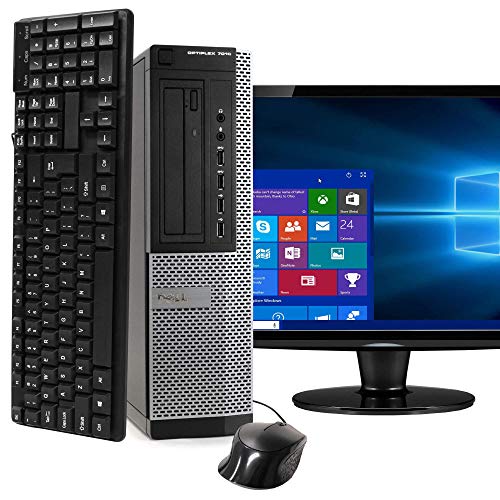
Dell Optiplex 7010 Desktop Package, i5, 8 GB, 500 GB HDD

Dell OptiPlex 7070 SFF, i7-9700, 32 GB, 1 TB NVMe SSD

DELL Optiplex 7060 SFF, i7-8700, 32 GB, 512 GB NVMe

HP ProDesk 600G4 Tower, i7-8700, 32 GB, 1 TB SSD

GEEKOM IT12 Mini PC, i3-12300HE, 16 GB, 512 GB SSD

Dell OptiPlex Desktop Bundle, 24-inch Monitor, i7-6700, 16 GB

Lenovo 24-inch FHD All-in-One, 16 GB, 128 GB PCIe SSD
More Details On Our Top Picks
That Core Ultra 7 and 32 GB of memory put this HP in the range you notice during busy days, not just during quick browser checks. The 2 TB solid-state drive gives you room for files, photo libraries, and a long trail of apps without forcing constant cleanup.
The dark wood finish also helps it blend into a living room desk or den setup better than a plain black box. Microsoft Copilot support points it toward newer Windows workflows, though the real appeal is still the strong parts list and the sensible, low-fuss design.
Strong Points
- Large memory headroom keeps tab-heavy work smoother.
- 2 TB storage suits family files and media.
- Compact enough for a shared home office corner.
- Windows 11 Home keeps the setup familiar.
Things To Consider
- The integrated graphics fit everyday use better than graphics-heavy work.
- Dark wood styling feels more room-friendly than utilitarian.
Feature Snapshot
Who It Suits Best
Home workers, family tech hubs, and anyone who wants a desktop that can keep several jobs open without feeling strained will get the most out of it.
Where A Sibling Pick Shines
Dell OptiPlex 7070 SFF Desktop PC fits better for you when raw speed matters more than a softer design and you prefer a more office-like tower.
This Dell package leans into convenience more than raw muscle, and that matters for a spare room, dorm-like setup, or a household that wants everything in one box. The 19-inch LCD, keyboard, mouse, WiFi, and DVD drive reduce the number of extra parts you have to source later.
The trade-off shows up in the older 8 GB memory and 500 GB hard drive, which suit lighter use better than big media libraries. For basic web work, documents, and email, though, the setup feels straightforward, and the Windows 11 Pro install gives it a more businesslike edge than the HP OmniDesk above.
Highlights
- Bundle format saves you from piecing together extras.
- 19-inch display makes a ready-to-use starter setup.
- Windows 11 Pro suits a work-at-home desk.
- DVD drive still helps with older discs.
Small Caveats
- Mechanical storage feels slower than the SSD-based picks here.
- 8 GB RAM is fine for light use, not heavy multitasking.
Made For
You get the most from this package when you want a simple, complete desktop setup for email, homework, or light office work.
Swap It Out When
Lenovo 24-inch FHD All-in-One suits you better if desk clutter is the main concern and you want a cleaner single-screen footprint.
Speed is the story here. The 8-core i7-9700, 32 GB of DDR4 memory, and 1 TB NVMe SSD make this OptiPlex feel aimed at people who keep spreadsheets, browser windows, and desktop apps open at the same time.
NVMe means a faster solid-state drive interface, so files and programs tend to open with less delay than on older storage. The AX210 WiFi 6E adapter and wireless keyboard and mouse help it fit a modern home office, though the renewed format means condition details matter as much as the spec sheet.
Upsides
- Eight-core processor gives you room for heavier multitasking.
- 1 TB NVMe storage keeps day-to-day use responsive.
- WiFi 6E support suits newer home networks.
- Small form factor saves desk space.
Points To Note
- Renewed desktops reward shoppers who are comfortable with a used platform.
- Small chassis can be less flexible for later expansion.
Core Details
Best Suited To
Home workers, power users, and spreadsheet-heavy households will appreciate the extra headroom more than casual users will.
Look Elsewhere When
HP ProDesk 600G4 Tower fits better if you want a tower with a more open upgrade path and a less compact layout.
This 7060 hits a familiar sweet spot for home office work, because it pairs an i7-8700 with 32 GB of memory without taking over the desk. Built-in WiFi and Bluetooth matter more than they sound, especially in a room where you want fewer dongles and fewer cables.
Compared with the 7070 above, the storage is smaller, but the 512 GB NVMe drive still gives you the fast feel most households want for daily use. The wireless keyboard and mouse round out the package, so the main compromise is simply how much room you want for files and installed apps.
Bright Spots
- 32 GB RAM keeps multitasking comfortable.
- NVMe storage helps the system feel quick.
- WiFi and Bluetooth make setup cleaner.
- Small chassis suits compact desks.
Areas To Watch
- 512 GB storage may feel tight for large media collections.
- Renewed units need a little more attention to condition details.
The Right Fit
You’ll like this one most in a home office that needs fast everyday responsiveness without moving into a larger tower.
Another Choice May Suit
HP OmniDesk Desktop PC works better for you if storage size and a newer chip matter more than keeping the footprint small.
A tower shape changes the ownership story right away, because you get a roomier case and easier physical access than the small-form-factor Dells above. That matters in a home office where you may want better internal breathing room and a machine that feels less cramped.
The i7-8700, 32 GB of DDR4 memory, and 1 TB SSD make it a strong fit for household multitasking, and the WiFi 5G plus Bluetooth pairing keeps external setup tidy. It’s not the most compact pick here, but that’s the trade you make for a more traditional desktop shape.
Reasons To Buy
- Tower case gives you easier access for future changes.
- 1 TB SSD suits large local file libraries.
- 32 GB RAM supports busy work sessions.
- Bluetooth and WiFi reduce cable clutter.
Softer Spots
- Tower footprint takes more room than an SFF unit.
- Renewed format calls for a careful condition check.
Whose Shelf It Belongs On
This fits you best when your home desk can spare space and you value easier growth later.
Skip It When
GEEKOM IT12 Mini PC is the cleaner choice if your desk is tight and you want a tiny chassis with modern ports.
Some home desks need a desktop that disappears visually, and this GEEKOM is built for exactly that kind of setup. The metal chassis and mini form factor make it easy to tuck beside a monitor, behind a display, or on a small shelf without feeling bulky.
USB4 and 8K UHD support point to a more modern port mix than the older renewed Dells, which helps if you use newer accessories or external displays. The i3-12300HE and 16 GB memory suit everyday home work well, though power users will likely want more headroom than this class provides.
Best Bits
- Very small footprint saves desk space.
- Metal chassis adds a sturdier feel.
- USB4 broadens accessory and display options.
- Upgradable design helps longer-term ownership.
Room For Improvement
- Mini systems usually ask for more external organization.
- 16 GB memory suits everyday work more than heavy content work.
Perfect Match For
You’ll get the most value from this mini PC in a tight workspace, a study nook, or a minimalist living room desk.
Reach For A Different Pick When
HP ProDesk 600G4 Tower suits you better if you want a larger chassis and a more conventional upgrade path.
Quick Facts
For a household that wants a screen included, this Dell bundle removes a common extra step. The 24-inch monitor, wireless networking, Bluetooth, HDMI, and wireless accessories make it feel ready for a desk, a study corner, or a guest-room workstation.
The i7-6700 and 16 GB RAM are older than the faster Dells and HPs above, so the appeal here is completeness, not cutting-edge speed. The 512 GB SSD helps the system feel responsive for regular home tasks, and the black finish keeps the setup plain in a good way.
Positives
- Monitor included, so setup starts farther ahead.
- HDMI gives you flexible display connections.
- 16 GB RAM handles common home tasks well.
- Wireless accessories keep the desk less tangled.
Honest Caveats
- Older processor class trails the newer Core Ultra and i7-9700 picks.
- Renewed bundle buyers often value condition notes more closely.
Who Should Grab It
This is a sensible fit for you when you want a full desktop setup without assembling each piece separately.
Where A Sibling Pick Shines
Dell OptiPlex 7060 SFF is the better choice if you want a newer-feeling core machine in a smaller body.
The all-in-one format is the whole point here, because the display and computer share a single footprint. That makes it a strong fit for kitchens, shared family spaces, or a small office where cable sprawl gets old fast.
The 23.8-inch FHD IPS screen with anti-glare finish and 99% sRGB coverage gives it a polished everyday look, while the Intel N100, 16 GB RAM, and 128 GB PCIe SSD keep it aimed at routine work rather than heavy lifting. Speakers, camera, microphone, HDMI, Bluetooth 5.2, and the bundled wireless keyboard and mouse make it feel complete out of the box.
What We Like
- All-in-one design cuts cable clutter.
- FHD IPS panel gives you a clear daily view.
- Anti-glare screen helps in bright rooms.
- Wireless keyboard and mouse are included.
- Camera and microphone suit video calls.
Minor Gripes
- 128 GB storage feels modest for large local libraries.
- All-in-one systems are less flexible than separate tower setups.
Feature Rundown
Who Will Love This
You’ll appreciate this Lenovo most if you want a tidy, single-unit desktop for light home and office use.
Where Another Pick Fits Better
HP OmniDesk Desktop PC is the stronger choice if you want much more storage and a faster class of processor.
What Matters Most Before Choosing Computer Desktops For Home
Match The Machine To The Room
A small desk usually favors a mini PC or all-in-one, while a bigger corner can handle a tower. You’ll feel that difference every day, not just during setup, because cable count and footprint shape how usable the space stays.
Pay Attention To Storage And Memory
SSD storage keeps a desktop feeling responsive, while hard drives suit lighter budgets and simpler tasks. Memory matters just as much, since 8 GB can be fine for basics, but 16 GB or 32 GB makes tab-heavy days easier.
Think About Expansion And Accessories
A tower usually leaves more room for future changes, while an SFF or all-in-one keeps things neat. Bundles with a monitor, keyboard, and mouse help you get started faster, but separate pieces can give you more control over screen size and comfort.
A Quick Reality Check
Mistakes Worth Dodging
A common slip-up is matching the desktop to the desk by size alone and forgetting storage, memory, and ports. Another is treating renewed systems like new retail units, which leaves condition and included accessories underchecked.
Where The Extra Money Goes
Higher-tier desktops usually pay for faster processors, larger SSDs, more RAM, and better port options. That upgrade matters most for households that keep several apps open, share one machine, or want a desktop that stays comfortable for years of routine use.
Frequently Asked Questions
What size desktop works best for a home office?
A small form factor works well on tight desks, while a tower suits people who want more room to grow. All-in-ones fit best where you want the cleanest possible setup.
Is 8 GB of RAM enough for home use?
Eight gigabytes handles email, documents, and lighter browsing. Once you add lots of tabs, streaming, or multiple apps, 16 GB feels far more comfortable.
Do renewed desktops make sense for home buyers?
They can, especially when you want stronger specs for less cluttered spending. The important part is checking the included accessories, storage type, and condition details.
Is an SSD worth prioritizing over a hard drive?
Yes, because an SSD makes booting and app opening feel quicker. A hard drive still works for lighter needs, but it rarely feels as brisk.
What is the better choice, tower or all-in-one?
A tower gives you more flexibility for future changes. An all-in-one keeps the setup tidy and saves space, which helps in shared rooms.
