


Computer desktops still make sense when you want stable power, easier expansion, and a screen-and-keyboard setup that stays put. That matters for home offices, school setups, small-business desks, and any space where a laptop starts feeling cramped.
Here you’re looking at compact Dell towers, newer Core Ultra machines, and a few value-leaning renewed options with stronger storage or memory. The right pick depends on your desk space, how many apps you keep open, and whether you care more about ports, speed, or long-term flexibility.
The Shortlist At A Glance

Dell Optiplex 7050 SFF Desktop PC

Dell OptiPlex 7070 SFF Desktop Computer PC

DELL Optiplex 7060 SFF Desktop Computer PC

Dell Optiplex 3050 SFF Desktop Computer PC

Dell Tower Desktop, Intel Core Ultra 7-265


HP ProDesk 600 Desktop Computer
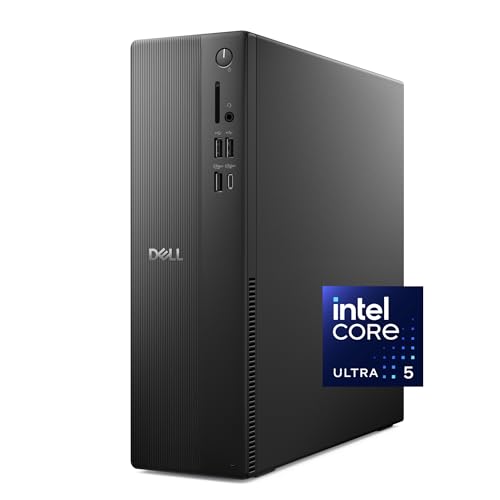
Dell Slim Desktop, Intel Core Ultra 5-225
More Details On Our Top Picks
The 7050 SFF sits in that useful middle ground where you get serious desktop muscle without giving up too much desk space. With an i7-7700, 32GB of DDR4 memory, and a 1TB SSD, it fits a home office that keeps plenty of tabs, spreadsheets, and browser windows open at once.
The small-form-factor case is the main trade-off, since compact systems rarely leave as much room for future add-ins as a full tower. Still, the WiFi, Bluetooth, HDMI, and dual-monitor support make it easy to place in a shared room or a tight office corner.
Strong Points
- 32GB RAM helps heavy multitasking feel less cramped.
- 1TB SSD gives you room for files, apps, and work archives.
- Dual-monitor support suits a more productive desk layout.
- WiFi and Bluetooth reduce cable clutter around the tower.
Things To Consider
- The compact chassis limits expansion compared with a larger tower.
- Renewed gear can arrive with cosmetic variation, which matters in a visible office.
Who It Suits Best
You’ll get the most from this one in a home office or small business setup that values storage and memory more than flashy design.
Where A Sibling Pick Shines
Dell OptiPlex 7070 SFF Desktop Computer PC suits you better when you want a newer i7-9700 platform and stronger port-heavy desk flexibility.
Among the renewed compact towers here, this one leans harder into speed and modern usability. The i7-9700, 32GB of DDR4 memory, and 1TB NVMe M.2 SSD give you a snappy feel for office work, file handling, and the daily shuffle between apps.
The included wireless keyboard and mouse help keep the desk cleaner, and the built-in WiFi 6E card is a practical touch for busy households or shared workrooms. In a setup with two screens, the dual DisplayPort output makes more sense than a bare-bones office box.
What We Like
- Intel i7-9700 suits heavier multitasking than lower-core office systems.
- NVMe storage speeds up boot and app loading in daily use.
- WiFi 6E supports a more current wireless setup.
- Wireless input accessories cut down desk clutter.
Minor Gripes
- The SFF case still leaves less upgrade room than a mid-tower.
- Accessory bundles are handy, though some setups already have preferred keyboard and mouse gear.
Feature Snapshot
Made For
You’re looking at a smart fit for office users who keep several programs open and want a compact machine with modern wireless support.
Look Elsewhere When
Dell Slim Desktop, Intel Core Ultra 5-225 is a better match for a newer platform in a slimmer shell, especially for a tidy home workspace.
This 7060 keeps the same compact Dell office shape but steps into a six-core i7-8700, which gives it a steadier feel for juggling work apps, email, and video calls. The 32GB of DDR4 memory and 512GB NVMe M.2 SSD also make it feel less bare than entry-level renewed machines.
The built-in WiFi and Bluetooth help a lot in a mixed home setup where you don’t want extra adapters hanging off the back. Compared with the 7050, storage is smaller, so this one makes more sense for you when documents and cloud work matter more than a huge local library.
Upsides
- Six CPU cores suit steady office multitasking.
- Bluetooth support simplifies wireless accessory use.
- Compact footprint keeps the desktop from taking over the desk.
- 32GB RAM gives the system plenty of working space.
Worth Noting
- 512GB storage is plenty for many desks, though not as roomy as the 1TB options above.
- The renewed finish can be a little variable from unit to unit.
Core Details
Best Suited To
You’ll appreciate this most in a compact office where fast responsiveness matters more than huge storage capacity.
A Better Fit Elsewhere
Dell OptiPlex 7070 SFF Desktop Computer PC is the stronger step-up for you if newer wireless support and a larger SSD matter more.
The 3050 is the most modest renewed tower in this group, and that makes its appeal pretty clear. It gives you a quad-core i5-6500, 16GB of DDR4 memory, and a 256GB SSD, which is enough for browsing, documents, and schoolwork without occupying much desk real estate.
WiFi, DisplayPort, HDMI, and 4K support widen its usefulness a bit, especially in a small office with one monitor or a TV acting as a display. The trade-off is simple: storage and raw headroom trail the stronger picks here, so this is more of a practical everyday machine than a heavy workload box.
Highlights
- Small-form-factor design works well on tight desks.
- 16GB RAM is enough for ordinary office multitasking.
- HDMI and DisplayPort offer flexible display hookup.
- 4K support broadens monitor and TV compatibility.
Areas To Watch
- 256GB storage fills more quickly than the 512GB and 1TB options above.
- The older i5 platform is better for basics than heavier workloads.
- Refurbished condition can mean some cosmetic wear.
Perfect Match For
You’ll get solid value here for light office use, homework stations, and a spare desktop that doesn’t need to do everything.
Another Choice May Suit
HP ProDesk 600 Desktop Computer is a more comfortable step when you want a newer i5-10400F platform for business tasks.
This is the premium-style tower in the lineup, and it earns that position through current hardware rather than just a bigger case. The Core Ultra 7-265, 32GB of memory, and 1TB PCIe NVMe SSD give it the kind of headroom that helps during busy workdays, heavier multitasking, or a desk that runs as a command center.
DisplayPort support for up to one 4K or four FHD screens, plus the wired keyboard and mouse, makes it easier to build a serious setup without hunting for accessories. In a long workday, the honest read is that this feels aimed at people who know they’ll keep a desktop for a while.
Best Bits
- Core Ultra platform brings a newer hardware foundation.
- 32GB RAM supports demanding multitasking.
- 1TB NVMe SSD leaves room for large file sets.
- DisplayPort monitor support fits multi-screen desks.
- Wired keyboard and mouse simplify initial setup.
Softer Spots
- The tower takes more room than the SFF picks above.
- It makes more sense for power users than for a bare-minimum school desk.
At A Glance
Who Will Love This
You’ll appreciate this most as a main desktop for heavy work, multi-monitor use, or a home office that needs extra breathing room.
Skip It When
Dell OptiPlex 3050 SFF Desktop Computer PC is the better match when your priorities are a smaller footprint and simpler everyday use.
The GEEKOM mini PC changes the conversation from tower size to sheer desk efficiency. Its i3-12300HE, 16GB of RAM, and 256GB SSD make more sense for a clean, low-profile setup than for a workstation that needs room to grow.
That smaller shell is the point, and it lands well for dorm desks, media corners, or a home office where every inch counts. The source claims about stronger benchmark behavior than an i5-12450H are worth treating as a vendor comparison note, but the practical takeaway is still clear, you’re getting a compact machine aimed at everyday responsiveness.
Positives
- Mini PC size leaves plenty of desk room.
- 16GB memory is enough for ordinary multitasking.
- SSD storage keeps everyday use feeling brisk.
- Low-profile design suits mounted or tucked-away setups.
Points To Note
- 256GB storage asks for a more disciplined file setup.
- The tiny chassis offers less internal expansion than the Dell towers.
Right Fit For
You’re looking at a strong fit for compact home offices, student rooms, and simple daily computing without a bulky case.
Where A Sibling Pick Shines
Dell OptiPlex 7070 SFF Desktop Computer PC suits you better when you want more storage, more ports, and a fuller office build.
HP’s ProDesk 600 lands squarely in the business-basic lane, and that’s not a bad place to be. The i5-10400F, 16GB of RAM, 256GB SSD, and GT 610 graphics combination is better suited to spreadsheets, documents, and routine office work than to anything visually demanding.
The clean read here is that you’re paying for a dependable office box, not a performance statement. In a small firm or a spare desk at home, that restraint can be useful, though the graphics card is dated enough that you’ll want to keep expectations modest.
Bright Spots
- Six-core i5 helps routine business work move along.
- 16GB RAM covers common office multitasking.
- 256GB SSD supports faster start-up than older hard drives.
- Simple hardware profile suits straightforward desk use.
Small Caveats
- GT 610 graphics are basic and best kept to light display tasks.
- Storage is modest for large local file libraries.
Whose Shelf It Belongs On
You’ll find this most useful in a workroom where reliability and plain office performance matter more than visual punch.
A Better Fit Elsewhere
Dell Tower Desktop, Intel Core Ultra 7-265 is the better match for you if you want a stronger, newer desktop for demanding workloads.
This slim Dell aims at the kind of desk where neatness matters as much as speed. The Core Ultra 5-225, 16GB of DDR5 memory, and 512GB SSD give it a more current feel than the older renewed towers, while the compact chassis should sit comfortably under a monitor or beside a small work surface.
DDR5, which is newer memory hardware than DDR4, matters here because it helps the system feel more up to date for everyday use. You’re trading away the larger storage and broader tower styling of the Ultra 7 model, but for a tidy household office, that slimmer profile is easy to like.
Best Bits
- Slim case saves room on small desks.
- DDR5 memory gives the platform a more current foundation.
- 512GB SSD is a balanced fit for everyday files and apps.
- Wi-Fi 6 and Bluetooth keep the setup modern and tidy.
Areas To Watch
- 512GB storage is sensible, though not as roomy as 1TB.
- The included wired keyboard suits simple setup, but some desks may prefer wireless gear.
The Right Fit
You’ll like this most in a small office or bedroom workspace where you want a current, space-saving desktop.
Swap It Out When
Dell Tower Desktop, Intel Core Ultra 7-265 is the better call for you if you want more storage and a larger build for heavier use.
What Matters Most Before Choosing Computer Desktops
Space, Ports, And Upgrade Room
Compact SFF towers fit neatly under a monitor, but they usually leave less room for future add-ins. Full towers take more space, though they’re easier to live with when you want a roomier interior and broader expansion options.
Memory And Storage Shape Daily Use
16GB of RAM handles ordinary home and office work, while 32GB feels calmer with many browser tabs, large spreadsheets, or several work apps open at once. SSD storage matters just as much, because it affects start-up speed and how quickly files open.
Match The Processor To The Job
Older i5 systems suit basic tasks, newer i7 and Core Ultra machines make more sense for heavier multitasking or multi-monitor setups. The right call depends less on the label and more on how much you pile onto the desktop each day.
A Quick Reality Check
Common Shopping Slip Ups
Many people focus on processor names and forget storage size, port layout, and case dimensions. That leaves them with a desktop that sounds strong on paper but feels awkward on the desk.
When Paying More Pays Off
Higher-tier desktops cost more because they usually add newer processors, more memory, faster storage, and better connectivity. That upgrade earns its keep when you work in multiple apps at once or want a machine that stays useful for longer.
Frequently Asked Questions
How Much RAM Makes Sense For Most Home Offices?
16GB covers everyday office work, browsing, and video calls without much friction. 32GB is the safer choice for larger spreadsheets, heavier multitasking, or a busier workday.
Is A Small-Form-Factor Desktop Harder To Upgrade?
SFF models usually leave less internal room than larger towers. That makes them easier to place, but less flexible later.
Do Renewed Desktops Make Sense For Everyday Use?
Yes, especially for desk work, schoolwork, and office tasks where you want strong value in a compact case. Cosmetic variation is the main thing to watch.
What Storage Size Feels Comfortable?
512GB works well for many people who keep files organized and lean on cloud storage. 1TB gives you more breathing room for local apps, media, and archives.
Should You Choose A Tower Or A Mini PC?
A tower gives you more presence, more expansion room, and often better cooling space. A mini PC wins when desk space is tight and your workload stays light to moderate.
