


Sorting out a desk full of cables gets old fast, especially when your laptop needs monitors, storage, wired networking, and charging at the same time. A good docking station turns that tangle into one neat hub, which matters whether you work from a home office, rotate between meeting rooms, or split time between desk work and travel.
The picks below focus on connection count, display support, power delivery, and how each dock fits a specific setup. Some are better for simple plug-in convenience, while others are built for heavier multi-monitor workflows.
The Shortlist At A Glance
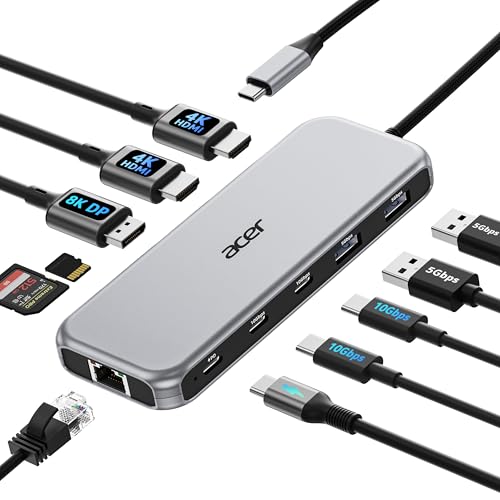
Acer Laptop Docking Station 3 Monitors, 11-in-1 USB C Docking Station

Anker Prime Docking Station 14-in-1 Dual Monitor

Anker Nano Laptop Docking Station 13in1 Detachable 6in1 USB-C Hub
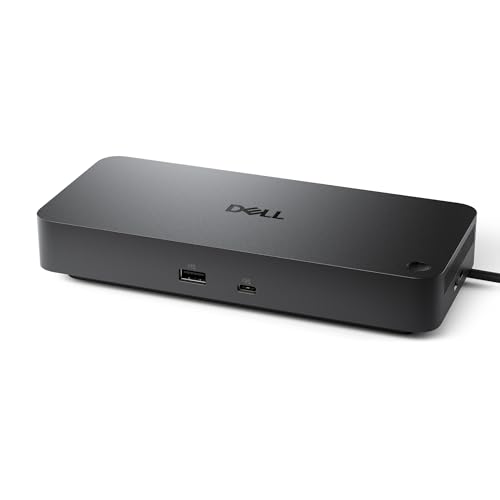
Dell Pro Laptop Docking Station WD25 USB-C 100W
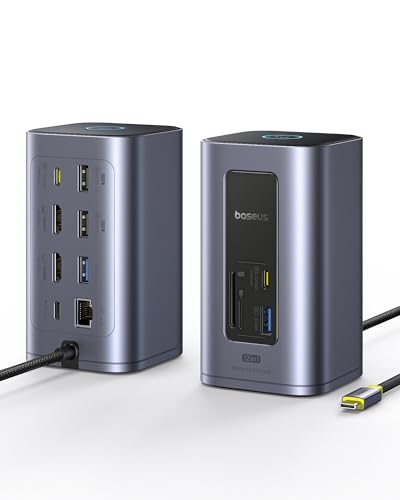
Baseus Spacemate Nomos Air Docking Station 12-in-1 Dual Monitor Windows
Anker Nano Laptop Docking Station Dual Monitor 8-in-1 USB-C Hub
WAVLINK Triple 4K Docking Station Dual HDMI DP 100W PD In
More Details On Our Top Picks
The Acer dock leans into flexibility, with enough outputs to support a busy desk without making the front of your laptop feel overworked. Two HDMI ports, one DisplayPort, Ethernet, SD, microSD, and both USB-C and USB-A connections give you a lot of room to organize a phone, mouse, keyboard, and external storage around one cable.
That mix suits a home office where a second or third screen matters, and the 100W charging support helps keep the laptop plugged in while the rest of the setup stays live. The honest trade-off is that it makes more sense for a desktop-style station than for travel, so this is better for a steady workstation than a bag-friendly setup.
Strong Points
- Two HDMI ports plus DisplayPort give you real display flexibility.
- Ethernet helps keep wired networking tidy on a desk.
- SD and microSD slots cut down on extra card readers.
- 100W charging support keeps cable clutter lower for daily work.
Things To Consider
- It suits a fixed desk more than a mobile carry setup.
- Three-screen use depends on laptop compatibility, so the host machine matters.
Feature Rundown
Who It Suits Best
You get the most from this one in a desk setup where multiple peripherals stay connected all day.
A Better Fit Elsewhere
The Anker Nano Laptop Docking Station Dual Monitor 8-in-1 USB-C Hub suits a smaller desk better, especially when you want fewer ports and a lighter footprint.
This Anker dock is built for a desk that does a lot at once, because the port count and power output both sit above the basic hub tier. The standout detail is the 160W total output, with support for charging several devices at the same time, which helps when your laptop, phone, headset, and tablet all end up on the same surface.
Compared with the Acer pick, this one feels more like a serious charging station that also handles displays, not just a video hub with extras. The trade-off is that its strength really shows in fuller setups, so a minimal laptop-and-mouse desk will not use its full potential.
What We Like
- 14-in-1 layout leaves room for displays, data, and charging.
- 160W total output helps power multiple devices from one station.
- Three USB-C ports add room for modern accessories.
- Dual-monitor support suits a productive office layout.
- Useful for keeping power bricks off the desk.
Minor Gripes
- Its stronger feature set makes more sense in a busy workspace than in a spare setup.
- You may not need this much charging headroom for a simple laptop routine.
Feature Card
Who Should Grab It
You fit this best when your desk holds several chargeable devices and you want fewer separate power bricks.
Another Choice May Suit
The Dell Pro Laptop Docking Station WD25 makes more sense for a brand-centered office that values a straightforward USB-C dock over higher-output flexibility.
The detachable hub makes this Anker model stand apart, because you can leave the larger desktop base where it belongs and take a smaller piece with you. That split design is handy for anyone moving between a fixed workstation and a café table, hotel room, or conference day, and it avoids carrying a full dock for every trip.
Compared with the first two picks, this one feels more adaptable than heavy-duty, which is useful when your routine changes through the week. The catch is that this hybrid idea only pays off when you actually use both sides, so a stay-put desk may be better served by a simpler, single-body dock.
Positives
- Detachable hub design gives you two-use flexibility.
- Works well for desk days and bag days alike.
- 13-in-1 layout covers both display and data needs.
- Useful for hybrid workers who move around often.
Worth Noting
- Two-piece design brings a little more setup thinking than a single dock.
- A fixed home office may not need the travel-friendly split.
- Storage is a bit less straightforward than with a one-piece unit.
At A Glance
Who Will Love This
You get the most from this one when your week includes both office days and lighter travel days.
Where A Sibling Pick Shines
The Baseus Spacemate Nomos Air Docking Station 12-in-1 fits better for someone who wants a single desktop dock and does not need the detachable travel piece.
The Dell Pro WD25 keeps the focus on clean USB-C docking, which is exactly what many office setups need. DisplayPort and HDMI give you the usual screen options, and the 100W power support keeps the laptop charged without turning the desk into a nest of adapters.
Compared with the more feature-packed Anker and Baseus models, this one feels calmer and more brand-centered, which suits a managed office or a simple home desk. The trade-off is that you are paying for straightforward reliability and ecosystem fit rather than a long list of extra ports.
Highlights
- USB-C docking keeps the connection path simple.
- DisplayPort and HDMI cover common monitor setups.
- 100W support helps reduce power clutter on the desk.
- Feels well matched to Dell-heavy workspaces.
Points To Note
- It is more focused than the higher-port Anker and Baseus options.
- Some setups will want more peripheral connections.
Core Details
Right Fit For
You match this best when your setup is Dell-centered and you prefer a tidy dock over a sprawling hub.
Look Elsewhere When
The Anker Prime Docking Station 14-in-1 Dual Monitor suits you better when device charging and port count matter more than keeping the dock simple.
The Baseus dock is built for a desk that needs broad connectivity without feeling scattered. Dual 4K outputs, six USB ports, and a 31.5-inch host cable give you room to place the dock where it makes sense, which helps in a larger home office or a setup with monitors that sit farther from the laptop.
Compared with the Dell pick, this one gives you a more generous spread of ports and a less restrained feel overall. The trade-off is that its value shows best in a fuller workspace, so a compact corner desk may not benefit from every connection it offers.
Upsides
- Dual 4K outputs suit a sharper multi-screen desk.
- Six USB ports help group accessories in one place.
- Long host cable adds placement freedom.
- Useful for keeping a cluttered desk more orderly.
Small Caveats
- The wider feature set makes more sense on a larger desk.
- More ports also means more cable planning.
Details At A Glance
The Right Fit
You suit this best if your desk is full enough to need both screen expansion and several accessory connections.
Swap It Out When
The Anker Nano Laptop Docking Station Dual Monitor 8-in-1 USB-C Hub is the cleaner choice for a smaller setup that does not need as many ports.
This Anker Nano hub keeps things lean, which is useful when your desk has little spare room and your laptop already carries the main workload. It still covers the important pieces, with dual 4K monitor support, fast data ports, and SD and TF card slots, so you do not give up the basics just to shrink the footprint.
Compared with the Baseus and Acer models, it is much easier to picture on a tight writing desk or a shared apartment setup. The catch is that the smaller size leaves less headroom for sprawling accessory collections, so power users may outgrow it faster than they expect.
Bright Spots
- Small footprint helps on crowded desks.
- Dual 4K support covers a practical two-screen workflow.
- 10 Gbps data ports help move files quickly.
- SD and TF slots are useful for camera work.
Softer Spots
- Compact size means fewer extras than larger docks.
- Power users may want a more expansive port mix.
- It suits simpler routines more than complex station setups.
Built With In Mind
You fit this best when you want a dual-monitor dock that stays easy to place beside a laptop.
Reach For A Different Pick When
The WAVLINK Triple 4K Docking Station makes more sense for heavy multitasking and a three-screen Windows desk.
The WAVLINK dock speaks to power users first. Triple-display support, high refresh rates over DisplayPort, and three USB-A 2.0 ports for a wireless mouse and keyboard make it a serious desktop tool, especially in a Windows-only setup where screen space matters more than portability.
Unlike the Anker Nano and Dell options, this one is clearly aimed at desks that handle coding, trading, and conference multitasking at the same time. One thing worth considering is the charging note, since you need to match the power setup carefully, so this is best for a user who pays close attention to laptop charging requirements.
Best Bits
- Triple-monitor support serves demanding desk work well.
- DisplayPort high refresh support helps with fast-moving visuals.
- Three USB-A 2.0 ports suit wireless peripherals.
- 100W power input keeps the dock ready for a full workstation.
Areas To Watch
- Windows-only use narrows who can take advantage of it.
- Power matching deserves care during setup.
- It feels better suited to a fixed desk than to travel.
Key Specs
Whose Shelf It Belongs On
You suit this best if your desk is mostly Windows-based and you want three screens without compromise.
Where Another Pick Suits Better
The Anker Prime Docking Station 14-in-1 Dual Monitor is the more flexible fit for mixed-device charging and a less Windows-specific routine.
What Matters Before You Choose A Laptop Dock
Port Mix And Monitor Count
Start with the screens, then match the dock to the laptop’s video output path. Dual monitor support covers many desks, but triple-screen setups usually need a more specific port layout and a compatible host device.
Power Delivery And Daily Charging
Power delivery means the dock can send charging power through the same USB-C cable that carries data and video. Higher numbers help on larger workstations, especially where the laptop stays plugged in for hours.
Desk Size And Cable Length
A compact desk works better with a smaller hub, while a wider workstation can handle a larger dock with longer host cabling. Keep the dock close enough for easy reach, but not so close that every cable bend feels cramped.
Travel Habit Versus Fixed Setup
Some docks make sense as permanent desk hardware, while others fit a bag and a hotel desk more comfortably. Detachable pieces and smaller footprints matter more once your work routine leaves the same room often.
Two Quick Things Worth Watching
Wrong Turns To Avoid
Do not match a dock to your monitor count alone. You also need the laptop’s port standards, the power you want, and whether Windows-only features matter for your setup.
When Paying More Pays Off
Higher-tier docks usually cost more because they add stronger power output, more video paths, and extra USB or network connections. That upgrade makes sense for full desks, mixed peripherals, or work routines that stay plugged in all day.
Frequently Asked Questions
What makes a docking station different from a simple USB hub?
A docking station usually combines display output, charging, and peripheral ports in one place. A simple hub often covers fewer connections and leaves more work to separate adapters.
Can one dock handle two or three monitors?
Yes, many can, but the laptop has to support that display setup too. The dock’s HDMI or DisplayPort count only works as far as the host machine allows.
Do you need USB-C for most of these docks?
Most of the picks here rely on USB-C for the main connection or charging path. That keeps data, video, and power moving through one cable.
Is a bigger dock always better?
Not for a smaller desk or lighter workflow. A compact dock is easier to place, while a bigger one only pays off when you actually use the extra ports and screen support.
Which pick fits travel better?
The Anker Nano Laptop Docking Station 13in1 Detachable 6in1 USB-C Hub stands out for that. Its split design makes it easier to think about both desk use and carry-in use.
Final Thoughts
For a clean laptop setup, the right dock depends less on raw port count and more on how you work every day. The Anker Prime and WAVLINK options suit fuller desks, while the Anker Nano and Dell choices make more sense for leaner routines. Pick the one that matches your screens, your space, and how often you move your laptop around.
