


Computers in this range need to do two things well, run daily work without fuss and fit the room you actually have. You may want a compact tower for a desk corner, an all-in-one for a tidy setup, or a desktop with enough memory to keep spreadsheets, video calls, and browsers open at once.
This shortlist stays focused on practical hardware, not marketing gloss. You get a mix of small-form-factor systems, all-in-ones, and faster tower builds, so the right fit depends on whether you care more about desk space, display convenience, or upgrade room.
Quick Look At The Shortlist

Dell Optiplex 7050 SFF Desktop PC 32GB DDR4 1TB SSD
HP ProDesk 400 G9 SFF Business Desktop Computer 32GB RAM
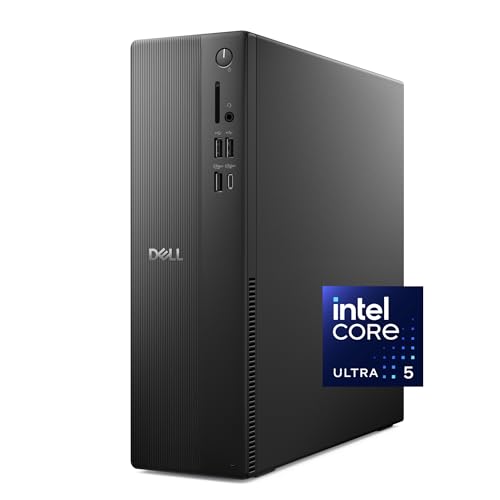
Dell Slim Desktop Intel Core Ultra 5-225 512GB SSD

HP Desktop Computer Tower Intel 6-Core i5-12500
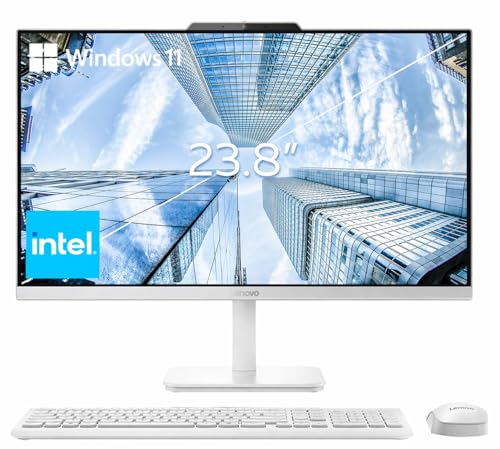
Lenovo 24″ FHD All-in-One Desktop Computer 16GB RAM

HP OmniStudio 24″ Full HD All-in-OneDesktop Computer 16GB DDR5 RAM

ASUS V500 Home & Business Tower Desktop 32GB DDR5 RAM
More Details On Our Top Picks
A small-form-factor tower like this suits desks that already feel crowded. The 32GB of DDR4 memory gives you room for browser tabs, office apps, and background tools without the machine feeling stretched, while the 1TB SSD keeps file access and boot-up pace sensible for daily office work.
The trade-off is age, not size. The Core i7-7700 and renewed condition make it a smarter value-oriented office box than a long-term growth platform, but that also keeps it relevant for bookkeeping, admin work, and remote calls in a spare room or back office.
Strong Points
- Small case helps you reclaim desk space.
- 32GB memory supports heavier multitasking.
- 1TB SSD gives generous local storage.
- Wi-Fi, Bluetooth, and HDMI simplify setup.
Things To Consider
- Renewed condition fits well for value-focused setups, not brand-new expectations.
- The older processor is fine for office work, but not a fresh upgrade path.
- Dual-monitor use depends on the rest of your display gear.
Feature Snapshot
Who It Suits Best
You benefit most here if you want a compact work PC for email, documents, web apps, and light multitasking.
A Better Fit Elsewhere
ASUS V500 Home & Business Tower Desktop suits you better if you want a newer chip and more headroom for heavier workloads.
This HP feels aimed at desks with more than one screen and more than one cable. Dual 4K display support, USB-C, HDMI, RJ-45, and Wi-Fi give you a broader connection mix than the Dell Optiplex 7050 SFF, so a dock-light office setup is easier to manage.
That matters in real workspaces where one machine has to handle video calls, cloud tools, and a wired network without much drama. The included keyboard and mouse also make first setup simpler, though the CPU is described only as an Intel chip, so the appeal leans more toward balanced office use than headline-grabbing power.
What We Like
- Dual 4K display support helps multi-monitor desks.
- USB-C and HDMI broaden connection options.
- Wired keyboard and mouse reduce setup friction.
- 32GB RAM supports steady multitasking.
- 1TB PCIe SSD keeps file access brisk.
Points To Note
- The processor is listed generically, so chip detail is limited.
- SFF cases can limit internal expansion compared with towers.
- Four-monitor ambitions need the right display setup, not just the desktop alone.
Who Should Grab It
You fit this model best if you run a home office or small business desk with multiple displays and steady daily use.
Look Elsewhere When
Dell Slim Desktop ECS1250 suits you better if you want a newer processor platform in a slim chassis.
The newer Core Ultra 5 platform gives this Dell a more current feel than the older Optiplex box, and the slim enclosure keeps it unobtrusive on a shallow desk. For everyday home use, 16GB of DDR5 memory and Wi-Fi 6 are a sensible pairing, especially in spaces where you want performance without a bulky tower.
The honest read is that 512GB of storage is enough for many home offices, but not generous for large media libraries or years of project files. Still, the bundled wired keyboard and the Intel UHD graphics make it straightforward for productivity work, browsing, and video calls in a compact footprint.
Positives
- Core Ultra 5 brings a newer desktop platform.
- DDR5 memory helps the system stay responsive.
- Wi-Fi 6 suits busy networks and shared homes.
- Slim design keeps the footprint tidy.
Areas To Watch
- 512GB storage may feel tight for media-heavy use.
- Integrated graphics are built for everyday work, not creative overload.
- The slim case can be less flexible for internal upgrades than a tower.
Core Details
Right Fit For
You suit this pick best if you want a slim, current desktop for work apps, web use, and light creative tasks.
Swap It Out When
HP Desktop Computer Tower i5-12500 makes more sense if you want a fuller storage setup and a roomier case.
Compared with the slimmer Dell systems, this HP tower gives you a more traditional upgrade-friendly shape. The 6-core Core i5-12500 and 16GB of memory make sense for office multitasking, school projects, and day-to-day household use where you want a straightforward machine that doesn’t demand much attention.
The 1TB PCIe SSD is the part that makes the setup feel complete, because it gives you both fast startup and enough room for local storage without leaning on external drives right away. The trade-off is simple: a tower takes more space, so it rewards a standard desk setup more than a tight corner.
Highlights
- 6-core processor fits mixed everyday workloads.
- 1TB PCIe SSD gives useful storage headroom.
- Tower layout usually leaves more room for future expansion.
- 16GB RAM works well for standard multitasking.
Softer Spots
- The tower footprint needs more floor or desk room.
- No display is included, so you need your own monitor.
- It is a sensible work machine, not a flashy one.
At A Glance
The Right Fit
You fit this tower best if you want a basic office or household desktop with a normal tower layout.
Where A Sibling Pick Shines
Lenovo 24″ FHD All-in-One Desktop Computer suits you better if you want the screen and computer in one tidy unit.
An all-in-one makes sense in rooms where you want the fewest boxes possible. This Lenovo folds the 24-inch Full HD display and the computer into one unit, which keeps cabling lighter than the HP tower and the Dell desktops above it.
The 16GB of RAM is solid for home and office use, while the 256GB PCIe SSD keeps the machine quick but leaves storage space modest. That smaller drive is the main trade-off, though the included wireless keyboard and mouse help it feel ready for a clean desk from the start.
Bright Spots
- All-in-one design reduces desktop clutter.
- 24-inch Full HD screen gives you a built-in display.
- Wireless keyboard and mouse keep the setup neat.
- Wi-Fi 6 and Bluetooth 5.2 add modern connectivity.
Small Caveats
- 256GB storage is modest for large local libraries.
- All-in-one layouts usually offer less upgrade flexibility than towers.
- The built-in screen means the whole unit matters more if the panel ever becomes a problem.
Built With In Mind
You suit this pick best if you want a tidy home-office or family desktop with fewer visible cables.
Another Choice May Suit
ASUS V500 Home & Business Tower Desktop is the better fit if you want more storage and a more expandable chassis.
The fanless design is the detail that separates this HP from the rest of the group, especially in bedrooms, shared spaces, or any room where noise is a nuisance. Pair that with the 23.8-inch Full HD screen, 1080p webcam, and dual mics, and you get a setup that leans hard into calling, chatting, and light home productivity.
One thing worth considering is the 128GB SSD, which is fine for lean software use but leaves less breathing room than the Lenovo or the tower systems. The 16GB DDR5 memory helps keep day-to-day use smooth, yet this still feels best for a compact household workstation rather than a storage-heavy main machine.
Best Bits
- Fanless operation keeps noise low.
- 1080p webcam and dual mics suit video calls.
- 23.8-inch Full HD screen keeps the setup self-contained.
- DDR5 memory adds a current memory platform.
Worth Noting
- 128GB storage is tight for large local files.
- All-in-one format leaves less room for internal changes.
- Best used where a single integrated unit makes life easier than a separate tower and monitor.
Feature Card
Whose Shelf It Belongs On
You suit this model best if you want a quiet all-in-one for calls, web work, and a neat shared room.
Reach For A Different Pick When
Lenovo 24″ FHD All-in-One Desktop Computer is the better fit if you want a roomier storage drive.
This ASUS sits at the stronger end of the list, and the 10-core Core i7-13620H gives it the kind of headroom that heavier multitaskers usually notice first. Compared with the HP tower, you also get 32GB of DDR5 memory and a 1TB SSD, so the machine is set up for large app loads, active file work, and busier office routines.
The included 64GB USB flash drive is a practical bonus for quick file handoff or setup media, though the real value is the core hardware. It feels like the cleanest option for someone who wants a business-ready tower without stepping into a more complex workstation class.
Positives
- 10-core processor gives strong multitasking room.
- 32GB DDR5 suits demanding daily workloads.
- 1TB SSD offers useful local storage.
- DisplayPort helps with monitor connections.
- Wi-Fi 6 and bundled peripherals reduce setup hassle.
Minor Gripes
- The tower footprint needs dedicated space.
- The bundled USB drive is handy, but not the main reason to choose it.
- Most value here comes from speed and capacity, so lighter users may not need this much hardware.
Details At A Glance
Perfect Match For
You suit this pick best if you want a fast home-business tower for demanding office work and frequent multitasking.
Not Your Match When
HP OmniStudio 24″ Full HD All-in-OneDesktop Computer makes more sense if a quieter all-in-one setup matters more than raw power.
What Matters Most Before Choosing Computers For 1000 Dollars
Wrong Turns To Avoid
Storage can look generous until large photo folders, project files, and backups pile up. A compact desktop with 256GB or 128GB storage works for light use, but it asks for more discipline than a 1TB system.
The Upgrade Payoff
Higher-tier models usually pay for faster processors, more memory, and better ports. That extra cost makes sense for multitasking, multi-monitor work, or a desk that needs one machine to do several jobs without slowing down.
Things Worth Knowing First
Common Shopping Slip Ups
Many setups fail on fit, not power, so measure the desk and check the display plan first. A tower needs space, while an all-in-one trades upgrade room for a cleaner footprint.
What The Higher Tier Buys
More money usually buys newer chips, DDR5 memory, and larger SSDs. That matters most for heavy office use, busier households, and anyone who keeps several apps open all day.
Frequently Asked Questions
What size desktop works best for a small desk?
A small-form-factor tower or all-in-one keeps the footprint compact. A full tower makes sense only when you have enough space for the case and cables.
Is 16GB memory enough for daily work?
Yes, 16GB handles office apps, video calls, and browsing well. More memory becomes useful when you keep many tabs and tools open at once.
Do all-in-one desktops save space?
They do, because the display and computer sit in one unit. The trade-off is less internal flexibility than a tower.
Why choose 1TB storage over 256GB?
1TB gives you more room for documents, downloads, and media without relying on external drives right away. 256GB works better for lighter file habits.
Which pick suits heavier multitasking?
ASUS V500 Home & Business Tower Desktop stands out for that role. Its 10-core processor and 32GB DDR5 memory give it more headroom than the others here.
