


Basic home use calls for a computer that boots quickly, handles web browsing without strain, and stays easy to live with on a desk or kitchen counter. That usually means sensible storage, enough memory for multitasking, and a screen or case size that fits your room instead of taking it over.
The eight picks below cover compact desktops, all-in-ones, and a few renewed office machines that still make sense for email, streaming, schoolwork, and everyday apps. You’ll also see where a stronger processor or a larger display earns its place, and where a smaller, simpler setup is the smarter call.
Quick Look At The Shortlist
Dell Optiplex 7010 Desktop Package

GEEKOM IT13 MAX AI Mini PC 2026

Dell Optiplex 3050 SFF Desktop PC

HP ProDesk 600 G3 SFF with 21.5-inch Monitor

HP 2025 22-inch FHD All-in-One Desktop
Lenovo IdeaCentre All-in-One Desktop
Lenovo 24-inch FHD All-in-One Desktop

HP Windows 11 Desktop Computer with 24-inch LCD
More Details On Our Top Picks
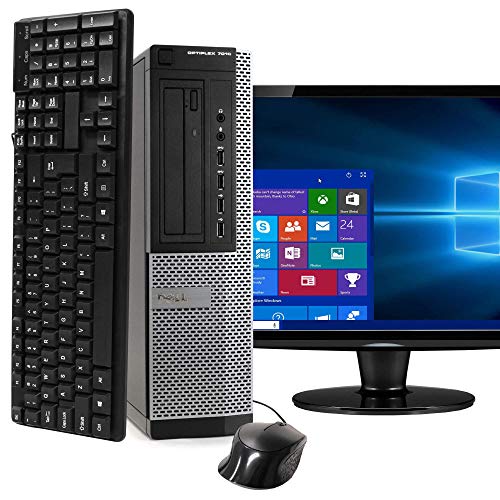
This package suits a desk that needs everything in one box, including the 19-inch screen, keyboard, mouse, and DVD drive. The quad-core i5 and 8GB of memory point to steady web work, school tasks, and streaming in a typical household.
The 500GB hard drive is the trade-off, since it gives you more room than a tiny starter drive but not the snappy feel of an SSD. That makes this Dell a sensible fit for straightforward use, especially in a room where convenience matters more than speed bragging.
Strong Points
- Full desktop bundle reduces setup friction.
- 19-inch display fits a compact work corner.
- Keyboard and mouse are included, so you avoid separate accessory shopping.
- DVD support still helps for older discs and archived media.
Things To Consider
- The hard drive is slower than solid-state storage.
- The 19-inch panel feels modest beside larger all-in-ones.
- Renewed hardware makes a quick cosmetic check worth doing on arrival.
Who It Suits Best
You’ll get the most from this package in a spare room, dorm-style setup, or family space where one purchase needs to cover the basics.
Where A Sibling Pick Shines
HP Windows 11 Desktop Computer with 24-inch LCD suits you better when a larger display and newer accessory bundle matter more than the included DVD drive.
This mini PC is the most ambitious hardware in the group, and that shows in the Intel Core Ultra 9 185H plus 24GB of LPDDR5 memory. LPDDR5 means low-power, high-speed memory, which helps the machine stay responsive in a small chassis.
That compact case matters on a crowded desk, especially beside the bulkier renewed towers and all-in-ones above. The honest read is that this setup makes the most sense for power users who want a tiny footprint without giving up headroom.
Highlights
- Strong processor choice for heavier everyday workloads.
- 24GB memory gives breathing room for tabs and apps.
- 500GB SSD should keep startup and file access brisk.
- Mini format leaves space for a cleaner desk.
- Good match for a dual-monitor setup.
Points To Note
- You still need your own monitor and peripherals.
- The small form factor can make port access feel tighter.
- It is more machine than most basic home tasks require.
Built With In Mind
You’ll appreciate this most in a compact office where speed matters and you already have a monitor, keyboard, and mouse ready.
Look Elsewhere When
Dell Optiplex 7010 Desktop Package is the easier starting point for a simple all-in-one purchase with screen and accessories included.
The Optiplex 3050 takes a practical route: small case, 16GB of DDR4 memory, and a 256GB SSD for quick starts and quieter day-to-day use. DDR4 is the older mainstream memory type here, but 16GB still gives you enough room for multitasking across mail, browsing, and documents.
Compared with the first Dell package, this one trades the bundled monitor for a much smaller footprint and faster storage. For most apartments or shared desks, that balance is easier to live with, assuming you already have a screen.
Upsides
- Small form factor saves desk space.
- SSD storage feels more responsive than a hard drive.
- 16GB memory supports routine multitasking well.
- WiFi and video outputs add flexible setup options.
Room For Improvement
- You need to supply your own monitor and input devices.
- Its office-style case looks plain rather than decorative.
- Compact internals can be less forgiving during upgrades.
Right Fit For
You’ll suit this pick best in a small home office, student corner, or TV-side setup where a separate monitor already exists.
Another Choice May Suit
HP ProDesk 600 G3 SFF Desktop Computer with 21.5-inch Monitor makes more sense for someone who wants a ready-to-use bundle right out of the box.
This HP bundle lands in a useful middle ground, since you get the desktop, 21.5-inch full HD monitor, keyboard, and mouse in one shot. Full HD means 1920 by 1080 resolution, which keeps text and video clear enough for routine home use.
Compared with the Dell Optiplex 3050, this version is less about shrinking the tower and more about cutting setup steps. That makes it a tidy choice for a parent’s desk, a first apartment, or a spare-room workstation.
Best Bits
- Monitor and accessories arrive with the desktop.
- 21.5-inch screen is comfortable for email and streaming.
- DisplayPort support gives you a direct video path.
- 16GB memory and SSD storage keep routine use smooth.
Softer Spots
- The screen size is useful, though not especially large.
- Renewed gear deserves a quick cable and port check at setup.
Whose Shelf It Belongs On
You’ll like this most in a room where you want a tidy, low-hassle desktop without hunting for a separate monitor.
Swap It Out When
Lenovo IdeaCentre All-in-One Desktop suits you better when a larger 24-inch display and newer wireless standards matter more.
Feature Card
This all-in-one keeps the footprint simple by folding the screen and computer into one unit. The 8GB of DDR5 memory and 128GB SSD storage make sense for light web use, online forms, and school logins, especially in a bedroom or small kitchen desk.
DDR5 is newer memory, so the system has a more current feel than the older office refurbish models above, even though the storage is modest. The honest read is that this fits best where clutter matters more than raw capacity.
Bright Spots
- All-in-one design keeps cords and parts to a minimum.
- HD webcam and Type-C port add modern convenience.
- Wi-Fi support helps with casual browsing and video calls.
- 22-inch screen lands in a comfortable middle size.
Areas To Watch
- 128GB storage fills faster than larger SSDs.
- The system suits lighter home use more than demanding multitasking.
- All-in-one designs usually offer less room for expansion.
Perfect Match For
You’ll get the most from this in a compact room where a clean desktop matters and your workload stays light.
Reach For A Different Pick When
Lenovo IdeaCentre All-in-One Desktop makes more sense if you want a larger 24-inch panel and a 512GB SSD.
Lenovo leans into comfort here with a 24-inch full HD anti-glare IPS display, and IPS means in-plane switching, a panel type known for wider viewing angles. In a shared space, that matters because a couch or side chair still gets a readable picture.
The 512GB SSD gives it more breathing room than HP’s 128GB all-in-one, and the Wi-Fi 6 and Bluetooth 5.2 support keep the feature set current. For a family room or homework station, that combination feels measured rather than flashy, which is usually enough.
Reasons To Buy
- 24-inch display gives documents and streaming room to breathe.
- Anti-glare finish helps under brighter lights.
- 512GB SSD offers practical everyday storage space.
- Wi-Fi 6 and Bluetooth 5.2 support modern peripherals.
- All-in-one shape keeps the setup tidy.
Small Caveats
- The 8GB memory is fine for basics, though not expansive.
- You get less internal upgrade freedom than with a tower.
The Right Fit
You’ll be happiest with this in a shared family space, student corner, or light office where a larger screen helps more than extra internal hardware.
A Better Fit Elsewhere
GEEKOM IT13 MAX AI Mini PC 2026 suits you better when desk space is tight and you already own a monitor you like.
Core Details
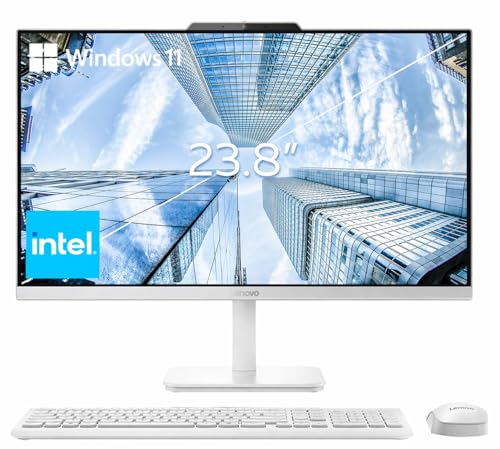
This Lenovo aims squarely at everyday home and office use, and the 16GB of RAM gives it more breathing room than the 8GB all-in-one above. PCIe SSD storage, short for peripheral component interconnect express, usually means a faster connection between the storage drive and the system.
That faster storage path matters most during repeated daily chores, like opening browser tabs, moving documents, or jumping between calls and spreadsheets. It feels like the calmer, more complete sibling to the simpler HP 2025 unit, especially for a busy desk.
Standout Traits
- 16GB memory is a strong fit for mixed daily tasks.
- 24-inch display gives you useful workspace without crowding.
- Wi-Fi 6 and Bluetooth 5.2 keep it current.
- Wireless keyboard and mouse simplify the desk layout.
Honest Caveats
- The fixed all-in-one design leaves little room for later expansion.
- No optical drive keeps the body slimmer, but less legacy-friendly.
- Vent placement deserves a little attention on crowded shelves.
Best Suited To
You’ll appreciate this most in a home office, study nook, or small business corner where a tidy setup and stronger memory matter.
Consider Something Else When
HP 2025 22-inch FHD All-in-One Desktop suits you better when space is tighter and your use stays lighter.
This HP bundle arrives like a full desk in a box, with the 24-inch LCD, RGB keyboard and mouse, speakers, and webcam all included. For family use, that cuts the scavenger hunt for accessories and keeps the setup moving quickly.
The Intel i5, 16GB of memory, and 500GB SSD form the most balanced hardware mix in the group for basic home work. Compared with the Lenovo all-in-ones, this one leans more toward convenience accessories than display finesse, and that trade-off works in living rooms and shared spaces.
Positives
- 24-inch screen gives comfortable viewing room.
- 500GB SSD helps with faster starts and easier file storage.
- Included speakers and webcam cover common home tasks.
- Wi-Fi 6 AX200 and Bluetooth expand connection options.
- Complete accessory set keeps first-day setup simple.
Worth Noting
- The bundle includes many parts, so desk cable management matters.
- Renewed units deserve a close look at ports and included accessories.
- The case and monitor pair are practical, not especially slim.
Who Should Grab It
You’ll like this best for a family room, homework station, or shared household desk where convenience matters more than minimalism.
Where Another Pick Suits Better
Lenovo IdeaCentre All-in-One Desktop is the cleaner fit for you when a built-in screen and fewer loose pieces appeal more.
Feature Rundown
What Matters Most Before Choosing One
Hidden Buying Traps
Many shoppers focus on processor names and ignore the storage type, which changes daily feel more than the label on the chip. A hard drive can slow a basic home machine down, while an SSD keeps startup and app launches far more responsive.
The Upgrade Payoff
Higher-tier models usually cost more because they bundle faster storage, stronger graphics support, larger memory pools, or cleaner all-in-one displays. That extra spend pays off most for multitasking, family sharing, or anyone who wants fewer bottlenecks during long sessions.
Frequently Asked Questions
What size screen works best for basic home use?
A 21.5-inch to 24-inch display usually feels comfortable for email, browsing, and streaming. Smaller screens save space, while larger ones help with shared use and side-by-side windows.
How much memory do you need for everyday tasks?
8GB handles simple browsing, schoolwork, and video calls. 16GB gives you more breathing room for many tabs and a few apps at once.
Is an SSD worth it for this category?
Yes, because it usually makes the system feel faster during startup and file access. A hard drive can still work, but it tends to feel slower in daily use.
Do all-in-one desktops make sense for home use?
They do when you want fewer cables and a cleaner desk. A tower plus monitor can still be better when upgrades or replacements matter more.
Should you choose a renewed desktop for home use?
A renewed desktop can make sense when you want more hardware for the money and can accept older parts. A quick check of included accessories and ports is still smart before setup.
