


Home computers need to do a lot without taking over the room. You want a setup that handles browsing, documents, streaming, video calls, and the occasional heavier task without turning into a constant compromise. This roundup focuses on desktops and all-in-ones that fit real homes, from compact desks to shared family spaces.
Some options lean toward value and simplicity, while others are built for faster multitasking, tidier cable management, or a cleaner all-in-one footprint. The right choice depends on how much space you have, how often you multitask, and whether you care more about easy placement or raw speed.
Quick Look At Our Top Home Picks
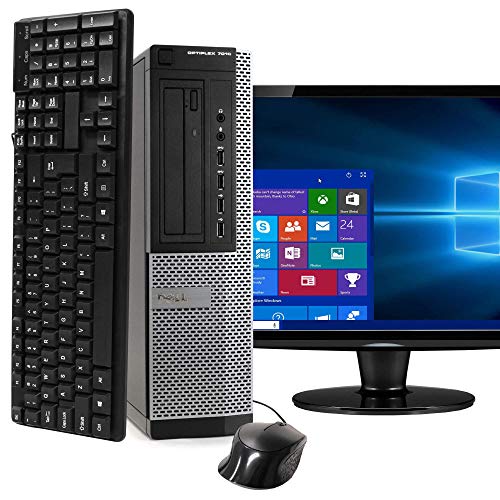
Dell Optiplex 7010 Desktop Package

Dell OptiPlex 5060 Windows 11 Desktop

Dell Tower Desktop Core Ultra 7-265

Beelink SER5 Mini PC 16GB 480GB

Dell 23.8-Inch All-in-One Desktop

HP 2025 22-Inch All-in-One Desktop
Lenovo IdeaCentre 24-Inch All-in-One

Lenovo IdeaCentre 24 All-in-One 16GB
The bundled 19-inch LCD, keyboard, and mouse make this a straightforward home setup, especially for a spare room or a desk that needs to work without extra shopping. The quad-core i5 and 8GB of memory suit web use, email, and office tasks; the 500GB hard drive gives you room, but it won’t feel as snappy as an SSD-based machine.
That trade-off puts it in a very specific lane, and that’s fine for households that care more about a complete package than speed bragging. You also get WiFi and Windows 11 Pro, which makes the overall layout easy to place and easy to manage for light daily work.
Strong Points
- Keyboard, mouse, and display are already included, so you skip the piecemeal setup.
- 8GB of RAM handles everyday browser tabs and office apps without much fuss.
- Windows 11 Pro fits home admin tasks that benefit from extra control.
- WiFi support keeps placement flexible in a den or secondary room.
Things To Consider
- The hard drive storage is slower than an SSD, so startup and file access feel more old-school.
- The 19-inch screen is compact, which suits tight desks but can feel limited for side-by-side work.
Feature Card
Who It Suits Best
Budget-conscious home users who want a ready-to-go desktop for browsing, forms, and document work will get the most from this package.
Where A Sibling Pick Shines
Dell OptiPlex 5060 Windows 11 Desktop fits better for you if you want a faster-feeling SSD and more memory for heavier multitasking.
This one sits in a stronger everyday spot than the OptiPlex 7010 package because it combines a six-core i5, 16GB of RAM, and a 500GB SSD with a separate 1TB hard drive. That mix matters in a family office, because you get faster boot behavior from the SSD and extra room for files on the secondary drive.
WiFi and Bluetooth round out the setup, so you can place it where the desk allows instead of where the cable run dictates. The honest read is that it’s still a renewed desktop, so the value comes from the spec balance, not from flashy extras.
Upsides
- The SSD helps the system feel more responsive than a hard-drive-only desktop.
- 1TB of additional storage is handy for photos, downloads, and archived files.
- 16GB of memory gives you more breathing room than the 8GB setup in Item 1.
- Bluetooth support is useful for wireless peripherals and tidy desk layouts.
Points To Note
- The renewed format may suit cost-focused shoppers, but it can feel less reassuring than a new unit.
- The tower form factor takes more space than the mini PC later in the list.
Feature Rundown
Made For
Households that want a reliable all-round desktop for browsing, document work, media, and a bit of light editing will get strong value from this mix.
A Better Fit Elsewhere
Dell Tower Desktop Core Ultra 7-265 suits you better if heavier multitasking or future headroom matters more than this renewed value angle.
This is the kind of tower that makes sense in a busy home office where several tasks happen at once, and the 32GB of memory is the detail that stands out immediately. Pair that with a Core Ultra 7 processor and a 1TB PCIe NVMe SSD, and you get a machine built for fast launching, quick file access, and plenty of working room.
It also comes with Wi-Fi 6, Bluetooth, and a wired keyboard and mouse, so the desk setup is complete right away. Compared with Item 2, this one leans much harder into speed and headroom, though the size and power level are overkill for basic email-only use.
Bright Spots
- 32GB of RAM gives you a wide cushion for tabs, apps, and background tasks.
- The NVMe SSD is the kind of storage that keeps the system feeling quick.
- Wi-Fi 6 is a useful upgrade for modern home networks.
- Included keyboard and mouse reduce the extra pieces you need to buy.
Small Caveats
- The tower format needs more floor or desk space than an all-in-one or mini PC.
- For simple browsing and streaming, the hardware level may exceed what you actually need.
Core Details
The Right Fit
Power users who run several apps at once, keep lots of browser tabs open, or want a home workstation with serious headroom will benefit most.
Skip It When
Beelink SER5 Mini PC suits you better if you want a much smaller footprint for a TV stand, compact office, or media nook.
The Beelink SER5 is the smallest pick here, and that matters a lot on a crowded desk or beside a living-room TV. Its Ryzen 5 5500U processor, 16GB of DDR4 memory, and 480GB NVMe SSD give it enough muscle for everyday work, media playback, and brisk app switching without requiring a full tower.
Triple-display support at 4K 60Hz adds a flexible side, which is useful for a home office that wants multiple screens without a giant chassis. Compared with the Dell all-in-one options, this mini PC hides almost everything and leaves the monitor choice up to you, though that also means more setup decisions.
Highlights
- Small chassis makes it easy to tuck behind a monitor or TV.
- NVMe storage supports faster day-to-day responsiveness than a basic hard drive.
- Triple-display output gives you room to expand a workstation.
- WiFi 6 and Bluetooth 5.2 help it fit modern accessory setups.
- Good for media-corner use because it stays out of the way physically.
Room For Improvement
- You’ll need your own display, which adds planning compared with an all-in-one.
- Mini PCs can run warmer in tight spaces, so ventilation matters.
- Storage capacity is fine for everyday use, but large media collections may outgrow it.
Details At A Glance
Who Should Grab It
Home users who want a tiny desktop for streaming, office apps, or a neat dual-purpose desk-and-TV setup will appreciate the form factor most.
Look Elsewhere When
Dell 23.8-Inch All-in-One Desktop suits you better if you want the screen built in and prefer a simpler out-of-box setup.
This all-in-one keeps the desktop footprint tidy by putting the computer behind a 23.8-inch screen, which is exactly the kind of layout many homes need. The Intel Core 3 100U is aimed at everyday use rather than heavy workloads, so it fits browsing, school assignments, forms, and streaming without asking for much desk space.
The narrow, single-screen design feels especially sensible in a kitchen counter nook or shared family corner. Compared with the Beelink mini PC, you get a much simpler setup because the display is already part of the machine, though upgrading later is less flexible.
What We Like
- The all-in-one layout cuts cable clutter and keeps the desk cleaner.
- 23.8 inches is a comfortable middle ground for home use.
- Well suited to routine tasks like browsing, forms, and streaming.
- Easy placement in rooms where you want fewer visible components.
Areas To Watch
- Upgrades are usually less straightforward on all-in-one machines.
- The Core 3 tier is more about daily basics than demanding software.
Key Specs
Whose Shelf It Belongs On
Homes that want a neat, single-piece computer for general use, shared spaces, or casual work will find this format especially practical.
Another Choice May Suit
Lenovo IdeaCentre 24 All-in-One Desktop Computer Intel 16GB 512GB SSD AIO is the stronger fit if you want more memory for busier multitasking.
The HP 2025 keeps things simple with a 22-inch all-in-one format, which makes it a natural fit for desks that can’t spare much room. The 13th Gen Intel quad-core chip, 8GB of DDR5 memory, and 128GB SSD point toward everyday routines, not heavy creative work.
That’s enough for school portals, video calls, documents, and general browsing, especially in a bedroom desk or apartment setup. Compared with the Dell all-in-one above, this one is a touch smaller and feels more stripped down, so it makes sense for light daily use rather than broader workloads.
Positives
- 22-inch size keeps the footprint compact for smaller rooms.
- DDR5 memory gives the system a newer memory platform than older DDR4 machines.
- USB-C and HDMI add useful connection options for home setups.
- HD webcam support fits video calls and remote school use.
Softer Spots
- 128GB of storage is modest, so large photo or video collections need outside storage.
- The everyday-use focus means heavier multitasking calls for a stronger machine.
Technical Sheet
Built With In Mind
Light home users, students, and anyone setting up a compact desk for browsing and calls will find the format easy to live with.
Swap It Out When
Dell OptiPlex 5060 Windows 11 Desktop is the better call if you want more storage and a stronger multitasking cushion.
Lenovo gives you a larger 24-inch all-in-one canvas here, and the anti-glare IPS panel is the detail that helps it work in bright rooms. IPS means in-plane switching, a display type known for wider viewing angles, so this machine makes more sense in shared spaces where the screen isn’t always seen straight on.
The 8GB of RAM and 512GB SSD keep it in the everyday-home category, but the screen size and Wi-Fi 6 support give it a more polished feel than smaller basics. Compared with the HP 22-inch all-in-one, this one feels roomier and a little more comfortable for long browsing sessions or schoolwork.
Best Bits
- The 24-inch display gives you more room for documents and streaming.
- Anti-glare treatment helps cut reflections in bright household spaces.
- IPS viewing angles are useful for shared-family use.
- 512GB SSD storage is a practical middle ground for most homes.
Worth Noting
- 8GB of memory is fine for daily tasks, but heavy multitasking leaves less room.
- The all-in-one format is tidy, though later hardware changes are less flexible.
Feature Snapshot
Perfect Match For
Families and shared-home users who want a larger, cleaner desktop for schoolwork, browsing, and entertainment will appreciate the balance here.
Reach For A Different Pick When
Lenovo IdeaCentre 24 All-in-One Desktop Computer Intel 16GB 512GB SSD AIO fits you better if you need more memory for busier multitasking.
This Lenovo keeps the same tidy all-in-one format as Item 7, but the 16GB of RAM changes the feel in a meaningful way. More memory helps the machine stay steadier with multiple browser tabs, document apps, and background tasks, which is exactly the kind of cushion busy households notice.
The 512GB PCIe SSD also helps the everyday experience feel more responsive, and the WiFi 6 support fits modern homes with several connected devices. The trade-off is the same one all-in-ones bring, less upgrade flexibility than a tower, but the clean footprint remains a strong advantage.
Reasons To Buy
- 16GB of RAM gives you more breathing room than the 8GB model above.
- 512GB PCIe SSD storage offers a practical mix of speed and capacity.
- All-in-one design keeps the desk clean and simple.
- WiFi 6 helps it fit modern home networks more comfortably.
- Good choice for households that keep several apps open at once.
Minor Gripes
- All-in-one machines usually leave less room for later hardware changes.
- Like most tidy desktop formats, cable organization depends on the few accessories you add.
At A Glance
Who Will Love This
Busy homes that want a cleaner desk and more memory than the typical entry-level all-in-one will appreciate this model most.
A Better Fit Elsewhere
Dell Tower Desktop Core Ultra 7-265 is the better match for you if you want the strongest multitasking headroom in this list.
What Matters Most Before Choosing Computers For Home Use
Wrong Turns To Avoid
Don’t match the machine to the headline alone. A compact mini PC can be excellent, but it still needs a monitor, and a low-storage all-in-one can feel cramped fast once you start saving photos, downloads, and school files.
The Upgrade Payoff
Higher-tier desktops usually cost more because they put money into faster processors, more memory, SSD storage, and better display or connection options. That upgrade pays off most in homes where several apps stay open at once, or where the computer doubles as a work station after hours.
Frequently Asked Questions
What matters most in a home computer?
Memory, storage type, and screen size usually matter more than flashy branding. A responsive SSD and enough RAM make daily use feel smoother than a stronger chip paired with slower storage.
Is an all-in-one better than a tower?
An all-in-one saves space and cuts cable clutter. A tower is easier to expand and can offer more performance for the money.
How much storage feels enough for home use?
512GB handles many homes well, especially with cloud storage or external drives. Smaller drives work for light use, but they fill up quickly with photos, downloads, and updates.
Do mini PCs make sense for families?
Yes, for homes that already have a monitor and want a small footprint. They fit neatly in media rooms, dorm-style desks, and compact offices.
What should you prioritize for multitasking?
Start with 16GB of memory or more, then look for an SSD. A stronger processor helps too, but memory often decides how smoothly several apps stay open together.
