


Online schooling asks for more than a screen and a keyboard. You need a computer that starts quickly, handles video calls without fuss, and fits the way you study at a desk, on a couch, or between classes.
That’s why this roundup focuses on lean laptops, a few Chromebook options, and one desktop for a fixed workspace. The trade-off is simple, low-cost machines keep things light, while higher-spec choices give you more breathing room for multitasking and storage.
The Shortlist At A Glance

Samsung Galaxy Chromebook Go


Acer Chromebook 315 CB315-4H-C8XU
HP 14″ Student Business Laptop

HP 14″ HD Chromebook Laptop

HP 2025 22″ FHD All-in-One Desktop
acer Gateway Chromebook 314 CBO314-1H-C476
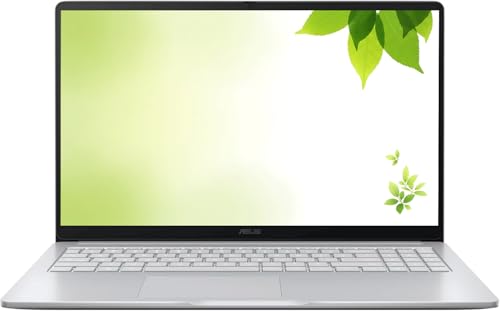
ASUS 2026 15″ FHD IPS Chromebook
More Details On Our Top Picks
Chromebook Go fits the student who wants a light machine that stays out of the way. The 14-inch size keeps the footprint modest, and the ChromeOS setup suits web classes, docs, and school portals.
The trade-off is clear, 4GB RAM and 64GB storage keep it in the basics lane. That makes it a sensible match for assignment work, not a heavy multitasking setup, and the slim build should suit a backpack more easily than a dorm desk.
Strong Points
- ChromeOS keeps school tasks straightforward.
- 14-inch body travels easily between classes.
- Low-maintenance storage suits cloud-first work.
Things To Consider
- 4GB RAM limits heavier multitasking.
- 64GB storage fills quickly with local files.
Feature Card
Who It Suits Best
Middle school and high school work fits it well, especially in homes that already lean on cloud docs and web apps.
A Better Fit Elsewhere
Acer Chromebook 315 CB315-4H-C8XU suits you better if a larger 15.6-inch screen helps with split-screen assignments and longer reading sessions.
Windows 11 changes the feel here, since many school families still want a familiar desktop-style setup. The 14-inch HD panel, webcam, and the mix of USB-C, USB-A, SD card, and headphone jack make it easier to handle classes without extra fuss.
The honest read is that 64GB SSD storage keeps this in a narrow lane, so cloud files help a lot. Compared with the Chromebook Go, this HP makes more sense for households that want Windows software compatibility first and foremost.
What We Like
- Windows 11 supports common school software.
- Webcam and mic suit live classes.
- USB-C, USB-A, and SD card ports simplify accessories.
- Renewed format can fit tight budgets.
Room For Improvement
- HD resolution is basic on a 14-inch panel.
- 64GB SSD leaves little room for large local files.
Who Should Grab It
You’ll get the most from it in a home office or homework corner where Windows apps matter more than display sharpness.
Where A Sibling Pick Shines
HP 14″ HD Chromebook Laptop makes more sense for lighter browser-based schoolwork, especially when you want ChromeOS instead of Windows.
The larger 15.6-inch Full HD IPS display is the first thing that changes the feel here. IPS, or in-plane switching, gives you broader viewing angles, which helps when you’re checking notes from the side or sharing the screen across a table.
ChromeOS keeps the workflow lean, but the combination of Wi-Fi 6, Android app access, and built-in offline storage gives it more range than the smaller Chromebook Go. For a student who lives in browser tabs and documents, that extra screen space matters more than flashy power.
Highlights
- 15.6-inch screen makes split-screen work easier.
- Full HD resolution keeps text cleaner than basic HD panels.
- Wi-Fi 6 is a strong fit for busy home networks.
- Offline storage helps during unstable connections.
Points To Note
- 4GB memory still limits heavier multitasking.
- Large screen size adds bulk for daily carry.
Details At A Glance
Perfect Match For
Middle and high school students who spend long stretches reading, typing, and jumping between browser tabs will appreciate the larger panel.
Another Choice May Suit
Samsung Galaxy Chromebook Go fits better for younger students who want the lightest possible 14-inch carry.
This HP leans harder into extras than the earlier 14-inch picks. The bundled Office 365 term, Copilot AI tools, and the split storage setup, 128GB SSD plus 512GB SD card, give you more room to organize class files without leaning entirely on cloud storage.
The trade-off is that the 14-inch HD screen still keeps resolution modest, so the appeal comes more from the software bundle and storage arrangement than from the panel itself. For a high schooler or college student who keeps slides, downloads, and note files on the machine, that setup feels practical.
Positives
- Office 365 bundle reduces setup friction.
- Combined SSD and SD card storage offers more headroom.
- USB-C, USB-A, HDMI, and SD card support classroom gear.
- 720p camera helps with remote lessons and check-ins.
Minor Gripes
- HD resolution is a step below Full HD options.
- Bundled extras help most when you’ll use them regularly.
Core Details
The Right Fit
You benefit most from this one in a study setup that mixes online classwork with downloadable files and occasional desktop software use.
Look Elsewhere When
Acer Chromebook 315 CB315-4H-C8XU makes more sense for students who would rather spend their time on a larger screen and ChromeOS simplicity.
This one keeps the formula straightforward, a 14-inch Chromebook with a quad-core Intel N4120, webcam, HDMI, and both USB-A and USB-C support. Four cores help spread light multitasking more comfortably than a dual-core chip, so browser tabs, docs, and video lessons stay in a reasonable lane.
The claimed 14-hour battery life stands out on paper, though real-world use always depends on screen brightness and how heavily you lean on video calls. For a student schedule that moves from morning classes to homework later in the day, that kind of stamina is the main attraction.
Best Bits
- Quad-core chip gives it more breathing room than basic dual-core Chromebooks.
- HDMI and USB ports simplify classroom and home hookups.
- ChromeOS keeps app maintenance simple.
- Lightweight student format fits backpack travel.
Softer Spots
- HD panel is serviceable rather than sharp.
- 64GB eMMC storage favors cloud-based work.
- Battery life depends heavily on workload and brightness.
Best Suited To
Elementary through middle school students get a lot of practical use from this Chromebook, especially in homes that want a simple school device.
Where Another Pick Fits Better
ASUS 2026 15″ FHD IPS Chromebook fits better for older students who want a larger screen and more storage.
An all-in-one desktop changes the school setup completely, because the screen and computer live together on the desk. The 22-inch Full HD panel gives you more space for split windows, and the 8GB DDR5 memory should feel smoother than the 4GB machines in this list.
The trade-off is obvious, this is a stay-put option rather than a carry-everywhere one. For a shared homework station, it makes sense, and the included HD webcam, HDMI, and USB-C ports help it cover class calls and peripheral connections without clutter.
Upsides
- 22-inch display suits long study sessions.
- 8GB DDR5 gives it more multitasking room.
- All-in-one form keeps the desk cleaner than a tower setup.
- HD webcam works well for remote instruction.
Areas To Watch
- It stays on the desk, so it won’t travel.
- 128GB storage is modest for a desktop.
Technical Sheet
Made For
Family study corners, dorm desks, and home offices suit this desktop better than a portable laptop.
Skip It When
Samsung Galaxy Chromebook Go is the cleaner fit for students who need a machine that slips into a backpack every day.
Gateway’s 314 keeps the shape familiar, but the 14-inch Full HD screen gives it a cleaner look than the smaller HD laptops here. At 3.31 pounds, it’s easier to carry than the desktop replacement crowd, and the HD camera plus Wi-Fi 5 keep the basics covered for school portals and video calls.
The honest read is that it lands between portability and screen comfort, which suits commuters and backpack users well. Compared with the Samsung Chromebook Go, this one gives you sharper Full HD visuals, though it keeps the same 4GB memory and 64GB storage ceiling.
Standout Traits
- Full HD display improves text clarity.
- Lightweight build helps on school days with lots of movement.
- HD camera supports remote classes.
- ChromeOS keeps routine maintenance light.
Small Caveats
- Wi-Fi 5 is older than Wi-Fi 6 machines in this list.
- 4GB RAM and 64GB storage still keep it basic.
Whose Shelf It Belongs On
Students who carry a laptop between classes or study spots get the most out of this model.
Reach For A Different Pick When
Acer Chromebook 315 CB315-4H-C8XU makes more sense for anyone who wants a larger screen for split-screen note taking.
This renewed ASUS leans into size and freshness, with a 15-inch FHD IPS display and 128GB of storage giving it more room than the tighter 64GB options above. The IPS panel should help during group study sessions, and the HDMI port makes it easy to add an external display for homework nights.
Because it’s renewed, the value story depends on the condition details on the listing, so that matters more here than on a sealed-new machine. Compared with the Gateway Chromebook 314, this ASUS gives you more storage and a larger screen, which makes it a stronger desk-and-dorm hybrid.
Bright Spots
- 15-inch FHD IPS display gives documents more space.
- 128GB storage outclasses the smallest Chromebook options here.
- HDMI and USB ports widen setup flexibility.
- ChromeOS keeps day-to-day use straightforward.
Honest Caveats
- Renewed condition deserves a careful look at the listing notes.
- 4GB memory still limits heavier workloads.
The Right Fit
Older students who want a larger display without jumping to a full Windows laptop should find this format appealing.
Swap It Out When
HP 2025 22″ FHD All-in-One Desktop suits you better if your school setup stays in one place and you want a bigger screen.
What Matters Most Before You Choose
Common Shopping Slip Ups
Screen size gets attention first, but memory and storage decide how long the machine stays pleasant to use. A 4GB, 64GB setup can handle school portals and docs, yet it fills quickly once downloads and browser tabs pile up.
The Upgrade Payoff
Higher-tier models usually add a sharper display, more memory, or more storage headroom, and that matters in a packed school day. The upgrade is worth it when you juggle video calls, research tabs, and local files on the same machine.
A Quick Reality Check
Hidden Buying Traps
Ports matter more than they seem, especially for headsets, projectors, and card readers. ChromeOS helps with simple school workflows, while Windows makes more sense for software-specific classes.
Where The Extra Money Goes
More money often buys a larger display, faster storage, or a desktop layout that keeps everything stable on a desk. That step up pays off for students who spend hours at the same workspace and want less compromise.
Frequently Asked Questions
What size computer works best for online school?
A 14-inch laptop works well for portability and small desks. A 15.6-inch screen helps more with split windows and reading notes.
Is ChromeOS enough for school?
ChromeOS suits web classes, documents, and cloud-based homework very well. Windows is the safer choice for software that needs a desktop app.
How much storage do you really need?
64GB can work for browser-based school use and cloud storage habits. More storage helps when you save slides, downloads, and offline files locally.
Do Chromebooks handle video classes well?
Yes, as long as the webcam, microphone, and network connection are solid. A stronger display and more memory help when you keep calls, notes, and tabs open together.
Is an all-in-one desktop a good school choice?
It works well for a fixed study station and shared family use. It’s less suitable for students who move between rooms or carry a computer to class.
