


Remote work asks a lot from a computer, steady video calls, clean multitasking, and enough speed to keep documents, browsers, and chat tools open without friction. The eight picks below lean toward practical setups for home offices, spare rooms, and shared spaces where desk space and reliability matter just as much as raw specs.
You’ll see a mix of compact towers, business laptops, and all-in-one designs. That spread matters because the right fit depends less on hype and more on how you work, whether that means carrying your setup between rooms or keeping a tidy desk with fewer cables.
The Shortlist At A Glance

HP ProDesk 600 G3 SFF Desktop Computer 21.5″ FHD Monitor, i5-6500, 16GB DDR4, 256GB SSD, WiFi, BT, Windows 11 Pro

Dell Latitude 5420 14″ FHD Business Laptop, i5-1145G7, 16GB DDR4 RAM, 256GB SSD, Camera, HDMI, Windows 11 Pro

Dell 23.8″ All-in-One Desktop, FHD, Intel Core 3 100U, Windows 11 Home

HP 2025 22″ FHD All-in-One Desktop Computer, 13th Gen Intel Quad-Core CPU, 8GB DDR5, 128GB Storage, HDMI, Type-C, Wi-Fi, HD Webcam, Win11 Pro, Black
Lenovo IdeaCentre All-in-One Desktop Computer, 8GB RAM 512GB SSD, Intel 4-Core Processor, 24″ FHD Anti-Glare IPS Display, Wi-Fi 6, Bluetooth 5.2, Windows 11, Everyday Use AIO

Lenovo IdeaCentre 24 All-in-One Desktop Computer, Intel 16GB 512GB SSD AIO
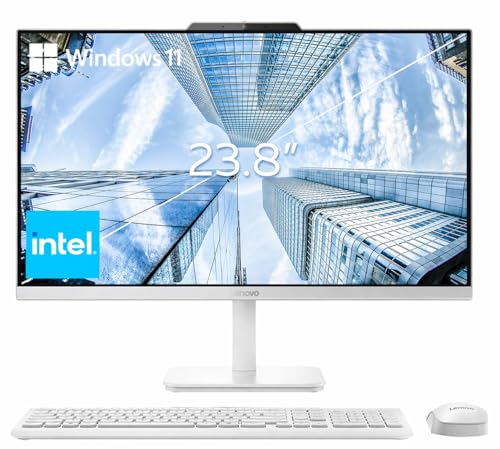
Lenovo 24″ FHD All-in-One Desktop Computer for Home & Office, Intel Processor, 16GB RAM, 256GB PCIe SSD, HDMI, WiFi 6, Bluetooth 5.2, Business AIO, Vent-Hear, Wireless KB & Mouse, Windows 11 Pro

Lenovo IdeaCentre 24″ FHD All-in-One Desktop, 16GB RAM 512GB SSD, Intel 4-Core Processor, Intel Graphics, Wi-Fi 6, Bluetooth 5.2, Windows 11, 2026 Edition
More Details On Our Top Picks
A small-form-factor tower like this suits a desk that has to stay tidy. The 21.5-inch FHD monitor gives you a compact workspace, and the included keyboard, mouse, Wi-Fi, and Bluetooth reduce the usual setup scramble.
The i5-6500, 16GB of DDR4 memory, and 256GB SSD put it in the practical zone for mail, documents, browser tabs, and video calls. It feels especially sensible for home offices that want a monitor-included package without paying for extra hardware you may already own.
Strong Points
- Small desktop footprint leaves more room for notebooks, a webcam, or a second screen.
- 16GB of DDR4 memory helps keep work apps open together without constant reloading.
- The 256GB SSD boots faster than a mechanical drive and cuts down on waiting.
- Bundled keyboard and mouse make the setup easier for a spare room or starter office.
Things To Consider
- The 21.5-inch monitor feels compact beside the larger screens in the Lenovo all-in-ones.
- Renewed condition makes this a value-minded path, but cosmetic variation is part of that trade.
- Storage is modest for large media libraries, so cloud use or external storage may help.
Feature Card
Who It Suits Best
You benefit most if you want a compact office desktop for email, documents, and video meetings.
Where A Sibling Pick Shines
The Lenovo IdeaCentre 24″ FHD All-in-One Desktop, 16GB RAM 512GB SSD, Intel 4-Core Processor, Intel Graphics, Wi-Fi 6, Bluetooth 5.2, Windows 11, 2026 Edition suits you better for a larger screen and a cleaner all-in-one layout.
For work that moves with you, a 14-inch laptop keeps the whole setup portable without feeling stripped down. The Latitude 5420 pairs that smaller chassis with a full HD screen, HDMI, and a built-in camera, which makes it a tidy match for meetings on the move.
The i5-1145G7, 16GB of DDR4 RAM, and 256GB SSD create a sensible middle ground for browser-heavy days, spreadsheets, and cloud tools. Compared with the HP ProDesk, you give up the bundled desk setup, but you gain a machine that slips into a bag and belongs in conference rooms as easily as in a kitchen table office.
What We Like
- 14-inch size makes commuting, travel, and room-to-room work far easier.
- 16GB of memory suits people who keep several work tabs and apps open.
- HDMI gives you a simple path to a monitor at home or in a meeting room.
- The camera keeps the machine ready for video calls without extra hardware.
Areas To Watch
- The smaller screen works well on the go, but it feels tighter than the 23.8-inch all-in-ones.
- 256GB of storage is serviceable, though large photo or media archives may need outside storage.
- As a renewed unit, the finish and battery history deserve the usual close look on arrival.
Who Will Love This
You fit this laptop best if you work away from a fixed desk and value a compact, business-first machine.
A Better Fit Elsewhere
The HP ProDesk 600 G3 SFF Desktop Computer 21.5″ FHD Monitor, i5-6500, 16GB DDR4, 256GB SSD, WiFi, BT, Windows 11 Pro works better for a stationary setup with included peripherals.
This Dell leans into the all-in-one formula, so the computer and display live together in a single footprint. For shared desks, that means fewer cables and less clutter, which helps a lot in a room that also has notebooks, chargers, and maybe a printer nearby.
The 23.8-inch FHD panel gives you more breathing room than the HP 22-inch unit, and the Intel Core 3 100U is aimed at everyday work rather than heavy creative loads. That makes sense for email, web apps, school tasks, and long stretches of document editing, though power users will feel the limits sooner than they would on the Lenovo 16GB models.
Highlights
- All-in-one construction cuts cable clutter and keeps the desk visually simple.
- The 23.8-inch display gives you comfortable room for side-by-side windows.
- FHD resolution keeps text and meeting windows clear for daily work.
- Works well in homes where one machine serves work, study, and casual browsing.
Worth Noting
- Core 3 positioning suits routine productivity more than demanding multitasking.
- The integrated design is tidy, but it leaves less room for future hardware changes than a tower.
- Windows 11 Home fits basic use, though some business setups prefer the Pro edition found on other picks here.
Right Fit For
You suit this desktop best if you want a clean home-office setup with a larger screen and modest upkeep.
Skip It When
The Lenovo IdeaCentre 24″ FHD All-in-One Desktop, 16GB RAM 512GB SSD, Intel 4-Core Processor, Intel Graphics, Wi-Fi 6, Bluetooth 5.2, Windows 11, 2026 Edition is the smarter move for heavier multitasking.
This HP keeps the formula simple: a 22-inch all-in-one with a current Intel quad-core chip, 8GB of DDR5 memory, and 128GB of storage. DDR5 is newer memory than DDR4, so that matters most for responsiveness in everyday tasks, even though the storage ceiling is modest.
The built-in HDMI, Type-C, Wi-Fi, and HD webcam make it easy to plug into a home desk without extra pieces piling up. Compared with the Dell 23.8-inch all-in-one, you give up screen size, but you pick up a neater feature mix for light work, calls, and browsing.
Positives
- DDR5 memory gives the system a current-generation feel for routine multitasking.
- HD webcam and Wi-Fi suit work calls without chasing extra accessories.
- Type-C and HDMI make desk setup more flexible for common peripherals.
- The compact 22-inch size fits smaller home office corners.
Points To Note
- 128GB of storage fills quickly once you add large work files or local media.
- The smaller panel feels less spacious than the 23.8-inch Lenovo and Dell all-in-ones.
- It fits everyday use well, but it isn’t aimed at demanding creative work.
Core Details
Made For
You suit this pick best if you want a basic all-in-one for calls, browsing, and lightweight office work.
Reach For A Different Pick When
The Lenovo IdeaCentre 24 All-in-One Desktop Computer, Intel 16GB 512GB SSD AIO gives you more memory and storage for heavier day-to-day use.
The 24-inch anti-glare IPS display gives this Lenovo a calmer, easier-on-the-eyes feel for long stretches of spreadsheets and browser tabs. IPS means in-plane switching, a panel type known for wider viewing angles, so the screen stays more usable from off-center seats or a standing-desk posture.
Compared with the HP 22-inch all-in-one, you get more screen room and a larger 512GB SSD, which matters once your work files and apps start piling up. The trade-off is that 8GB of RAM is still a moderate amount, so it fits ordinary office work better than a pile-up of heavy apps.
Upsides
- The 24-inch screen gives documents and tabs more breathing room.
- Anti-glare finish helps reduce reflections in bright rooms.
- 512GB SSD storage gives you more local space than the smaller HP unit.
- Wi-Fi 6 and Bluetooth 5.2 fit a more current home-office setup.
Softer Spots
- 8GB of RAM is fine for daily use, though large multitaskers may want more.
- The all-in-one design keeps the desk tidy, but upgrades are naturally more limited than on a tower.
- It’s strongest as a desktop replacement, not as a machine you carry around.
Best Suited To
You suit this desktop best if you spend long hours at one desk and want a wide, low-clutter workspace.
Another Choice May Suit
The Dell Latitude 5420 14″ FHD Business Laptop, i5-1145G7, 16GB DDR4 RAM, 256GB SSD, Camera, HDMI, Windows 11 Pro fits you better if portability matters more than screen size.
This is the Lenovo that leans hardest into a roomy, practical desktop setup. The 16GB of RAM and 512GB PCIe SSD matter more than the plain marketing language, because they translate into smoother app switching and more room for documents, downloads, and work files.
Compared with the 8GB Lenovo all-in-one above, this one is the better fit for people who keep a lot open during the day. It still feels like an everyday machine rather than a power desktop, but that balance tends to work well for home offices that need stability more than flash.
Best Bits
- 16GB of RAM supports heavier multitasking than the 8GB all-in-one options.
- 512GB SSD gives you generous room for apps and project files.
- All-in-one design keeps cables under control on a small desk.
- Suited to long browser sessions, office suites, and cloud work.
Room For Improvement
- The feature set is practical, but it stays squarely in the everyday-work lane.
- All-in-one systems are neater, though future hardware changes are more constrained than on a tower.
- You may want a separate keyboard or mouse preference check, since desktop comfort is personal.
Core Details
Who Should Grab It
You suit this Lenovo best if you work from one desk and like a little extra memory headroom.
Swap It Out When
The Dell Latitude 5420 14″ FHD Business Laptop, i5-1145G7, 16GB DDR4 RAM, 256GB SSD, Camera, HDMI, Windows 11 Pro fits better for travel-heavy schedules.
Bundled peripherals make this Lenovo feel closer to an out-of-the-box work station than a bare desktop. That matters for home offices that want one purchase to cover the screen, the computer, the keyboard, and the mouse without extra shopping.
The 16GB RAM and 256GB PCIe SSD keep it in a comfortable middle ground for business tasks, while Wi-Fi 6 and Bluetooth 5.2 modernize the connection side. Compared with the Dell 23.8-inch all-in-one, this Lenovo looks better prepared for someone who wants the whole package in a more business-oriented setup.
Reasons To Buy
- Wireless keyboard and mouse reduce the number of separate items you need to source.
- 16GB of memory gives it a stronger multitasking base than entry-level all-in-ones.
- Wi-Fi 6 and Bluetooth 5.2 suit a current home-office network stack.
- HDMI helps you extend the desktop to a larger monitor later on.
Minor Gripes
- 256GB of storage is workable, though power users may fill it faster than expected.
- The spec list is solid, but the machine still lives in the everyday productivity category.
- Desk owners who prefer an adjustable laptop setup may find the fixed layout less flexible.
The Right Fit
You suit this desktop best if you want a business-style all-in-one with fewer separate parts to manage.
Look Elsewhere When
The HP ProDesk 600 G3 SFF Desktop Computer 21.5″ FHD Monitor, i5-6500, 16GB DDR4, 256GB SSD, WiFi, BT, Windows 11 Pro fits better when you prefer a smaller tower and monitor bundle.
This 2026-edition Lenovo reads like the cleaner, more modern sibling in the group. The 24-inch FHD display, 16GB of RAM, and 512GB SSD give you a roomy working surface with enough memory and storage for a busy day of tabs, calls, and documents.
The Intel Graphics wording matters because it points to integrated graphics, which is the right expectation for office work, streaming, and everyday use rather than graphics-heavy editing. Compared with the earlier Lenovo all-in-ones, this one stands out as the neatest upgrade path for someone who wants a polished desktop and current connectivity in one box.
Standout Traits
- 16GB RAM and 512GB SSD give you a strong daily-use balance.
- 24-inch FHD screen keeps multitasking comfortable without crowding the desk.
- Wi-Fi 6 and Bluetooth 5.2 suit a current work-from-home setup.
- Integrated graphics fit routine work and media without overpromising.
Small Caveats
- It makes the most sense as a fixed desktop, not a travel machine.
- The all-in-one design is tidy, though internal changes are less flexible than on a tower.
- You may not need this much headroom for very light browsing and email.
Whose Shelf It Belongs On
You suit this model best if you want a current all-in-one for daily office work and a cleaner desk layout.
Where Shoppers Go Wrong
The HP 2025 22″ FHD All-in-One Desktop Computer, 13th Gen Intel Quad-Core CPU, 8GB DDR5, 128GB Storage, HDMI, Type-C, Wi-Fi, HD Webcam, Win11 Pro, Black fits better for lighter use and tighter budgets.
What Matters Most Before You Choose Computers For Remote Work
Screen Size, Mobility, And Desk Clutter
A laptop makes sense for moving between rooms, commutes, and shared workspaces. An all-in-one or small desktop fits better when you want a fixed station with fewer loose parts.
Memory And Storage Headroom
8GB can cover light work, but 16GB handles more tabs and meetings with less friction. SSD storage also matters because it affects boot speed and how much local work material you can keep close at hand.
Ports, Webcam, And Network Fit
HDMI, USB-C, Wi-Fi 6, Bluetooth, and a built-in camera change how quickly you settle in. Those details matter most in homes where your desk also has to serve video calls, external monitors, and wireless accessories.
A Quick Reality Check Before You Buy
Common Shopping Slip Ups
People often fixate on processor names and ignore storage size or screen dimensions. That’s how you end up with a machine that feels cramped or full sooner than expected.
What The Higher Tier Buys
More money usually buys a larger display, more RAM, a bigger SSD, or a cleaner all-in-one layout. That upgrade pays off most for all-day work, heavier multitasking, and desks that need to stay uncluttered.
Frequently Asked Questions
What kind of computer works best for remote work?
A stable machine with enough RAM, a fast SSD, and a display that matches your desk space usually fits best. A laptop helps with mobility, while an all-in-one keeps the workspace cleaner.
Is 8GB of RAM enough for remote work?
It suits light browsing, email, and document work. For lots of tabs, video calls, and app switching, 16GB feels more comfortable.
Do all-in-one computers save desk space?
Yes, because the display and computer sit together in one unit. That usually means fewer cables and a tidier setup.
Why choose a laptop instead of a desktop for remote work?
A laptop gives you mobility and a built-in battery, so your setup can move with you. A desktop usually offers a steadier desk presence and less concern about carrying hardware.
Is a 256GB SSD enough for remote work?
It can work for documents, apps, and cloud-first use. Larger files, photos, and downloads fill it faster, so heavier storage users usually want more room.
