


Finding the right computer for older adults usually means cutting through clutter, not chasing raw speed. A good setup keeps text legible, startup simple, and daily tasks like email, video calls, and streaming within easy reach. That matters whether you’re replacing an aging laptop, setting up a compact desk, or choosing a machine that won’t feel intimidating after the first week.
Quick Look At The Shortlist

ASUS Lightweight 15.5″ Full HD Laptop (Star Black)
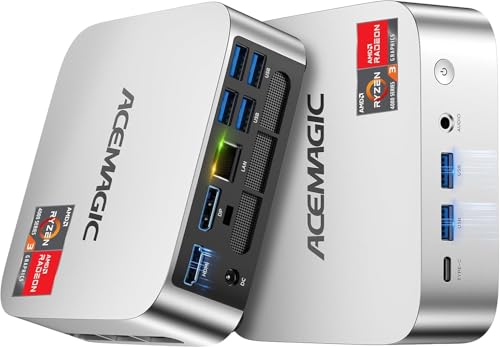
ACEMAGIC Mini PC Windows 11 Pro AMD Ryzen 7330U 16GB RAM 256 SSD

GEEKOM IT12 Mini PC, Intel i3-12300HE 16GB RAM 512GB SSD
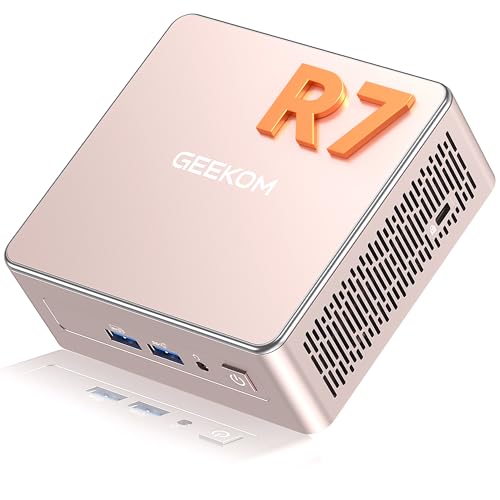
GEEKOM A5 2027 Edition Mini PC, Ryzen 7 7730U, 16GB RAM 512GB SSD
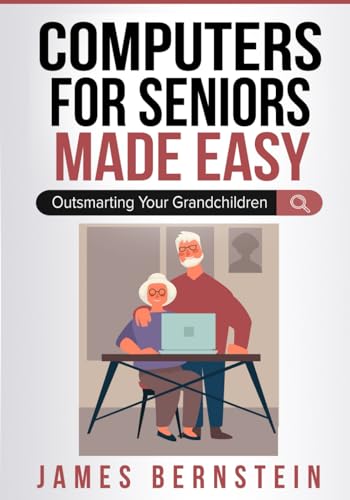
Computers for Seniors Made Easy: Outsmarting Your Grandchildren

Computers for Seniors Made Easy: Outsmarting Your Grandchildren
HP 2025 Pavilion 15.6″ FHD Touchscreen Laptop Computer, 10-Core Intel i5-1334U, 32GB RAM, 1TB Storage
More Details On Our Top Picks
For a senior-friendly setup that stays straightforward, this ASUS keeps the focus on size and simplicity. The 15.5-inch Full HD display gives you a roomy workspace for email, video calls, and web pages, while Windows 11 Home keeps the software side familiar to many households.
The Intel Celeron chip, 4GB LPDDR4 memory, and 128GB SSD point this toward everyday use rather than heavy multitasking. That trade-off makes sense for checking mail, browsing, and light document work, though you may outgrow it sooner than the mini PCs below. The backlit keyboard also helps in dim rooms.
What We Like
- 15.5-inch Full HD screen gives you more room for text and menus.
- Windows 11 Home keeps the interface current without adding extra complexity.
- The backlit keyboard helps in evening use or low light.
- Lightweight design suits moving between rooms or trips to a table.
Things To Consider
- 4GB memory is modest for lots of tabs or several apps at once.
- 128GB SSD storage leaves less room for large photo collections.
- A renewed unit can be a smart value, though cosmetic variation is common.
Feature Snapshot
Who Should Grab It
New Windows users who want a larger screen without a bulky machine will get the most out of it.
Where A Sibling Pick Shines
HP 2025 Pavilion 15.6″ FHD Touchscreen Laptop Computer suits you better when touch control, more memory, and far more storage matter.
Compared with the ASUS laptop, this ACEMAGIC mini PC trades portability for a tidier desk. Its Ryzen 7330U processor and 16GB of DDR4 memory give it more breathing room for web tabs, video calls, and several day-to-day programs running together.
The compact case fits neatly beside a monitor, which helps keep a senior setup uncluttered. Windows 11 Pro also leans a little more businesslike than the Home edition on the first pick, though the real draw here is the small footprint and quieter-style everyday setup.
Highlights
- 16GB memory supports smoother multitasking than the entry laptop above.
- The small chassis keeps desk space open for a larger monitor or paperwork.
- Ryzen 7330U is a sensible fit for everyday responsiveness.
- Windows 11 Pro can suit home offices and light business use.
Softer Spots
- You need a monitor, keyboard, and mouse, so setup takes more pieces.
- Mini PCs stay put, which makes them less handy for room-to-room use.
- The 256GB SSD is workable, though large photo libraries can fill it quickly.
Core Details
Built With In Mind
Desk-based users who want a compact machine with a little more muscle than an entry laptop will find the fit strong.
A Better Fit Elsewhere
ASUS Lightweight 15.5″ Full HD Laptop (Star Black) suits you better when you want to carry the computer from room to room.
This GEEKOM model moves a step beyond the ACEMAGIC box by leaning into sturdier business-style construction. The full metal chassis matters in shared offices or a home desk that stays powered on for long stretches, because it tends to feel less fragile than a plastic shell.
With 16GB of RAM and a 512GB SSD, it gives you more room for apps and files than the previous mini PC. USB4 support and 8K UHD output also point to a more capable desk, though most senior setups will care more about the extra storage and the upgradable design than the highest display ceiling.
Best Bits
- Metal housing adds a more durable feel for daily desk use.
- 512GB SSD gives you far more storage than the smaller mini PC above.
- USB4 expands connection options for modern accessories.
- Upgradable design helps the system last longer as needs change.
Points To Note
- The box format still depends on an external monitor and peripherals.
- 8K output matters less for the simple tasks most senior setups need.
- The business-leaning design feels utilitarian rather than warm or decorative.
At A Glance
Perfect Match For
Home office users who want a small, sturdy desktop with room to grow will get the most from it.
Another Choice May Suit
ACEMAGIC Mini PC Windows 11 Pro AMD Ryzen 7330U 16GB RAM 256 SSD makes more sense for a tighter budget and a simpler storage target.
Among the mini PCs here, this GEEKOM feels like the step-up choice for heavier day-to-day use. The Ryzen 7 7730U and 16GB of RAM give you more cushion than the IT12, especially for multitasking across browser tabs, spreadsheets, and video calls.
That extra headroom also helps the machine stay relevant longer in a home office. The 512GB SSD keeps launch times quick and gives you room for a sensible file library, though the small form factor still means you’re building around a monitor and external peripherals.
Positives
- Ryzen 7 7730U provides the strongest everyday processing profile in this group.
- 16GB RAM keeps multiple tasks moving with less slowdown.
- 512GB SSD suits a fuller document and media load.
- The tiny chassis keeps the desktop clean and open.
Areas To Watch
- It still needs a separate monitor and input devices.
- The compact format is less convenient for taking between rooms.
- Power users may still want more ports on the desk.
Details At A Glance
Whose Shelf It Belongs On
Frequent home-office users who want a compact desktop with more stamina will benefit most.
Look Elsewhere When
GEEKOM IT12 Mini PC, Intel i3-12300HE 16GB RAM 512GB SSD makes more sense for you when a more restrained processor is still enough and hardware flexibility matters more.
Not every pick has to be hardware, and this title fills the gap for someone learning Windows at home. It points toward staying connected, safer browsing habits, and routine tasks, which makes it a useful companion to a new laptop or mini PC rather than a replacement for one.
The large-print paperback and hardcover formats matter more than they sound, because clear page layout can reduce strain during setup. That makes this a sensible fit for grandparents who want plain explanations instead of jargon, though the subject matter is more about guidance than speed.
Reasons To Buy
- Focuses on staying connected in everyday use, not technical jargon.
- Large-print format supports easier reading during setup sessions.
- Useful alongside a new computer for practice and reference.
- Covers common tasks that matter in a home setting.
Room For Improvement
- It does not replace hands-on practice with the actual device.
- The two editions are nearly identical in purpose, so the choice is mostly format-based.
Quick Facts
Who Will Love This
New or nervous Windows users who want a patient, readable guide will get the most value.
Skip It When
HP 2025 Pavilion 15.6″ FHD Touchscreen Laptop Computer is the better path when you want the hardware and the learning on one desk.
This second listing sits in the same content lane as the previous book, so the real question is format and preference. The large-print paperback and hardcover options make it accessible for home study, especially for someone who likes to keep a manual near the computer.
Used alongside a practical machine like the ASUS laptop or HP Pavilion, it can reduce the friction of learning menus and everyday tasks. The honest read is that its value comes from the clarity of the subject, not from flashy presentation.
Plus Points
- Large-print formats suit slower, more comfortable reading.
- Matches the kind of home support many new users need.
- Pairs well with a fresh Windows setup.
Small Caveats
- The two copies duplicate the same theme, so one is usually enough.
- It helps most as a reference, not as a full teaching system.
Right Fit For
Households that want a plain-English reference book near the computer will get the most from it.
Swap It Out When
Computers for Seniors Made Easy: Outsmarting Your Grandchildren, ASIN B099BYDL4S, is the cleaner first choice if you only need one copy for the shelf.
For seniors who want a laptop that feels more generous than the entry ASUS, this HP Pavilion brings a bigger comfort margin. The 15.6-inch touchscreen helps with direct tapping, while 32GB of RAM and a 1TB storage setup give you far more room than the lightweight model at the top of the list.
That extra memory is the quiet advantage here, because it keeps multiple browser tabs, email, documents, and streaming running with less strain. Long battery life and Wi-Fi 6 also suit a house where the laptop gets moved from couch to table to bedroom without much planning.
Strong Points
- Touchscreen control is easier for some hands than trackpad-only use.
- 32GB RAM gives you generous multitasking room.
- 1TB total storage leaves plenty of space for photos and files.
- Full-size keyboard helps long typing sessions feel less cramped.
- Wi-Fi 6 supports a modern home network setup.
Worth Noting
- The stronger spec set adds cost and can feel like more than a casual user needs.
- A 15.6-inch laptop is less portable than a smaller travel machine.
- Touchscreens need more fingerprint cleaning than standard displays.
Feature Rundown
The Right Fit
Seniors who want a larger, more forgiving laptop for daily browsing and family calls will benefit most.
Reach For A Different Pick When
ASUS Lightweight 15.5″ Full HD Laptop (Star Black) makes more sense for you when lighter carry weight matters more than a touch panel and extra headroom.
What Matters Most Before Choosing Computers For Senior Citizens
Common Shopping Slip Ups
A common miss is chasing raw speed while ignoring screen size, keyboard comfort, and simple navigation. A compact mini PC can be excellent, but it only works well when the desk already has a monitor and peripherals ready to go.
The Case For Spending Up
Higher-tier models usually cost more because they bring stronger processors, more memory, larger storage, and better display options. That extra room matters when you want fewer slowdowns, more file space, and a machine that still feels useful after routines expand.
Things Worth Knowing First
Wrong Turns To Avoid
The easiest mistake is buying for the spec sheet instead of the actual household setup. A laptop suits room-to-room use, while a mini PC fits a fixed desk with cleaner cable management.
Where The Extra Money Goes
More money often buys a larger screen, extra RAM, a faster SSD, or touch input. That upgrade is worth it for family photo storage, video calls, and heavier multitasking, but not for a machine used only for email and browsing.
Frequently Asked Questions
What kind of computer suits a new Windows user best?
A laptop with a clear screen and a full keyboard usually feels easiest. A mini PC makes sense only when the desk already has the rest of the setup.
Do mini PCs work well for senior households?
Yes, especially for a fixed desk with limited space. You need to plan for a monitor, keyboard, and mouse.
How much storage makes sense for everyday use?
128GB can work for light use, but 256GB or more gives you more breathing room. Photo libraries and downloaded files fill small drives faster than most people expect.
Is a touchscreen worth it?
Touch helps some people, especially for scrolling and tapping icons. It also adds fingerprints and usually costs more.
Why buy a book instead of another computer?
A plain-language guide helps with menus, settings, and routine tasks. It pairs well with a new machine and lowers the learning curve.
