


Running Sims 4 well is mostly about steady performance, enough memory, and a setup that fits the space you actually use. A tidy all-in-one can suit a bedroom desk, a mini PC can tuck under a monitor, and a gaming tower makes more sense for heavier multitasking or mod-heavy saves.
This roundup focuses on practical fit rather than hype. You’ll see options for compact desks, everyday school use, and stronger desktop headroom, so you can match the machine to your play style instead of forcing your setup around the computer.
Quick Look At The Shortlist

Apple 2024 iMac 24-inch Retina Display, 16GB Memory, 256GB SSD

BOSGAME E5 11 Pro Mini PC, AMD Ryzen 5300U

STGAubron Gaming PC Desktop Core i7 8th Gen, GTX 1660S, 16G DDR4

STGAubron Gaming PC Desktop Intel i7 Xeon E5, RX 550, 16G RAM

STGAubron Gaming PC Desktop Intel i7 Xeon E5, RX 550, 16G RAM
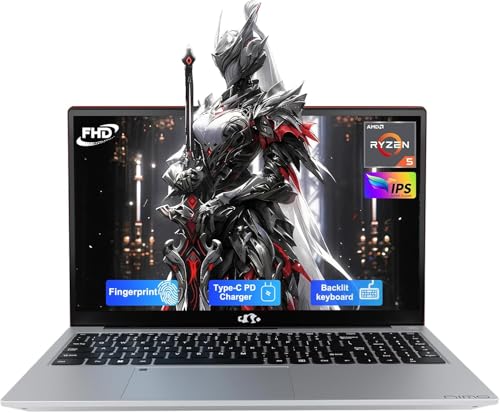
NIMO 15.6” IPS FHD Laptop, 8GB RAM, 256GB SSD, AMD Ryzen 5
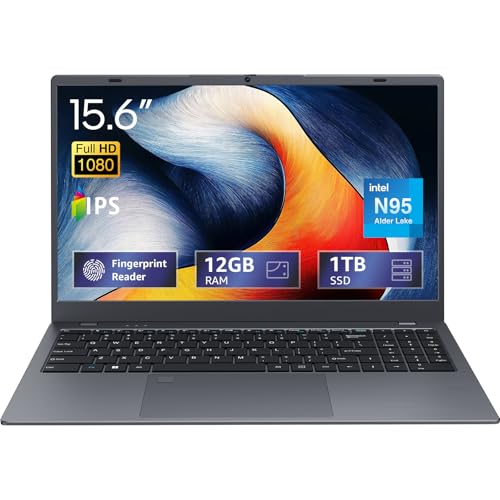
UOWAMOU 15.6 IPS FHD Laptop, 12GB LPDDR5 RAM, 1TB NVMe SSD

STGAubron Gaming PC Desktop Intel i7 Xeon E5, RX 550, 16G RAM
More Details On Our Top Picks
The appeal here is obvious for a desk that has to do double duty as a living space. The 24-inch Retina display gives you room for Sims menus, creative apps, and everyday browsing without adding a separate tower.
Its 16GB unified memory, a shared memory pool used by the chip and graphics side together, helps the system stay composed across tabs and apps. The trade-off is simple, storage is 256GB SSD, so a heavy game library belongs on external storage or in cloud-based routines.
Strong Points
- All-in-one design keeps the footprint tidy on small desks.
- 24-inch display gives Sims plenty of working room.
- 16GB unified memory helps with multitasking and background apps.
- Pink finish adds a softer look than a plain black tower.
Things To Consider
- 256GB storage fills quickly with games and media.
- All-in-one parts are less flexible than a separate tower setup.
Who It Suits Best
Style-conscious homeowners and casual Sims players who want a compact desktop with a clean display area will get the most out of it.
Where Another Pick Suits Better
STGAubron Gaming PC Desktop Core i7 8th Gen, GTX 1660S, 16G DDR4 suits you better for heavier game loads and more graphic headroom.
A mini PC like this makes sense beside a monitor where desk space is already tight. The Ryzen 3 5300U uses 4 cores and 8 threads, so you get enough parallel processing for Sims, tabs, and school or office work without a full tower.
The upside is the small footprint, the catch is that compact systems usually leave you with less room for future internal expansion. For a dorm, den, or shared work nook, that trade-off often feels reasonable.
Upsides
- Small chassis fits under or behind a monitor.
- Four cores and eight threads support everyday multitasking.
- Good match for a simple Sims 4 setup.
Minor Gripes
- Less room for upgrades than a standard tower.
- Mini PC cooling can feel more constrained under long workloads.
Who Will Love This
Students, apartment dwellers, and home-office users who want a tiny desktop with enough headroom for casual Sims play will appreciate the layout.
A Better Fit Elsewhere
Apple 2024 iMac 24-inch Retina Display, 16GB Memory, 256GB SSD makes more sense for a polished all-in-one desk setup with a larger screen.
This tower is aimed at Sims 4 players who also keep a browser, chat app, and maybe a capture tool open at once. The GTX 1660S 6G gives it more graphics room than the Ryzen mini PC above, which matters once you push into heavier visual loads or broader gaming use.
The 16G DDR4 memory and 512G SSD give it a practical middle ground, enough for current game installs and everyday responsiveness. ARGB lighting, WiFi 6, Bluetooth 5.2, DisplayPort, and HDMI round out the package, though the styling will feel busy on a minimalist desk.
Highlights
- GTX 1660S 6G offers stronger graphics breathing room.
- 16GB DDR4 suits gaming plus background apps.
- 512GB SSD keeps load times and launches quick.
- WiFi 6 and Bluetooth 5.2 improve connection flexibility.
Areas To Watch
- ARGB lighting adds visual flair that not everyone wants.
- Desktop tower shape takes more space than a mini PC.
- Some households may prefer a quieter, simpler all-in-one.
Perfect Match For
Sims players who also stream, edit clips, or keep several apps open at once will get the most value from this configuration.
Swap It Out When
BOSGAME E5 11 Pro Mini PC, AMD Ryzen 5300U fits better for a tighter desk or a more discreet setup.
Core Details
This one sits in the middle of the pack in a useful way, especially for Sims 4 households that want a basic tower without chasing flashy extras. The RX 550 4G is modest by gaming standards, yet it gives you a dedicated graphics card instead of leaning entirely on integrated graphics.
That matters for a smoother desktop experience and a little more breathing room with lighter games, schoolwork, or business tasks. The 512G SSD helps everyday responsiveness, though the overall ceiling stays below the stronger GTX-based STGAubron above.
Bright Spots
- Dedicated RX 550 graphics add useful headroom.
- 16GB RAM supports routine multitasking.
- 512GB SSD is a practical everyday size.
- Good fit for a no-frills tower setup.
Softer Spots
- Graphics headroom is modest for heavier gaming.
- Best suited to lighter Sims play and general desktop work.
Who Should Grab It
Desktop users who want a straightforward tower for Sims 4, school tasks, and light multitasking will find the spec mix sensible.
Look Elsewhere When
STGAubron Gaming PC Desktop Core i7 8th Gen, GTX 1660S, 16G DDR4 is the better fit for broader gaming headroom.
Feature Rundown
This STGAubron model is the plain-spoken version of a gaming tower, and that can be exactly what you want for Sims 4. The core parts mirror the previous STGAubron desktop, so you’re looking at the same kind of balanced entry-level footprint with RX 550 graphics and 16GB RAM.
For a bedroom setup, homework station, or starter game desk, that keeps things simple. The honest read is that it suits lighter to moderate use better than high-pressure gaming, but its straightforward design makes ownership easier to live with.
Best Bits
- Simple tower format is easy to place and cable-manage.
- 16GB RAM helps with everyday app switching.
- RX 550 graphics support lighter gaming use.
Room For Improvement
- Same basic performance tier as the other RX 550 STGAubron.
- Less appealing for heavier mods or demanding visual settings.
The Right Fit
Budget-conscious shoppers who want a simple desktop for Sims 4, school tasks, and browsing should feel comfortable with this one.
Reach For A Different Pick When
Apple 2024 iMac 24-inch Retina Display, 16GB Memory, 256GB SSD is the cleaner match for a more polished all-in-one workspace.
Portable machines like this matter for Sims players who move between class, commuting, and home. The 15.6-inch IPS panel, which means in-plane switching for wider viewing angles and steadier color from the side, gives you a sensible screen size without turning the laptop into a slab.
Its Ryzen 5 processor and 8GB RAM fit everyday school work, browsing, and lighter game sessions, though heavier multitasking will feel tighter than on the desktop options above. The backlit keyboard, fingerprint reader, 65W Type-C charging, and 180-degree hinge make it easy to live with in shared spaces.
Positives
- 15.6-inch IPS display is easy to carry and still comfortable.
- Backlit keyboard helps in dim dorm rooms or evening use.
- Fingerprint sign-in adds quick daily convenience.
- 65W Type-C charging keeps cable clutter down.
Worth Noting
- 8GB RAM leaves less room for heavy multitasking.
- 256GB storage suits lighter libraries better than large installs.
- Laptop cooling and battery life depend on workload and settings.
Made For
Students and commuters who want a portable computer for classwork, browsing, and occasional Sims play will find the format easy to carry.
Another Choice May Suit
UOWAMOU 15.6 IPS FHD Laptop, 12GB LPDDR5 RAM, 1TB NVMe SSD suits you better if storage room matters more than a lighter spec sheet.
Feature Snapshot
The storage spec is the headline here: 1TB NVMe SSD gives you far more room than the NIMO laptop above. NVMe, or non-volatile memory express, is the storage interface that helps drives respond quickly, so routine launches and file access tend to feel brisk.
LPDDR5 memory is the newer low-power RAM style, which helps keep a thin laptop efficient, and the quad-core N95 stays aimed at basic tasks instead of heavy workloads. For Sims 4, that makes it a sensible portable option for modest play, school assignments, and streaming video on the side.
What We Like
- 1TB SSD leaves room for a larger game and file library.
- 12GB LPDDR5 RAM gives extra breathing space over 8GB models.
- Lightweight body suits backpacks and daily carrying.
- Multi-port layout helps with simple peripherals and adapters.
Small Caveats
- N95 processor is aimed at light everyday computing.
- Best suited to modest Sims use, not heavy creative work.
Whose Shelf It Belongs On
Students and home users who want a portable machine with more storage than the usual entry-level laptop will get the most out of it.
Skip It When
STGAubron Gaming PC Desktop Core i7 8th Gen, GTX 1660S, 16G DDR4 is the stronger call for more demanding gaming loads.
Details At A Glance
This last tower mirrors the earlier RX 550 STGAubron in a way that makes it easy to understand: a straightforward desktop with enough muscle for Sims 4 and general home use. It won’t pretend to be a premium gaming rig, and that honesty helps.
For school desks, family rooms, or a first desktop after years of laptops, it gives you a stable place to start. The 16GB RAM and 512GB SSD keep the basics moving well, though users chasing heavy mods or wide-open game headroom should look back to the GTX 1660S model.
Positives
- Clear, uncomplicated tower format suits simple setups.
- 16GB memory covers routine multitasking well.
- 512GB SSD offers practical everyday storage.
Honest Caveats
- RX 550 graphics stay in the lighter-performance lane.
- Better for standard Sims use than demanding visual settings.
Built With In Mind
Home users who want a basic desktop for Sims 4, browsing, and school assignments should find the layout straightforward.
Where A Sibling Pick Shines
STGAubron Gaming PC Desktop Core i7 8th Gen, GTX 1660S, 16G DDR4 is the better fit for heavier visual work and wider game headroom.
What Matters Most Before Choosing Computers For Sims 4
Common Shopping Slip Ups
A lot of Sims 4 setups fail because the machine looks fast on paper but runs out of memory or storage too quickly. Focus on RAM, SSD size, and the kind of graphics support the machine actually has, not just the processor name.
Where The Extra Money Goes
Higher-tier models usually buy you more headroom for mods, multitasking, bigger displays, and better graphics hardware. That extra spend makes sense for heavier play or long work sessions, while lighter school-and-play use can stay in a simpler range.
A Quick Reality Check
Hidden Buying Traps
Compact systems save space, but they usually leave less room for upgrades. Laptops bring portability, though they trade off desktop flexibility and long-term expansion.
The Upgrade Payoff
Spending up matters most when you keep several apps open, want smoother visuals, or plan to keep the same machine for years. For casual Sims players, modest specs can still feel perfectly reasonable.
Frequently Asked Questions
How much RAM helps with Sims 4?
16GB gives you more breathing room for mods, browser tabs, and background apps. 8GB can still work for simpler setups, but it feels tighter sooner.
Do you need a gaming tower for Sims 4?
No, a tower is not mandatory. A good all-in-one, mini PC, or laptop can work well for lighter play and everyday use.
Is an SSD important for this game?
Yes, an SSD helps the system feel faster at startup and during loading. It does not replace good memory or graphics support, though.
Are laptops a smart choice for Sims 4?
Laptops make sense for school, travel, and small rooms. They usually give up upgrade room compared with desktop systems.
What matters more, graphics or processor?
For Sims 4, both matter, but dedicated graphics help once you push visual settings or add other game use. A balanced spec mix is usually the safer route.
