


Sound recording runs smoother when your computer setup, interface, microphone, and monitoring gear all fit the same workflow. You want enough processing headroom for sessions, low-latency routing, and hardware that matches how you actually record, whether that’s voiceovers, podcast edits, guitar tracks, or live streams. The picks below lean toward practical studio use, not empty feature lists.
The Shortlist At A Glance
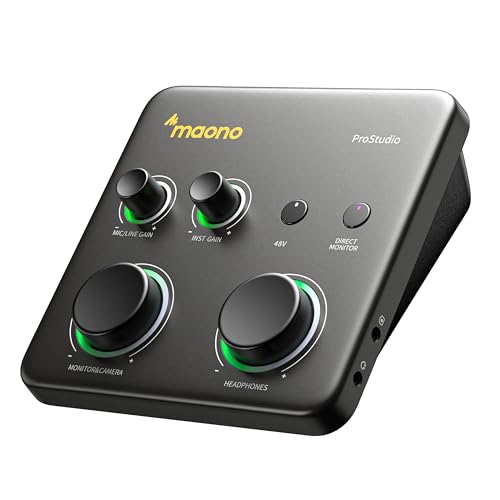
MAONO P1 USB Audio Interface 70dB Gain

TENLAMP G10 Creator Audio Mixer Bundle

Dell Tower Desktop Intel Core Ultra 7-265

Dejasound Studio Recording Microphone with Isolation Shield

syndesmos Wired Over Ear Headphones

MorTime Condenser Microphone Bundle

ALSO GO Podcast Equipment Bundle F998

Brvomussy Podcast Equipment Bundle
More Details On Our Top Picks
For solo recording, gain matters fast, and this MAONO unit gives you up to 70dB, which helps hungry dynamic mics without adding an external booster. The 24-bit/192kHz ceiling keeps the capture path clean on paper, and ASIO support points to lower-latency monitoring for voice takes or guitar parts.
The dual USB layout also suits a desk where you jump between computer work and mobile capture. Loopback and independent mute control make sense for streaming or podcast edits, though the real trade-off is that you’re still building around a compact interface rather than a full mixer.
Strong Points
- High gain helps demanding dynamic microphones.
- 24-bit/192kHz support suits detailed vocal capture.
- ASIO support is useful for lower-latency monitoring.
- Loopback fits livestreaming and screen-based content.
Things To Consider
- Compact interfaces keep the setup lean, so you give up the hands-on control of a larger mixer.
- Routing software can add a little setup time for first-time users.
Feature Card
Who It Suits Best
Solo streamers, home vocalists, and guitar recorders get the most from the interface-first layout.
Where A Sibling Pick Shines
Brvomussy Podcast Equipment Bundle fits better for desktop creators who want a broader bundle instead of a lean interface.
This bundle goes after the creator who wants a single box instead of piecing together mixer, microphone, and extras separately. Noise reduction, voice effects, auto-tune, and Bluetooth point to a setup that can cover casual streaming, rough vocal work, and quick desk changes without much gear hunting.
The upside is obvious in a spare room or bedroom studio, where less cabling usually means fewer headaches. The trade-off is just as clear, though, because all-in-one kits tend to ask you to accept the bundle’s exact layout rather than hand-picking every part.
What We Like
- Bundle format reduces the need for separate purchases.
- Bluetooth broadens playback and routing options.
- Voice effects help for casual content and experimentation.
- Noise reduction supports cleaner spoken-word sessions.
Worth Noting
- All-in-one kits can limit how much you customize the chain later.
- Auto-tune and effects are useful tools, but they suit stylized work more than plain recording.
Who Should Grab It
New streamers and podcast starters who want one coordinated package should find this the easiest path.
Another Choice May Suit
MAONO P1 USB Audio Interface is the cleaner fit for you if you already own a microphone and only need the interface side.
A tower desktop changes the pace of a recording space, because you get real processing room instead of asking a thin laptop to do everything. The Core Ultra 7-265, 32GB of memory, and 1TB PCIe NVMe SSD point to a machine that can handle project files, editing sessions, and multitasking without feeling cramped.
Wi-Fi 6 and Bluetooth matter less for glamour and more for day-to-day convenience, especially in a small studio that already has enough cables. The included wired keyboard and mouse keep the setup straightforward, though the integrated Intel UHD graphics mean this is clearly a workhorse for audio and general production rather than graphics-heavy creative work.
Bright Spots
- 32GB memory gives editing sessions more breathing room.
- 1TB NVMe SSD helps projects open and save quickly.
- Desktop form factor usually offers easier future expansion than a slim laptop.
- Included keyboard and mouse simplify first-day setup.
Areas To Watch
- It takes more desk space than a compact laptop.
- Intel UHD Graphics keep the focus on audio, not visual workloads.
Core Details
Made For
Editing-heavy studios, podcasters with several apps open, and users who want a stationary production hub fit this desktop well.
Look Elsewhere When
MAONO P1 USB Audio Interface makes more sense for a portable recorder who wants a much smaller footprint.
This mic setup is aimed at the desk singer or podcaster who wants a more controlled capture area without building a full booth. The isolation shield helps block some nearby reflections, and the pop filter reduces plosive bursts, which are the hard puffs that hit a mic on words with P and B sounds.
USB output keeps the connection direct to a PC, smartphone, or laptop, so the path stays simple for home studios and mobile sessions. The trade-off is that this kind of all-in-one desktop mic usually rewards careful placement, and it may feel less flexible than a separate mic-plus-interface chain.
Highlights
- USB connection keeps setup direct and simple.
- Isolation shield helps manage nearby room noise.
- Pop filter supports cleaner spoken vocals.
- Works across PC, smartphone, and laptop use cases.
Points To Note
- The shield and mic take up more desk room than a bare microphone.
- Careful positioning matters more than it does with a larger studio environment.
Quick Facts
Right Fit For
Home studio users who want a compact vocal station with built-in room control benefit most here.
Skip It When
MorTime Condenser Microphone Bundle is the better move for you if you want a broader accessory package around the mic itself.
Monitoring headphones can be the quiet workhorse in a recording chain, and this over-ear wired pair sits in that lane. The 50mm dynamic driver size suggests enough diaphragm movement for fuller low end, while the 20Hz to 20kHz range covers the usual hearing span for music and speech monitoring.
For mix checks, tracking vocals, or matching levels in a noisy room, wired headphones remove the battery question and keep latency out of the picture. The trade-off is predictably simple, since closed monitoring comfort and isolation depend on fit, clamp, and long-session tolerance more than on the spec sheet alone.
Best Bits
- Wired connection avoids battery management.
- Over-ear style suits longer monitoring sessions.
- 50mm drivers are useful for fuller bass response.
- Good fit for vocal takes and mix checks.
Minor Gripes
- The headband fit will matter a lot during long sessions.
- Wired use keeps you tethered to the desk.
Whose Shelf It Belongs On
Home recordists and DJs who want straightforward wired monitoring should feel right at home with this pair.
Reach For A Different Pick When
MAONO P1 USB Audio Interface is the smarter match for you if the main need is signal input rather than headphone monitoring.
This MorTime kit leans hard into completeness, and that’s useful for someone setting up a first desk recording corner. You get a boom arm, shock mount, metal pop filter, sponge cover, earphone, cables, and a live sound card, so the missing pieces list gets short fast.
The cardioid pickup pattern is the key audio term here, and it means the mic favors sound from the front while reducing side pickup. For chatting, live broadcasts, or casual singing, that pattern usually helps keep focus on your voice, though the large kit also means more parts to arrange and store.
Upsides
- Large accessory set cuts down on add-on shopping.
- Boom arm and shock mount help place the mic cleanly.
- Cardioid pickup is useful for voice-focused recording.
- Live sound card broadens the bundle’s use cases.
Softer Spots
- More included parts means more desk setup and cable management.
- Bundles like this can feel busy in tight rooms.
Perfect Match For
Beginners building a first vocal desk with as little separate shopping as possible fit this kit well.
Swap It Out When
Dejasound Studio Recording Microphone with Isolation Shield is the better fit for a tighter, simpler desk footprint.
This package is built for voice work first, with the mixer and BM800 microphone paired as a coordinated starter path. The broader bundle approach also saves you from chasing boom arms, pop filters, and cables separately, which matters in a small office or spare room where setup time adds up fast.
Compared with the lean MAONO interface, this route is more about all-in-one convenience than sleek minimalism. The honest read is that that trade feels right for new podcasters who want a single checkout and a clear starting point, not a puzzle of matching parts.
Positives
- Bundle format keeps the initial setup more coordinated.
- Mixing plus microphone support voice-first projects.
- Good fit for desk-based podcast work.
Honest Caveats
- Bundle kits can leave less room for custom component choices later.
- Desktop users still need to manage cabling and placement carefully.
The Right Fit
New podcasters and narrators who want a bundled entry point should find the setup path straightforward.
Where Another Pick Suits Better
TENLAMP G10 Creator Audio Mixer Bundle works better for you if Bluetooth and extra voice shaping matter more than a narrower voice kit.
This bundle is the most effects-forward pick in the group, with a voice changer and live sound card aimed at vlog, livestream, and social content work. The source details also point to smart noise reduction and omnidirectional capture, which means the mic is built to hear broadly while the processing tries to keep the result cleaner.
That combination suits a creator who wants a playful sound palette more than a plain studio chain. Compared with the ALSO GO bundle, this one leans harder into broadcast character, though that also means you need to be comfortable shaping your sound instead of keeping everything strictly neutral.
Reasons To Buy
- Voice effects open up more content styles.
- Live sound card suits broadcast-style use.
- Noise reduction helps tame rough desktop environments.
- Broad compatibility works for laptop-based content creation.
Small Caveats
- Effects-based kits need more restraint to stay natural on voice tracks.
- Omnidirectional pickup can bring in more room sound than a tighter pattern.
Built With In Mind
Livestreamers and short-form creators who want more vocal color than a plain interface setup should look here first.
A Better Fit Elsewhere
MAONO P1 USB Audio Interface is the cleaner path for a podcaster who wants straightforward signal handling without voice effects.
What To Weigh Before Choosing Computers For Sound Recording
Storage And Session Load
A sound recording machine needs enough room for project files, raw takes, and exported mixes. SSDs, especially PCIe NVMe drives, help keep opening and saving snappy, while low RAM turns into sluggish app switching fast. Desktop users usually have an easier upgrade path, which matters once sessions start piling up.
Connectivity And Monitoring
USB, Bluetooth, and wired monitoring each solve a different part of the workflow. You want the interface path to stay clean, the headphones to avoid latency, and the machine to handle multiple audio tools without choking. That balance matters most in home studios, where one machine often does everything.
Desk Space Versus Flexibility
A tower desktop gives you more room to grow, while a compact interface or mic bundle keeps the footprint small. The right choice depends on whether you record in one fixed spot or move between rooms and locations.
Things Worth Knowing First
Common Shopping Slip Ups
A lot of setups go wrong by focusing on one strong spec and ignoring the rest of the chain. A powerful desktop still needs the right interface, and a feature-heavy bundle can become awkward in a cramped workspace. Match the whole setup to your room and routine.
The Case For Spending Up
Higher-tier models usually charge more for processing headroom, better routing, cleaner monitoring, and extra included hardware. That upgrade makes sense for long editing sessions, multi-app workflows, and desk setups that need fewer compromises. For occasional voice notes, the extra spend often feels excessive.
Frequently Asked Questions
What matters most in a computer for recording audio?
Stable processing, enough memory, and fast storage matter most. Those three keep recording, editing, and plugin work from feeling cramped.
Is a desktop better than a laptop for sound recording?
A desktop usually gives you more power and easier future upgrades. A laptop wins on portability, though it can run into limits sooner during heavier sessions.
Do you need a separate audio interface?
A separate interface helps when you use XLR microphones, need cleaner gain, or want better monitoring control. USB mics work for simpler setups, but they leave less room to expand.
How much storage does a recording setup need?
That depends on how many projects you keep and how often you work with long takes or multitrack sessions. A larger SSD makes life easier because audio files add up fast.
Do bundled kits make sense for beginners?
Bundled kits make sense when you want one purchase and a complete desk setup. They are less ideal when you already own part of the chain or want to fine-tune every component.
