


Streaming asks a lot from one setup. You need a machine that can handle your game, your camera, your audio tools, and a chat tab without turning every scene switch into a pause. This shortlist focuses on that real-world mix, from compact control gear to full desktops built for heavier multitasking.
Quick Shortlist For Twitch Streaming
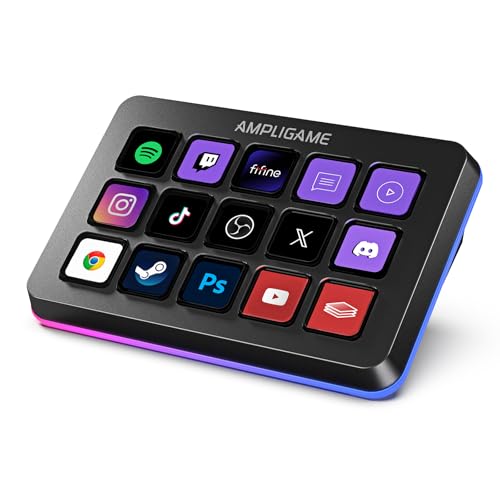
FIFINE AmpliGame Stream Controller 15 Macro Keys
EMEET PIXY Dual-Camera AI-Powered PTZ Camera 4K

BOSGAME E5 11 Pro Mini PC, AMD Ryzen 5300U
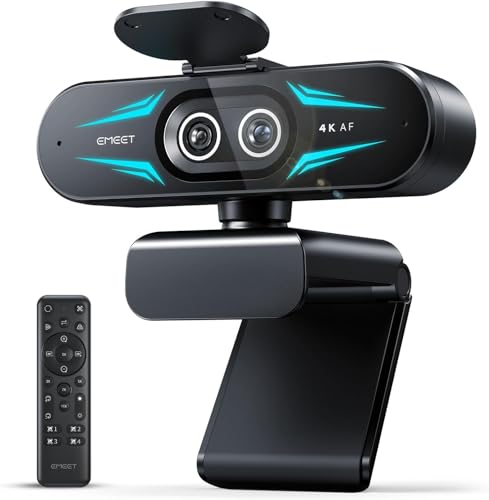
EMEET C60E Dual-Camera 4K Webcam for Streaming

Prebuilt Gaming Desktop PC, AMD Ryzen 5 5500, GeForce RTX 3050 6GB

Gaming PC Desktop Computer, GeForce RTX 3050 8GB GDDR6

ViprTech Rebel 4.0 GamingPC, Ryzen 7, RTX 4060 8GB
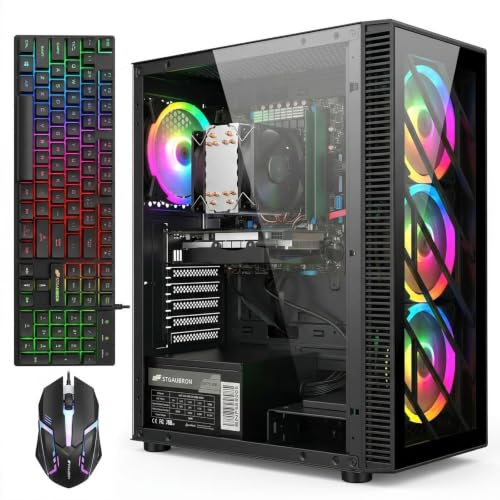
STGAubron Gaming PC Desktop, Intel i7 Xeon E5, RX 550 4G
More Details On Our Top Picks
Shortcuts matter most once your stream starts moving fast, and this controller is built around that job. The 15 macro keys give you room for scene changes, app launches, and repeating actions without hunting through menus. For a desk already crowded with a mic arm, webcam, and maybe a small mixer, that kind of control can feel like clearing clutter from the center of the stage.
The trade-off is straightforward, it solves control more than it solves computing power. You’re looking at a Mac and PC-friendly stream keypad, not a full workstation, so it fits best beside another machine rather than in place of one. Compared with the larger desktop picks below, it helps you work faster at the stream desk instead of carrying the whole load.
Strong Points
- 15 assignable keys keep common actions close.
- Scene switching and trigger commands suit OBS-style setups.
- Small footprint leaves space for a keyboard and mouse.
- Works across Mac and PC, which helps mixed workstations.
Things To Consider
- It’s a control surface, not a computer.
- The value shows up most in busy stream workflows.
- Setup time depends on how deep your macros go.
Who It Suits Best
Streamers who run OBS-heavy shows or juggle frequent hotkeys will get the most from it.
Where A Sibling Pick Shines
EMEET C60E Dual-Camera 4K Webcam for Streaming fits better for streamers who need the camera itself to do more of the production work.
This one leans hard into camera intelligence. The dual-camera layout pairs a main 4K imaging path with a second AI-assisted lens that helps keep framing and exposure on track, which matters when you lean, gesture, or shift position during a live show. Compared with the smaller stream controller above, this is about presence on camera, not stream deck speed.
PTZ, or pan-tilt-zoom, means the camera can move its view rather than stay fixed, and that gives you more range in a single device. The trade-off is setup complexity, since smarter framing usually means more tuning before it feels natural. For solo hosts, coaches, or creators who stand and move, it makes a lot of sense.
What We Like
- Dual-camera design gives it more framing flexibility.
- 4K capture suits sharper face cam and product shots.
- AI tracking helps keep you centered during movement.
- PTZ control is useful for more dynamic streams.
Points To Note
- It rewards careful setup more than a basic webcam does.
- The feature set is more than some simple desk streams need.
- It’s best suited to a cleaner, front-facing mount.
Built With In Mind
Creators who move around the frame or present products on camera will benefit most.
Another Choice May Suit
EMEET C60E Dual-Camera 4K Webcam for Streaming is the easier fit for streamers who want a more straightforward webcam with zoom control.
A mini PC earns its keep on compact desks, and this BOSGAME model is aimed squarely at that use. The Ryzen 3 5300U gives you 4 cores and 8 threads, which is enough structure for browser tabs, chat tools, overlays, and office work without demanding tower-sized space. For a spare room studio or a small apartment desk, that balance is the point.
The honest read is that you’re getting a space-saver, not a heavyweight stream rig. That makes it a strong fit for lighter broadcasts, admin work, and control-room duties beside a separate capture or gaming setup. Compared with the fuller desktops later in the list, it trades raw headroom for a tidier footprint.
Highlights
- Mini form factor keeps the desk open.
- 4 cores and 8 threads suit everyday multitasking.
- Good fit for streaming tools plus office tasks.
- Lower physical footprint helps small studios feel less crowded.
Minor Gripes
- It’s better for lighter workloads than demanding gaming streams.
- Internal expansion is naturally tighter than in a tower.
- Long session creators may want more headroom elsewhere.
Feature Snapshot
Whose Shelf It Belongs On
Home office streamers and anyone who wants a small companion PC for control tasks will appreciate it.
Look Elsewhere When
Prebuilt Gaming Desktop PC, AMD Ryzen 5 5500, GeForce RTX 3050 6GB fits better for streamers who want one tower to handle more of the workload itself.
The C60E is the kind of webcam that makes a single camera do more than one job. Its wide-angle and telephoto views let you shift from whole-room framing to tighter presentation shots, which is useful in product demos, tutorials, or a desk stream with two people. That flexibility sits closer to the PIXY than to the simpler camera options you see in many setups.
PDAF, or phase-detection autofocus, helps the lens lock focus more quickly than basic contrast-only systems, and that matters when your hands move into frame. The remote control and dual microphones add convenience, although the overall appeal depends on how much control you want from one device. For many live hosts, it’s a tidy all-in-one camera solution.
Upsides
- Wide-angle and telephoto views cover different shot styles.
- Hybrid zoom helps frame closer detail without changing seats.
- Autofocus support is useful during active presentations.
- Built-in mics and remote control simplify day-to-day use.
Softer Spots
- The richer feature set takes more setup attention.
- Desk mounting and placement matter more with dual-view framing.
- Some streamers may still prefer a separate mic.
Core Details
Perfect Match For
Stream hosts who demonstrate gear, craft, or tabletop content will get the most from it.
Skip It When
EMEET PIXY Dual-Camera AI-Powered PTZ Camera 4K is the stronger fit for creators who want more camera automation and tracking support.
This is the first full tower here that feels aimed at doing several stream tasks at once. The Ryzen 5 5500, RTX 3050 6GB, 16GB of DDR4 memory, and 1TB NVMe SSD point to a setup that can cover games, overlays, and basic editing without immediately feeling cramped. For a first serious Twitch station, that combination lands in a sensible middle lane.
The trade-off is that 6GB graphics memory is comfortable for 1080p-focused play, but it is not a blank check for every heavy visual setting. You also get ARGB air cooling, which adds visual flair and practical airflow, though it can mean a little extra cable and fan presence inside the case. Compared with the BOSGAME mini PC, this one gives you a much more complete all-in-one stream tower.
Best Bits
- Ryzen 5 and RTX 3050 balance stream and game load.
- 16GB memory helps with common multitasking needs.
- 1TB NVMe SSD keeps apps and captures close at hand.
- Prebuilt format removes assembly work for new setups.
Small Caveats
- Graphics limits are best matched to 1080p-focused use.
- ARGB styling adds more case lighting than some desks need.
- Heavy editing projects will still benefit from higher-end hardware.
At A Glance
The Right Fit
New streamers who want a single desktop for gaming, OBS, and editing will feel at home here.
Where A Sibling Pick Shines
ViprTech Rebel 4.0 GamingPC, Ryzen 7, RTX 4060 8GB suits streamers who want more graphics headroom and a stronger ceiling.
Among the midrange towers in this roundup, this one pushes harder on graphics memory. The RTX 3050 with 8GB GDDR6 gives you more room than the 6GB card in the ZYNEEX desktop, and that difference matters when you want a game, a browser, and stream tools open at the same time. It’s a useful middle step before you jump to the higher-cost RTX 4060 class.
The Ryzen 7 4700LE adds another layer of multitasking comfort, especially for streamers who keep many apps alive during a broadcast. The machine still sits in familiar 3050 territory, so the value comes from balance rather than flashy excess. For content creation mixed with live play, that usually beats overbuying a feature you won’t use.
Positives
- 8GB graphics memory gives more breathing room than 6GB models.
- Ryzen 7 support helps with multitasking and background tasks.
- Good fit for streaming while gaming at modest settings.
- Desktop format leaves room for upgrades and maintenance.
Areas To Watch
- It still sits below the stronger RTX 4060 tier.
- The case and cooling design will matter during longer sessions.
- Power users may prefer a newer graphics step up.
Technical Sheet
Who Should Grab It
Streamers who keep several apps open and want better graphics breathing room will benefit most.
Reach For A Different Pick When
ViprTech Rebel 4.0 GamingPC, Ryzen 7, RTX 4060 8GB is the cleaner step up for creators who want a more capable graphics platform.
This is the most capable desktop in the group on paper, and it reads that way in the part list. Ryzen 7, RTX 4060 8GB, 16GB of memory, and a 1TB NVMe SSD point to a machine built for heavier game loads, cleaner multitasking, and longer stretches on stream without immediately running out of room. The RGB case lighting is a styling bonus, not the reason to choose it.
The flip side of that higher ceiling is simple, you’re paying for headroom. For a creator who edits, streams, and games from the same tower, that extra graphics margin can feel well placed; for lighter broadcasts, it may be more machine than you need. Compared with the ZYNEEX desktop, this one is the stronger long-term anchor.
Reasons To Buy
- RTX 4060 8GB gives the most graphics room in this list.
- Ryzen 7 helps the system stay calm with multiple tasks open.
- 1TB NVMe SSD fits a serious game and capture library.
- RGB case lighting adds a polished desk presence.
Worth Noting
- Its strengths matter most in more demanding setups.
- It makes sense to match it with a stronger display.
- The higher part mix may exceed what casual streamers need.
Details At A Glance
Who Will Love This
Creators who want one tower to handle stream duties, gaming, and editing will get the most from it.
Where A Sibling Pick Shines
Prebuilt Gaming Desktop PC, AMD Ryzen 5 5500, GeForce RTX 3050 6GB is the milder choice for anyone who wants a more restrained starting point.
This STGAubron desktop sits at the more modest end of the list, and that makes its role pretty clear. The 16GB of DDR4 memory and 512GB SSD help with daily multitasking, while the RX 550 4G graphics card keeps expectations in check for lighter gaming and simpler stream layouts. For study rooms, home offices, or first-time stream setups, that can be enough.
The main trade-off is graphics headroom, so this is not the machine for a creator who wants demanding visual settings or a crowded broadcast desk. It pairs better with basic overlays, smaller games, and straightforward capture work. Compared with the ViprTech and ZYNEEX towers, it’s the gentlest entry point in the group.
Positives
- 16GB memory is helpful for common desktop multitasking.
- 512GB SSD keeps boot and launch times sensible.
- Lower-intensity streamers can keep costs and complexity down.
- Works as a simple all-purpose home or study machine.
Honest Caveats
- RX 550 graphics set clear limits for heavier gaming.
- It suits lighter streams more than visually demanding ones.
- Storage may feel tight once clips and games build up.
Made For
New streamers and home-office users who want a basic tower with room to grow a little.
Swap It Out When
Gaming PC Desktop Computer, GeForce RTX 3050 8GB GDDR6 is the better fit for anyone who wants a stronger graphics ceiling.
What Matters Most Before Choosing Computers For Streaming Twitch
Match The Machine To Your Stream Load
The biggest mistake is treating a stream PC like a normal office desktop. Your setup has to handle game rendering, scene switching, browser tabs, audio tools, and chat at once, so processor strength, memory, and graphics all matter together. A mini PC can suit control duties, but a tower is the cleaner route for full gaming plus broadcast work.
Don’t Overbuy Lighting And Underspec The Core
RGB case lighting looks sharp, yet it doesn’t help frame rate or encode overhead. The real spend usually goes into the CPU, GPU, memory, and SSD, because those parts shape how stable your stream feels during longer sessions. For a creator planning to edit clips and archive VOD files, storage capacity matters fast.
Camera And Control Gear Still Shape The Result
A strong desktop does not fix a weak face cam, and a smart webcam does not replace a capable computer. Stream controllers, PTZ cameras, and dual-view webcams help more when your workflow needs fast scene changes or active on-camera movement. For desk-based shows, simpler gear often keeps the whole chain easier to manage.
Things Worth Knowing First
Common Shopping Slip Ups
Shoppers often focus on one headline part and ignore the rest of the system. That usually leads to a machine that looks strong on paper but stumbles once chat, OBS, and gameplay run together. A more balanced part mix keeps the stream calmer.
The Upgrade Payoff
Higher-tier machines cost more because you get better graphics headroom, faster multitasking, and more comfortable storage for captures and games. For creators who keep one PC doing everything, that extra margin is easy to justify. For lighter chatting or presentation streams, the midrange route usually makes more sense.
Frequently Asked Questions
Do you need a full gaming PC for Twitch streaming?
Not always. A lighter stream setup can work with a mini PC or a camera-focused upgrade, depending on how much gameplay you plan to run.
Why does the GPU matter so much?
The graphics card helps carry game rendering and can reduce pressure on the rest of the system. That becomes more important once you stream and play at the same time.
Is a webcam upgrade enough on its own?
A better webcam improves what viewers see, but it won’t fix a slow computer. For a cleaner result, the camera and the PC should both suit the workload.
How much storage makes sense for streamers?
A larger SSD helps once you keep games, clips, and editing software in one place. Smaller drives fill quickly, especially with recorded sessions.
Are mini PCs a good choice for streaming setups?
They work well for control stations, office tasks, and lighter broadcasts. For a main gaming stream desk, a tower usually gives you more room to grow.
