


Studio work runs smoother when the computer side stops getting in the way. You want stable connections, enough headroom for recording and playback, and a setup that fits the way you actually work, whether that means a compact USB interface at a desk or a fuller workstation with room for plugins and storage.
This roundup focuses on studio recording rigs and bundles that make sense for home rooms, podcast corners, and small production spaces. Some picks center on the computer itself, while others build around interfaces, microphones, shields, and mixer packages that keep a session moving without a pile of extra parts.
Quick Look At The Shortlist

PreSonus AudioBox USB 96 25th Anniversary Studio Recording Package

MAONO PD200W Hybrid Wireless Podcast Microphone

Upgraded Studio Recording Microphone with Isolation Shield & Pop Filter

Studio Recording Microphone Isolation Shield with Pop Filter and Metal Tripod Stand

Also GO Podcast Equipment Bundle, F998 Audio Mixer with BM800 Microphone

Podcast Equipment Bundle, Recording Studio Package with Podcast Microphone and Voice Changer

Dell Precision 3620 / T3620 Entry Level Music Production Workstation PC
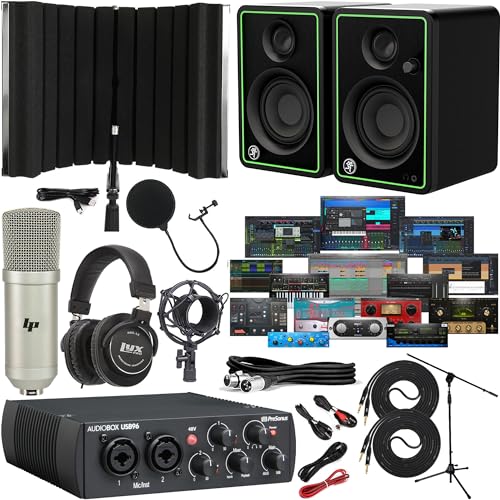
PreSonus AudioBox USB 96 Recording Bundle with Studio Monitors, Condenser Mic, Isolation Shield & Software
More Details On Our Top Picks
This bundle fits you well when you want a straightforward studio start without chasing separate pieces. The AudioBox USB 96 interface gives you the computer-recording core, while the included mic and headphones cover the basic chain for vocals and monitoring.
The honest read is that it makes the most sense in a home room where you want one purchase to cover a lot of ground. Compared with the standalone mic options below, it asks for more desk space, but it also removes more guesswork.
Strong Points
- Interface-centered setup keeps recording and monitoring in one path.
- Included microphone helps you get a session going without extra matching.
- Headphones support private monitoring in shared spaces.
- Works well for vocals, instruments, and simple home production.
Things To Consider
- It takes more desk room than a single-mic pick.
- You still need a computer and recording software workflow in place.
Feature Card
Who It Suits Best
You benefit most if you want a home recording setup that covers the basics in one boxed purchase.
A Better Fit Elsewhere
The Dell Precision 3620 / T3620 Entry Level Music Production Workstation PC suits you better if your priority is raw session capacity rather than bundled recording gear.
Three connection paths make this mic unusually adaptable for studio recording on a computer desk. Wireless mode gives you room to move, USB keeps setup simple, and XLR ties into a more traditional audio interface chain.
That flexibility matters most for podcasting, voiceover, and stream work where your setup can change from week to week. Compared with the PreSonus bundle, this one is far more focused on the microphone itself, so you trade extra accessories for cleaner placement choices.
Highlights
- Wireless, USB, and XLR connectivity cover multiple studio styles.
- Dynamic capsule design suits spoken voice use especially well.
- Cardioid pickup pattern helps keep the front-facing voice focus tighter.
- The included desktop stand keeps the footprint manageable on a desk.
Room For Improvement
- Wireless convenience can add one more thing to manage on a busy desk.
- Serious multitrack setups will still lean on an interface or mixer.
- Software features matter less if you only want a bare-bones mic path.
Who It Suits Best
You fit this pick best if you record speech-heavy content and want one mic that can move between simple and more advanced rigs.
Another Choice May Suit
The ALSO GO Podcast Equipment Bundle, F998 Audio Mixer with BM800 Microphone suits you better if you want a fuller starter package with more included accessories.
This one leans toward a self-contained vocal corner, which is useful in apartments or shared rooms. The isolation shield and pop filter sit around the microphone path to help shape a more contained recording space without much setup drama.
Compared with the MAONO pick, it’s less about connection flexibility and more about the physical recording environment. That makes it a sensible choice for you if desk noise and room reflections are part of the daily picture.
Upsides
- USB output keeps the connection path direct for computer work.
- Isolation shield supports a more focused desk recording area.
- Pop filter helps manage close-mic vocal plosives.
- Works across PC, laptop, and smartphone use cases.
Points To Note
- The shield adds bulk, so storage matters on a small desk.
- More pieces also mean a little more setup time before each session.
Details At A Glance
Who Will Love This
You suit this pick best if you want a compact vocal station and already know your way around basic desk setup.
Where A Sibling Pick Shines
The PreSonus AudioBox USB 96 Recording Bundle with Studio Monitors, Condenser Mic, Isolation Shield & Software is the stronger match for a fuller home studio starting from zero.
The appeal here is plain: a compact recording station built around control and placement. A metal tripod stand usually helps with steadier desk positioning, and the three-panel shield gives the microphone a more enclosed working space.
That’s useful for spoken-word sessions where you want a neater footprint than a full bundle. Compared with the Dejasound mic package, this one leans more toward room shaping than toward mic-first simplicity.
Bright Spots
- Metal tripod stand gives the setup a firmer desktop base.
- Three-panel shield creates a more defined recording zone.
- Compatible with phones, PCs, and laptops for flexible placement.
- Pop filter helps keep close vocal work cleaner at the source.
Softer Spots
- The shield needs thoughtful storage because it occupies noticeable space.
- More hardware around the mic means a bit more assembly each time.
Best Suited To
You fit this pick best if you record at a desk and care more about mic placement control than about bundled software extras.
Swap It Out When
The MAONO PD200W Hybrid Wireless Podcast Microphone suits you better if cable freedom and multiple connection paths matter more than a shield-based setup.
This bundle is built for fast setup, especially for you who want a podcast desk to feel complete without sourcing every cable and accessory separately. The mixer, microphone, boom arms, cables, mounts, and filters work as one coordinated starter path.
That matters in a first apartment, a spare room, or any place where you’d rather spend less time matching parts. Compared with the simpler Dejasound mic bundle, this one is broader and more hands-on, which helps beginners but also brings more pieces to manage.
Best Bits
- Multiple included components reduce the need for separate add-ons.
- F998 mixer gives you a more control-rich desk centerpiece.
- BM800 mic keeps the voice path anchored in a known podcast format.
- Accessories like boom arms and filters help finish the workspace neatly.
Areas To Watch
- More bundled parts also mean more setup and cable management.
- Desk organization matters, especially in tight workspaces.
Who Should Grab It
You fit this bundle best if you want a broad starter kit for podcasting and voice recording with minimal separate sourcing.
Look Elsewhere When
The MAONO PD200W Hybrid Wireless Podcast Microphone is the cleaner match for you if you want a smaller, more adaptable mic-first setup.
This package pushes harder into live content work than the other bundles here. The sound card and voice changer make it better suited to stream-style sessions where you want quick control over the on-air character of the audio.
That focus is helpful for vloggers and live presenters who want a single desk hub rather than separate pieces scattered across the table. The trade-off is that the more specialized feature set may be more than you need for plain voice capture.
Reasons To Buy
- Sound card puts more session control in one place.
- Voice changer adds flexibility for live presentation work.
- Smart noise reduction support suits busier room environments.
- Bundled approach helps simplify a streaming desk.
Minor Gripes
- Special effects matter less for straight narration or simple narration work.
- It asks for more desk attention than a single microphone pick.
The Right Fit
You suit this pick best if your sessions lean toward streaming, live voice work, or content creation with a more processed sound.
Reach For A Different Pick When
The PreSonus AudioBox USB 96 25th Anniversary Studio Recording Package makes more sense for you if you want a more traditional recording-first bundle.
For heavier sessions, this desktop puts the emphasis on core workstation parts instead of audio extras. The Intel i7-6700, 32GB of DDR4 memory, and dual-storage layout give you the kind of foundation that suits plugin-heavy DAWs and larger project files.
That mix is especially relevant in a studio where you want the computer to stay out of the way while recording and editing stack up. Compared with the bundle-style options above, this one is the more serious computer-first choice, though it does not include recording gear.
What We Like
- 32GB of memory supports larger session loads with more breathing room.
- SSD and HDD pairing balances boot speed with roomy storage.
- HDMI and USB 3.0 cover common studio desk connections.
- Windows 11 Pro gives the system a current workstation base.
Honest Caveats
- It is a renewed desktop, so condition expectations matter.
- Integrated graphics are enough for studio use, but not for visual workloads.
- You still need separate audio hardware and microphones for a complete rig.
Core Details
Made For
You suit this workstation best if you need a computer base for audio work, not a bundled microphone kit.
Where Shoppers Go Wrong
The PreSonus AudioBox USB 96 Recording Bundle with Studio Monitors, Condenser Mic, Isolation Shield & Software fits better for you if you want the computer side and the studio gear in one purchase.
This is the broadest home-studio style package in the group. You get the AudioBox 96 interface, monitors, a condenser mic, an isolation shield, and software support, so the desk can move from recording to playback without a lot of extra sourcing.
That balance suits you especially well in a spare room or corner studio where you want recording and listening to live in the same place. Compared with the first PreSonus bundle, this one is even more complete on the desk itself, though it naturally asks for more space.
Positives
- Monitors and headphones support both playback and private work.
- The included mic, shield, and interface cover the core signal chain.
- Software inclusion helps you move from setup to recording faster.
- Good fit for music demos, podcast work, and general home production.
Small Caveats
- The full bundle needs more desk and shelf room than a single mic.
- More included parts means more unpacking and cable routing.
Feature Rundown
Who Should Grab It
You suit this bundle best if you want a home studio foundation with monitoring, recording, and software in one package.
Where Another Pick Suits Better
The Dell Precision 3620 / T3620 Entry Level Music Production Workstation PC is the better fit for you if the computer itself matters more than the bundled studio gear.
What Matters Most Before Choosing Computers For Studio Recording
Session Load And Headroom
A computer for studio work needs enough memory and processor strength to keep tracks, plugins, and monitoring steady. A lighter vocal setup can live with simpler hardware, while larger arrangements and effect chains ask for more room to breathe.
Storage And File Handling
Fast solid-state storage helps the system start quickly and open sessions with less waiting, while larger hard drives give you a place for archives and backups. For long projects, that split matters more than flashy specs on paper.
Connection Paths And Desk Fit
USB 3.0, HDMI, and interface-friendly layouts matter because studio desks get crowded fast. A clean physical setup often saves more frustration than chasing small spec bumps.
Before You Click Buy
Wrong Turns To Avoid
A common mistake is buying a computer that looks strong on paper but leaves too little memory or storage for audio work. Another is choosing a bundle that duplicates gear you already own, which wastes desk space and money.
The Upgrade Payoff
Higher-tier systems usually pay for faster processors, more RAM, and better storage balance. That upgrade makes sense when you handle larger sessions, keep many plugins open, or want fewer bottlenecks during editing.
Frequently Asked Questions
What makes a computer suitable for studio recording?
You want stable processing, enough memory, and storage that keeps sessions moving. USB connectivity and a sensible desk layout matter too.
Do you need a dedicated audio interface?
A dedicated interface is useful for cleaner input control, headphone monitoring, and microphone connections. Basic computer audio works for simple tasks, but it gives you less flexibility.
Is a bundle better than buying parts separately?
A bundle helps when you want a working setup with less matching work. Separate pieces suit you better when you already own some studio gear or want to upgrade one part at a time.
How much storage helps for audio projects?
More storage helps once projects start piling up, especially with multitrack work and archived takes. A mix of fast SSD storage and larger hard-drive space is practical for many studios.
What should you prioritize for a first studio computer?
Start with processing headroom, memory, and a stable recording path. After that, choose the bundle or desktop style that fits your room and your workflow.
