


Picking a computer in 2026 is less about raw speed alone and more about fit. You need the right balance of screen size, storage, portability, and ports for the way you actually work, study, or run a desk setup.
This shortlist keeps the focus on practical use cases, from lightweight laptops for class to compact desktops for a crowded office. You’ll also see where each pick gives up something, because no single machine handles every job cleanly.
Quick Look At The Shortlist

Apple MacBook Air 13-inch M5

Dell Optiplex 7050 SFF Desktop PC

Apple MacBook Air 15-inch M5

Apple MacBook Pro M5 14-inch

GEEKOM IT12 Mini PC
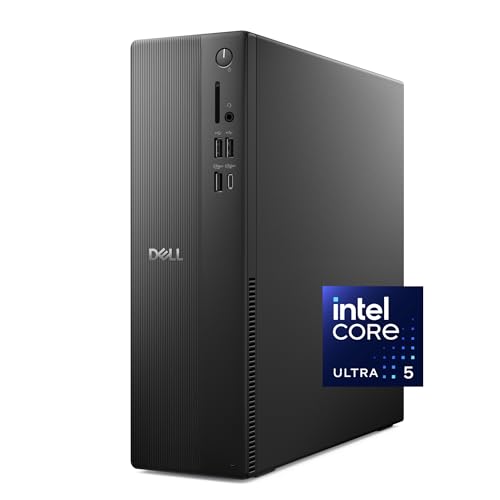
Dell Slim Desktop ECS1250
HP 2026 Lightweight Chromebook

HP Essential 2026 Laptop
More Details On Our Top Picks
The 13-inch MacBook Air keeps the footprint light without feeling stripped down. The 13.6-inch Liquid Retina display gives you more canvas than a basic ultrabook, and the 16GB unified memory setup suits steady multitasking, from class notes to a stack of browser tabs.
The honest trade-off is obvious, it’s built for portability first, not the heaviest creative workloads. You also get Touch ID, Wi-Fi 7, and a 12MP Center Stage camera, which makes this a polished daily carry for commuters, students, and anyone who wants fewer compromises than a budget machine like the HP Essential.
Strong Points
- 13.6-inch display gives you enough room for documents, spreadsheets, and split windows.
- 16GB unified memory helps the machine stay composed with multiple apps open.
- Touch ID speeds up sign-in without adding extra clutter to the chassis.
- Wi-Fi 7 suits busy homes and shared dorm networks with modern routers.
Things To Consider
- Midnight finishes tend to show smudges more readily than lighter coatings.
- One USB-C centered workflow can feel tight for desk-heavy setups.
Who It Suits Best
Students, commuters, and office workers who want a slim laptop with a larger-than-basic screen will get the most from it.
A Better Fit Elsewhere
Apple MacBook Pro M5 14-inch suits creators who want more display headroom and a stronger GPU for heavier editing work.
Small-form-factor desktops like this Optiplex suit desks where every inch matters. The i7-7700, 32GB DDR4 memory, and 1TB SSD storage point to a machine that can keep a browser, office apps, and local files moving without the cramped feeling of an underpowered starter box.
Compared with the thin-and-light Apple laptops, this one stays planted and makes sense beside a monitor or two. HDMI and dual-monitor support matter in a home office, while Wi-Fi and Bluetooth make the setup less fussy, though the renewed condition means cosmetic variation is part of the equation.
Upsides
- 32GB memory helps with heavier multitasking and many open tabs.
- 1TB SSD leaves room for documents, media, and installed software.
- Compact SFF case fits under or beside a monitor with ease.
- Dual-monitor support suits spreadsheet work and split workflows.
Worth Noting
- The older processor generation is fine for office work, not demanding creator tasks.
- Renewed units can arrive with surface wear that does not affect function.
- Stays tied to a desk, so it’s a poor fit for moving around the house.
Made For
Office users, back-room workstations, and home setups that need a compact wired desktop will get the most value here.
Look Elsewhere When
Dell Slim Desktop ECS1250 suits shoppers who want a newer platform and a cleaner out-of-box home-office build.
The 15-inch Air keeps the same thin-laptop approach as the 13-inch model, then stretches the display to 15.3 inches for more breathing room. That extra space helps with side-by-side documents, wider spreadsheets, and the kind of schoolwork that feels cramped on smaller screens.
You still get the same 16GB unified memory, 512GB SSD, Touch ID, Wi-Fi 7, and 12MP Center Stage camera, so the real draw is workspace, not a new feature list. For most dorm rooms and kitchen tables, it’s the better-feeling machine when you want a larger screen without jumping to a heavier pro notebook.
Highlights
- 15.3-inch panel gives you more room for editing and multitasking.
- Thin chassis keeps a large-screen laptop surprisingly easy to carry.
- 16GB unified memory supports steady everyday use and app switching.
- 512GB SSD gives reasonable local storage for files and projects.
Areas To Watch
- Larger screen means a bigger bag footprint than the 13-inch Air.
- Midnight finish can pick up fingerprints during daily carry.
Right Fit For
Students, writers, and office workers who want a portable laptop with a roomier display will appreciate it most.
A Better Fit Elsewhere
Apple MacBook Air 13-inch M5 suits commuters who value the smallest possible footprint above screen space.
Where the Air models lean light, this MacBook Pro shifts toward sustained work. The M5 chip pairs a 10-core CPU with a 10-core GPU, and the 14.2-inch Liquid Retina XDR display is aimed at people who notice screen quality during long editing or design sessions.
That extra memory and storage headroom, 24GB unified memory and 1TB SSD, make the machine feel better suited to heavier files than the Air line. The trade-off is price and weight class, so you’re paying for a more serious workstation feel rather than a casual carry-around notebook.
Best Bits
- 10-core CPU and 10-core GPU suit demanding app loads.
- 24GB unified memory helps with larger projects and multitasking.
- 1TB SSD leaves plenty of local room for creative files.
- Liquid Retina XDR display is a strong match for visual work.
- Space Black finish gives it a restrained studio look.
Points To Note
- More computer than many home users need for email and browsing.
- Less convenient for all-day carrying than the Air models.
Who Should Grab It
Creative professionals, power users, and students in media-heavy programs will get the most from it.
Swap It Out When
Apple MacBook Air 15-inch M5 is the better fit for everyday use where portability matters more than GPU muscle.
Feature Rundown
Mini PCs make sense in shared workspaces where a full tower would crowd the desk. The IT12 uses a full metal chassis, ships with 16GB RAM and a 512GB SSD, and adds USB4 plus 8K UHD support, so it’s clearly aiming at tidy setups with real peripheral needs.
The upgradable design matters for offices that expect a machine to stay in service for a while, and the low-heat brief is welcome in a shelf or counter install. Compared with the Dell Optiplex 7050 SFF, this one takes up even less room, though the smaller box may be less forgiving for users who want easy internal access.
Reasons To Buy
- Full metal chassis gives the unit a more solid desk presence.
- USB4 expands use with modern docks and fast peripherals.
- 8K UHD support makes it suited to high-resolution display setups.
- Upgradable design helps extend useful life in office environments.
Small Caveats
- Mini form factor can be less convenient for hardware access than a larger desktop.
- Entry-level processor class keeps it aimed at office and admin work.
- Best paired with a separate monitor, keyboard, and mouse.
Whose Shelf It Belongs On
Small offices, front desks, and counter setups that need a tiny but capable desktop will appreciate it most.
Another Choice May Suit
Dell Slim Desktop ECS1250 is the safer fit for shoppers who want a more mainstream tower-style desktop with easier expansion room.
Core Details
This Dell lands in the useful middle ground between the older Optiplex and the ultra-small GEEKOM mini PC. Intel Core Ultra 5-225, 16GB DDR5, and a 512GB SSD point to a current, everyday desktop for work documents, web use, and general home office life.
The wired keyboard included in the box is a small but practical touch, and Wi-Fi 6 plus Bluetooth make it easier to build a neat workspace. One thing worth considering is that the Intel UHD Graphics are fine for standard desktop duties, yet they won’t replace a machine aimed at visual production.
Positives
- Core Ultra platform keeps the system current for daily office work.
- 16GB DDR5 gives the desktop a responsive feel with multiple apps open.
- 512GB SSD is a sensible size for software and documents.
- Included wired keyboard helps you get set up quickly.
Minor Gripes
- Integrated graphics are aimed at basic use, not creative acceleration.
- Windows Home may not suit every business deployment.
The Right Fit
Home office workers and general desktop users who want a straightforward, modern tower will fit it well.
Where A Sibling Pick Shines
GEEKOM IT12 Mini PC suits counters and tight shelves where an even smaller footprint matters more than a tower shape.
This Chromebook keeps the hardware modest on purpose. A 14-inch HD IPS display, 4GB DDR5, and 128GB SSD storage suit web work, school portals, and streaming, especially for anyone who treats the laptop as a browser-first machine.
Compared with the MacBook Air line, you give up speed headroom and screen sharpness, but you also get a lighter, simpler setup running Chrome OS. The renewed label makes it appealing for budget-minded shoppers who want a secondary laptop for travel, though the lower-resolution panel is a real trade-off.
Bright Spots
- Lightweight design makes it easy to carry through campus or across town.
- Chrome OS keeps the interface simple for routine tasks.
- HD IPS panel gives better viewing angles than older basic screens.
- 128GB SSD suits cloud-centered storage habits.
Room For Improvement
- 4GB memory is tight for heavy multitasking.
- HD resolution leaves less detail than a Full HD panel.
- Renewed units can vary in exterior wear.
Best Suited To
Students, light web users, and travelers who need a simple machine for browsing and school tasks will get the most from it.
Skip It When
Apple MacBook Air 13-inch M5 is a better fit for demanding multitaskers who want a much stronger premium laptop.
The HP Essential keeps things pared back for basic productivity. With 4GB RAM and an Intel processor, it’s aimed at email, document work, school portals, and casual browsing rather than heavy app juggling.
That makes it a sensible entry point for someone who wants a simple laptop without paying for more machine than necessary. Compared with the Chromebook above, it may feel more like a conventional Windows notebook, but the same modest memory means you’ll want to keep expectations grounded.
Standout Traits
- Simple hardware profile suits basic day-to-day computing.
- Office-oriented setup is easy to understand for first-time laptop users.
- Works well for word processing and light browsing tasks.
Honest Caveats
- 4GB memory can feel tight with many browser tabs open.
- Better as a light-duty machine than a long-term power user system.
- Not the match for editing, gaming, or heavy multitasking.
Built With In Mind
Students, home users, and anyone who needs a basic Windows laptop for simple tasks will suit it best.
Reach For A Different Pick When
HP 2026 Lightweight Chromebook suits shoppers who prefer Chrome OS and a lighter travel-friendly notebook.
Feature Snapshot
What Matters Most Before You Choose A Computer
Common Shopping Slip Ups
Memory and storage get confused a lot. For everyday use, you want enough RAM for open apps and enough SSD space for your files, not a fancy label.
What The Higher Tier Buys
Better screens, stronger chips, and more memory usually cost more because they support heavier workloads and smoother multitasking. That upgrade makes sense for editing, design, or long work sessions, not plain email.
Frequently Asked Questions
How much memory suits a basic computer?
4GB can work for light browsing and school portals. 16GB feels much more comfortable for multitasking and longer sessions.
Is a laptop or desktop better for a home office?
A laptop gives you flexibility and easier storage. A desktop usually offers a tidier desk setup and better long-term expandability.
What does an SSD change day to day?
An SSD helps the machine start and open apps faster than older spinning storage. It also makes the system feel more responsive during routine work.
Do mini PCs handle regular office work well?
Yes, they fit spreadsheets, email, and web apps neatly. They make the most sense where desk space is tight.
Is a Chromebook enough for school use?
For web-based coursework and documents, yes. Heavy software and demanding multitasking push you toward a fuller laptop or desktop.
