


Docking stations make a laptop feel less like a compromise and more like a proper desk setup. You get fewer cables, easier monitor hookups, and a cleaner way to add Ethernet, card slots, audio, and extra USB ports without living in adapter chaos.
This roundup is built for home offices, hybrid work setups, and anyone who plugs and unplugs gear every day. You’ll see compact hubs, heavier desk docks, and models that suit dual or triple displays, so your choice can match your desk, laptop port, and monitor setup.
Quick Look At The Shortlist

Baseus Spacemate Docking Station 11-in-1
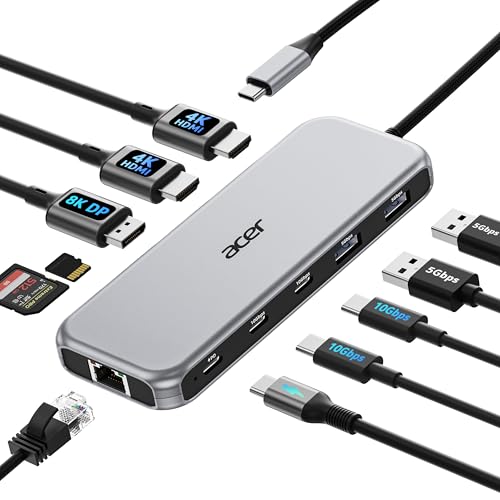
Acer Laptop Docking Station 3 Monitors, 11-in-1

Anker Prime Docking Station, 14-in-1 Laptop Docking Station Dual Monitor

Anker Nano Laptop Docking Station, 13in1 Dock
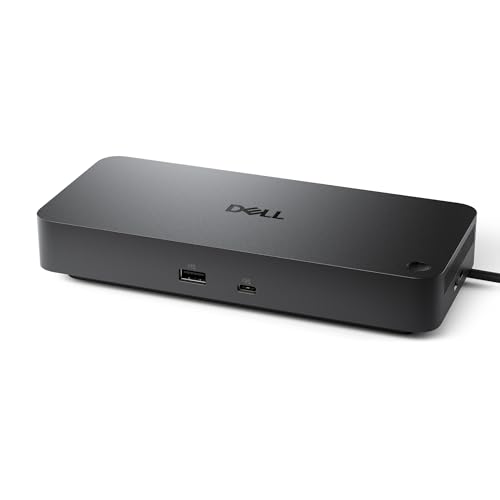
Dell Pro Laptop Docking Station WD25
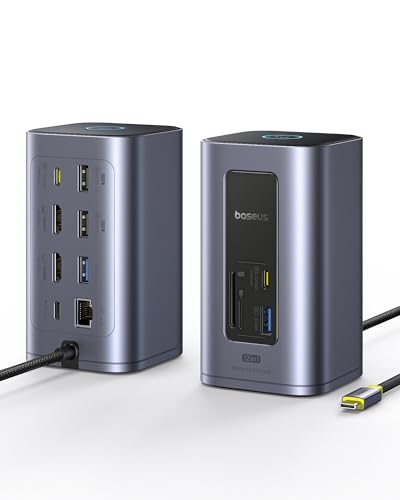
Baseus Spacemate Nomos Air Docking Station 12-in-1
Anker Nano Laptop Docking Station Dual Monitor 8-in-1 USB C Hub
More Details On The Shortlist
Three video outputs make this Baseus dock feel built for a desk that never sits still. The mix of HDMI, DisplayPort, USB-C, USB-A, Ethernet, and AUX gives you room for monitors, wired networking, storage, and headset audio without juggling adapters.
That breadth helps most in a busy home office, though the trade-off is obvious, it’s more dock than a casual travel hub. Windows-focused triple display support makes it a smart fit for spreadsheet work, content review, or anyone who keeps several windows open all day.
What We Like
- Triple-display layout supports a roomy desk setup.
- 10Gbps USB-A and USB-C ports help keep file transfers moving.
- Gigabit Ethernet suits a stable wired connection for work.
- 100W USB-C PD input leaves room for charging while docked.
Things To Consider
- Triple-display output is aimed at Windows use, so it is not the most flexible choice for mixed-device homes.
- The port-rich layout can feel overbuilt for a simple laptop-and-one-monitor desk.
Feature Snapshot
Who It Suits Best
Windows users who need several connections in one place will get the most from this dock, especially in a fixed desk setup.
A Better Fit Elsewhere
Anker Nano Laptop Docking Station, 13in1 Dock suits you better when desk space and travel carry equal weight.
Some docks try to do a little of everything, and this Acer model leans hard into that idea. Two HDMI ports, one DisplayPort, USB-C, USB-A, Ethernet, SD, and microSD give you a broad spread of connections without cluttering your desk with extra dongles.
The 4K at 60Hz HDMI output is the part that stands out for many laptop setups, because it keeps text and windows looking crisp on external displays. For workdays that mix file transfers, memory card imports, and charging, this one feels especially practical, though three-screen setups depend on laptop compatibility and the right port behavior.
Highlights
- Two HDMI ports and one DisplayPort widen your monitor options.
- SD and microSD slots help with camera cards and mobile devices.
- 10Gbps USB-C ports suit faster storage and accessory use.
- 1Gbps Ethernet keeps a wired link available at the desk.
- 100W charging support helps reduce charger clutter.
Worth Noting
- Three-monitor setups depend on your laptop’s video support, so compatibility still deserves a quick check.
- The many ports are useful, but they also make the dock feel more desk-bound than grab-and-go.
At A Glance
Who Will Love This
Content workers, office multitaskers, and anyone moving files from cards and drives will appreciate the spread of ports.
Skip It When
Baseus Spacemate Docking Station 11-in-1 suits you better if you want a more Windows-centered triple-display desk.
Plenty of docks stop at “enough,” but this Anker model aims a little higher with 14-in-1 connectivity and a strong focus on charging. Four devices can draw power at once through three USB-C ports and one USB-A port, which helps a crowded desk stay orderly.
That kind of headroom matters for power users juggling a laptop, phone, tablet, and peripherals at the same station. It does ask for a busier permanent setup, though, so this makes more sense on a full work desk than in a bag that changes locations every day.
Upsides
- 14-in-1 layout leaves room for a wide mix of accessories.
- 160W total output supports multi-device charging at the desk.
- Three USB-C ports help modern gear feel less cramped.
- Dual-monitor support suits a more serious workstation.
- Strong for users who keep several devices plugged in at once.
Areas To Watch
- The larger feature set may be more than a simple two-device desk needs.
- Its desk-first nature makes storage and cable routing worth planning early.
Quick Facts
Best Suited To
Power users who keep a full desk setup in one place will get the most value from this dock.
Where A Sibling Pick Shines
Baseus Spacemate Nomos Air Docking Station 12-in-1 suits you better if you want a cleaner dual-monitor layout with less bulk.
This one stands out because it tries to serve two lives at once. You get a 13-in-1 desktop dock, plus a detachable 6-in-1 hub that can pull off the desk and go with you, which is handy for hybrid work or tight travel bags.
Compared with the heavier Anker Prime, this feels more adaptable than expansive. It still supports triple displays, so you do not give up desk usefulness, but the detachable piece makes the whole setup easier to justify for commuters and frequent office switchers.
Best Bits
- Detachable hub gives you desk and travel flexibility.
- Two-in-one layout can replace separate accessories.
- Triple-display support keeps a workstation capable.
- Useful for people who move between locations during the week.
Small Caveats
- The detachable setup asks for a little more cable awareness than a fixed dock.
- Travel-friendly design usually means you will think more about what stays attached and what gets packed.
Feature Card
Who Should Grab It
Hybrid workers and commuters who split time between a desk and other work spots will appreciate the flexible design.
Look Elsewhere When
Dell Pro Laptop Docking Station WD25 suits you better when your laptop stays parked at one office station.
Dell keeps this one focused on the kind of desk setup that just needs to work every weekday. USB-C, 100W charging, DisplayPort, and HDMI cover the basics without turning the dock into a science project.
The sustainability angle and centralized device management will matter most in office settings where standardization matters. For home users, the honest read is simpler: you’re mostly getting a straightforward, business-minded dock that pairs well with a laptop parked near a monitor or two.
Bright Spots
- Clean, business-friendly feature mix.
- 100W USB-C charging keeps a desk less cluttered.
- DisplayPort and HDMI cover common monitor setups.
- Centralized management suits shared or managed workplaces.
Points To Note
- The simpler layout may feel restrained next to the more port-heavy Anker picks.
- It makes the most sense in a steady office role, not as a travel companion.
Details At A Glance
The Right Fit
Office setups and shared workstations get the clearest benefit from this dock’s straightforward style.
Swap It Out When
Anker Nano Laptop Docking Station 13in1 Dock suits you better if you need a detachable hub for moving between desks.
This Baseus dock leans into a neater desk footprint, which is a welcome contrast to the busier port clouds above. Dual 4K outputs and a 31.5-inch host cable make it feel intended for a more polished setup where cable reach matters.
That longer host cable helps most on wider desks or standing setups, though it also means you’ll want to plan placement a little carefully. For dual-monitor Windows use, it hits a sensible middle ground between a slim hub and a heavier workstation dock.
Reasons To Buy
- Dual 4K outputs suit a sharp two-monitor desk.
- Six USB ports give you room for everyday peripherals.
- 31.5-inch host cable helps with flexible placement.
- Cleaner layout can reduce desktop clutter.
Minor Gripes
- The longer cable is helpful, but it also asks for a bit of desk planning.
- Dual-monitor focus makes it less ambitious than triple-display picks like the Baseus Spacemate Docking Station 11-in-1.
Core Details
Whose Shelf It Belongs On
Desk-focused Windows users who want a tidier layout with dual monitors will feel at home here.
A Better Fit Elsewhere
Baseus Spacemate Docking Station 11-in-1 suits you better if triple displays matter more than a cleaner footprint.
Not every desk needs a dock that feels like command central. This Anker hub keeps things tighter with 8-in-1 connectivity, yet still covers dual monitors, card slots, and fast data paths for a tidy workspace.
The 85W USB-C upstream output and 100W PD input give you a sensible charging setup for a daily carry laptop. It suits smaller desks, mobile professionals, and anyone who wants fewer moving parts, though you give up the broader expansion of the larger Baseus and Dell options.
Positives
- Compact shape is easier to place on small desks.
- Dual 4K at 60Hz supports a clean two-monitor setup.
- SD and TF slots help with camera or media cards.
- 10Gbps ports keep common accessories moving quickly.
Honest Caveats
- The smaller port count limits how much desk gear you can park on the dock.
- Windows-focused display behavior means mixed-device homes need a little more checking.
Technical Sheet
Built With In Mind
Frequent travelers and laptop-first workers who still want dual monitors will get the most value from this compact hub.
Another Choice May Suit
Baseus Spacemate Nomos Air Docking Station 12-in-1 suits you better if you want a more desk-heavy Windows setup with extra breathing room.
What Matters Most Before Choosing A Dock
Display Count And Compatibility
Start with your monitor plan, not the dock itself. Dual and triple display support can depend on your laptop’s USB-C behavior, especially on Windows setups, so the safe move is matching the dock to the screens you actually plan to use.
Port Mix And Desk Habits
USB-A, USB-C, Ethernet, card slots, and audio all matter in different ways. A design-heavy setup may need faster data ports and dual 4K, while a simple office desk may only need charging, one monitor, and a wired network connection.
Size, Cable Reach, And Mobility
Larger docks usually belong on fixed desks, while smaller hubs travel more easily. Long host cables can help with standing desks or awkward layouts, but they also ask for a little planning so the workspace stays tidy.
Power Delivery And Daily Charging
Power delivery means the dock can pass charging power through the laptop connection. Higher output matters most for larger notebooks and work setups with several accessories, while lighter carry machines can be happy with a more compact model.
Small Details That Change The Choice
Where Shoppers Go Wrong
Many setups fail because the dock is chosen before the laptop’s video support is checked. A strong port count helps, but it won’t fix a mismatch between the notebook and the monitor plan.
Where The Extra Money Goes
Higher-tier docks usually pay for more ports, stronger charging, better monitor support, and cleaner desk management. That upgrade makes sense for long work sessions, shared offices, or a desk that runs several devices at once.
Frequently Asked Questions
Do Docking Stations Work With Every Laptop?
No, the laptop’s USB-C and video support still matters. The dock can only do what the computer connection allows.
How Many Monitors Can You Run?
That depends on the dock and the laptop connection. Some support dual displays, while others are built for triple-screen desks on Windows.
Is Ethernet Still Useful On A Dock?
Yes, especially for a desk setup that benefits from a wired connection. It can make workstations feel more stable than relying on wireless alone.
Do You Need A Large Dock For Home Use?
Not always, because many home setups only need charging, one or two screens, and a few USB ports. A compact hub can be enough for that kind of desk.
Why Do Some Docks Include SD Card Slots?
They help with cameras and memory cards, which is handy for photo work or file transfers. That can save you from adding another adapter to the desk.
Closing Thoughts
The right dock depends on how busy your desk really is. If you want the most flexible workstation, the Anker Prime and the larger Baseus models carry the most room to grow, while the Anker Nano options make more sense for leaner setups. For a clean desk that matches your habits, the better dock usually becomes obvious once you map the monitors, ports, and charging needs.
