


You want one USB-C connection to handle monitors, peripherals, wired internet, and charging without turning your desk into a cable knot. These Docking Stations For Windows Laptop focus on that everyday problem, whether you split your time between a home office, a shared desk, or a travel bag that still needs serious output.
Some of these picks lean heavy-duty, others stay compact and travel friendly. The right one depends on how many screens you run, how much power your laptop needs, and whether you care more about desk neatness or portability.
Quick Look At The Shortlist

WAVLINK Laptop Docking Station 85W PD
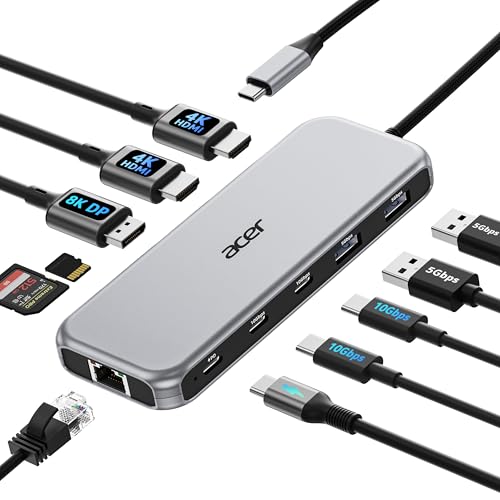
Acer Laptop Docking Station 3 Monitors 11-in-1 USB C Docking Station

Anker Prime Docking Station 14-in-1 Laptop Docking Station Dual Monitor

Anker Nano Laptop Docking Station 13in1 Dock with Detachable 6in1 USBC Hub
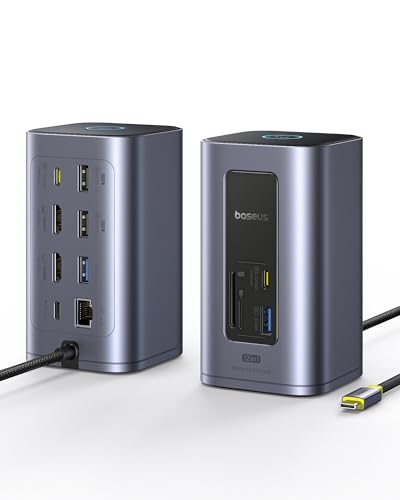
Baseus Spacemate Nomos Air Docking Station 12-in-1 for Dual Monitor Windows
Anker Nano Laptop Docking Station Dual Monitor 8-in-1 USB C Hub for Windows

Acer 13-in-1 Laptop Docking Station USB-C 3 Display Docking (2 HDMI+1 DP)
More Details On The Shortlist
Triple-monitor support is the big story here, and it matters most in a busy desk setup where one screen handles calls, another holds reference work, and the third keeps your main task front and center. Dual DisplayPort outputs plus HDMI give you more display-routing flexibility than simpler two-screen docks.
That 85W Power Delivery ceiling means the dock can pass charge along to a compatible laptop while still handling the rest of your gear. The trade-off is that a feature-dense layout can feel busy at first, so this suits you best when your desk stays fairly fixed and you want the same hub to handle workday cables without much fuss.
Strong Points
- Triple-display support gives you room for multitasking without juggling windows all day.
- DisplayPort and HDMI together make monitor matching easier across mixed setups.
- 85W power delivery keeps a compatible laptop charged through a single cable.
- USB 3.0, USB 2.0, Ethernet, and card slots cover common desk needs.
Things To Consider
- The port layout asks for a little desk planning, especially beside a large monitor stand.
- USB 2.0 ports suit low-demand gear, so faster accessories belong elsewhere.
- It makes more sense as a permanent desk hub than as a carry-around companion.
Feature Snapshot
Who It Suits Best
Desk-bound professionals who run multiple monitors and want one central connection point will get the most from this layout.
Where A Sibling Pick Shines
Anker Nano Laptop Docking Station Dual Monitor 8-in-1 USB C Hub for Windows is the cleaner fit for a lighter desk or a smaller carry kit.
Compared with the WAVLINK pick, this Acer leans into a broad port mix and still keeps three displays in play. Two HDMI ports, one DisplayPort, and 100W charging support make it feel aimed at a desk that does a bit of everything.
The honest read is that this suits a laptop owner who wants fewer adapters hanging off the side of the machine and more connection choices in one block. In a home office, that usually means a steadier routine for monitors, storage, and wired networking, though the larger feature set can feel overbuilt for very light use.
What We Like
- Three-display support gives you room for documents, chat, and creative work at once.
- Two HDMI ports make matching modern monitors straightforward.
- 100W charging support helps a compatible laptop stay powered during long work blocks.
- USB-C, USB-A, Ethernet, and card slots reduce the need for extra adapters.
- At a fixed desk, the wider port mix keeps daily plug-ins organized.
Small Caveats
- It asks for a desk setup that can make room for several cables at once.
- The extra connectivity is useful, though not every station will use all of it.
Built With In Mind
You benefit most here when your Windows laptop lives at a home desk and shares time between monitors, storage, and Ethernet.
A Better Fit Elsewhere
Baseus Spacemate Nomos Air Docking Station 12-in-1 for Dual Monitor Windows suits you better when a cleaner dual-screen layout matters more than triple-monitor reach.
Among the group, this is the dock that feels built around power management as much as display routing. Four-device charging support and up to 160W total output give it a more serious workstation feel than the slimmer picks before it.
You may find that extra headroom helpful if your desk already carries a laptop, a phone, a tablet, and a peripheral that all want power at once. The trade-off is simple: more capability usually means a busier footprint, so it fits best where the dock stays put and earns its keep every day.
Bright Spots
- 14-in-1 layout keeps charging, data, and displays in one place.
- 160W total output gives you room to support several devices at once.
- Three USB-C ports and one USB-A port make power distribution easier.
- Dual-monitor support keeps the dock focused on office-style work.
Points To Note
- The feature set makes more sense on a dedicated desk than in a moving bag.
- Owners who only need one screen may be paying for capacity they won’t use.
Core Details
Whose Shelf It Belongs On
Power users with a fixed workstation and several devices that need regular charging will get the most out of this dock.
Swap It Out When
WAVLINK Laptop Docking Station 85W PD fits you better if triple displays matter more than maximum charging headroom.
The detachable hub is the clever part here, because it lets one dock serve both a desk setup and a lighter carry kit. That two-piece idea is handy for hybrid work, where your office days and travel days demand different levels of gear.
Compared with the bulkier Anker Prime, this one looks built for movement without giving up the convenience of a larger desktop dock. The honest catch is that detachable designs reward neat cable habits, so you get the most from it when you like keeping your workspace tidy and your bag light.
Upsides
- Detachable 6-in-1 hub adds flexibility for desk days and travel days.
- 13-in-1 layout reduces the need to pack separate adapters.
- Triple-display support suits a more serious mobile workstation.
- It helps keep home-office gear and travel gear from overlapping too much.
Areas To Watch
- Detachable parts deserve careful storage so nothing gets left behind in a bag.
- It makes the most sense for people who switch locations often.
- Smaller laptops may still need a little desk space to keep cables neat.
Technical Sheet
Who Will Love This
Hybrid professionals who move between a desk, a meeting room, and a travel bag will get the best match here.
Look Elsewhere When
Baseus Spacemate Nomos Air Docking Station 12-in-1 for Dual Monitor Windows is the cleaner route for a simpler, fixed dual-monitor desk.
This Baseus model leans into a cleaner desktop feel, and the 31.5-inch host cable gives you more placement freedom than short-lead docks. For a dual-monitor desk, that can matter as much as port count, because cable reach affects where the hub actually sits.
Six USB ports and dual 4K outputs make it practical without feeling overstuffed. Compared with the Anker Prime, it reads as the calmer choice for someone who values order on the desk more than maximum power output, though the lighter charge-first crowd may still find it more than they need.
Best Bits
- Dual 4K outputs support a serious two-screen workstation.
- Six USB ports help keep accessories organized.
- Long host cable gives you more freedom for desk placement.
- The layout suits a workspace that needs tidier cable routing.
Worth Noting
- Dual-monitor focus makes it less appealing for three-screen plans.
- The long cable helps placement, though it also needs a little routing care.
Details At A Glance
Perfect Match For
Dual-monitor Windows setups in a tidy home office will get the most natural fit from this dock.
Another Choice May Suit
Anker Nano Laptop Docking Station Dual Monitor 8-in-1 USB C Hub for Windows makes more sense if you want a smaller, leaner hub.
This is the smaller-footprint option in the group, and that makes it easy to picture on a crowded desk beside a laptop stand. Dual 4K monitor support keeps it useful for real work, even though it stops well short of the larger port banks on the other picks.
The 8-in-1 layout is a sensible middle ground for commuting professionals or anyone who wants a dock that travels without much bulk. The trade-off is obvious: fewer total connections than the bigger Anker and Acer models, so it suits streamlined setups more than cable-heavy workstations.
Positives
- Compact size makes placement easier on smaller desks.
- Dual-monitor support still gives you room to spread out your work.
- 10 Gbps data paths help the dock stay responsive with modern accessories.
- SD and TF slots help photographers and creators move files without extra gear.
Softer Spots
- The port count stays lean, so larger setups may outgrow it.
- It makes more sense for streamlined desk use than for a crowded command center.
- Cable management matters more here because space is tighter.
The Right Fit
You suit this dock best when you want a smaller Windows hub for daily use, travel, or a desk with limited room.
Reach For A Different Pick When
Anker Prime Docking Station 14-in-1 Laptop Docking Station Dual Monitor is the stronger call for heavier charging and a fuller workstation.
This Acer sits in the practical middle ground, especially for someone who wants triple-display flexibility without moving all the way up to a heavy power-focused dock. The included 110W adapter and the mix of HDMI, DisplayPort, USB-C, USB-A, Ethernet, and audio make it feel like a proper desk anchor.
One detail worth noting is the SD and TF reader that can handle both card types at the same time, which helps anyone who moves files often. Compared with the Baseus model, this one gives you a more complete port spread for general office work, though it still makes the most sense on a stable desk rather than in a bag.
Highlights
- 13-in-1 layout covers video, data, networking, and audio in one unit.
- Triple-display support gives you room for a wider desktop workflow.
- 110W power adapter adds a stronger power base for a compatible laptop.
- SD and TF reading together is handy for photo and media work.
Minor Gripes
- The wider feature mix makes it feel more at home on a permanent desk.
- People who only need one or two accessories may not use the full spread.
Feature Rundown
Who Should Grab It
Home-office users who want a well-rounded dock for displays, cards, and wired networking will feel right at home here.
Skip It When
Anker Nano Laptop Docking Station Dual Monitor 8-in-1 USB C Hub for Windows is the smarter call for anyone who wants to keep the setup smaller and lighter.
What Matters Most Before You Choose A Dock
Port Mix And Monitor Count
Start with displays, because that sets the whole shape of the dock you need. A two-monitor desk is well served by slimmer units, while triple-screen work calls for the larger Acer and WAVLINK layouts.
Power Delivery And Daily Charging
Power Delivery, or PD, means the dock can pass charging to your laptop through USB-C. Higher PD and stronger total output matter most when your laptop stays plugged in for long stretches or shares power with several devices.
Desk Space And Travel Habits
Long host cables and detachable hubs help when your desk layout changes often. A fixed workstation can handle a heavier dock, but a carry bag usually benefits from a smaller frame and fewer dangling extras.
Small Details That Change The Experience
Common Shopping Slip Ups
Plenty of people focus on port count and forget compatibility, especially around Windows display support and USB-C video output. Matching the dock to your laptop’s port capability keeps the setup from feeling more complicated than it should.
What The Higher Tier Buys
Higher-end docks usually spend the money on stronger charging, more display routing, and a richer mix of USB and card connections. That upgrade makes sense for a fixed desk with several devices, not for a simple one-screen setup.
Frequently Asked Questions
Do These Docks Work With Any Windows Laptop?
No, the laptop still needs the right USB-C support for the features you want. Display output and charging depend on the machine’s port capability.
How Many Monitors Can You Run?
That depends on the dock, with some built for dual displays and others for triple-screen layouts. Your laptop also has to support the setup.
Is Power Delivery The Same As Charging Speed?
Not exactly, because PD is the delivery method and the wattage tells you how much power can move through it. A higher wattage usually helps larger laptops and busier desks.
Do You Need Ethernet On A Docking Station?
Wired internet helps in places where Wi-Fi feels unstable or crowded. It’s especially useful for long work sessions, file transfers, and calls.
Which Dock Is Best For Travel?
The Anker Nano Laptop Docking Station Dual Monitor 8-in-1 USB C Hub for Windows is the easiest fit for a bag. Its smaller footprint makes it less awkward to carry than the fuller desktop models.
Closing Thoughts
The best choice depends on how much your desk has to do. For triple screens and broad connectivity, the WAVLINK and Acer options make sense, while the Anker Nano and Baseus picks keep things tighter and more portable. Match the dock to your workday, not just the port count, and you’ll end up with a setup that feels orderly instead of cluttered.
