


Working from a laptop gets messy fast once you add monitors, chargers, cards, and a wired network line. A good dock brings those loose ends together, so your setup feels steadier whether you’re at a home office desk, a shared workspace, or a travel station that you keep packing and unpacking.
These seven picks cover a wide spread, from compact dock stands to fuller desktop hubs with multi-display output. You’ll see which options suit simple everyday use, which ones make sense for stronger workstation setups, and which designs are easier to live with in cramped spaces.
The Shortlist At A Glance
Acer Laptop Docking Station 3 Monitors, 11-in-1 USB C Docking Station
Anker Prime Docking Station (DL7400), 14-in-1 Triple Display, DisplayLink
Mukiya USB C Laptop Docking Station Stand, 8 in 1 Hub 4K HDMI, Dock Stand

BENFEI Laptop Stand with USB C 6in1 Docking Station, HDMI 4K@60Hz,Gigabit Ethernet, 100W Power Delivery, 10Gbps 1*USB C 3.2 and 2*USB A 3.2

Dell Universal Dock – D6000S, Equipped with USB-C/USB-A PowerShare Options, Connect Upto Three 4K Displays, LED Indicator

Anker Prime TB5 Docking Station, 14-in-1 Thunderbolt 5 Dock for Laptops

Laptop Stand with Docking Station, 8 in 1 USB C Hub HDMI Portable Laptop Stand for Desk with USB Ports, Multiport USBC Dock Stands Foldable Adjustable Computer Riser Holder Dongle for MacBook
More Details On Our Top Picks
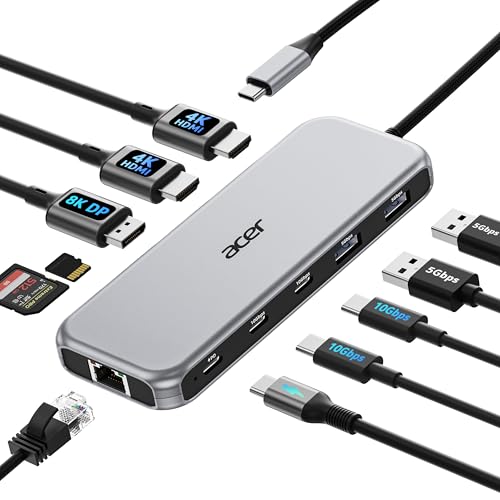
Three external displays can turn a laptop into a much calmer work machine, and this Acer dock is built around that kind of desk. You get two HDMI ports rated for 4K at 60Hz plus a DisplayPort that reaches 8K at 30Hz, so the layout suits a spreadsheet-heavy setup or a home office that juggles reference windows.
It also covers the everyday pieces that matter, like USB-C, USB-A, Ethernet, SD, and microSD. The trade-off is that the dock only makes sense for a laptop with a compatible USB-C port, so the fit is straightforward for modern machines and less useful for older hardware.
Strong Points
- Multi-display support gives you room for separate apps, which helps on long workdays.
- 10Gbps USB-C ports and 5Gbps USB-A ports handle common peripherals without feeling cramped.
- Ethernet support keeps a wired office connection in reach for desk-bound use.
- SD and microSD slots help you move camera or file card content without extra adapters.
Worth Noting
- It depends on a USB-C laptop port, so older systems need a different setup.
- Seven screens of information are not the point here, the dock rewards users who actually need a larger desk footprint.
Feature Snapshot
Who It Suits Best
Home-office setups and remote workers with more than one display get the most out of it.
A Better Fit Elsewhere
Anker Prime TB5 Docking Station, 14-in-1 Thunderbolt 5 Dock for Laptops suits you better if you want a more advanced workstation path with newer high-speed links.
Desk users who keep growing their setup tend to outgrow basic hubs, and this Anker model leans into that problem. Its DisplayLink support matters because that chip-based video approach helps some laptops drive more external screens, which is a real advantage for mixed monitor layouts.
The port list is dense: multiple USB-C options, HDMI, DisplayPort, USB-A, Ethernet, audio, and both SD and TF slots. The honest read is that this is more dock than casual accessory, so it fits best beside a serious workstation rather than a laptop that only needs a charger and one display.
Highlights
- Fourteen connections make it easier to keep displays, storage, and peripherals in one place.
- Triple-display support suits multitaskers who want more screen space than a simple hub offers.
- Two 100W USB-C ports help accommodate modern charging and accessory needs.
- A 2.5Gbps Ethernet port gives wired networking a stronger ceiling than basic gigabit docks.
- SD and TF slots are useful for photo, video, or file transfers without another adapter.
Small Caveats
- DisplayLink software support adds setup steps, so this is less grab-and-go than a plain USB-C hub.
- The port count can feel excessive for a simple laptop bag setup.
- Keyboard and mouse connections are better planned at the dock side, which keeps the desk cleaner.
Built With In Mind
You’ll appreciate it most in a fixed workspace with several monitors and wired accessories.
Reach For A Different Pick When
Acer Laptop Docking Station 3 Monitors, 11-in-1 USB C Docking Station suits you better if you want a simpler path into multi-screen work without such a long port list.
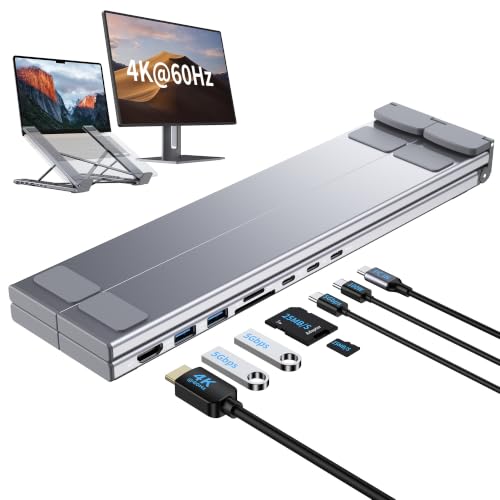
This Mukiya pick does two jobs at once, which is exactly why it stands apart from the flatter docks above. It acts as a USB-C hub and a laptop stand, so your screen sits higher while the desk stays less cluttered.
The port set is leaner than the Anker and Acer options, but that’s part of the appeal for a small desk or kitchen-table workstation. For everyday email, browsing, and one external display, it keeps the setup tidy without making the laptop feel trapped in a full desktop dock.
Upsides
- The stand-plus-hub design saves space and cuts down on separate accessories.
- 4K HDMI output supports a clean single-monitor setup for work or streaming.
- USB 3.0 ports offer 5Gbps transfer speed for common drives and peripherals.
- SD and TF slots make quick card access easier for casual content work.
Areas To Watch
- The smaller port count means less room for a busy desktop full of devices.
- Stacked stand designs can take a little more careful cleaning around hinges and cable paths.
Made For
Compact home offices and students with limited desk depth get the most from this layout.
Where A Sibling Pick Shines
BENFEI Laptop Stand with USB C 6in1 Docking Station fits you better if you want a sturdier aluminum feel and a more refined ergonomic adjustment path.
Feature Rundown
Some dock stands focus on shape, and this BENFEI model tries to solve posture at the same time. You can adjust the height from 68mm up to 178mm, which gives you room to bring the screen closer to eye level without piling books under the laptop.
Compared with Mukiya’s simpler stand-dock combo, this one feels more polished for a fixed desk and a plugged-in routine. The aluminum alloy body and anti-slip silicone should help it stay planted, though the added structure also means it’s not the lightest answer for a bag-first setup.
What We Like
- Adjustable height and angle make it easier to tune the screen to your workspace.
- 100W power delivery is useful for charging while keeping the dock in play.
- HDMI at 4K and 60Hz suits smoother external display use.
- Gigabit Ethernet gives you a steady wired network option at the desk.
- Aluminum alloy construction brings a more solid feel than lightweight plastic stands.
Points To Note
- The stand format takes more desk height than a flat dock.
- Owners who move between rooms often may find a simpler hub easier to pack.
- Adjustable parts can collect dust, so occasional wipe-downs help keep the hinge area neat.
Right Fit For
People who want a neater posture setup at a fixed desk will get the most from it.
Another Choice May Suit
Umaniy Laptop Stand with Docking Station, 8 in 1 USB C Hub HDMI Portable Laptop Stand for Desk with USB Ports fits you better if foldability matters more than a sturdier workstation feel.
Core Details
Universal docking is where the Dell D6000S earns its place. It works with laptops that use USB-C or USB-A, which makes it more flexible than the USB-C-only options above and easier to slot into a mixed office or an older device lineup.
It also supports up to three 4K displays, so it can handle a desk that needs serious screen space. The LED indicator is a small but useful touch, though the dock feels more office-bound than travel-friendly, especially beside the foldable Umaniy or the slimmer Acer.
Best Bits
- USB-C and USB-A compatibility gives it broad laptop coverage.
- Three 4K displays suit workstations that rely on several windows at once.
- PowerShare support can simplify charging on a busier desk.
- The indicator light makes it easier to confirm the dock is active at a glance.
Minor Gripes
- It feels more like a desk anchor than a carry-around dock.
- Users who only need one screen may not use its full capability.
Whose Shelf It Belongs On
You’ll get the best match here in offices that mix newer and older laptops across several workstations.
Swap It Out When
Anker Prime Docking Station (DL7400), 14-in-1 Triple Display, DisplayLink fits you better if your setup needs a deeper accessory list and a more modern triple-display path.
Thunderbolt 5 is the headline here, and that puts this Anker dock in a different class from the USB-C and USB-A models above. You also get two Thunderbolt 5 downstream ports, so the dock is built for more demanding laptop setups that need serious expansion headroom.
The active cooling system matters because higher-output docks can run warm during heavy desk use, and that cooling helps the unit stay composed under load. For video editors, developers, or anyone building around a premium workstation, the feature mix feels properly aimed, though it is more dock than casual add-on.
Bright Spots
- Thunderbolt 5 support gives you a forward-looking connection path.
- Two downstream Thunderbolt 5 ports open the door to more advanced daisy-chained setups.
- HDMI 2.1 or DisplayPort 2.1 gives you a modern path to external monitors.
- SD and TF readers support media-heavy workflows without extra gear.
- The active cooling design is a sensible touch for longer desk sessions.
Trade Offs
- It asks for a laptop that can actually benefit from Thunderbolt 5.
- The feature set is deep, so casual users may pay for more dock than they need.
The Right Fit
High-end laptop owners who want a desk setup that can grow with their gear will appreciate it most.
Look Elsewhere When
BENFEI Laptop Stand with USB C 6in1 Docking Station, HDMI 4K@60Hz,Gigabit Ethernet, 100W Power Delivery, 10Gbps 1*USB C 3.2 and 2*USB A 3.2 suits you better if you want a simpler, lighter desk companion.
At A Glance
Foldable stands solve a very specific problem, they keep a laptop usable without claiming much bag space. This Umaniy design adds an 8-in-1 hub with HDMI, USB-A, USB-C, and card access, so it works like a compact desk kit for hotel rooms, shared tables, or a mobile work corner.
Its 4K HDMI output and 5Gbps USB data ports cover the basics cleanly, and the SD or TF transfer speed is quoted up to 25MB/s. The trade-off is clear, though, a folding stand with ports is a convenience piece rather than a full desktop dock, so power users will want something more like the Dell or Anker Prime models.
Positives
- Foldable construction makes it easier to pack for trips or hybrid work.
- The stand angle gives your laptop a better desktop position than a flat hub.
- 4K HDMI output supports an external monitor in small temporary setups.
- USB-C and USB-A ports handle common peripherals without extra adapters.
Honest Caveats
- It suits light to moderate desk use more than a full multi-monitor station.
- Foldable hardware can take a little extra care during packing and storage.
- Card transfer speed is useful, though not aimed at demanding media pipelines.
Who Should Grab It
Frequent movers, commuters, and anyone splitting time between several desks will appreciate the compact format.
Skip It When
Anker Prime TB5 Docking Station, 14-in-1 Thunderbolt 5 Dock for Laptops fits you better if your workspace stays fixed and your gear needs a far deeper connection set.
Quick Facts
What Matters Before You Choose A Laptop Dock
Connection Count
Start with the devices you keep plugged in every day, then match the dock to that list. A simple setup can live happily on a compact hub, while a monitor-heavy desk needs more video outputs, Ethernet, and enough USB ports to avoid constant swapping.
Port labels matter too. USB-C, USB-A, HDMI, DisplayPort, SD, and Ethernet each solve a different job, so the useful dock is the one that covers your routine without adding clutter.
Power And Display Needs
Charging support and monitor support usually decide whether a dock feels helpful or cramped. Higher power delivery is useful for larger laptops, while multiple display outputs matter more for spreadsheets, creative work, and reference-heavy tasks.
DisplayLink and Thunderbolt also change the experience. Those names sound technical, but the plain idea is simple, they affect how well the dock handles more screens and more demanding setups.
Desk Space And Mobility
A flat dock stays out of the way, while a stand-style dock helps with posture and screen height. Foldable designs are the smarter call for travel, but they usually give up some expansion and desk stability.
Choose the form factor around where you spend the most time. A permanent home office rewards size and port range, while a shared desk or carry bag rewards compact design.
Small Details That Change The Experience
Common Shopping Slip Ups
Many people focus on port count and miss laptop compatibility. That’s the quickest way to end up with a dock that looks right but does little for your machine.
Video support, charging support, and cable placement deserve attention too. A dock can seem versatile on paper, then feel awkward once you plug in monitors and a charger at the same time.
The Upgrade Payoff
Higher-tier docks usually cost more because they add stronger display support, faster data paths, more power headroom, and better build materials. Active cooling, Thunderbolt, and wider port sets also push the price upward.
That extra spend makes sense for a fixed workstation or a laptop that anchors your day. For lighter use, a simpler hub keeps things easier and leaves more room in the budget.
Frequently Asked Questions
What makes a laptop dock different from a basic hub?
A dock usually offers more ports, more stable desk use, and better support for monitors and charging. A basic hub often stays smaller and simpler.
Do all laptop docks work with every laptop?
No, connection type matters a lot, especially for USB-C and Thunderbolt models. Your laptop port support decides what the dock can actually do.
Why do some docks support more external monitors than others?
Chipset design, video standards, and software support all shape monitor count. DisplayLink and Thunderbolt often expand what a dock can handle.
Is a dock stand better than a flat dock?
A dock stand helps with screen height and desk organization. A flat dock is usually easier to place in tight spaces or carry between locations.
What should you check before adding a dock to a work setup?
Check laptop compatibility, monitor inputs, and the number of ports you actually use each day. Matching the dock to your routine matters more than chasing a long feature list.
Closing Thoughts
The right dock makes your laptop feel like it belongs on the desk instead of just visiting it. For most setups, the best choice is the one that matches your screens, your charging needs, and how much you move around. Pick the shape that fits your space first, then let the port list do the rest.
