


An external GPU lets a thin laptop or a handheld gaming PC borrow serious graphics muscle without you cracking open a case. That matters if your daily machine travels light but your evenings demand high frame rates or fast rendering. This shortlist covers plug-and-play docks with built-in graphics, empty enclosures for the card you already own, and even a support bracket worth adding to any heavy desktop build. Each pick below fits a different setup, budget, and level of tinkering tolerance.
The Shortlist At A Glance

ASUS ROG XG Mobile (2025) RTX 5070 Ti GC34R-050
ASUS ROG XG Mobile (2025) RTX 5090 GC34X-053

ASUS ROG XG Mobile (2023) RTX 4090 Docking Station
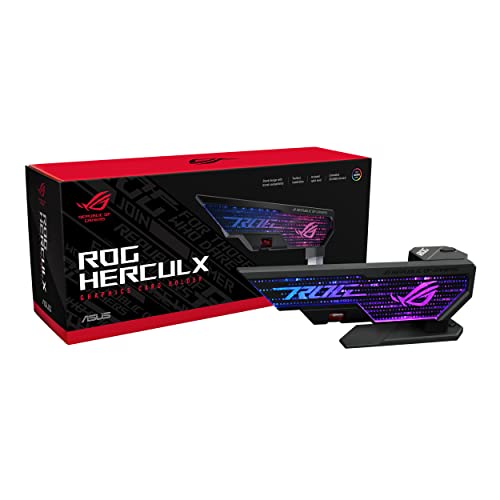
ASUS ROG Herculx GPU Anti-Sag Holder

ASUS ROG Herculx White GPU Anti-Sag Holder

GMKtec AD-GP1 eGPU Dock Radeon 7600M XT

MINISFORUM DEG1 eGPU Dock Oculink
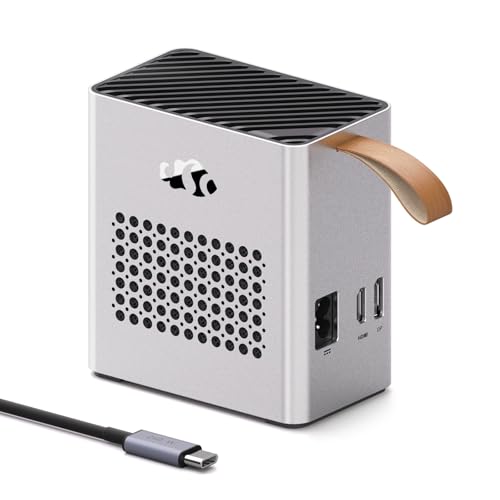
Nimo RX 7600M XT 8GB eGPU Docking Station
PCIE 3.0 x16 22Gbps eGPU Dock Thunderbolt 4

BOSGAME eGPU Dock Radeon RX 7600M XT
More Details On Our Top Picks
The 2025 XG Mobile pairs an NVIDIA GeForce RTX 5070 Ti Laptop GPU with Thunderbolt 5, the newest version of the high-bandwidth connection standard that keeps external graphics from bottlenecking. ASUS packs all of this into a body roughly the size of a hardcover novel, which makes it one of the few eGPUs you could genuinely toss into a backpack.
In practice, that means a student who games at night can leave the dock at home during lectures and clip it on when they’re back at their desk. Wired ethernet and extra ports round out the dock function, so one cable handles graphics, network, and peripherals.
Strong Points
- Thunderbolt 5 bandwidth keeps frame rates closer to internal-GPU territory than older docks manage.
- Novel-sized footprint slides onto a crowded desk without claiming a shelf.
- Built-in ethernet gives competitive players a stable wired connection through the same cable.
- Dock functionality means fewer separate adapters cluttering your workspace.
Things To Consider
- You’ll need a compatible Thunderbolt 5 machine to see its full benefit; older laptops leave bandwidth on the table.
- A premium-tier GPU inside means this sits near the top of the price range for the category.
Who It Suits Best
Owners of recent ROG Flow or other Thunderbolt 5 laptops who want near-desktop gaming without a second full PC.
Where A Sibling Pick Shines
Shoppers wanting maximum raw horsepower over portability should look at the ASUS ROG XG Mobile (2025) RTX 5090 instead.
This is the top rung of the 2025 XG Mobile ladder, swapping the 5070 Ti for an NVIDIA GeForce RTX 5090 Laptop GPU while keeping the same Thunderbolt 5 backbone and novel-sized chassis. Where the cheaper sibling balances cost and capability, this one exists for people who refuse to compromise on settings sliders.
Think 1440p ultra presets, ray tracing in supported titles, or GPU-heavy creative work like video export and 3D rendering. The honest read is that most casual players won’t need this much silicon, but content creators and enthusiasts will feel the difference every session.
Highlights
- RTX 5090-class graphics headroom for maxed-out settings and demanding creative software.
- Same compact, travel-friendly shell as the rest of the XG Mobile line.
- Thunderbolt 5 connectivity plus dock-style ports reduce cable sprawl at your desk.
Minor Gripes
- Cost puts it well above what most students or casual gamers reasonably need.
- Its power draw assumes a capable outlet setup; a weak power strip may not be comfortable long-term.
Made For
Enthusiasts and creators running a Thunderbolt 5 laptop who treat graphics performance as a daily requirement rather than a weekend luxury.
Skip It When
Budget-conscious gamers get far better value per dollar from the GMKtec AD-GP1 with its built-in Radeon 7600M XT.
The 2023 generation uses ASUS’s proprietary PCIe connection to ROG Flow laptops rather than Thunderbolt, which historically delivered higher effective bandwidth than generic docks of its era. Inside sits a GeForce RTX 4090 Laptop GPU, still a formidable chip for 1440p gaming today, fed by a hefty 330W power adapter.
The built-in I/O hub is the quiet hero here: one attachment adds ports your slim Flow laptop lacks. Owners commonly report the whole system feels less like an accessory and more like a desktop replacement that happens to detach.
What We Like
- Proprietary PCIe link to Flow Series machines sidesteps the bandwidth tax of generic connections.
- Integrated I/O hub turns the dock into your laptop’s port expander too.
- 330W adapter comfortably feeds the GPU under sustained load.
- RTX 4090 Laptop GPU remains strong for modern titles at high settings.
Points To Note
- It only works with ROG Flow Series laptops, so check compatibility before committing.
- The large power brick adds noticeable weight to any travel bag.
At A Glance
Right Fit For
ROG Flow Series owners who want a single device that boosts graphics and expands connectivity at once.
Another Choice May Suit
Anyone without a Flow laptop should consider the OwlTree PCIE 3.0 x16 dock, which accepts standard Thunderbolt machines and your own graphics card.
Not every entry here is a dock, and this one earns its spot by protecting the expensive card you already own. Modern triple-fan GPUs are heavy, and over months the board can bow at the far end, a problem builders call sag. The Herculx props the card up with solid zinc alloy construction and adjusts in height without tools.
Two details set it apart from cheap acrylic stands: a small spirit level on top so you know it’s truly plumb, and Aura Sync RGB lighting that matches the rest of an ASUS-themed build. It also avoids occupying PCIe slots, which budget stands sometimes block.
Bright Spots
- Zinc alloy body bears the weight of oversized triple-slot cards without flexing.
- Toolless height adjustment takes seconds during a rebuild or upgrade.
- Spirit level removes guesswork when seating the support arm.
- Doesn’t occupy PCIe slots, keeping expansion options open.
Small Caveats
- RGB lighting only syncs within the Aura Sync ecosystem, so mixed-brand builds lose that feature.
- Owners note the adjustment range suits mid-tower cases best; very compact chassis can be tight.
Quick Facts
Who Will Love This
Desktop builders running large air-cooled or triple-fan cards who want invisible insurance against board warping.
Swap It Out When
Builders chasing an all-white theme should grab the ASUS ROG Herculx White edition instead for a matched look.
Functionally this is the same zinc alloy support as the black Herculx reviewed above, reworked for white-themed builds where a dark bracket would stick out like a thumbtack on a wedding cake. White component ecosystems have exploded in popularity, and finding accessories that match used to mean settling for flimsy plastic.
You keep the toolless adjustment, the spirit level, and the wide chassis compatibility. The lighting pattern differs slightly from the black version, leaning cleaner and more minimalist, which suits understated builds better than rainbow-heavy setups.
Plus Points
- White finish blends seamlessly into matching ROG white component builds.
- Same sturdy zinc alloy structure as the original, so no strength was traded for looks.
- Minimalist lighting pattern complements clean, understated rigs.
Softer Spots
- White surfaces show dust faster than dark finishes, so occasional wiping keeps it looking fresh.
- Purely cosmetic difference from the black model, so there’s no functional reason to pay attention to color unless aesthetics matter to you.
Whose Shelf It Belongs On
Anyone assembling or upgrading an all-white gaming PC with heavy graphics hardware that needs proper support.
Reach For A Different Pick When
Standard black or neutral builds save nothing by choosing white; the original ASUS ROG Herculx does the identical job.
The AD-GP1 arrives with its graphics already installed: an AMD Radeon 7600M XT carrying 8GB of GDDR6 memory on AMD’s RDNA 3 architecture. That’s the sweet-spot chip for 1080p and light 1440p gaming, and having it pre-mounted means zero assembly, zero thermal paste, zero guesswork.
Connectivity is generous for the money, spanning HDMI 2.1, DisplayPort 2.0, USB4, and Oculink, the latter being a compact PCIe cable standard that some mini PCs and handhelds expose directly. Mini PC owners, in particular, often find this turns a basic office box into a legitimate gaming rig overnight.
Reasons To Buy
- Pre-installed Radeon 7600M XT means true plug-and-play, no build skills required.
- Both USB4 and Oculink inputs cover modern mini PCs and compatible handhelds.
- HDMI 2.1 and DisplayPort 2.0 outputs handle high-refresh external monitors.
- 8GB of GDDR6 gives modern titles adequate texture headroom.
Trade Offs
- The GPU is fixed, so there’s no upgrade path when newer chips arrive.
- Oculink performance depends heavily on your host device’s implementation, which varies between brands.
Feature Snapshot
Best Suited To
Mini PC and handheld owners who want a one-cable graphics boost without touching a screwdriver.
Consider Something Else When
Users who already own a powerful desktop GPU will extract more value from the MINISFORUM DEG1, which accepts their existing card.
The DEG1 flips the formula: it ships empty, waiting for whatever graphics card you supply. That openness is its appeal, since a spare RTX 4090 or RX 7900 XTX pulled from an old build slots straight in. Power flexibility follows the same logic, accepting both ATX and SFX standard supplies, the two common desktop PSU formats.
The link runs over Oculink at PCIe 4.0 speeds across four lanes, which beats many USB-based docks for sustained throughput. One habit change matters though: Oculink doesn’t support hot plugging, so you connect while everything is powered down.
Upsides
- Bring-your-own-GPU design unlocks flagship cards you may already own.
- PCIe 4.0 x4 Oculink link sustains higher throughput than most USB alternatives.
- Accepts ATX or SFX power supplies, including compact SFX units for tidy mini builds.
- Downstream PCIe x16 slot accommodates full-length desktop cards.
Room For Improvement
- No hot plugging: the host machine must be shut down before connecting or disconnecting.
- Your host needs a native Oculink port, which rules out most mainstream laptops.
- Card and power supply are separate purchases, raising the true total cost.
Who Should Grab It
Tinkerers with an Oculink-equipped mini PC and a spare desktop graphics card looking for a clean docking solution.
Look Elsewhere When
Thunderbolt-only laptop owners should pick the OwlTree PCIE 3.0 x16 dock, which speaks Thunderbolt 3/4 and USB 4 natively.
Nimo’s take on the all-in-one dock adds two conveniences the GMKtec AD-GP1 skips: a built-in 240W power supply and 65W Power Delivery charging back to your laptop. That last number matters more than it sounds, because it means one cable can drive graphics and keep your machine topped up simultaneously, no separate charger trailing behind.
The Radeon RX 7600M XT with 8GB of GDDR6 targets the same 1080p-to-entry-1440p crowd, and dual connection options cover both USB4 hosts and Oculink-equipped devices. Handheld gaming PC owners are an obvious fit here, since those devices benefit from both the boost and the passthrough charging.
Standout Traits
- 65W Power Delivery charges your laptop through the same connection driving the GPU.
- Integrated 240W PSU eliminates a bulky external power brick.
- 80Gbps USB4 plus dedicated Oculink covers a wide range of host devices.
- Pre-installed graphics mean no assembly whatsoever.
Worth Noting
- The fixed Radeon 7600M XT caps future performance; there’s no swap path.
- Some handheld consoles need firmware or driver fiddling before the dock cooperates fully.
Details At A Glance
The Right Fit
Handheld gaming PC and ultrabook users who value a single-cable desk setup that also recharges their device.
Not Your Match When
Multi-monitor productivity users get more display outputs from the BOSGAME dock, which drives up to four screens.
This unbranded-style dock is the tinkerer’s entry point: a bare-bones PCIe 3.0 x16 enclosure that accepts nearly any NVIDIA card from the GTX 450 era onward, or any AMD equivalent with available drivers. A Thunderbolt 4 cable comes included, and it plays nicely with Windows 10/11, Linux, and even certain handheld consoles such as the Lenovo Legion Go.
Power input is unusually flexible, taking USB-C Power Delivery, an 8-pin CPU connector, Molex, or a DC 5521 barrel feed depending on what your parts bin offers. The catch is bandwidth: PCIe 3.0 over Thunderbolt leaves more performance on the table than Oculink rivals, so pair it with a mid-range card rather than a flagship.
Positives
- Extremely broad card compatibility, from decade-old GTX models to current releases.
- Multiple power input options suit whatever supply you already own.
- Works with Linux as well as Windows, rare among budget docks.
- Handheld console support extends its usefulness beyond laptops.
Honest Caveats
- PCIe 3.0 bandwidth bottlenecks high-end cards, muting their advantage.
- Setup involves driver installation and BIOS-level patience; beginners may hit snags.
Built With In Mind
Experimenters on a tight budget who own a modest spare GPU and a Thunderbolt-capable laptop or handheld.
Where Another Pick Suits Better
Anyone pairing a flagship RTX 4090 or RX 7900 XTX should step up to the MINISFORUM DEG1 for its faster PCIe 4.0 Oculink path.
BOSGAME treats the eGPU as a full desk hub rather than just a graphics booster. Beyond the built-in Radeon RX 7600M XT with 8GB of GDDR6 on RDNA 3, you get an M.2 2280 slot supporting SSDs up to 4TB, an RJ45 ethernet jack, and two USB-A 3.2 ports. Video output spans two HDMI 2.1 ports and two DisplayPort 2.0 outputs, enough for a four-display arrangement.
Host compatibility covers Thunderbolt 3, Thunderbolt 4, USB 4, and Oculink, making it one of the most flexible connection stories in this roundup. Compared with the Nimo dock, you trade away laptop charging but gain storage expansion and extra screens.
Best Bits
- Four simultaneous display outputs suit traders, editors, and streamers alike.
- M.2 slot adds up to 4TB of fast storage without another enclosure.
- Ethernet plus dual USB-A ports replace a separate hub entirely.
- Thunderbolt 3/4, USB 4, and Oculink inputs maximize host compatibility.
Areas To Watch
- No Power Delivery passthrough, so laptops still need their own charger.
- The fixed RX 7600M XT won’t satisfy players chasing ultra 1440p frame rates.
Core Details
Perfect Match For
Professionals running multi-monitor setups on a laptop or mini PC who also want casual gaming after hours.
Another Choice May Suit
Single-monitor gamers prioritizing laptop charging will prefer the Nimo RX 7600M XT dock with its 65W Power Delivery.
What Matters Most Before Choosing External Gpus
Match The Connection To Your Machine
The port on your laptop decides everything. Thunderbolt 4 and USB 4 offer around 40Gbps and broad compatibility, Thunderbolt 5 pushes further for newest-generation machines, and Oculink delivers strong PCIe throughput but only works on devices that expose it natively. Buying a dock your host can’t fully feed wastes money, so confirm your exact port before anything else.
Decide Between Built-In And Bring-Your-Own
Enclosures with a pre-installed Radeon 7600M XT trade upgradeability for simplicity: plug in and play tonight. Empty docks like the MINISFORUM DEG1 cost less upfront but assume you own a card and a power supply. First-timers usually land happier with the integrated route, while anyone with a spare GPU sitting in a closet gets obvious value from the open design.
Count Your Displays And Peripherals
Some docks are pure graphics boosters; others double as hubs with ethernet, USB-A, M.2 storage, or four monitor outputs. Tally what your desk actually needs, because a feature-rich dock can replace two or three separate accessories.
Factor In Power Realities
Built-in PSUs keep things tidy, while external bricks add weight but simplify replacements. Charging passthrough, where offered, genuinely reduces desk clutter for daily commuters.
Key Considerations Across These Picks
Traps First Timers Fall Into
The most common mistake is buying for the card you wish you had instead of the port you actually have. An Oculink-only dock paired with a Thunderbolt laptop is an expensive paperweight. Second, people underestimate power: a flagship GPU in a bare dock still needs a capable supply, and that cost belongs in your budget from day one.
What Separates Premium From Basic
Higher-tier units justify their cost through bandwidth, integration, and convenience. Thunderbolt 5 links, built-in power delivery, pre-installed GPUs, and hub features all remove friction you’d otherwise solve with extra purchases. Paying up pays off for daily drivers; occasional tinkerers rarely feel the difference.
Frequently Asked Questions
Do external GPUs work with any laptop?
No, your laptop needs a compatible port such as Thunderbolt 3/4, USB 4, Thunderbolt 5, or native Oculink. Standard USB-A or plain USB-C ports without these protocols won’t carry graphics data.
Is an eGPU good for gaming?
Yes, it can turn a thin laptop into a capable gaming machine, especially at 1080p. Expect some performance loss versus an internal desktop card due to connection bandwidth, typically modest on modern links.
Can I use an external GPU with a handheld gaming PC?
Several docks in this list support handhelds with USB 4 or Oculink ports, including certain models popular with handheld gamers. Check your specific device’s port and driver support before purchasing.
Do eGPUs charge my laptop while connected?
Only models with Power Delivery passthrough do, such as the Nimo dock’s 65W output. Many enclosures handle graphics alone, leaving your regular charger in service.
Are external GPUs worth it compared to a desktop?
For people who travel or lack space, an eGPU delivers most of the benefit with one cable. A full desktop still wins on raw value and upgrade depth, so the right answer depends on how portable your life is.
Closing Thoughts
The right external GPU comes down to honesty about your hardware and habits. ROG Flow owners have purpose-built options, mini PC and handheld users get excellent value from the integrated Radeon docks, and tinkerers with spare cards should lean toward open enclosures. Whichever direction fits, match the connection first and let everything else follow from there.
