


Older discs still matter for software installs, archived photos, music libraries, and the occasional backup job. A good external drive saves you from hunting for a built-in tray that many thin laptops no longer include. The list below keeps the focus on simple setup, useful port combinations, and the kind of portability that fits a desk, dorm, or travel bag.
Some of these picks stay minimal and portable, while others add extra ports or card slots for a more useful desktop setup. That mix matters, because the right choice depends on whether you mainly need a disc reader or want a small hub that pulls double duty.
Quick Shortlist For Busy Laptop Setups

Alronly External CD/DVD Drive USB 3.0 Type-C Burner Writer Reader

ORIGBELIE External CD/DVD Drive for Laptop 4 USB Ports 2 SD/TF Slots

Wbacon 7 in 1 External CD/DVD Drive for Laptop USB 3.0 External CD Drive
2 in 1 External CD DVD Drive USB 3.0 and Type-C Disc Reader Burner Player
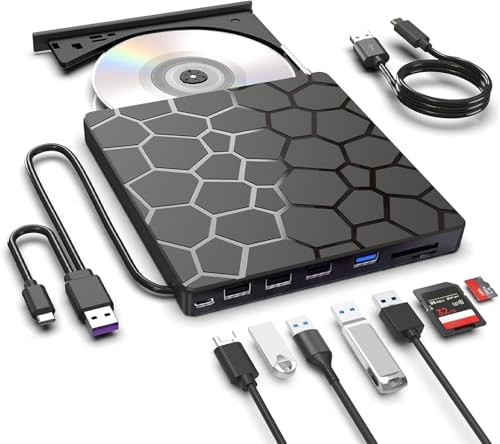
8 in 1 External CD DVD Drive USB 3.0 and Type-C Disc Reader Burner Player
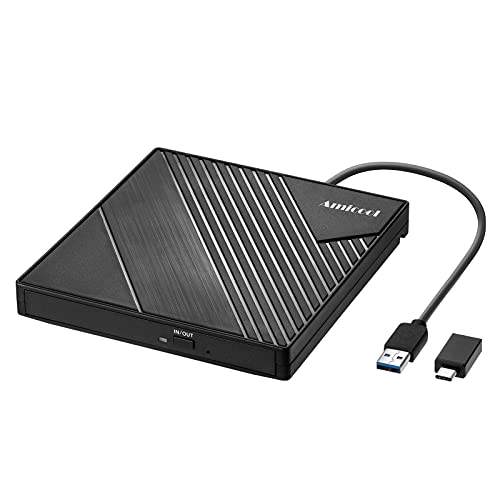
Amicool External DVD Drive USB 3.0 USB C CD Burner CD/DVD +/-RW Optical Drive
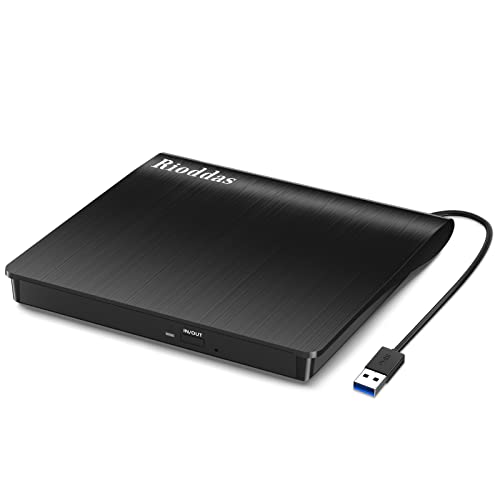
Rioddas External CD/DVD Drive for Laptop USB 3.0 CD DVD Player Portable +/-RW Burner
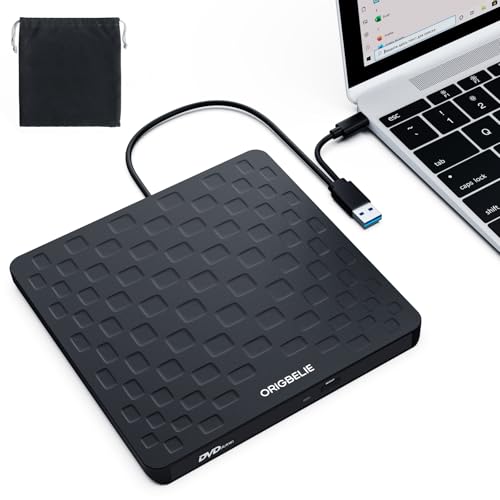
ORIGBELIE External CD DVD Drive for Laptop USB 3.0 Type-C 13mm DVD Player
More Details On Our Top Picks
Alronly keeps things focused on the part that matters most, a dual-connector drive that works through USB 3.0 and Type-C. That makes it an easy fit for a newer ultrabook or an older notebook on the same desk, and the stated 5 Gbps transfer ceiling points to brisk file movement for disc tasks.
The mix of up to 8x DVD and 24x CD speeds is useful for routine burning, music disc work, or installing older software from media you already own. The trade-off is plain enough, this is a disc-first tool, so you are not getting extra hub features like the more expanded ORIGBELIE and Wbacon picks.
Strong Points
- USB-A and Type-C support reduces cable hassle.
- Fast enough for everyday disc reading and writing.
- Useful for mixed laptop and desktop setups.
- Good fit for software installs from physical media.
Things To Consider
- No extra ports, so it stays single-purpose.
- Portable design usually means lighter construction.
- Desk users may still want a direct rear port for steadier power.
Feature Card
Who It Suits Best
You benefit most here if you want a straightforward drive for a laptop, desktop tower, or Mac setup without extra desk clutter.
A Better Fit Elsewhere
ORIGBELIE External CD/DVD Drive for Laptop 4 USB Ports 2 SD/TF Slots suits you better when you want the drive to act like a small desktop hub too.
This ORIGBELIE model is the one that starts to feel like a desk companion instead of just an optical drive. Four USB ports and two SD or TF slots make it more useful for people who shuffle flash drives, memory cards, and disc media in the same workflow.
That broader setup is handy in a home office or a photo corner, especially where cable access is limited. The honest trade-off is size and complexity, because the extra ports add convenience but also make this a less minimal pick than the Alronly or Rioddas options.
What We Like
- Four USB ports add real desk utility.
- Two card slots help with camera media.
- Lets you reduce the number of separate hubs.
- Fits well beside a monitor and keyboard.
- Good match for mixed storage workflows.
Worth Noting
- More features usually mean a busier footprint.
- Card and port use can tempt cable sprawl.
- Less suited to a bare-minimum travel kit.
Who Will Love This
You get the most out of this one if your desk already handles memory cards, flash drives, and discs in the same routine.
Skip It When
Wbacon 7 in 1 External CD/DVD Drive for Laptop USB 3.0 External CD Drive makes more sense when you want a smaller add-on without the extra port cluster.
Wbacon sits in a useful middle ground, with a seven-in-one layout that gives you more room to plug in accessories without turning your desk into a tangle. The USB 3.0 and Type-C support also keeps it relevant for both current laptops and older machines.
Its stated 5 Gbps data path, plus up to 8x DVD and 24x CD speeds, line up well with normal disc burning and playback jobs. Compared with the slimmer JKNJX and Rioddas picks, this one is more about convenience than pure minimalism.
Positives
- Seven-in-one layout adds practical flexibility.
- USB 3.0 and Type-C broaden compatibility.
- Good for desks that juggle several accessories.
- Useful speed specs for regular disc tasks.
Minor Gripes
- Extra features can make storage a little less neat.
- More ports also mean more to keep track of.
- Port-heavy designs usually suit desks better than bags.
Core Details
Built With In Mind
You suit this pick best if you want one compact device that still leaves room for a few extra peripherals.
Another Choice May Suit
Alronly External CD/DVD Drive USB 3.0 Type-C Burner Writer Reader suits you better if the drive itself matters more than added ports or card slots.
JKNJX keeps the formula stripped down, and that is exactly what some setups need. The dual-port cable supports USB-A and USB-C, so you can move between an older desktop and a newer laptop without carrying another adapter.
The plug-and-play angle matters most for people who just want to insert a disc and get on with the job. Compared with the feature-heavy ORIGBELIE units, this one stays much more travel-friendly, though you give up the extra ports that make those models feel more like mini hubs.
Highlights
- USB-A and USB-C coverage is genuinely handy.
- Simple setup suits less technical use.
- Small form works well in carry bags.
- Good fit for quick disc access.
Areas To Watch
- No extra ports or card slots here.
- Best suited to straightforward disc work.
- Travel use still benefits from careful cable storage.
At A Glance
Right Fit For
You fit this model best if you want a slim disc drive for hotel desks, class use, or a tidy home office setup.
Where A Sibling Pick Shines
Wbacon 7 in 1 External CD/DVD Drive for Laptop USB 3.0 External CD Drive makes more sense if you want the same sort of portability with extra port capacity.
ASHDOL pushes the expansion story further with an eight-in-one layout, which makes sense for a desk that keeps growing more crowded over time. The USB 3.0 and Type-C support keeps it flexible, while the added ports reduce the number of separate dongles you need to manage.
That broader design is useful for home office work, light media handling, or a setup where your laptop sits near a card reader and several peripherals. The trade-off is simple, a more capable shell usually feels less lean than a basic disc drive like the Rioddas unit.
Reasons To Buy
- Eight-in-one design covers several desk tasks.
- USB 3.0 and Type-C support make it versatile.
- Can reduce clutter from separate accessories.
- Good for a semi-permanent workstation.
Softer Spots
- More capability usually brings more bulk.
- Best suited to a desk, not a pocket.
- Port-rich gear tends to need a little more cable care.
Whose Shelf It Belongs On
You match this model best if your desk already handles drives, cards, and a few USB peripherals in one place.
Look Elsewhere When
JKNJX 2 in 1 External CD DVD Drive USB 3.0 and Type-C Disc Reader Burner Player fits better when you want the simplest possible carry piece.
Amicool feels like the steady, familiar choice in this group. The USB 3.0 and USB-C pairing covers a wide spread of laptops and desktops, and the CD/DVD +/-RW support gives you the usual rewrite flexibility for mixed disc libraries.
Because it also lists compatibility across Windows, Mac, and Linux environments, it suits households or workspaces where devices are not all the same brand. Compared with the more feature-loaded ORIGBELIE and ASHDOL models, this one stays more traditional and less crowded.
Bright Spots
- Broad operating-system support is useful in mixed households.
- USB 3.0 and USB-C widen connection options.
- CD/DVD +/-RW support suits common rewrite tasks.
- Works well as a no-drama backup drive.
Trade Offs
- The design stays focused on disc work, not extras.
- Port-rich alternatives may suit busy desks more.
- For desktop use, direct connection usually makes sense.
The Right Fit
You suit this pick best if you want a familiar external drive that can move between different operating systems without fuss.
Reach For A Different Pick When
ORIGBELIE External CD/DVD Drive for Laptop 4 USB Ports 2 SD/TF Slots is the better match when you want more than disc handling in the same enclosure.
Rioddas keeps the formula simple in a way that works for a lot of plain disc tasks. It runs from USB power, so you do not have to manage a separate adapter, and that makes it easy to drop into a bag or leave near a desktop.
The direct-connect setup also appeals to people who want a quick reader for archived discs, software media, or basic burning. The trade-off is that it stays intentionally narrow, so anyone wanting extra ports or card slots will get more from ORIGBELIE or ASHDOL.
Best Bits
- USB-powered design keeps the setup clean.
- Simple operation suits occasional disc use.
- Portable size helps in shared spaces.
- Good for archived media and older installers.
Small Caveats
- No extra hub features for added convenience.
- Desktop use is better with a solid USB port.
- Keeping the cable neatly stored helps portability.
Made For
You fit this model well if you want an uncomplicated drive for occasional disc access at home, school, or a shared office.
A Better Fit Elsewhere
Wbacon 7 in 1 External CD/DVD Drive for Laptop USB 3.0 External CD Drive makes more sense when you want a little more expansion without moving up to a full hub-style unit.
This ORIGBELIE model stands out because the 13 mm note points to a slimmer disc format fit, which is useful for modern notebook setups that keep a tight profile. The USB 3.0 and Type-C support also keeps it easy to place beside either a newer laptop or a desktop with the right front-panel port.
In a small office or a travel bag, that thinner profile can matter more than extra extras. The honest trade-off is that this version stays more dedicated to the drive itself, while the bigger ORIGBELIE and ASHDOL picks bring more desk-side utility.
Upsides
- Slimmer-profile design suits compact setups.
- USB 3.0 and Type-C keep it flexible.
- Good fit for modern laptops with little spare space.
- Still practical for routine disc reading and writing.
Room For Improvement
- More focused on fit than extra functions.
- Travel cases should protect the cable well.
- Slim gear can feel less substantial on a crowded desk.
Perfect Match For
You suit this pick best if your laptop setup is tight and you want the drive to stay visually and physically slim.
Swap It Out When
ORIGBELIE External CD/DVD Drive for Laptop 4 USB Ports 2 SD/TF Slots is the smarter choice when your desk needs more than disc support alone.
What To Weigh Before You Choose
Common Shopping Slip Ups
Connection type matters more than most people expect, so match USB-A, USB-C, or both to your actual ports. Extra hubs look useful, but they can be overkill for a person who only needs disc access.
When Paying More Pays Off
Higher-tier models usually cost more because they add ports, card slots, or a cleaner all-in-one shape. That upgrade makes sense for desks that juggle memory cards, flash drives, and discs every day.
Frequently Asked Questions
Do These External Drives Work With Modern Thin Laptops?
Most of these drives are made for laptops that no longer include an optical bay. USB 3.0 and Type-C support help them fit newer machines, while older desktops often need a straightforward rear USB port.
Why Do Some Models Mention USB 3.0 And Type-C?
That usually means the drive can connect to both older USB-A ports and newer USB-C ports. It gives you more flexibility across different devices.
Do Extra Ports And Card Slots Matter?
They matter most on a desk where you regularly move files between discs, flash drives, and memory cards. For light travel use, a simpler drive is usually easier to carry.
Can You Use These Drives For Burning And Reading?
Most picks here support both reading and burning, though the exact disc formats and speeds vary by model. The product page details tell you which tasks each one fits best.
Which Pick Fits A Mixed Device Setup?
Alronly External CD/DVD Drive USB 3.0 Type-C Burner Writer Reader is the cleanest fit for a mixed laptop and desktop routine. Amicool External DVD Drive USB 3.0 USB C CD Burner CD/DVD +/-RW Optical Drive is another steady option for multi-system use.
