


You’re shopping for a gaming laptop under 1000 because you want playable frame rates, fast boot times, and enough headroom for schoolwork or work tasks without paying for extras you won’t use. The tricky part is balance, since a strong GPU can be held back by limited memory, while a roomy SSD can’t rescue a weak chip. This roundup keeps the focus on practical spec combinations that make sense for daily use, dorm rooms, commutes, and late-night gaming sessions.
The Shortlist At A Glance

Acer Nitro V Gaming Laptop ANV15-52-586Z


Acer Nitro V 15.6″ FHD IPS 165Hz Gaming Laptop
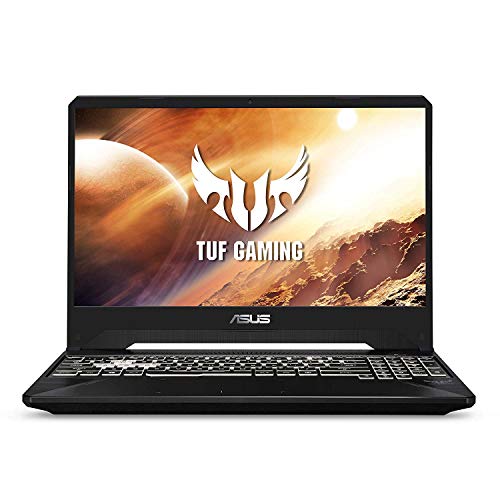
ASUS TUF FX505DT Gaming Laptop Computer 15.6″

HP Victus 15.6″ Full HD 144Hz Gaming Laptop

Lenovo Gaming Laptop Ryzen 5 7535HS

KAIGERR Gaming Laptop Ryzen 7 5825U

Lenovo 15 Gaming Laptop Ryzen 5 7535HS
More Details On Our Top Picks
The Nitro V lands in the part of the market that matters most for gaming under this budget, a current Intel Core i5 paired with an RTX 4050 laptop GPU. That pairing gives you more room for modern games than older 3050-class models like the HP Victus entries, especially at 1080p where the 15.6-inch IPS panel can actually show the difference. The 165Hz refresh rate helps motion look cleaner in fast games, though the 8GB memory ceiling means heavy multitasking still deserves care.
You may find this the easiest choice to recommend for a gamer who wants the strongest graphics card in the group without moving into a bulky machine. The 512GB Gen 4 SSD should feel responsive for launches and patches, and the backlit keyboard suits late sessions or dim rooms. The trade-off is simple, storage and memory are respectable rather than generous, so this is better for a focused gaming setup than a sprawling all-day work station.
Strong Points
- RTX 4050 graphics gives you more headroom for current games than the older RTX 3050 picks.
- 165Hz panel supports smoother motion in fast scenes, which helps in shooters and racing games.
- Gen 4 SSD should keep loading and patch installs brisk for everyday use.
- Backlit keyboard makes evening play easier in a dark room.
Worth Noting
- 8GB RAM can feel tight once you stack a game with several background apps.
- 512GB storage is workable, though larger game libraries will fill it sooner than a 1TB model.
- The stronger GPU makes this less about value extras and more about raw game performance.
Feature Rundown
Who It Suits Best
Competitive-minded gamers and single-task focus shoppers will get the most from this spec mix.
Where Another Pick Suits Better
HP Victus 15.6″ Full HD 144Hz Gaming Laptop fits you better if you want 16GB RAM for heavier multitasking.
This Victus lands a little behind the Nitro V on graphics muscle, but the Intel Core i5-12500H still keeps it firmly in serious gaming territory. In a shared bedroom or a campus desk setup, the 8GB RAM and 512GB SSD combination keeps the machine simple and predictable, though not especially roomy. The Full HD screen is the right match for the RTX 3050, since that GPU class makes more sense at 1080p than at higher resolutions.
The honest read is that this model works best for someone who wants a straightforward gaming notebook with a familiar HP chassis and no distracting extras. Enhanced thermals are a useful note for long sessions, yet the memory ceiling stays the main limitation. Compared with the Acer Nitro V, you’re giving up newer graphics hardware, so this fits better for lighter competitive play and broader general use.
Highlights
- Core i5-12500H gives you a dependable multitasking base.
- RTX 3050 still covers many 1080p games cleanly.
- 512GB SSD helps the system feel quick at startup and launch.
- Enhanced thermal design should suit long gaming stretches in a warm room.
Points To Note
- 8GB RAM leaves less breathing room once chat apps, browsers, and games stack up.
- RTX 3050 sits below the stronger Acer Nitro V options in this list.
- Storage is adequate, though larger game libraries need some housekeeping.
Core Details
Who Will Love This
Casual and midrange gamers who want a clean, familiar laptop for everyday use should feel at home here.
Look Elsewhere When
Acer Nitro V Gaming Laptop ANV15-52-586Z suits you better when stronger graphics matter more than brand familiarity.
This Nitro V is the most future-facing model in the group because it moves to RTX 5050 graphics with 8GB of GDDR7 memory, which is newer and quicker memory than the older GDDR6 setup on many budget laptops. Pair that with the same i5-13420H class processor as the first Acer, and you get a machine that feels aimed at players who want a little more runway. The included mouse pad is a small touch, nothing dramatic, but it helps the unboxing feel complete.
For most desk setups, the 15.6-inch 165Hz display and 16GB RAM make this easier to live with than the 8GB-only machines in the list. You still need to respect the 512GB SSD limit, especially with large modern installs, yet the overall balance looks stronger for streaming, recording, and everyday multitasking. Compared with the HP Victus models, this one puts more emphasis on graphic headroom than on broad software comfort.
Reasons To Buy
- RTX 5050 and GDDR7 memory give you the freshest graphics setup here.
- 16GB RAM makes multitasking and background apps far less cramped.
- 165Hz screen suits fast action and cleaner motion.
- Mouse pad included, so the setup feels more complete out of the box.
Minor Gripes
- 512GB storage can still fill quickly once several large games land on it.
- The more advanced GPU is attractive, though you may not need that level for lighter gaming.
- Windows 11 Home keeps things standard rather than work-focused.
Technical Sheet
Who Should Grab It
Streamers, multitaskers, and gamers who want newer graphics hardware in a mainstream chassis should look here first.
Another Choice May Suit
HP Victus 15.6″ Full HD 144Hz Gaming Laptop fits you better if you’d rather spend less attention on graphics freshness and more on the overall HP formula.
ASUS’s TUF line usually leans practical, and this FX505DT follows that path with an AMD Ryzen 5 class chip, 8GB DDR4 memory, and a 256GB PCIe SSD. Compared with the newer Acer and HP models, the hardware looks older, so you should think of it as a leaner gaming option rather than a modern all-rounder. The RGB keyboard adds some personality, which matters more in a bedroom or gaming corner than it does in a quiet office.
The 15.6-inch format keeps it familiar, and the dual-fan design with anti-dust treatment is the kind of detail that matters after months of use, not just on day one. You may find the smaller SSD demands a more careful library setup, since modern games can crowd it fast. Still, for a shopper who values a sturdier-feeling legacy model, this ASUS keeps its case straightforward.
Upsides
- Ryzen 5 and GTX 1650-era graphics suit lighter gaming and older titles.
- Dual-fan cooling with anti-dust design is useful for longer ownership.
- RGB keyboard gives the machine a more personalized look.
- PCIe SSD is quicker than older hard-drive setups.
Areas To Watch
- 256GB storage feels tight once several modern games are installed.
- 8GB DDR4 memory keeps the configuration basic by current standards.
- Older platform means less headroom than the newer Nitro V or Victus models.
Best Suited To
Light gaming shoppers who want a practical legacy machine and do not need the newest graphics tier should look here.
Skip It When
Acer Nitro V Gaming Laptop ANV15-52-586Z is the smarter move if newer graphics and a faster display matter more.
This Victus gets the spec mix many shoppers are really looking for under this budget, an RTX 3050, a 12th Gen Core i5, and 16GB of RAM. That extra memory is the difference between “good enough” and “easy to live with” for people who leave browsers, launchers, and voice chat open while gaming. The 144Hz display keeps motion smooth, and the Performance Blue finish adds a little personality without turning flashy.
Compared with the first HP Victus, this one stands out because the larger memory pool makes daily use less cramped. The 512GB SSD is still a practical middle ground, so you get reasonable storage without overcommitting to a heavier chassis. For a home desk, dorm room, or shared family space, this is the kind of laptop that feels predictable in a good way.
Bright Spots
- 16GB RAM gives you better multitasking comfort than the 8GB models in this roundup.
- RTX 3050 remains a sensible fit for 1080p gaming.
- 144Hz display supports smoother motion in fast games.
- Windows 11 Pro is useful for shoppers who want a more work-friendly setup.
Small Caveats
- RTX 3050 trails the newer Acer Nitro V options in graphics headroom.
- 512GB storage is fine for a starter library, though it still asks for occasional cleanup.
- The design stays conventional rather than particularly compact.
Details At A Glance
Made For
Multitask-heavy gamers and students who want one machine for class, work, and play should feel right at home.
Where A Sibling Pick Shines
Acer Nitro V Gaming Laptop ANV15-52-586Z suits you better if you want newer graphics hardware over HP’s extra memory.
Lenovo keeps this model lean with a Ryzen 5 7535HS, 8GB of DDR5 memory, and 256GB of PCIe storage. The Radeon 660M graphics point this more toward lighter gaming, cloud play, and general use than toward heavy AAA work, so the fit is clear from the start. The 15-inch FHD IPS screen and Wi-Fi 6 support make it feel well matched to a dorm desk or a carry-everywhere routine.
Compared with the RTX-based picks above, this one asks less from the GPU and gives more to portability-minded shoppers who care about a simpler loadout. The Copilot AI Assistant PC note is mostly about Windows convenience, not gaming muscle, so think of it as a helper feature rather than a headline draw. In a quiet coffee shop or classroom carry, the restrained setup makes sense.
What We Like
- Ryzen 5 7535HS gives you a modern six-core base for everyday tasks.
- DDR5 memory helps the system feel more responsive than older DDR4 machines.
- Wi-Fi 6 and Bluetooth 5.3 support a more current wireless stack.
- 15-inch panel keeps the footprint manageable for transport.
Honest Caveats
- Radeon 660M graphics suit lighter games better than demanding releases.
- 256GB storage feels lean for a long-term game library.
- 8GB RAM is serviceable, though power multitaskers will want more headroom.
Right Fit For
Students and portable-use shoppers who want a lighter gaming laptop with current wireless features should focus here.
Reach For A Different Pick When
HP Victus 15.6″ Full HD 144Hz Gaming Laptop is the better move when you want more gaming muscle from an RTX 3050.
This KAIGERR stands out for storage first, gaming second, which is a sensible angle for people who keep lots of files and several large programs on hand. The Ryzen 7 5825U has eight cores and sixteen threads, so day-to-day responsiveness should be good for work, browsing, and lighter gaming loads. Unlike the RTX-equipped Acer and HP models, this one leans on Radeon RX Vega 8 graphics, so its gaming ceiling sits lower even though the memory and storage look generous.
For a home office that doubles as a casual play space, the 16GB RAM and 1TB NVMe SSD combination is hard to ignore. You still need to accept the graphics trade-off, and that’s the honest read, but the extra storage makes it easier to keep a broader library installed. The 15.6-inch format keeps it familiar rather than oversized.
Best Bits
- 1TB NVMe SSD gives you more room for games, documents, and media.
- 16GB RAM makes the machine feel more open for multitasking.
- Ryzen 7 5825U brings eight cores and sixteen threads for broader workloads.
- Useful for creative and business tasks where storage space matters.
Softer Spots
- Vega 8 graphics sit well below the RTX laptops for gaming.
- Gaming appeal depends more on lighter titles than on demanding new releases.
- Performance focus tilts toward storage and productivity rather than pure frame rates.
Whose Shelf It Belongs On
Shoppers who want a roomy everyday laptop for files, schoolwork, and casual gaming should feel comfortable here.
Swap It Out When
Acer Nitro V Gaming Laptop ANV15-52-586Z makes more sense when gaming performance matters more than storage space.
This Lenovo keeps the formula stripped back: Ryzen 5 7535HS, 8GB DDR5, and a 256GB PCIe SSD. That makes it the least fussy option in the roundup, and for a traveler or dorm setup, that simplicity can be the point. Compared with the KAIGERR, you give up the bigger SSD, while compared with the RTX machines, you give up serious gaming headroom.
Still, the right use case is easy to see, especially for light play, streaming, and everyday school or office work. The lighter spec mix should feel less demanding on power and storage management, though you’ll want realistic expectations about graphics. In a small bag or a cramped desk, that restraint is useful.
Positives
- Simple parts list keeps the machine easy to understand and manage.
- DDR5 memory gives you a current memory standard.
- Portable-friendly build suits dorms, commutes, and tight workspaces.
- Ryzen 5 7535HS is enough for routine multitasking and lighter games.
Areas To Watch
- 256GB storage is the smallest in this group and fills quickly.
- 8GB RAM is fine for basics, though heavy multitasking feels restricted.
- Graphics are modest, so this is not the choice for demanding titles.
The Right Fit
Travel-minded shoppers and students who want a compact, no-nonsense machine for light gaming should focus here.
Where A Sibling Pick Shines
HP Victus 15.6″ Full HD 144Hz Gaming Laptop fits better if you want more memory and a stronger all-around gaming profile.
What Matters Most Before You Choose One
What To Prioritize First
GPU class should come before flashy extras. In this budget, an RTX 4050 or RTX 5050 gives you more useful gaming headroom than a prettier shell with limited graphics.
Memory is the next filter. 16GB makes a big difference once you keep a game, a browser, and chat software open together.
Storage And Screen Fit
256GB works only for small libraries and disciplined installs. A 512GB or 1TB drive gives you more room before constant cleanup starts to feel annoying.
For gaming, a 1080p display is the sensible target. Higher refresh rates help motion feel smoother, but only when the GPU can keep up.
Match The Laptop To The Room
A dorm desk, a bedroom setup, and a café carry have different needs. Thicker gaming hardware can make sense at home, while a leaner Lenovo or KAIGERR suits you better on the move.
Two Things That Catch Shoppers Out
Mistakes Worth Dodging
People often chase the largest screen or the longest feature list and miss the GPU tier. A strong chip with too little memory or storage turns into chores fast.
What The Upgrade Pays For
Higher-tier models usually spend the extra money on newer graphics silicon, more RAM, and faster SSDs. That matters most when you want smoother frame delivery, less waiting, and less app juggling.
Frequently Asked Questions
What matters most in a gaming laptop under 1000?
Graphics hardware comes first, then memory, then storage. A balanced RTX 3050 or better setup usually feels more useful than a flashy shell.
Is 8GB RAM enough for gaming?
It works for lighter use, but it gets cramped once you keep several apps open. 16GB feels much easier to live with.
Is a 256GB SSD too small?
For a single-game setup, it can work. For a larger library, you’ll run into cleanup sooner than you’d like.
Do refresh rates matter on these laptops?
Yes, especially in fast games where motion clarity helps. A 144Hz or 165Hz panel gives the screen more room to keep up.
Which model fits everyday use and gaming together?
The HP Victus 15.6″ Full HD 144Hz Gaming Laptop is the most balanced all-rounder here. The Lenovo Gaming Laptop Ryzen 5 7535HS is better for lighter use and portability.
