


Gaming laptop shopping can get noisy fast, especially when you’re trying to avoid paying for power you’ll never use. The picks here focus on models that make the first step into PC gaming feel steadier, with a mix of smoother screens, familiar keyboard layouts, and hardware that can handle everyday play without a lot of setup drama.
You’ll also see where each machine fits best in real life, whether that means a dorm desk, a shared family room, or a work-and-play setup that stays in one place. The honest read is that some models lean more toward game-ready graphics, while others trade raw speed for a calmer price-to-performance balance.
Quick Look At The Shortlist

acer Nitro V Gaming Laptop ANV15-51-51H9

HP Victus 15 Gaming Laptop 15-fa0025nr
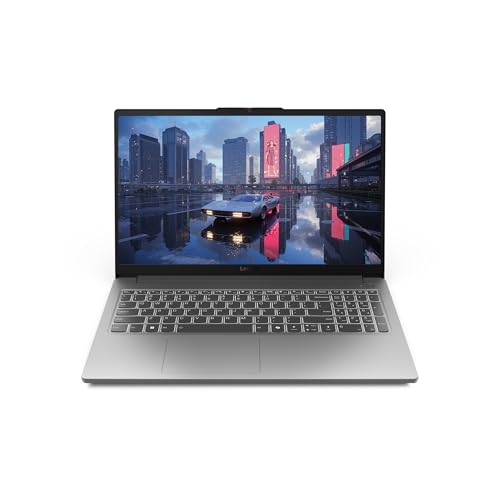
Lenovo LOQ Essential AI-Powered Student Gaming Laptop

HP Victus 15.6″ Full HD 144Hz Gaming Laptop

NIAKUN Laptop Computer 15.6 Inch Laptop PC
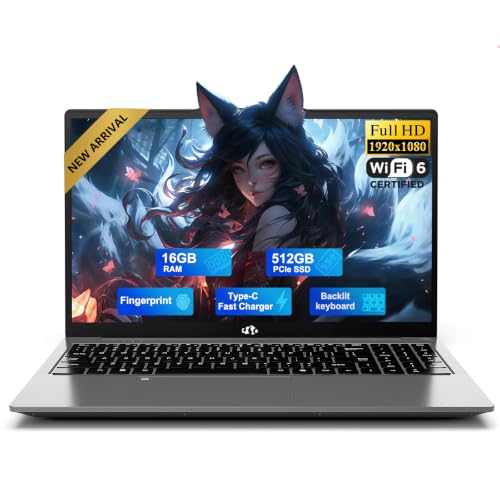
NIMO 15.6″ AI Creator Gaming Laptop 2026 Edition
More Details On Our Top Picks
The Nitro V makes the strongest case for a beginner who wants room to grow. Its Core i5-13420H processor and RTX 4050 graphics give you more breathing room than lighter starter systems, while the 15.6-inch Full HD IPS panel at 144Hz keeps motion looking smoother in fast games.
The trade-off is that this kind of headroom only matters if you plan to spend more time gaming than just opening a few tabs and a launcher. Still, for a first serious setup at a desk, the 8GB DDR5 memory, 512GB Gen 4 SSD, Wi-Fi 6, and backlit keyboard cover the basics well enough for everyday use.
Strong Points
- RTX 4050 graphics give you stronger game-side breathing room than the RTX 3050 models in the HP Victus picks.
- The 144Hz screen helps action feel smoother, which matters in shooters, racers, and any game with fast camera movement.
- Gen 4 SSD storage usually means quicker game launches and less waiting around at startup.
- Wi-Fi 6 suits a home setup with several connected devices sharing the same network.
Things To Consider
- 8GB of memory is workable, but heavier multitasking can feel tighter than on the 16GB Victus model below.
- The stronger parts make more sense on a desk than in a bag all day.
Feature Card
Who Will Love This
New PC gamers who want a more future-ready starter machine will get the most from this one.
Where Another Pick Suits Better
HP Victus 15.6″ Full HD 144Hz Gaming Laptop fits you better if you want 16GB memory for schoolwork and gaming side by side.
This Victus keeps things straightforward, which is often what a first gaming laptop should do. The 12th Gen Core i5-12500H and RTX 3050 form a familiar entry-level pairing, and the Full HD screen gives you a sensible starting point for mainstream games without a lot of setup fuss.
Compared with the Nitro V, you give up some graphics headroom, but the rest of the package stays easy to live with. The backlit keyboard helps in dim rooms, and the 512GB SSD is large enough for a few favorite games plus school files, though you’ll still want to manage storage with care.
What We Like
- The RTX 3050 keeps this model squarely in the beginner-friendly lane.
- Windows 11 Home arrives ready for everyday use, so setup feels familiar.
- The backlit keyboard suits evening gaming sessions or shared spaces with softer lighting.
- Its familiar HP Victus design is easy to place on a desk without feeling bulky.
Points To Note
- 8GB of memory can feel modest once game launchers, chat apps, and a browser all stay open.
- The RTX 3050 is fine for getting started, but it trails the RTX 4050 systems above it.
- Storage fills faster than you might expect once a few larger games are installed.
Made For
Casual gamers and students who want a simple, recognizable gaming laptop will feel at home here.
Another Choice May Suit
Lenovo LOQ Essential AI-Powered Student Gaming Laptop suits you better if you want a newer RTX 4050 setup for heavier gaming.
Lenovo’s LOQ Essential feels aimed at a student who wants a laptop that can handle class work during the day and games at night. The 12th Gen Core i5-12450HX and RTX 4050 combination gives you a clearer step up from the RTX 3050 machines, while the 15.6-inch IPS panel with 144Hz refresh keeps gameplay looking smoother.
The Luna Grey finish keeps the look restrained, which helps in a classroom or shared study space. Eight gigabytes of memory and 512GB of storage are enough for a starter library, though the real draw is the stronger graphics side, not a sprawling multitasking machine.
Highlights
- The RTX 4050 makes this a stronger long-term gaming option than the HP Victus 15 models.
- The 144Hz screen suits fast-paced play and keeps motion feeling less choppy.
- Its student-friendly styling works well in dorms, libraries, and shared desks.
- The 512GB SSD gives you a decent base for a few major games and daily files.
Room For Improvement
- 8GB memory is serviceable, but multitasking can feel tighter once several apps stay open.
- You may want to keep extra storage habits in mind as game files grow.
Core Details
Right Fit For
Students who want a cleaner balance of class tasks and gaming power will get the most from this pick.
A Better Fit Elsewhere
HP Victus 15.6″ Full HD 144Hz Gaming Laptop fits you better if you want 16GB memory for a busier multitasking routine.
This Victus is the most balanced of the HP pair, mostly because the 16GB of memory changes daily use in a real way. You can keep a browser, a game launcher, and school apps open with less friction, and the RTX 3050 still handles the entry-level gaming side without making the system feel intimidating.
The 144Hz panel and Wi-Fi 6 keep the experience modern enough for a beginner setup, while the Windows 11 Pro environment suits a shared home machine or a student who likes a little more control. The compromise is familiar: the RTX 3050 sits below the RTX 4050 options, so you’re choosing comfort and multitasking over the strongest graphics ceiling.
Upsides
- 16GB RAM gives you more breathing room than the other budget-minded picks here.
- Wi-Fi 6 suits homes with several people streaming and gaming at once.
- The 512GB PCIe SSD should feel quick during boot and game loading.
- Windows 11 Pro can appeal to students who want a more flexible work setup.
Softer Spots
- The RTX 3050 is fine for starting out, though heavier gaming will push it more than the RTX 4050 models.
- Storage planning still matters once larger game installs start stacking up.
Feature Rundown
Who Should Grab It
Beginners who want smoother multitasking and a more comfortable everyday laptop will appreciate this one most.
Look Elsewhere When
acer Nitro V Gaming Laptop ANV15-51-51H9 fits you better if graphics headroom matters more than extra memory.
This NIAKUN model leans more toward everyday computing than serious gaming, and that matters a lot. The 16GB memory and 512GB SSD make it feel more sensible for business tasks, note-taking, and a bit of light play, while the backlit keyboard helps in low light.
The processor naming here is older than the chips in the Acer, HP, and Lenovo picks, so you’re not looking at the same gaming ceiling. For a student who mainly wants a roomy Windows 11 Pro laptop with some extra software already in the mix, it can still make sense.
Best Bits
- 16GB memory gives you a comfortable base for office work and web-heavy days.
- The 512GB SSD supports quick startup and everyday file storage.
- Windows 11 Pro suits work, school, and general laptop use.
- The backlit keyboard is handy in shared rooms or evening study sessions.
Minor Gripes
- The Core i7-7600U platform is older than the chips in the other gaming-focused picks.
- Serious gaming is not its natural lane, especially beside the RTX-equipped laptops in this list.
- Office 365 activation depends on following the setup steps carefully.
Best Suited To
Students and office users who want a general-purpose laptop with only light gaming on the side will get the most from it.
Swap It Out When
HP Victus 15.6″ Full HD 144Hz Gaming Laptop suits you better if your main goal is playing modern games with dedicated graphics.
The NIMO stands out most for the way it bundles a premium metal top cover with a 100W USB-C charger and a creator-friendly angle. That makes it feel less like a stripped-down starter laptop and more like a machine for someone who edits, studies, and games in the same day.
You also get a 2-year warranty, which is a notable support signal for a newer shopper comparing it with the Acer and HP options above. The catch is that the Ryzen 5 6600H is a six-core chip aimed at general responsiveness and light-to-moderate workloads, so it’s a better fit for hybrid use than for chasing the strongest gaming ceiling.
Reasons To Buy
- The metal top cover gives the chassis a more finished feel.
- The included 100W USB-C charger is convenient for travel and desk use.
- Six-core Ryzen 5 processing suits editing, schoolwork, and everyday tasks.
- The 2-year warranty adds a reassuring ownership layer.
Areas To Watch
- The creator-first angle may matter more than gaming focus for some shoppers.
- You should expect a hybrid-use machine, not a pure performance monster.
At A Glance
Whose Shelf It Belongs On
You’ll appreciate this most as a flexible work-and-play laptop with stronger support touches than the average starter machine.
Reach For A Different Pick When
Lenovo LOQ Essential AI-Powered Student Gaming Laptop is the better fit if your main goal is dedicated gaming with RTX 4050 graphics.
What Matters Most Before You Choose
Common Shopping Slip Ups
Don’t let screen size do all the work for you. A 144Hz panel, 8GB or 16GB memory, and the graphics chip matter more once you start loading real games and keeping chat or school apps open.
The Upgrade Payoff
Higher-tier models cost more because the graphics chip, memory, and cooling usually move up together. That extra spend makes sense for you once gaming stops being occasional and becomes part of a regular routine.
Before You Click Amazon
Where Shoppers Go Wrong
It’s easy to chase a familiar brand and miss the part that changes how the laptop feels day to day. A beginner setup should match your game list, your desk space, and how many apps you keep open at once.
What The Higher Tier Buys
Better graphics and more memory usually mean smoother play and less waiting. That matters most for newer games, larger installs, and long sessions where a basic machine starts to feel crowded.
Frequently Asked Questions
What specs matter most for a first gaming laptop?
The graphics chip matters most for game smoothness, followed by memory and storage. A 144Hz display helps too, especially in fast-moving games.
Is 8GB memory enough for beginner gaming?
It can work for lighter use and a smaller app stack. 16GB feels more comfortable once you keep several apps open together.
Do you need an RTX 4050 for starting out?
No, but it gives you more room for newer games and longer ownership. An RTX 3050 is still a sensible entry point for casual play.
Why does screen refresh rate matter?
Higher refresh rates can make motion look smoother, which is useful in fast games. A 144Hz panel is a nice fit for that kind of play.
Should you choose gaming hardware or better memory first?
Gaming hardware matters more for frame rates, while memory helps with multitasking. For mixed school and play use, 16GB is often the calmer choice.
