


Golf simulator setups are rough on weak laptops. You need steady graphics, enough memory for smooth course loading, and a display that keeps motion clean without turning the room into a blur.
This shortlist focuses on machines that make sense for home simulators, spare rooms, and shared entertainment spaces. Some lean into high-refresh screens and stronger GPUs, while others stay sensible for lighter simulator software and everyday use.
Quick Look At The Shortlist

ASUS ROG Strix G16 (2025) RTX 5060
ASUS ROG Strix G18 (2025) RTX 5080

ASUS ROG Strix G16 (2025) RTX 5080
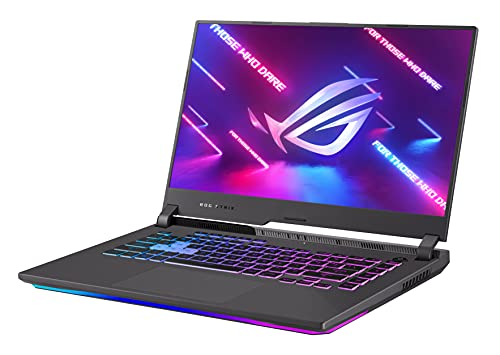
ASUS ROG Strix G17 (2021) RTX 3050 Ti

FUNYET Gaming Laptop 16GB 512GB SSD

Acer Nitro V i5 RTX 4050

Acer Nitro V i7 RTX 4050

msi Katana 15 HX RTX 5070
More Details On Our Top Picks
For a golf simulator room that also handles everyday use, this Strix G16 sits in a sensible middle lane. The 16-inch 16:10 panel gives you a bit more vertical space than a plain 16:9 screen, which helps the setup feel less cramped during menus and launch screens.
The RTX 5060, Core i7-14650HX, 16GB DDR5, and 1TB Gen 4 SSD form a clean baseline for smooth simulator play and quick loading. You may still want more memory later for heavier multitasking, but out of the gate it looks like a strong fit for a shared desk or living room rig.
Strong Points
- 165Hz refresh and 3ms response suit motion-heavy simulator visuals.
- RTX 5060 gives you modern graphics headroom without jumping to the largest chassis.
- 1TB SSD leaves room for launchers, courses, and everyday files.
- Wi-Fi 7 helps keep a crowded home network steadier for online play and updates.
Things To Consider
- 16GB memory is fine for many setups, though multitaskers may want more later.
- Its 16-inch format travels more easily than the G18, but it still asks for a decent desk.
Core Details
Who It Suits Best
Home sim players who also use the laptop for work, streaming, or school will get the most from this mix of speed and restraint.
A Better Fit Elsewhere
ASUS ROG Strix G18 (2025) RTX 5080 suits you better once the simulator lives on a large desk and you want more raw headroom.
The G18 goes in the opposite direction from the G16, and that’s the point. Its 18-inch 2.5K display gives simulator software more room to breathe, so shot data, course views, and launch windows feel less crowded on screen.
With an RTX 5080, Core Ultra 9 275HX, 64GB DDR5, and 8TB M.2 PCIe SSD, this is clearly built for heavy multitasking and a large software library. The trade-off is size, because this one belongs on a permanent desk more than a lap or rolling cart.
What We Like
- 18-inch panel makes simulator visuals easier to follow from a seated setup.
- 240Hz refresh helps motion stay crisp in fast-moving games.
- 64GB memory and 8TB storage are unusually roomy for a laptop.
- Core Ultra 9 275HX gives you serious processing overhead for demanding workloads.
- Win11 Pro suits work-first owners who also game after hours.
Small Caveats
- The large chassis is not the easygoing travel choice in this list.
- Its power level makes it overkill for casual simulator use.
- Owners with limited desk depth may find the footprint demanding.
Feature Rundown
Who Will Love This
Serious simulator hobbyists with a fixed setup and a taste for oversized displays will get the most from it.
Swap It Out When
ASUS ROG Strix G16 (2025) RTX 5060 fits better for a smaller desk or a room that doubles as a workstation.
This G16 keeps the more manageable 16-inch footprint, but the 2.5K 240Hz panel gives it a sharper, faster feel than the RTX 5060 version. That matters in simulator rooms where you also want menus, score overlays, and desktop work to look clean.
The RTX 5080, Core Ultra 9 275HX, 32GB DDR5, and 1TB SSD make it the sharper all-rounder of the two ASUS G16 models here. The honest read is that it makes the most sense for you if you want strong gaming headroom without moving up to the bulkier G18.
Highlights
- 2.5K resolution adds extra clarity to simulator dashboards and desktop use.
- 240Hz refresh keeps fast motion very smooth.
- 32GB memory is comfortable for gaming and background apps.
- Wi-Fi 7 supports modern home networks and quick patch downloads.
Areas To Watch
- 1TB storage is fine, though the G18 gives you far more room.
- It still needs a proper desk or stand, not a cramped lap setup.
Perfect Match For
You’ll like this most if you want a premium gaming laptop that still fits into a normal-size room.
Another Choice May Suit
MSI Katana 15 HX RTX 5070 is a cleaner fit for someone who wants strong speed in a more traditional 15.6-inch chassis.
The older G17 has a different appeal: it gives you a big 17.3-inch panel without pushing into the newer premium price tier. For simulator software, that wider viewing area can still feel comfortable, especially in a room where the laptop stays parked.
Its RTX 3050 Ti and Ryzen 7 4800H are clearly behind the newer ASUS and MSI options, so you’re buying a simpler platform rather than raw speed. That trade-off makes sense for lighter simulator use, basic gaming, and a setup that doesn’t need to chase cutting-edge settings.
Upsides
- 17.3-inch display gives you a roomy visual field for simulator dashboards.
- 144Hz refresh is a clean step above standard office panels.
- 16GB memory and 512GB SSD cover the basics well.
- Older parts can make this a more approachable step into gaming laptop ownership.
Points To Note
- RTX 3050 Ti is the lightest graphics option in this group.
- Windows 10 is dated compared with the newer machines here.
- 512GB storage can fill quickly once you add a few large games.
Best Suited To
Casual simulator users who want a large screen and don’t need premium-frame rates will get the most from it.
Where A Sibling Pick Shines
Acer Nitro V i7 RTX 4050 suits you better once you want a fresher platform with stronger everyday pace.
This FUNYET model reads as the plainest option in the list, and that can be enough for a lightweight simulator station. The 16-inch FHD panel, 16GB memory, and 512GB SSD cover the basics without trying to pretend it belongs in the same class as the RTX 5080 machines.
The fingerprint unlock and backlit keyboard add convenience for a shared household, especially in a room that doubles as an office. The catch is that the Intel 12th Gen Celeron N95 is modest, so you should expect this to fit easier simulator software and general computing more than demanding graphics settings.
Bright Spots
- 16GB memory is a sensible floor for everyday multitasking.
- Backlit keys help in dim simulator rooms.
- Fingerprint unlock adds a quick sign-in option for shared use.
- Windows 11 Pro suits basic work and home setup management.
Room For Improvement
- The Celeron-class processor is the weakest compute option here.
- 512GB storage leaves less breathing room for a large game library.
- It fits lighter simulator software better than demanding, high-frame-rate play.
Right Fit For
Budget-focused shoppers who want a simple computer that can also host a light simulator setup are the best match.
Reach For A Different Pick When
ASUS ROG Strix G16 (2025) RTX 5060 is the better route once simulator performance matters more than keeping costs modest.
The first Acer Nitro V in the list keeps things lean with a 15.6-inch IPS screen and RTX 4050 graphics. That combination makes sense for a compact simulator station where you care more about dependable basics than showpiece hardware.
Its 8GB DDR5 memory is the sharpest compromise here, so this one fits light use more comfortably than a heavy multitasking routine. Still, the Gen 4 SSD, backlit keyboard, and Wi-Fi 6 give it a useful everyday shape for a bedroom desk or a starter gaming corner.
Best Bits
- RTX 4050 gives you modern entry-level gaming support.
- Gen 4 SSD should keep boot and launch times brisk.
- Backlit keyboard is handy in low-light simulator spaces.
- 15.6-inch size stays easier to place on smaller desks.
Softer Spots
- 8GB memory is tight once several apps run together.
- The smaller screen is less roomy than the ASUS G16 and G18 options.
- It suits starter simulator use better than heavier loads.
Made For
Starter simulator owners who want a portable 15.6-inch machine will get the most out of it.
Look Elsewhere When
Acer Nitro V i7 RTX 4050 is the cleaner choice once you want more memory and a faster 165Hz panel.
This Nitro V improves the earlier Acer formula in the places that matter for daily use. You get 16GB DDR5 memory, a 1TB Gen 4 SSD, and a 165Hz display, which makes it easier to leave simulator software, launchers, and a few background apps open at once.
It’s still a 15.6-inch machine, so you’re not buying sheer screen size, but that keeps the footprint friendlier for apartments and mixed-use desks. The Intel Core i7-13620H gives it a cleaner pace than the i5 model above, and that extra margin is easy to appreciate once the laptop becomes your main home computer.
Reasons To Buy
- 16GB memory is a much healthier fit for multitasking.
- 1TB SSD gives you room for a fuller game library.
- 165Hz display keeps motion smoother than the 144Hz Nitro V.
- Wi-Fi 6 works well for typical home network use.
Minor Gripes
- It still sits below the RTX 5060 and RTX 5080 class in graphics power.
- 15.6 inches can feel tight next to the larger ASUS choices.
The Right Fit
Home gamers who want a balanced, midrange laptop for simulator play and everyday tasks will like this most.
Where A Sibling Pick Shines
MSI Katana 15 HX RTX 5070 suits you better if the goal is stronger top-end performance and a QHD+ display.
The Katana 15 HX is the most processor-heavy option in this roundup, and the i9-14900HX gives it obvious appeal for people who keep a lot open at once. The QHD+ 165Hz display sharpens the visual side too, so golf simulator interfaces and modern games both land with more detail than a basic FHD panel.
With 32GB DDR5 and a 1TB NVMe SSD, it feels ready for heavier gaming sessions and larger installs. The 15.6-inch size keeps it more manageable than the G18, though the heat and noise profile on a machine like this usually matter more than they do on the gentler ASUS and Acer options.
Standout Traits
- Core i9-14900HX brings very strong CPU capacity.
- RTX 5070 gives you a step above RTX 4050 and RTX 5060 class machines.
- 32GB memory supports heavy multitasking.
- QHD+ screen adds useful sharpness for simulator data and desktop work.
Worth Noting
- It asks more from cooling than the lighter midrange machines.
- 15.6 inches is still smaller than the big ASUS G18 panel.
- Its power level makes more sense for serious gaming than casual simulator use.
Whose Shelf It Belongs On
Power users who want a laptop that can carry gaming, simulator work, and heavy multitasking are the best match.
Where The Extra Money Goes
ASUS ROG Strix G16 (2025) RTX 5080 is the more balanced choice once you want strong speed without leaning as hard into CPU-heavy overhead.
What Matters Most Before You Choose
Wrong Turns To Avoid
Do not chase GPU power alone. Golf simulator software benefits from a decent graphics chip, but screen size, refresh rate, memory, and storage all shape the day-to-day experience.
Another common miss is underestimating desk space. An 18-inch chassis like the ASUS ROG Strix G18 fits best in a fixed room, while a 15.6-inch Acer Nitro V makes more sense for tighter layouts.
The Upgrade Payoff
Higher-tier machines usually buy you more memory, larger SSDs, and stronger CPUs, which helps when the laptop doubles as a game library and daily workstation. That extra room also matters for owners running launchers, recording tools, or background apps alongside simulator software.
For casual play, a midrange RTX 4050 or RTX 5060 machine is often enough. For heavier gaming, larger libraries, and a more permanent setup, the premium ASUS and MSI options earn their place.
Frequently Asked Questions
Do Gaming Laptops For Golf Simulator Need A Huge GPU?
Not always. A midrange GPU can handle many simulator setups well, especially with a sensible display resolution.
Is A 16-Inch Laptop Enough For Simulator Use?
Yes, for many setups it is. A 16-inch panel is easier to place and still gives you useful screen space.
How Much Memory Should You Aim For?
16GB is the practical floor for most of these laptops. 32GB or more makes more sense for heavy multitasking and larger game libraries.
Does A Higher Refresh Rate Matter Here?
It helps motion look smoother, especially in fast moving games and menu transitions. For simulator work, it also makes the overall feel more responsive.
Which Picks Suit A Shared Home Room Best?
The ASUS ROG Strix G16 models and Acer Nitro V i7 are easier to fit into a mixed-use room. The larger G18 works better in a dedicated desk setup.
