


Linux gaming is a compatibility puzzle first and a hardware choice second. You want enough GPU headroom for modern titles, a keyboard that stays comfortable through long sessions, and a screen that keeps motion clean without wasting your budget on cosmetic extras.
This roundup focuses on laptops that make sense for everyday gaming, creator work, and mixed-use setups. You’ll see where each model fits, where it asks for compromise, and which one matches your style of play most closely.
Shortlist At A Glance

ASUS ROG Strix G16 (2025) Gaming Laptop

Acer Nitro V Gaming Laptop

NIMO 15.6 Light-Gaming Laptop

NIMO 15.6 FHD Light-Gaming Laptop

Alienware 16 Aurora Gaming Laptop
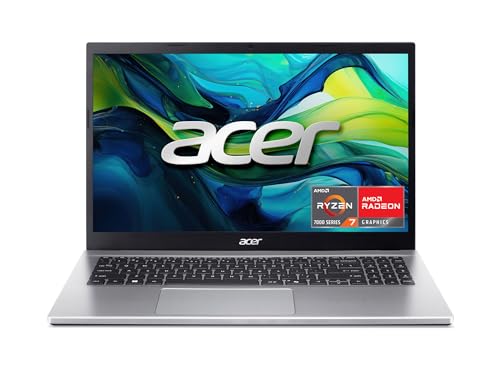
Acer Aspire Go 15 AI Ready Laptop

Lenovo Legion 5i Gaming Laptop
Gaming Laptop with AMD Ryzen 7 H255
More Details On Our Top Picks
That 16:10 panel gives you a little more vertical room than a standard 16:9 screen, which matters in both games and desktop work. Paired with the RTX 5060 and Core i7-14650HX, this sits in the strongest hardware tier in the list, so it suits you best when Linux gaming shares the stage with heavier multitasking.
The 165Hz refresh rate with a 3ms response spec is the kind of display profile that keeps motion clean in fast titles, while the 1TB Gen 4 SSD gives you room for a serious game library. The trade-off is that this class of machine usually asks for more money and more cooling headroom, so it makes the most sense on a desk rather than in a bag all day.
Strong Points
- RTX 5060 graphics leave room for demanding games and higher settings.
- 165Hz panel suits fast movement and quick camera changes.
- 1TB Gen 4 SSD helps keep a larger library installed.
- Core i7-14650HX gives you strong headroom for gaming plus background apps.
Things To Consider
- Its performance tier makes it a less casual carry.
- Windows 11 Home means you may be adjusting for Linux use yourself.
- The sharper gaming focus leaves less emphasis on slim portability.
Feature Snapshot
Who It Suits Best
You’re the best fit here if you want a gaming-first machine that still handles creative apps and multiple tabs without feeling strained.
Where A Sibling Pick Shines
The Lenovo Legion 5i suits you better if display quality matters more than raw chassis style, especially for visually rich games.
The Nitro V lands in a practical middle ground, with an RTX 4050 and a 165Hz 15.6-inch IPS panel that make sense for esports, lighter AAA play, and everyday use. Compared with the Strix G16, it trims the hardware headroom a bit, but that also makes the package easier to justify for a Linux setup that spends more time gaming than chasing elite frame ceilings.
You get 8GB DDR5 memory and a 512GB Gen 4 SSD, which is enough for a starter library but not especially roomy once you begin stacking large installs. The honest read is that this is the machine for a sensible setup, not a luxury one, and that restraint is part of the appeal.
Highlights
- RTX 4050 graphics cover mainstream gaming well.
- 165Hz IPS display helps motion feel smoother in fast titles.
- DDR5 memory gives you a newer memory platform than older budget laptops.
- Compact 15.6-inch size is easier to place on small desks.
Minor Gripes
- 8GB RAM can feel tight with modern multitasking.
- 512GB storage fills quickly once your library grows.
- Linux users may want to plan around Wi-Fi and graphics setup before long-term use.
Built With In Mind
You fit this best if you want a more affordable gaming laptop that still brings a real discrete GPU and a high-refresh panel.
Look Elsewhere When
The ASUS ROG Strix G16 suits you better when you want more graphics headroom and a larger SSD from the start.
Memory is the first thing that stands out here, because 32GB gives you more breathing room than the 8GB Nitro V and enough margin for code, browsers, and game launchers together. The Radeon 680M is integrated graphics, so this is not the same kind of gaming machine as the ASUS or Acer, but it suits lighter play, indie titles, and work-heavy Linux installs very well.
For content creation and business school use, the 1TB SSD keeps files and projects close at hand, while the 8-core Ryzen 7 Pro 6850U should feel comfortable in everyday multitasking. The trade-off is simple: this is a lighter-gaming laptop, not a high-FPS bruiser, so you’re choosing capacity and balance over raw graphics strength.
Bright Spots
- 32GB RAM helps with many tabs, coding tools, and project work.
- 1TB SSD gives you generous room for files and installs.
- Integrated Radeon 680M keeps the chassis focused on efficiency.
- Good fit for mixed use, including study and light gaming.
Areas To Watch
- Integrated graphics limit you to lighter game settings and simpler titles.
- No high-refresh panel detail is given, so motion tuning is less clear than on the gaming-first picks.
- The lighter-gaming focus makes it a weaker match for graphically heavy play.
Who Should Grab It
You’re the right match here if Linux gaming sits beside classwork, spreadsheets, and everyday productivity.
Swap It Out When
The Lenovo Legion 5i suits you better when frame rate and display quality matter more than RAM capacity.
This version keeps the same light-gaming core as the previous NIMO, but the fingerprint reader and 100W Type-C charging make it feel better suited to daily carry and shared workspaces. LPDDR5 memory, or low-power DDR5, is built to sip less power than standard memory types, which is useful when you care about efficiency more than heavy graphics output.
The 15.6-inch FHD panel keeps the format familiar, and the 1TB SSD again gives you practical storage for documents, projects, and a modest game library. Because the Radeon 680M is still integrated graphics, the machine stays closer to a productivity laptop with light gaming ability than a true gaming rig.
Upsides
- Fingerprint reader adds a convenient unlock step for shared or busy environments.
- 100W Type-C charging is useful for simpler desk setups and travel kits.
- 32GB LPDDR5 memory supports smooth multitasking.
- 1TB SSD gives you practical storage without crowding the system.
Small Caveats
- Integrated graphics keep it in light-gaming territory.
- Fewer gaming-focused details are listed than on the Acer or Lenovo models.
- The fingerprint sensor adds convenience, though it also means one more surface to keep clean.
The Right Fit
You’re best served here if you want a portable Linux work machine that can still handle casual play after hours.
Reach For A Different Pick When
The ASUS ROG Strix G16 is the stronger choice when gaming performance matters more than daily convenience features.
Alienware’s pitch here is clean industrial style with a gaming core, and that makes it stand apart from the busier looks of many performance laptops. The WQXGA 120Hz panel is a sharper canvas than the basic 1080p class, so you get a more refined desktop feel for games, streaming, and creative work.
The RTX 5050 and Core 7 240H place it in a capable mid-to-upper tier, though the exact fit depends on how demanding your Linux games are. Compared with the Lenovo Legion 5i, it trades some display refresh rate for a more restrained visual identity, which some setups will prefer and others won’t.
Reasons To Buy
- WQXGA resolution gives you a sharper-looking desktop than plain FHD.
- 120Hz refresh rate keeps the interface and gameplay feeling responsive.
- Anodized aluminum lid adds a more premium surface treatment.
- Midrange RTX 5050 graphics fit a wide range of gaming loads.
Worth Noting
- The style-forward design may matter more here than pure gaming value.
- 120Hz is solid, though it trails the faster panels on some rivals.
- Its polished finish can show fingerprints in daily use.
Perfect Match For
You fit this model well if you want a cleaner-looking gaming laptop for a desk that also doubles as a work station.
Another Choice May Suit
The Lenovo Legion 5i is a better fit for you if sharper display specs and higher-tier gaming graphics are the priority.
This Acer is the least gaming-focused option in the list, but that doesn’t make it uninteresting. With Ryzen 7 7730U, 16GB DDR4, and a 512GB PCIe Gen4 SSD, it lines up better with Linux users who want a steady everyday machine that can also handle lighter games.
The 15.6-inch FHD IPS screen should feel familiar for long browsing sessions and general work, and the Wi-Fi 6 support suits a normal home or campus network. The trade-off is obvious: the Radeon Graphics are fine for casual play, but they don’t belong in the same conversation as the discrete GPUs on the ASUS, Acer Nitro, or Lenovo Legion.
What We Like
- Ryzen 7 7730U gives you a sensible balance for daily tasks.
- 16GB memory fits basic multitasking without feeling overly stripped down.
- Gen4 SSD helps the system feel quick during boot and app launches.
- IPS panel is a comfortable match for long desk sessions.
Points To Note
- Integrated graphics keep gaming expectations modest.
- 512GB storage suits lighter libraries better than large install collections.
- It leans more toward daily productivity than dedicated gaming.
Whose Shelf It Belongs On
You’re the right fit here if you want a simple Linux daily driver that can handle casual play without chasing high settings.
Where Shoppers Go Wrong
The Acer Nitro V is the better call when you want a clear step up in gaming graphics and refresh rate.
The Legion 5i looks built for people who care about the display as much as the frame rate. Its 15-inch 2.5K WQXGA PureSight OLED panel gives you richer contrast and finer detail than the FHD panels on the ASUS and Acer Nitro, and that matters in visually dense games and everyday desktop use alike.
Under the panel, the RTX 5070 and Core i7-14700HX push this well into high-performance territory, with 16GB memory and 1TB storage giving the rest of the system a sensible backbone. OLED, or organic light-emitting diode, is the display tech that helps each pixel light itself, and the payoff is a deeper-looking image, though that premium screen usually means a higher asking point and more care around burn-in-sensitive static layouts.
Best Bits
- OLED display delivers striking contrast and sharp detail.
- 165Hz refresh rate keeps gaming motion smooth.
- RTX 5070 gives you a very strong graphics tier.
- 1TB storage supports larger game libraries and project files.
Softer Spots
- The premium display and GPU combination usually places it above entry-level budgets.
- OLED panels reward a little more care with static desktop content.
- It makes more sense for high-end play than casual browsing alone.
Built For In Mind
You’re the best match here if you want Linux gaming with a display that looks as polished as the rest of your setup.
Skip It When
The Acer Nitro V makes more sense if you want to spend less while still getting a high-refresh gaming panel.
This MALLRACE model leans on a strong CPU and a generous memory count rather than a long feature list, which makes it interesting for Linux users who want flexibility. The Ryzen 7 H255 can boost to 4.9GHz, and the 24GB DDR5 memory gives you more multitasking room than many midrange gaming laptops.
Radeon 780M graphics are integrated, so the fit stays closer to light and moderate gaming than to the heavier end of the category. That trade-off is pretty clear, but for many mixed-use setups it keeps the machine practical, especially when you want one laptop for work, study, and occasional play.
Positives
- 24GB DDR5 gives you a comfortable multitasking cushion.
- Ryzen 7 H255 brings strong CPU headroom for daily tasks.
- NVMe SSD should help the system feel responsive.
- Integrated graphics keep power needs simpler than on discrete-GPU models.
Room For Improvement
- Integrated graphics limit heavier gaming ambitions.
- Storage capacity is solid, though large game libraries may feel tight over time.
- The listing gives less detail than several rivals, so the fit is more about core hardware than extras.
Made For
You’re the right fit here if you want a Linux-friendly everyday laptop that can still handle casual gaming and multitasking.
Consider Something Else When
The Lenovo Legion 5i suits you better when a higher-end GPU and OLED display matter more than CPU and memory balance.
What Matters Most Before You Choose
Mistakes Worth Dodging
Linux gaming depends on more than raw specs. A laptop with a strong GPU can still feel awkward if the Wi-Fi card, display, or thermals create extra friction in daily use.
Storage matters faster than many people expect, especially with modern game sizes. A 512GB drive fills quickly once you add the system, launchers, and a few large titles.
The Upgrade Payoff
Higher-tier machines usually pay for better GPUs, sharper displays, stronger cooling, and more memory headroom. That extra cost makes sense for you when gaming takes priority over light office work.
It’s also where the smoother long-session experience tends to live. The premium jump often shows up in screen quality and sustained performance, not just headline speed.
Frequently Asked Questions
Which of these works best for Linux gaming?
The Lenovo Legion 5i and ASUS ROG Strix G16 give you the strongest gaming-first hardware in this list. The Legion leans harder into display quality, while the ASUS focuses on a balanced high-performance build.
Are integrated graphics enough for Linux play?
They work for lighter titles, indie games, and everyday use. The NIMO and Acer Aspire Go models fit that kind of workload better than demanding modern releases.
How much RAM should you target?
16GB is a sensible floor for a gaming-oriented Linux laptop, and 24GB or 32GB gives you more space for multitasking. Extra memory helps most when you keep browsers, launchers, and chat apps open at the same time.
Does the display really matter that much?
Yes, because refresh rate and resolution change how smooth motion looks and how much detail you see. The Legion 5i stands out here, while the Nitro V and Strix G16 focus on fast 165Hz FHD-class panels.
Which pick is most portable for mixed use?
The NIMO light-gaming models and the Acer Aspire Go make more sense for everyday carry. They give you a lighter gaming compromise than the higher-wattage ASUS or Lenovo options.
