


Gaming and classwork ask for different things, yet plenty of students need one laptop to handle both. That means fast-enough graphics for popular games, a keyboard that won’t feel cramped in a dorm, and battery and weight that still make sense in lecture halls.
The eight picks below cover that spread. You’ll see full-power machines for long evenings at a desk, lighter options for campus carry, and a few compromises that make sense for tighter budgets.
Quick Shortlist For Campus Gaming

ASUS ROG Strix G16 (2025) Gaming Laptop G615JMR-AS74

Acer Nitro V Gaming Laptop ANV15-52-586Z

Alienware 16 Aurora Gaming Laptop RTX 5050, Intel Core 7 240H
acer Gateway Chromebook 314 CBO314-1H-C476 Laptop
NIMO 15.6″ AI-Creator-Laptop R5-6600H

NIMO 15.6” FHD IPS Student-Laptop-Computer 16GB RAM 512GB SSD
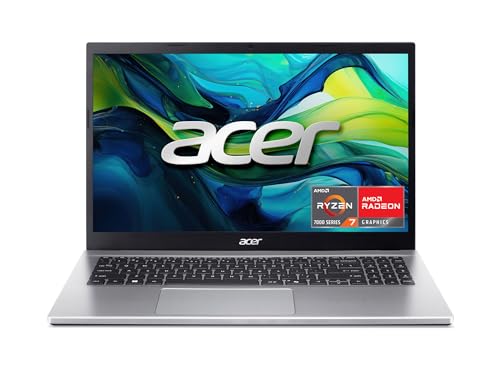
Acer Aspire Go 15 AI Ready Laptop AG15-42P-R9FW

HP 14″ Laptop Intel Processor N150 8GB RAM 128GB UFS
More Details On Our Top Picks
The Strix G16 sits at the serious end of this list, with an Intel Core i7-14650HX, RTX 5060 graphics, 16GB of DDR5 memory, and a 1TB Gen 4 SSD. That mix suits long sessions in a dorm room or lab desk, where game loads, large school files, and a few browser tabs all have to stay open together.
The 16-inch 16:10 panel with 165Hz refresh and 3ms response is the real student-friendly hook, because it gives you room for classwork without making games feel sluggish. The trade-off is plain: this is the heaviest-duty option here, so it makes less sense for someone carrying a laptop across campus all day.
Strong Points
- RTX 5060 graphics give you headroom for modern games and creative software.
- 16GB DDR5 memory helps with multitasking during class, streaming, and play.
- 1TB Gen 4 SSD offers generous local space for game installs and coursework.
- 165Hz display with 3ms response keeps motion looking clean in fast games.
- 16:10 aspect ratio gives you a taller workspace for documents and spreadsheets.
Things To Consider
- The power-first build suits desk use more than all-day carry.
- Its feature set is more machine than a casual note-taking machine, so lighter needs may feel overserved.
Feature Snapshot
Who It Suits Best
Students who want a desktop-like gaming setup in a single laptop will get the most from this one.
A Better Fit Elsewhere
Acer Nitro V Gaming Laptop ANV15-52-586Z suits tighter budgets and lighter gaming loads more cleanly.
This Nitro V keeps the spec story straightforward, and that helps in a student setup. You get an Intel Core i5-13420H, RTX 4050 graphics, 8GB of DDR5 memory, and a 512GB Gen 4 SSD, which is enough for lighter gaming sessions and everyday assignments without pushing into overbuilt territory.
The 15.6-inch FHD IPS panel at 165Hz is a clean fit for campus life, since it balances motion clarity with a screen size that still slips into a backpack. Compared with the ASUS ROG Strix G16, this one feels easier to justify for someone who games after class rather than building a whole desk command center.
Upsides
- RTX 4050 graphics cover mainstream gaming settings with room to spare.
- 8GB DDR5 keeps the starting cost leaner than heavier-spec models.
- 512GB Gen 4 SSD is enough for school files and a smaller game library.
- 165Hz IPS display makes fast movement look smoother in competitive titles.
Softer Spots
- 8GB memory can feel tight once games, chat apps, and course tabs pile up.
- Storage fills faster than the 1TB class models above it.
Core Details
Built With In Mind
Students who want a real gaming laptop without stepping into heavy-duty territory will find the balance sensible.
Where A Sibling Pick Shines
The ASUS ROG Strix G16 makes more sense for gamers who want more storage, more memory, and a stronger overall ceiling.
Alienware’s 16 Aurora leans into a cleaner, more polished look than the plastic-heavy crowd around it. The anodized aluminum lid and 16-inch WQXGA panel with 120Hz refresh and 300 nits brightness make it feel like a desk machine that still travels reasonably well to campus study sessions.
The RTX 5050 and Intel Core 7 240H pairing places it above the Chromebook and entry-tier picks, but the 120Hz screen is the bigger story for most students. It’s a good fit for someone who wants a machine that feels refined in a lecture hall and capable in a gaming setup, though the premium positioning makes the trade-offs obvious.
Bright Spots
- Anodized aluminum lid gives the chassis a more composed finish.
- 16-inch WQXGA display provides extra room for split-screen school work.
- 120Hz refresh suits gaming and fast scrolling without overdoing it.
- RTX 5050 graphics place it firmly in the capable gaming tier.
Areas To Watch
- The screen is fast, though not as quick as the 165Hz panels above.
- Its refined build makes more sense for desk use than rough daily hauling.
Details At A Glance
Who Should Grab It
Students who want a polished gaming laptop for a dorm desk and regular class carry will appreciate this balance.
Swap It Out When
The Acer Nitro V Gaming Laptop ANV15-52-586Z makes more sense for a more budget-minded setup.
This Chromebook belongs in the “keep it simple” camp. The Intel Celeron N4500, 4GB of LPDDR4X memory, and 64GB eMMC storage are modest, but they line up well with browser-based school work, note-taking, and cloud apps in a light daypack.
The 14-inch FHD screen and Chrome OS lean into portability over raw gaming muscle, so this is not the pick for heavy titles. For basic coursework and a machine you can carry without thinking much about it, the compact 3.31-pound body is the main attraction.
Reasons To Buy
- 14-inch full HD display keeps text crisp for class documents and web work.
- 3.31-pound body helps during long campus days.
- Chrome OS suits students who live in the browser.
- Simple hardware tends to keep everyday use straightforward.
Small Caveats
- 4GB memory and 64GB storage are tight for larger game libraries.
- The Celeron platform fits light work, not gaming-heavy expectations.
Right Fit For
Students who want an inexpensive, portable notebook for documents, web apps, and video calls will get the most out of it.
Another Choice May Suit
The HP 14″ Laptop Intel Processor N150 8GB RAM 128GB UFS gives you more breathing room for general school tasks.
The NIMO AI-Creator-Laptop is built for students who split time between class work, editing, and heavier multitasking. Its Ryzen 5 6600H, 16GB of RAM, 512GB SSD, Radeon 660M graphics, and 15.6-inch FHD IPS screen make it feel broader in purpose than the Chromebook above it.
The 100W fast power delivery support is a practical touch for a packed schedule, and that matters more than flashy language. The honest read is that it’s strongest for desktop-style use, so students who move between library tables, lab rooms, and a quiet bedroom desk will get the clearest benefit.
Highlights
- Ryzen 5 6600H gives you six cores for sustained daily workloads.
- 16GB RAM helps with app switching, class notes, and media projects.
- 512GB SSD leaves room for coursework and a practical app library.
- FHD IPS panel works well for editing, browsing, and split windows.
Room For Improvement
- The 15.6-inch format is less convenient than smaller campus-first models.
- It makes more sense for desk use than for ultra-light carry.
Whose Shelf It Belongs On
Students who edit video, keep many tabs open, or juggle school and side projects will appreciate the headroom.
Where A Sibling Pick Shines
The Acer Aspire Go 15 AI Ready Laptop AG15-42P-R9FW is the cleaner choice for students who want a simpler all-rounder.
This NIMO model reads like a school-first machine with a few nice extras. The 15.6-inch FHD IPS screen, 16GB memory, 512GB SSD, fingerprint reader, backlit keyboard, Wi-Fi 5, and Bluetooth 5.2 create a practical mix for dorm life and group projects.
Compared with the AI-Creator NIMO above, this one feels a touch more student-focused and a bit less project-heavy. One thing worth considering is the 65W Type-C charging support, which fits a bag-and-class routine well, even though the larger chassis still makes it more desk-friendly than ultra-compact.
Positives
- 16GB RAM gives you comfortable space for research, notes, and streaming.
- Fingerprint reader adds quick sign-in convenience for shared study spaces.
- Backlit keyboard helps late-night typing in dim rooms.
- 65W Type-C charging is easier to pack than some bulkier adapters.
Minor Gripes
- Wi-Fi 5 is less current than Wi-Fi 6 or Wi-Fi 7 options above.
- The larger 15.6-inch body is less handy for tight tablet-style carry.
The Right Fit
Students who want useful extras without stepping into a premium gaming chassis will find this the most straightforward of the NIMO pair.
Look Elsewhere When
Alienware 16 Aurora Gaming Laptop RTX 5050, Intel Core 7 240H suits students who want a more upscale gaming display and chassis.
The Aspire Go 15 keeps the formula easy to understand: Ryzen 7 7730U, Radeon graphics, 16GB DDR4, and a 512GB PCIe Gen4 SSD. That makes it a sensible middle ground for students who want school speed first, gaming second, and no interest in carrying a flashy chassis around campus.
The 15.6-inch FHD IPS panel is familiar and practical, especially for documents, spreadsheets, and long reading sessions. Compared with the NIMO student model, this Acer feels cleaner for general use, though it lacks the extra convenience features that help late-night work or quick sign-in.
Standout Traits
- Ryzen 7 7730U gives you more breathing room than entry-level chips.
- 16GB DDR4 supports everyday multitasking for school and media.
- 512GB PCIe Gen4 SSD keeps launches quick and storage reasonable.
- FHD IPS display is a safe, familiar fit for long study sessions.
Points To Note
- DDR4 memory is older than the DDR5 found in some rivals.
- Gaming is secondary here, so heavier titles have to stay in check.
Made For
Students who want a dependable general-purpose laptop that can handle occasional gaming after class will appreciate it.
Reach For A Different Pick When
The ASUS ROG Strix G16 (2025) Gaming Laptop G615JMR-AS74 is the better call for more demanding gaming and faster panel needs.
The HP 14-inch model keeps things light and simple, which matters for classes spread across a big campus. Intel N150, 8GB RAM, and 128GB UFS storage point to web work, notes, video calls, and light school software rather than true gaming depth.
The included one-year Microsoft 365 subscription is a practical classroom touch, and the Wi-Fi 6 support helps it stay current for everyday network use. Against the Acer Chromebook 314, this HP has a broader Windows setup, though the smaller storage pool means you’ll want to keep expectations measured.
Best Bits
- 14-inch body is easy to tuck into a backpack.
- Windows setup gives you a wider software path than Chrome OS.
- 8GB RAM is enough for notes, browsing, and classroom tools.
- Wi-Fi 6 helps in busy dorm or campus networks.
Honest Caveats
- 128GB UFS fills quickly once you install larger apps.
- Gaming needs stay modest, so this suits light titles and school first.
Best Suited To
Students who want a compact Windows notebook for assignments, streaming, and basic productivity will find the fit sensible.
Consider Something Else When
Acer Nitro V Gaming Laptop ANV15-52-586Z makes more sense for students who want actual gaming headroom.
What Matters Most Before You Choose A Campus Gaming Laptop
Common Shopping Slip Ups
Small storage and 8GB memory can vanish fast once you install games, course tools, and chat apps. A stronger chip does not fix cramped RAM or a tiny SSD, so match the whole spec sheet to your week, not just the headline graphics number.
Where The Extra Money Goes
Higher-tier models usually pay for faster GPUs, better screens, stronger cooling, and more generous memory or storage. That upgrade makes sense for editing, heavier gaming, or a student setup that has to last through a few academic years.
Frequently Asked Questions
Can gaming laptops also handle classes well?
Yes, and several on this list are built for that split life. The trick is choosing enough memory and storage for school files, then deciding how much gaming strength you actually need.
Is a 14-inch laptop too small for campus use?
Not at all for note-taking and travel, especially on a crowded commute. The trade-off is a tighter workspace, so larger screens feel easier for side-by-side documents.
How much memory makes sense for student gaming?
8GB works for lighter use, but 16GB is the calmer choice for multitasking. That extra headroom helps when class tabs, launchers, and a game are all open together.
Do you need a very fast screen for student gaming?
Higher refresh panels help fast games look smoother, and 120Hz or 165Hz is a noticeable step up from basic panels. For school work alone, the screen shape and size can matter just as much.
Which pick suits a limited budget best?
The acer Gateway Chromebook 314 CBO314-1H-C476 Laptop fits light school use, while the Acer Nitro V Gaming Laptop ANV15-52-586Z offers a more direct gaming path. Your choice comes down to whether school portability or gaming strength matters more.
