


Gaming laptops in this range live or die by the balance of GPU, memory, storage, and display speed. You need a machine that handles daily play without turning every new game into a compromise exercise.
This roundup focuses on real-world fit, from thin 15-inch options for commuting students to larger 17-inch systems for desk use. You’ll see where each model makes sense, where it feels restrained, and which pick fits your setup best.
Quick Look At The Shortlist

ASUS ROG Strix G16 (2025) Gaming Laptop 16” FHD+ 165Hz

Acer Nitro V Gaming Laptop Intel Core i5-13420H RTX 4050

msi Thin A15 15.6” 144Hz FHD Gaming Laptop Ryzen 5-7535HS
Gaming Laptop with AMD Ryzen 7 H255 24GB DDR5 512GB NVMe SSD
msi Cyborg 17 17.3″ FHD 144Hz Gaming Laptop Intel Core 7-240H

Lenovo Gaming Laptop Ryzen 5 7535HS 8GB DDR5 RAM 256GB PCIe SSD
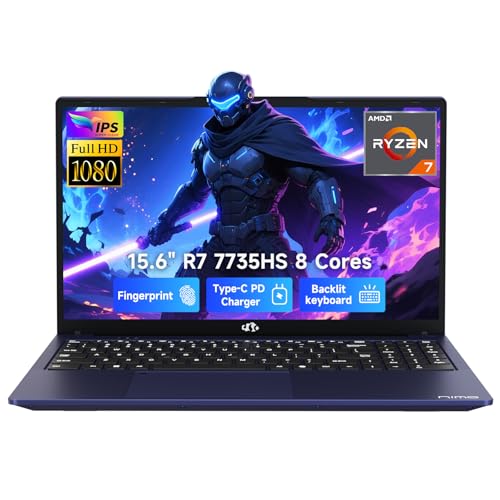
NIMO Thin & Light Gaming Laptop 15.6″ FHD IPS Display AMD R7 7735HS

NIMO Light Gaming Laptop AMD Ryzen 7 7735HS 8 Core 15.6″
More Details On Our Top Picks
That 16:10, 165Hz panel gives this ASUS a more expansive feel than the 15.6-inch crowd, and the faster refresh rate matters most in twitchy shooters. Pair that with an Intel Core i7-14650HX, RTX 5060, 16GB of DDR5 memory, and a 1TB Gen 4 SSD, and you get a spec sheet that fits serious gaming without looking stripped down.
For long sessions at a desk, the larger chassis should suit you better than the slimmer Acer Nitro V below. The honest trade-off is portability, since a 16-inch performance laptop usually asks for more bag space and a steadier charging routine.
Strong Points
- 16:10 screen shape gives more vertical space for games, menus, and day-to-day work.
- 165Hz refresh and 3ms response help motion feel crisp in fast titles.
- RTX 5060 leaves room for modern effects and higher settings than entry-level GPUs.
- 1TB SSD gives generous space for a larger game library and capture files.
Things To Consider
- The larger body is less convenient for commuting or squeezing into a small backpack.
- HX-series chips tend to make the most sense near an outlet.
- A strong cooling setup usually means more internal dust care over time.
Feature Rundown
Who Will Love This
You suit this model best when gaming happens at a desk and you want a fast screen with enough hardware headroom for newer releases.
Where A Sibling Pick Shines
The Acer Nitro V Gaming Laptop fits better for a more portable daily carry, especially for students who want a lighter routine.
This Acer lands in the middle of the group with a familiar 15.6-inch footprint, RTX 4050 graphics, and a 165Hz IPS display. That mix works well for anyone who wants smoother motion without jumping to the size or cost profile of the ASUS ROG Strix G16.
The 8GB DDR5 memory is the part to watch, because newer games and background apps can press against that ceiling faster than the CPU does. Still, for mixed school, streaming, and gaming use, the Nitro V gives you a tidy, practical setup.
What We Like
- RTX 4050 is a sensible step above very basic graphics hardware.
- 165Hz IPS panel helps fast motion look cleaner in esports-style play.
- 15.6-inch format stays easier to move than the larger 16-inch and 17-inch models here.
- 512GB SSD keeps boot times and game launches reasonably quick.
Worth Noting
- 8GB of memory feels tight for heavier multitasking.
- Half a terabyte can fill quickly once a few large games are installed.
- A slim gaming chassis can collect fingerprints around the keyboard deck.
Feature Card
Right Fit For
You fit this model well if you want a mainstream gaming laptop that still moves easily between a dorm, office, and home desk.
Skip It When
The ASUS ROG Strix G16 suits you better for a bigger screen and stronger component headroom in a desk-bound setup.
The MSI Thin A15 trims things back in a sensible way: Ryzen 5-7535HS, RTX 2050 graphics, 8GB DDR5, and a 512GB NVMe SSD. That makes it a clearer entry point than the Acer Nitro V, especially for lighter games, older esports titles, and general day-to-day use.
Its 144Hz screen is still useful, even with a more modest GPU, because menus and movement feel less sticky than on basic 60Hz notebooks. One thing worth considering is that this configuration is aimed at getting you into gaming, not at carrying every setting slider to the far right.
Highlights
- 144Hz panel gives smoother on-screen motion than standard office laptops.
- Ryzen 5-7535HS keeps the machine capable for school, browsing, and gaming.
- 512GB NVMe SSD helps the system feel quick in daily use.
- Thin chassis is easier to store in a packed bag.
Room For Improvement
- RTX 2050 sits at the lighter end for current games.
- 8GB memory may push you toward upgrades later.
- Thin laptops can run warmer under long gaming sessions, so vent care matters.
Built With In Mind
You fit this model best if you want a starter gaming laptop for less demanding titles and everyday tasks.
Look Elsewhere When
The Lenovo Gaming Laptop makes more sense for a tighter budget on storage, while the ASUS ROG Strix G16 is the stronger long-term performance play.
This MALLRACE model stands out for memory first, since 24GB DDR5 is a meaningful jump over the 8GB systems earlier in the list. That extra headroom helps when gaming sits beside chat apps, browser tabs, launchers, and capture tools, which is exactly how many people use a laptop now.
The Ryzen 7 H255 reaches up to 4.9GHz, so the chip is clearly aimed at stronger burst performance than the simpler Ryzen 5 options here. The trade-off is that the source gives you less detail on the rest of the machine, so this one makes the most sense when you value RAM capacity and CPU class more than feature depth.
Upsides
- 24GB DDR5 gives generous room for multitasking and heavier work.
- Ryzen 7 H255 brings stronger ceiling performance than the entry-tier Ryzen 5 chips here.
- 512GB NVMe SSD keeps loading times brisk for daily gaming.
- Good fit for creators who leave several apps open at once.
Softer Spots
- The listing leaves out display and graphics detail, so the full picture is incomplete.
- 512GB storage is fine for a starter library, but large installs add up quickly.
- Maintenance expectations depend on the final chassis design, which the source does not spell out.
Core Details
Who Should Grab It
You fit this one best if multitasking matters as much as gaming and you want more memory than most notebooks in this price band.
Where Another Pick Fits Better
The ASUS ROG Strix G16 suits you better if a clearly specified display and graphics package matters more than extra RAM.
A 17.3-inch screen changes the whole feel of this MSI, especially for anyone who keeps the laptop on a desk most of the time. The RTX 5060, 16GB DDR5, and 1TB NVMe SSD line up well for bigger game installs, while the Core 7-240H gives it a more modern CPU profile than the basic midrange chips in smaller models.
The larger panel is the reason to consider it, though. In a backpack, it will feel closer to a portable desktop replacement than a grab-and-go machine, which makes it a stronger fit than the Acer Nitro V or Lenovo when screen size takes priority over travel ease.
Best Bits
- 17.3-inch display gives more room for games and multitasking.
- RTX 5060 is a strong graphics step for modern titles.
- 1TB SSD gives ample space for a broader library.
- Type-C and Wi-Fi 6E add flexibility for newer peripherals and networks.
Areas To Watch
- The larger size is less convenient for daily travel.
- A big chassis usually asks for more desk space and a larger bag.
- Dark finishes can show dust and fingerprints more readily.
Perfect Match For
You fit this model best if your gaming setup stays at home and you want a screen that feels roomy without adding an external monitor.
A Better Fit Elsewhere
The NIMO Thin & Light Gaming Laptop works better for commuters, college schedules, and anyone who values a lighter carry.
The Lenovo takes a smaller, simpler route than most of the list, and that can be the right call for light gaming and everyday work. Ryzen 5 7535HS, Radeon 660M graphics, 8GB DDR5, and a 256GB PCIe SSD point to a machine that values basic responsiveness over big game libraries.
That smaller SSD is the detail to respect, because modern installs can crowd it fast. Still, for a student, casual player, or anyone who wants a clean 15-inch machine without excess bulk, the Lenovo keeps the price class grounded.
Bright Spots
- 15-inch IPS display keeps the footprint manageable.
- Ryzen 5 7535HS is a capable everyday processor.
- Radeon 660M handles lighter gaming and general use.
- Bluetooth 5.3 and Wi-Fi 6 fit modern wireless setups.
Minor Gripes
- 256GB storage leaves less room for larger game installs.
- 8GB memory may feel narrow for heavy multitasking.
- Casual users may end up managing files more often than they expect.
Whose Shelf It Belongs On
You fit this laptop best if your gaming stays light and you want a tidy machine for work, class, and a few favorite titles.
Another Choice May Suit
The Acer Nitro V is a smarter step up for you if you want more graphics room and a less cramped storage ceiling.
The NIMO Thin & Light lands in a useful middle ground, because it keeps the 15.6-inch format while moving up to Ryzen 7 7735HS and 16GB of DDR5 memory. That makes it more convincing than the Lenovo for multitasking, while still feeling easier to carry than the MSI Cyborg 17.
The 180-degree viewing angle is a small but practical detail for sharing the screen across a desk or adjusting the lid in tight spaces. One thing worth considering is that the source does not spell out the graphics chip, so you should judge it more as a portable productivity-and-light-gaming machine than a fully specified performance monster.
Reasons To Buy
- Ryzen 7 7735HS gives stronger CPU headroom than the Ryzen 5 models here.
- 16GB DDR5 supports smoother multitasking and lighter creator work.
- 15.6-inch size stays practical for campus or travel use.
- 180-degree hinge adds flexibility on shared desks.
Points To Note
- The graphics details are not fully spelled out in the source.
- Thin-and-light designs usually ask for more attention to thermal buildup during long sessions.
- The hinge is useful, but it does not replace a larger display for split-screen work.
Spec Overview
The Right Fit
You fit this model best if you want a travel-friendly laptop that still carries enough memory for real multitasking.
Where Shoppers Go Wrong
The MSI Cyborg 17 is the better match for you when screen size matters more than portability and you plan to keep the system near a desk.
This NIMO keeps the outline simple, but the Ryzen 7 7735HS gives it a strong enough CPU base for everyday gaming and general work. The 15.6-inch size keeps it in the same travel lane as the Lenovo and the Thin & Light NIMO, yet the processor class makes it feel more capable on paper.
Because the source stays brief, you should treat this as a straightforward portable option rather than a feature-rich showcase model. That can be a plus for shoppers who want fewer complications and a lighter bag, though it also means less detail to judge before you commit.
Positives
- Ryzen 7 7735HS gives stronger CPU breathing room than basic mainstream chips.
- 15.6-inch size stays easier to carry than 17-inch laptops.
- Good fit for routine gaming, school, and general productivity.
- Simple configuration keeps the buying decision straightforward.
Worth Noting
- The source leaves out several supporting details, so the full configuration is less transparent.
- Without more system specifics, storage and graphics expectations stay conservative.
- Portable designs usually reward careful bag choice and cable organization.
Who Should Grab It
You fit this model best if you want a lighter 15.6-inch gaming laptop and care more about CPU class than flashy extras.
Where A Sibling Pick Shines
The NIMO Thin & Light Gaming Laptop is the better call for you if 16GB memory and a 180-degree hinge matter in daily use.
What Matters Most Before You Choose
Mistakes Worth Dodging
Don’t let CPU names crowd out the rest of the build. A strong processor still feels constrained with too little memory or storage, especially once modern games and launchers pile up.
The Upgrade Payoff
Higher-tier notebooks tend to charge for better graphics, larger screens, faster-refresh panels, and extra memory headroom. That spending makes sense when you game often, keep many apps open, or want the machine to stay relevant longer.
Frequently Asked Questions
What matters most in gaming laptops under 5500?
Graphics class, memory capacity, and display refresh rate matter most. Storage size matters too, because large games fill small drives quickly.
Is 8GB memory enough for gaming?
It works for lighter gaming and basic multitasking. Heavier play, chat apps, and several browser tabs can make 16GB a smarter floor.
Do 144Hz and 165Hz screens make a real difference?
They help motion look smoother in fast titles and make desktop use feel snappier. The jump is most noticeable in esports-style play and scrolling.
Should you choose a 15-inch or 17-inch laptop?
Fifteen-inch models travel more easily and fit smaller desks. Seventeen-inch machines suit you better when screen space matters more than bag space.
Which pick fits a first-time gaming laptop user?
The msi Thin A15 and Lenovo Gaming Laptop are easier starting points. They keep the price class grounded and avoid overcomplicating the choice.
