


Gaming laptops under 600 usually ask you to choose between speed, screen size, and storage, so the right pick depends on how you actually use it. A commute-ready 15.6-inch machine, a larger 16-inch display for schoolwork, or a 17.3-inch panel for desk use all solve different problems. You also need to read the processor, memory, and graphics together, not one spec in isolation.
This roundup keeps the focus on value, portability, and real-world fit. A little extra memory helps with multitasking, a solid-state drive speeds up loading, and a stronger graphics chip matters most for lighter 1080p play. The better match is the one that fits your desk, your bag, and your patience for upgrades.
Quick Shortlist For Gaming Laptops Under 600

HP Victus 15.6″ FHD 144HZ Gaming Laptop 8GB RAM 512GB SSD
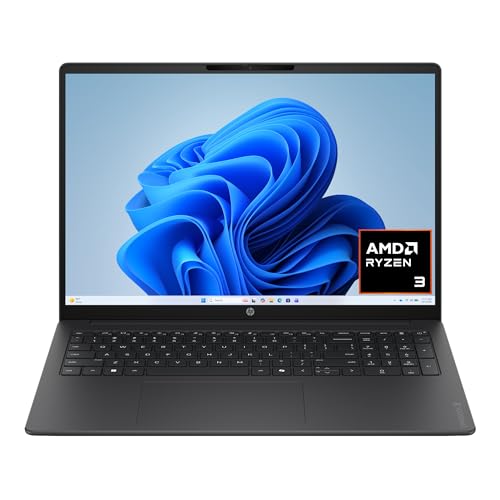
HP OmniBook 3 16 inch Laptop PC 2K Touchscreen 8 GB RAM 256 GB SSD 16-by0199nr
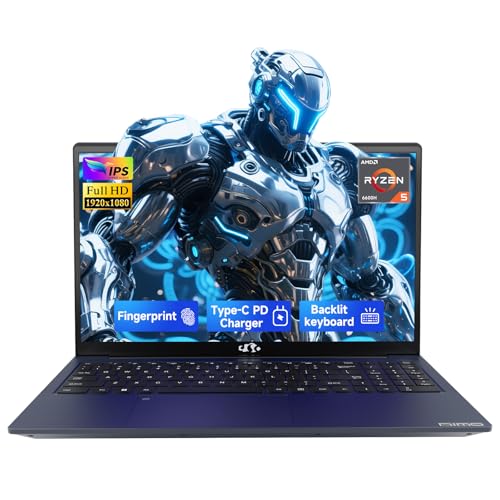
NIMO 15.6″ IPS FHD-Light Gaming Laptop AMD Ryzen 5 6600H
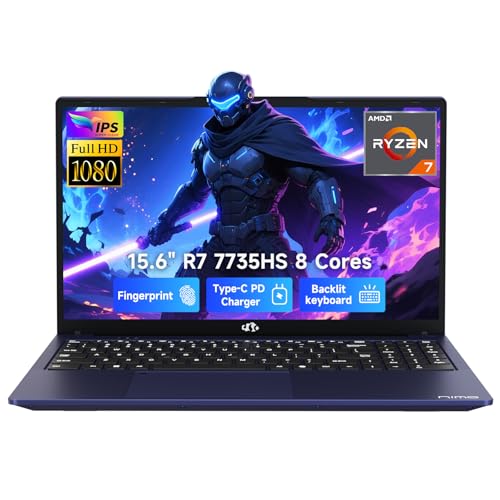
NIMO Thin & Light Gaming Laptop 15.6″ FHD IPS Display 16GB DDR5 RAM 512GB SSD
Light Gaming Laptop AMD Ryzen 7 5700U 16GB RAM 512GB SSD

NIMO Light Gaming Laptop AMD Ryzen 7 7735HS 15.6″

KAIGERR 2026 Laptop 24GB DDR5 512GB SSD Intel Core i5

17.3 Inch Laptop Core i7 CPU 16GB RAM 512GB SSD WIFI 6
More Details On Our Top Picks
144Hz makes the Victus easier to like for fast-moving games, and that higher refresh rate matters most when you spend evenings on shooters or racing titles. The Ryzen 5 7535HS, RX 6550M graphics, and DDR5 memory give it a cleaner gaming profile than the 16-inch OmniBook 3, which is more about general use than frame pacing.
In a dorm, on a shared desk, or in a room where one machine has to do a bit of everything, this shape makes sense. The included USB 3.0 hub is handy for cramped setups, though the 8GB memory ceiling in the source details means multitaskers may want to think carefully about headroom.
Strong Points
- 144Hz display keeps motion smoother in games.
- RX 6550M gives you a real gaming step up over basic integrated graphics.
- DDR5 memory helps everyday app switching feel brisk.
- USB hub adds useful desk flexibility for peripherals.
Things To Consider
- 8GB memory can feel tight with many tabs open.
- The 15.6-inch shell trades some screen size for easier carry.
- Owners who add accessories may still want a docking setup later.
Feature Rundown
Who It Suits Best
Students and casual gaming shoppers who want a stronger GPU without jumping to a bulky desktop replacement fit this well.
A Better Fit Elsewhere
NIMO Thin & Light Gaming Laptop 15.6″ FHD IPS Display 16GB DDR5 RAM 512GB SSD suits you better if you want more memory for heavier multitasking.
The 16-inch 2K touchscreen is the headline here, and that extra panel space helps a lot for class notes, web work, and streaming in a quieter room. Compared with the Victus, this HP leans toward comfort and visibility rather than gaming muscle, so the Radeon 610M is better treated as entry-level graphics.
That trade-off makes sense for commuters and home users who want a big screen without a heavy gaming-first shape. The 16:10 style hinted in the source context also suits documents and long pages, though 8GB memory and 256GB storage ask you to keep expectations realistic.
What We Like
- Large 16-inch touchscreen improves everyday navigation.
- 2K resolution gives text and images more room to breathe.
- Light gaming and streaming both fit the same machine.
- The broader screen layout helps with side-by-side windows.
Worth Noting
- Radeon 610M suits lighter graphics work, not demanding games.
- 256GB storage fills faster than larger SSD options.
- Touchscreens benefit from regular cleaning to avoid smudges.
Technical Sheet
Who Will Love This
College users and home office shoppers who care more about screen comfort than graphics power fit this model well.
Swap It Out When
HP Victus 15.6″ FHD 144HZ Gaming Laptop 8GB RAM 512GB SSD makes more sense for you if gaming frames matter more than touch input.
This NIMO leans into the part of the category that matters most for tight budgets, a capable Ryzen 5 6600H paired with DDR5 memory. That combination gives you a more serious starting point than entry systems like the OmniBook 3, especially for work, lighter editing, and modest gaming sessions.
In most apartments or dorm rooms, a 15.6-inch screen keeps the footprint sensible without feeling cramped. The source details point to easy expandability too, which helps this model make more sense for people who’d rather add capacity later than pay for it upfront.
Highlights
- Ryzen 5 6600H gives the laptop a stronger core than basic thin-and-light chips.
- DDR5 memory helps general responsiveness.
- 15.6-inch size stays manageable on a desk or in a bag.
- Expandable design helps you stretch the machine over time.
Areas To Watch
- Light-gaming framing signals limits with demanding titles.
- You may want to plan storage upgrades sooner than later.
Core Details
Built With In Mind
Students and first-time gaming shoppers who want stronger everyday speed without a bulky chassis fit this model well.
Look Elsewhere When
NIMO Thin & Light Gaming Laptop 15.6″ FHD IPS Display 16GB DDR5 RAM 512GB SSD is the cleaner step up for anyone who wants more finished hardware.
Among slim 15.6-inch options, this NIMO stands out for the way it pairs a Ryzen 7 7735HS with 16GB DDR5 and a 512GB SSD. That mix suits you better than the simpler Ryzen 5 machines above it, especially if you keep a browser, game launcher, and messaging apps open at the same time.
The 180-degree hinge is useful on a desk or in a shared room, and the Radeon 680M gives the system more gaming headroom than basic integrated graphics. The honest read is that thin laptops always make you trade some cooling space for portability, so it’s the balance, not a desktop replacement.
Upsides
- Ryzen 7 7735HS is a clear step up in CPU headroom.
- 16GB DDR5 suits multitasking far better than 8GB systems.
- 512GB SSD gives you more practical room for games and files.
- 180-degree hinge helps in flexible desk setups.
- Radeon 680M broadens what lighter gaming can handle.
Small Caveats
- Thin builds can run warm under sustained load.
- Portable hardware usually asks you to accept some fan noise.
Feature Snapshot
Right Fit For
You get the most from this machine in a mixed-use setup where work, school, and lighter gaming all share the same screen.
Where A Sibling Pick Shines
HP Victus 15.6″ FHD 144HZ Gaming Laptop 8GB RAM 512GB SSD suits you better if a dedicated graphics card matters more than a slim shell.
This KAIGERR keeps the formula straightforward, Ryzen 7 5700U, 16GB RAM, and a 512GB SSD, which is a sensible mix for everyday gaming and busy browser work. Compared with the NIMO entries above, it reads more like a practical all-rounder than a feature-heavy machine.
That makes it a decent fit for a kitchen desk, a student room, or a home office where the laptop spends most of its life plugged in. The storage and memory pairing should feel comfortable for many people, though the CPU platform is not as fresh as the newer Ryzen 7 options in this list.
Best Bits
- 16GB memory gives you useful breathing room for multitasking.
- 512GB SSD is a more workable starting point than smaller drives.
- Ryzen 7 branding gives the machine stronger everyday credibility.
- The straightforward spec mix is easy to understand and maintain.
Points To Note
- The CPU is older than the newer Ryzen 7 chips here.
- You may want to manage storage carefully once game installs grow.
Whose Shelf It Belongs On
Practical shoppers who want a simple balance of memory, storage, and light gaming performance should look here first.
Skip It When
NIMO Thin & Light Gaming Laptop 15.6″ FHD IPS Display 16GB DDR5 RAM 512GB SSD is the stronger match for anyone who wants a newer-feeling platform.
The stronger Ryzen 7 7735HS platform puts this NIMO closer to the top of the list for raw CPU headroom. In a small apartment or shared room, that kind of speed helps when you’re bouncing between work apps, a browser full of tabs, and lighter gaming sessions.
The Radeon 680M graphics mentioned in the source context adds useful value, because integrated graphics of that class can stretch farther than basic office chips. The trade-off is familiar, though, a performance-oriented slim laptop still has to manage heat and fan behavior with limited space.
Reasons To Buy
- Ryzen 7 7735HS gives you strong processing headroom.
- Radeon 680M can carry lighter gaming and creative tasks.
- 15.6-inch format keeps the machine portable enough for daily carry.
Honest Caveats
- Thin performance designs depend on careful cooling.
- Some shoppers may want a larger screen for longer sessions.
The Right Fit
You’ll get the most from this model in a work-first setup that still needs respectable game performance after hours.
Reach For A Different Pick When
HP Victus 15.6″ FHD 144HZ Gaming Laptop 8GB RAM 512GB SSD is better for you if a dedicated GPU matters more than integrated graphics.
Most systems in this roundup lean on 8GB or 16GB, so KAIGERR’s 24GB DDR5 stands out immediately. That extra memory helps most when your day includes a heavy browser load, streaming, and a few apps all at once, which is common in home-office and college setups.
The Core i5-12600H noted in the source context also gives the machine a more serious processor class than the entry-level models here. The catch is that this kind of spec mix matters most if you actually keep many things open, because simple web use won’t show the same payoff.
Positives
- 24GB DDR5 is the largest memory figure in this list.
- 512GB SSD gives you a sensible base for files and apps.
- Core i5-12600H should feel more capable for heavy multitasking.
Minor Gripes
- Extra memory helps most in busy workflows, not light browsing.
- You may still want to sort out storage habits with large game libraries.
Perfect Match For
College users, office multitaskers, and anyone with many tabs open at once should find this the most forgiving of the group.
Another Choice May Suit
NIMO Thin & Light Gaming Laptop 15.6″ FHD IPS Display 16GB DDR5 RAM 512GB SSD fits you better if gaming performance matters more than memory capacity.
The 17.3-inch panel makes this BIRDPLAY feel different from the 15.6-inch crowd, and that extra size is a real comfort on a desk. Paired with a Core i7, 16GB RAM, and a 512GB SSD, it reads more like a desk-friendly all-rounder than a travel machine.
That larger body is useful for spreadsheets, split-screen work, and evening gaming at home, though it’s less convenient to carry day to day. WiFi 6 and the numeric pad help in practical ways, while expandable storage gives you some room to grow without replacing the whole laptop.
Bright Spots
- 17.3-inch display gives you more room for work and games.
- Core i7 and 16GB RAM create a stronger everyday spec base.
- Numeric pad helps with data entry and spreadsheets.
- Expandable storage adds some future flexibility.
Room For Improvement
- The larger chassis is less convenient for frequent travel.
- Big-screen laptops usually take more desk space and bag space.
Who Should Grab It
Home office users and desk-bound gamers who want a wide display without moving to a desktop should look here first.
Where Shoppers Go Wrong
HP Victus 15.6″ FHD 144HZ Gaming Laptop 8GB RAM 512GB SSD is a better fit if you want something smaller and easier to carry.
What Matters Before You Choose A Budget Gaming Laptop
Common Shopping Slip Ups
A strong CPU alone does not make a good gaming machine. You want to pair it with enough memory and, for games, a graphics chip that can carry the load.
Where The Extra Money Goes
Higher-tier models usually spend more on faster processors, better graphics, larger screens, or more memory. That upgrade pays off most when you keep the laptop for years or juggle gaming with work and school.
Frequently Asked Questions
Can Gaming Laptops Under 600 Handle Popular Titles?
They can handle lighter and better-optimized games more comfortably than demanding new releases. A dedicated graphics chip helps far more than a basic integrated one.
Is 8GB RAM Enough For Gaming?
8GB works for lighter play and simple everyday use. More memory makes sense once you keep several apps or tabs open at the same time.
Does A Larger Screen Help For Gaming?
A larger screen improves visibility and split-screen comfort. The trade-off is extra size and less portability.
Why Does SSD Storage Matter So Much?
An SSD speeds up boot times and game loading. It also feels snappier during daily use than older mechanical storage.
Should You Prioritize Processor Or Graphics First?
For gaming, graphics usually matter first. For work-heavy use, the processor matters more, especially with many open apps.
