


Laptop graphics are a compromise by design: thin bodies, thermals, and battery life all fight against raw GPU power. This list exists because there’s more than one way around that problem, from external GPU docks that bolt desktop-class silicon onto a notebook to low-profile internal cards and full laptops with serious graphics built in. Whether you game after work, render CAD models on deadline, or just want dual monitors without stutter, one of these ten fits the bill.
Your Options, Compared

ASUS ROG XG Mobile (2025) RTX 5070 Ti External GPU

Dell Precision 3571 Workstation Laptop (Renewed)

ASUS GeForce GT 1030 2GB GDDR5 Graphics Card

ASUS Dual GeForce RTX 5060 8GB OC Edition

MSI GT 1030 4GD4 LP OC Graphics Card

MSI RTX 3050 LP 6G OC Graphics Card
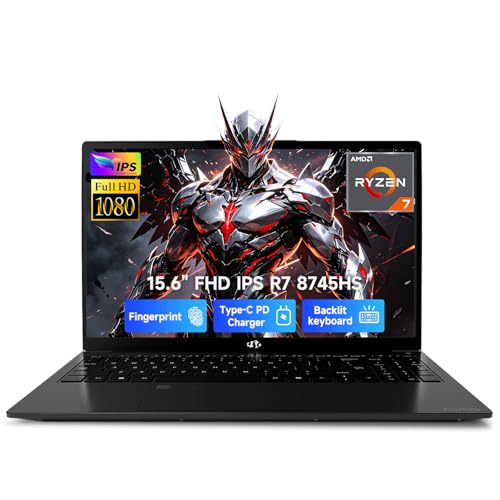
NIMO 15.6 Gaming-Creator Laptop Ryzen 7 8745HS

HP GeForce GT 730 2GB Low-Profile Graphics Card

Lenovo NVIDIA T1000 8GB GDDR6 Graphics Card

Khadas Mind Graphics RTX 4060 Ti eGPU Dock
The Details Behind The Selections
An external GPU, or eGPU, is a desktop-class graphics card housed in its own box that plugs into your laptop over a fast cable. The ROG XG Mobile takes that idea further by pairing an RTX 5070 Ti Laptop GPU with Thunderbolt 5, a connection standard whose extra bandwidth keeps performance loss to a minimum compared with an internal slot.
The footprint is roughly the size of a hardcover novel, which matters more than you’d think when your desk already holds a monitor stand and a coffee mug. Wired ethernet is built into the dock too, so a single cable run gives you graphics plus a stable network connection for competitive play.
Noteworthy Benefits
- Thunderbolt 5 throughput means less of the GPU’s power gets lost in translation than older USB-C docks.
- The compact shell slides into a backpack pocket, unlike most eGPU boxes that need their own shelf.
- Ethernet passthrough keeps ping low during ranked matches without a second cable sprawl.
- Doubles as a connectivity hub, consolidating your desk setup into one plug-in point.
Things To Consider
- Your laptop needs a Thunderbolt 5 or compatible port, so older machines simply won’t pair with it.
- This sits at the premium end of the category, and the cost reflects that positioning.
Who It Suits Best
Owners of recent high-end ROG or Thunderbolt-equipped laptops who want near-desktop frame rates without giving up portability.
A Better Fit Elsewhere
Shoppers wanting a more affordable dock route should look at the Khadas Mind Graphics RTX 4060 Ti eGPU Dock, which targets creators rather than maximum-tier gaming.
Sometimes the smartest way to upgrade laptop graphics is to buy a laptop that already has the right chip inside. This renewed Precision 3571 carries an Nvidia RTX T600 with 4GB of GDDR6, a professional-grade GPU built for CAD and visualization software rather than frame-rate bragging rights.
Around that GPU sits a Core i7-12700H with 14 cores reaching 4.7 GHz, 16GB of RAM, and a 512GB SSD, all driving a 15.6-inch 1080p non-touch panel. Because it’s sold through the refurbished program, the machine has been inspected and cleaned before resale, which softens the usual risk of buying used hardware.
What Stands Out
- The T600’s certified drivers keep stability high in SolidWorks, AutoCAD, and similar engineering tools.
- 14 CPU cores handle simulation and compile jobs that would choke a typical ultrabook.
- Windows 11 Pro comes preinstalled, ready for domain join and business software.
- Refurbished pricing puts workstation-class hardware within reach of students and freelancers.
Points To Note
- As a 2022-era machine, it trails current-generation GPUs in raw rendering speed.
- Cosmetic wear is normal on renewed units, so expect light scuffs rather than showroom finish.
- The 1080p non-touch screen is functional but unremarkable next to modern high-refresh panels.
Key Specs
Made For
Engineering students and freelance designers who need certified workstation graphics on a restrained budget.
Where A Sibling Pick Shines
Anyone prioritizing modern AI-accelerated performance over certified drivers will get more mileage from the NIMO 15.6 Gaming-Creator Laptop Ryzen 7 8745HS instead.
Not every graphics upgrade needs to be dramatic. The ASUS GT 1030 exists for the moment your old desktop struggles with 1080p video playback or a lightly modded game, and you want a fix that costs about as much as a nice keyboard. Its heatsink design runs without aggressive fan noise, a trait home-theater owners consistently appreciate since the card often sits inches from the couch.
ASUS builds this one with its Auto-Extreme automated manufacturing process and Super Alloy Power II components, both of which tend to translate into long service life. The included GPU Tweak II utility lets you watch temperatures and adjust clocks without digging through BIOS menus.
A Favorable Mix
- Quiet operation makes it a natural fit for living-room media PCs.
- Low power draw means many prebuilt systems can run it without a PSU swap.
- 2GB of GDDR5 handles HD video decode and esports titles at modest settings.
Small Caveats
- Modern AAA games will overwhelm the 2GB buffer quickly, so temper expectations.
- It’s an internal card, so laptop users would need a desktop or eGPU path instead.
Right Fit For
Anyone reviving an aging small-form-factor desktop for streaming, browsing, and older games on a tight budget.
Swap It Out When
You want a little more headroom in the same budget bracket; the MSI GT 1030 4GD4 LP OC doubles the memory for light multitasking gains.
Here’s the card for people building a compact gaming PC that punches above its size. The Dual RTX 5060 packs 8GB of GDDR7 memory onto a 2.5-slot board, meaning it occupies two and a half expansion slots’ worth of height, slim enough for mid-tower cases where triple-fan flagships won’t fit.
Two Axial-tech fans push air through the heatsink, borrowed from ASUS’s flagship cooling designs, and 0dB Technology stops the fans entirely under light loads so idle sessions stay silent. DLSS 4, Nvidia’s AI upscaling technology, generates extra frames to lift frame rates in supported titles, and the PCIe 5.0 interface pairs cleanly with current motherboards.
Where It Delivers
- GDDR7 memory bandwidth keeps high-refresh 1080p and entry 1440p gameplay smooth.
- The 2.5-slot body opens up small and mid-size case options most performance cards exclude.
- HDMI 2.1b and DisplayPort 2.1b outputs drive modern high-refresh monitors without adapters.
- Fan-stop behavior makes everyday desktop use nearly inaudible.
Trade Offs
- It’s a desktop card, so pairing it with a laptop requires an eGPU enclosure and a Thunderbolt port.
- Owners commonly report checking case clearance first; even 2.5-slot cards can clash with cramped layouts.
Quick Facts
Who Will Love This
Builders assembling a space-conscious gaming rig who refuse to sacrifice current-generation features to get there.
Reach For A Different Pick When
Tight SFF cases demand something slimmer; the MSI RTX 3050 LP 6G OC trades performance for a genuinely low-profile body.
Low-profile cards are half-height versions designed for slim desktop cases, and MSI’s take on the GT 1030 is one of the more practical ones around. Where the ASUS GT 1030 earlier in this list leans on a quiet heatsink, this variant adds a single fan and factory overclock, plus double the memory at 4GB, though it uses slower DDR4 rather than GDDR5.
In practice that trade works fine for the audience this card serves: HTPC builders, office refreshes, and anyone adding HDMI or DisplayPort output to a machine that only had VGA. DirectX 12 support and HDCP compliance mean protected 4K content streams without drama.
Why It Works Well
- Half-height bracket drops into slimline cases standard cards can’t enter.
- 4GB buffer leaves room for multiple browser tabs alongside video output.
- Factory overclock squeezes a bit more clock speed out of an already efficient chip.
- Single-fan design stays audible-free during video playback in most rooms.
Less Ideal Details
- DDR4 memory limits gaming headroom versus GDDR5 rivals like the ASUS version above.
- One fan means occasional dust cleaning to keep noise down over the years.
Who Should Grab It
Owners of slim desktop towers needing display outputs and light graphical muscle in a half-height format.
Another Choice May Suit
Gaming ambitions beyond esports titles call for the MSI RTX 3050 LP 6G OC, which brings ray tracing hardware to the same low-profile shape.
Ray tracing used to be a luxury reserved for full-height cards, and this MSI proves otherwise. Built on Nvidia’s Ampere architecture with dedicated RT and Tensor cores, the RTX 3050 LP 6G delivers real-time lighting effects and AI-assisted upscaling inside a low-profile bracket that fits slim cases.
The spec sheet reads sensibly: a 1492 MHz boost clock, 6GB of GDDR6 running at 14 Gbps across a 96-bit bus, and two HDMI 2.1a ports plus one DisplayPort 1.4a. That dual-HDMI arrangement is genuinely handy for streamers running a capture setup, since most competing cards lean heavily on DisplayPort.
A Few Strong Suits
- RT and Tensor cores bring modern Nvidia features to compact builds.
- 6GB of GDDR6 comfortably covers 1080p textures in current titles.
- Two HDMI 2.1a outputs simplify TV-plus-monitor arrangements.
- Low-profile form factor suits HTPC and small-form-factor gaming alike.
Details To Watch
- The 96-bit memory bus caps peak bandwidth, so 1440p gaming stretches it thin.
- Low-profile coolers run warmer under sustained load; periodic dust removal helps longevity.
Core Details
The Right Fit
Esports and mainstream 1080p players working within a slim-case build who still want DLSS and ray tracing support.
Not Your Match When
Standard mid-tower owners chasing higher frame rates should step up to the ASUS Dual RTX 5060 8GB OC Edition for GDDR7 bandwidth and newer architecture.
Integrated graphics have quietly become good enough to skip a discrete GPU entirely, and AMD’s Radeon 780M is the poster child. Inside this NIMO, that RDNA 3-based iGPU shares the die with an 8-core Ryzen 7 8745HS running at up to 4.9 GHz, delivering editing and light-gaming capability without the heat and cost penalty of a separate graphics chip.
The supporting cast is generous for the segment: 16GB of RAM, a 1TB SSD, a 100W USB-C fast-charging input, and a claimed two-year coverage period. For students cutting video between classes or remote workers streaming from a hotel room, the whole package travels lighter than any eGPU rig could.
Real-World Strengths
- Radeon 780M handles 1080p gaming and timeline scrubbing without a discrete GPU’s weight.
- 1TB SSD swallows project files that would overflow a 512GB machine.
- 100W USB-C charging means one brick powers the laptop and tops up other devices.
- 45W processor class sustains long export renders better than thin-and-light chips.
Some Limits To Know
- Shared system memory caps how far the iGPU scales versus dedicated VRAM.
- Brand-new entrant brands typically have shorter track records for long-term reliability.
Product Snapshot
Who Should Grab It
Students and traveling creators who edit video, run AI tools casually, and value one portable machine over a laptop-plus-dock combo.
Look Elsewhere When
Certified application stability outranks portability; the Dell Precision 3571 Workstation Laptop remains the safer seat for professional CAD work.
Some purchases aren’t about performance at all; they’re about adding outputs. The HP GT 730 is that kind of card, a 900 MHz core with 2GB of GDDR5 on a low-profile board meant to give an older office desktop the ability to drive several monitors at once. Quad-display support is the headline here, and trading desks, reception desks, and spreadsheet-heavy workflows are exactly where it earns its keep.
Gaming is not the mission. Older titles and casual games will run, but anything modern will leave the 2GB buffer gasping. Think of it as infrastructure rather than entertainment hardware, priced and shaped accordingly.
Advantages To Know
- Quad-display output turns one desktop into a multi-monitor command center.
- Low-profile sizing fits the slim towers most offices already own.
- GDDR5 memory keeps general desktop motion smooth compared with integrated fallbacks.
Where It May Fall Short
- Modern games exceed what this chip was ever designed to do.
- Being an older-generation part, driver support timelines are worth checking against your OS plans.
Whose Shelf It Belongs On
Office managers and productivity-focused users upgrading legacy desktops for multi-screen work at minimal expense.
Skip It When
Light gaming matters alongside display duties; the ASUS GT 1030 2GB GDDR5 offers a newer architecture for a similar role.
Professional visualization cards occupy a niche gamers often overlook: they trade headline frame rates for certified stability in software like CATIA, Revit, and Maya. Lenovo’s T1000 board carries 8GB of GDDR6 on Nvidia’s Turing architecture, aimed squarely at CAD designers, DCC artists, and engineers whose livelihood depends on a viewport that never glitches mid-render.
Four mini-DisplayPort outputs make multi-panel reference setups straightforward, and the compact footprint slots into workstations where full-length pro cards won’t fit. Compared with the RTX T600 inside the Dell Precision reviewed earlier, the T1000’s doubled memory gives heavier assemblies and larger scene files room to breathe.
What Earns Its Place
- 8GB of GDDR6 accommodates large CAD assemblies and textured 3D scenes.
- Four DisplayPort connections support expansive multi-monitor engineering layouts.
- Compact board length suits dense workstation chassis.
- Professional driver channels prioritize stability over flashy feature rollouts.
Factors To Consider
- Turing-era silicon lacks the newest AI acceleration features found in current RTX cards.
- Mini-DisplayPort outputs may require adapters depending on your monitor cables.
Who It Suits Best
Engineers, architects, and visualization professionals upgrading a workstation for certified application performance.
Consider Something Else When
Gaming shares equal billing with work on your machine; the ASUS Dual RTX 5060 8GB OC Edition serves both worlds more affordably.
Most eGPU docks are bare metal boxes; Khadas went a different direction. This unit houses a desktop RTX 4060 Ti with 16GB of GDDR6, connects over Thunderbolt 4 or 3, and throws in built-in speakers, dual HDMI 2.1a ports, and a USB4 port so the dock doubles as your desk hub.
When paired with the company’s Mind mini PC, the link reaches PCIe 4.0 x8 speeds at up to 128 GT/s, minimizing the bottleneck that usually haunts external graphics. Through a standard Thunderbolt laptop, expect solid but somewhat reduced gains, which is the honest physics of the category.
Standout Benefits
- 16GB of VRAM handles AI image generation and heavy 3D scenes comfortably.
- Integrated speakers reduce desk clutter by removing one more peripheral.
- USB4 and dual HDMI outputs consolidate monitor and accessory cabling.
- Ada Lovelace architecture supports current DLSS features for smoother gameplay.
Worth Bearing In Mind
- Peak performance figures assume pairing with a Khadas Mind host; generic laptops see smaller uplifts.
- Thunderbolt 4/3 requirement excludes machines with only basic USB-C ports.
Details At A Glance
Built With In Mind
Desk-bound creators using a lightweight laptop or mini PC who want desktop-class rendering power without maintaining a full tower.
Where Another Pick Suits Better
Competitive gamers seeking top-tier frame rates should weigh the ASUS ROG XG Mobile RTX 5070 Ti, whose newer GPU and Thunderbolt 5 link favor raw speed.
What Matters Most Before Choosing Graphics Cards For Laptops
Match The Connection To Your Machine
External GPUs live or die by their link. Thunderbolt 5 offers the most bandwidth, Thunderbolt 4 and USB4 sit a tier below, and plain USB-C ports often can’t carry a graphics signal at all. Check your laptop’s exact port specification before committing, because a mismatched dock becomes an expensive paperweight.
Decide Between Internal And External Paths
An internal card only helps if you actually own or plan to build a desktop; laptop users need either an eGPU dock or a new machine with capable graphics built in. Students and travelers usually benefit most from strong integrated graphics, while stationary creators gain more from a docked desktop GPU.
Weigh Memory Against Resolution
VRAM, the dedicated memory a GPU uses for textures and frames, determines how gracefully a card handles high resolutions and large files. Casual 1080p use gets by with 4 to 6GB, while AI workloads and 3D rendering reward 8GB or more.
Factor In Cooling And Noise
Slim cards and compact docks trade thermal headroom for size. In warm rooms or enclosed cabinets, prioritize designs with proven airflow, and plan on occasional dust cleaning to keep fans quiet over the years.
Key Considerations Across These Picks
Traps First Timers Fall Into
The most common mistake is buying a powerful card for a laptop that lacks the port to use it. Verify Thunderbolt or USB4 support first. Second, don’t chase VRAM numbers alone; architecture generation and memory type matter just as much for real-world speed.
When Paying More Pays Off
Higher tiers buy newer architectures, faster memory standards like GDDR7, and features such as DLSS frame generation. For daily productivity, those extras rarely justify the jump. For AI experimentation, 1440p gaming, or professional rendering, the upgrade pays for itself in saved render time and longer relevance.
Frequently Asked Questions
Can any laptop use an external graphics card?
Only laptops with Thunderbolt 3, Thunderbolt 4, USB4, or a proprietary connector can drive an eGPU. Standard USB-C ports without these protocols won’t carry the required data bandwidth.
Do external GPUs lose performance compared to internal ones?
Yes, some overhead is unavoidable over a cable. Modern Thunderbolt links minimize the gap, though bandwidth-heavy games feel it more than rendering tasks.
Is 4GB of VRAM still usable in 2026?
It handles office work, media playback, and older or esports titles fine. Current AAA games and AI tools will exhaust it quickly.
Are integrated graphics good enough for video editing?
Modern iGPUs like AMD’s Radeon 780M manage 1080p editing comfortably. Heavy 4K timelines and effects compositing still favor discrete GPUs with ample VRAM.
What’s the difference between gaming and workstation GPUs?
Gaming cards optimize frame rates and consumer features. Workstation cards prioritize certified stability and precision in professional software, often at a price premium.
Closing Thoughts
There’s no single right answer here, only the right match for your setup. Laptop owners with a Thunderbolt port should start with the eGPU docks; desktop upgraders will find their fit among the internal cards; and anyone due for a whole new machine can skip adapters entirely with the NIMO or the Precision. Match the connection, check the memory, and the rest falls into place naturally.
