


Laptop audio is rarely built for work calls. The mic picks up your keyboard clatter, the speakers flatten voices, and by hour three of back-to-back meetings your ears are done. A dedicated headset fixes all three problems at once, whether you’re taking customer calls in a shared apartment or leading a webinar from a kitchen table.
This roundup covers ten headsets across wired and wireless styles, from no-frills budget cords to premium multi-device models. Each entry breaks down where it shines, where it compromises, and which reader profile it actually fits, so you can match one to your desk instead of guessing.
A Side-By-Side Look

Amazon Basics On-Ear Wired Computer Headset with Adjustable Mic

LEVN Wireless Bluetooth Headset with Noise Cancelling Mic
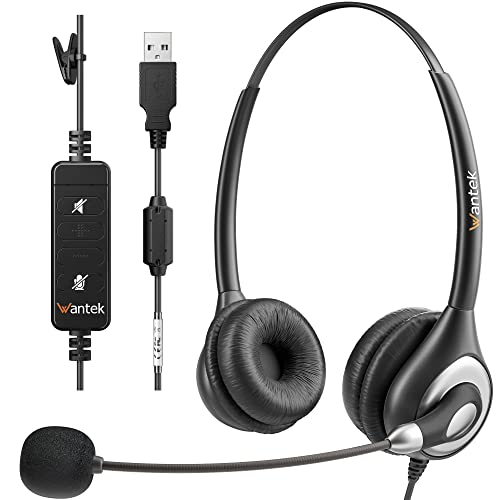
Wantek Corded USB Headset with Microphone (UC602)

Soothielec Wireless Headset with Mic & Noise Cancelling

Acer OHR690 Wireless Headset for Calls & Meetings

Vipdream Wireless Headset with Microphone, Bluetooth 5.3

Lenovo USB-A Wired Stereo Headset, AI Noise Canceling

Acpanore USB Headset with Microphone for PC

Poly Blackwire 5220 Wired Headset
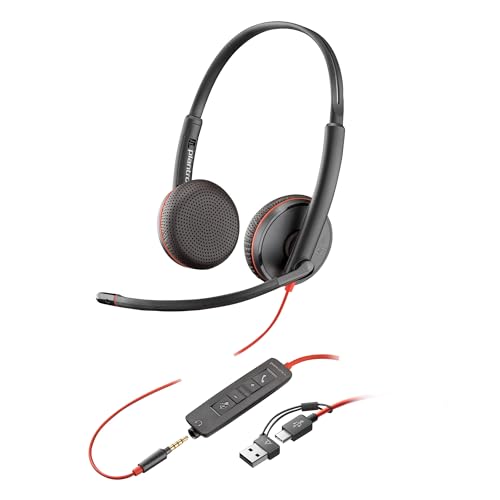
Poly Blackwire 3225 Wired Headset
Inside Each Recommended Option
This is the headset you hand to a student starting online classes or toss in a laptop bag for travel days. The foldable frame collapses flat, and the small/medium sizing suits narrower heads better than bulky over-ear models.
Connection flexibility is the real hook here: it runs through either a 3.5mm port or an in-line controller with a USB-A port, so older laptops and newer machines both work without adapters. The adjustable boom mic swings into place for calls and tucks away for music.
Where It Helps
- Folds down compactly, so it slips into a backpack pocket between classes
- Dual 3.5mm and USB-A connection covers nearly any laptop you own
- Adjustable microphone positions close to your mouth for clearer call audio
- Clear sound tuning handles voice-heavy meetings without muddy bass
Things To Consider
- The on-ear fit can feel snug during the first week; owners commonly report comfort improves as the cushions break in
- Small/medium sizing means larger heads may find the clamp tight over long sessions
Key Specs
Who It Suits Best
Students, occasional remote workers, and anyone who wants a dependable spare headset under a modest spend.
Consider Something Else When
Heavy daily callers should step up to the Wantek UC602, whose wider cushioning and acoustic protection suit marathon shifts far better.
Where the Amazon Basics above keeps things analog and simple, this LEVN goes fully wireless and leans hard on microphone intelligence. Its onboard processing filters background chatter before it ever reaches your caller, which matters enormously in cafés, co-working spaces, or anywhere a commute doubles as a meeting room.
The one-touch mute button deserves special mention. During video calls on Teams or Zoom, silencing yourself instantly, without fumbling through software menus, is the kind of small control you stop noticing until you use a headset without it.
Everyday Advantages
- Noise-filtering mic keeps your voice crisp even beside traffic or conversation
- Instant hardware mute gives privacy control mid-sentence
- Bluetooth freedom lets you pace around while staying connected to your laptop
- Suits call-center-style workloads where voice clarity is the whole job
Trade Offs
- Bluetooth means charging becomes part of your routine, unlike the always-ready Wantek UC602
- Mute behavior can vary depending on the meeting platform, so expect a short adjustment period
Right Fit For
Hybrid workers who take calls from changing environments and need their voice to stay clean regardless of surroundings.
Not Your Match When
Desk-bound users who resent charging cables will prefer the Lenovo USB-A wired headset, which draws power straight from the laptop.
Call center veterans tend to gravitate toward corded USB headsets, and the Wantek UC602 explains why. Digital signal processing, or DSP, cleans up your audio digitally before transmission, and acoustic shock protection guards your ears against sudden volume spikes, a real concern when you’re on the phone eight hours a day.
The build stays remarkably light with an adjustable headband and soft ear cushions, plus a flexible boom you can position once and forget. For webinars, classroom instruction, and long support shifts, it’s the sort of tool that disappears on your head, which is exactly what you want.
Practical Advantages
- Acoustic shock protection adds a hearing safeguard during unpredictable call volumes
- Ultra-light frame reduces neck strain across full workdays
- In-line controls put volume and call handling within thumb’s reach
- Wideband USB audio delivers business-grade voice quality on Zoom and Skype
Minor Gripes
- Ear cushions are consumable parts; regular cleaning and eventual replacement keep hygiene in check for shared desks
- The cord itself means zero mobility away from your laptop
Made For
Support agents, tutors, and webinar hosts logging consecutive hours of voice calls at a fixed workstation.
Look Elsewhere When
Anyone needing to roam during meetings will get more from the LEVN wireless headset earlier in this list.
Working from a lively household changes your requirements completely. Barking dogs, kids home from school, a partner on their own calls: environmental noise cancelling (ENC), which uses microphones to detect and subtract ambient sound from your outgoing audio, exists precisely for this chaos.
The Soothielec targets that scenario directly, blocking most background distractions so clients hear you rather than your living room. A dedicated one-touch mute button sits ready for Zoom and Teams sessions, letting you react to interruptions at home faster than any software toggle allows. Compared with the LEVN reviewed earlier, its pitch is similar, though it leans harder on noisy-environment performance.
Benefits That Matter
- ENC technology suppresses pets, children, and household commotion on calls
- Hardware mute reacts instantly when someone walks into the room
- Wireless design frees you to move between rooms without dropping the meeting
Small Caveats
- Mute functionality may behave differently across conferencing apps, worth confirming in your main platform first
- As with any wireless unit, battery care and periodic recharging become routine maintenance
Quick Facts
Who Will Love This
Parents and pet owners running meetings from busy shared spaces where silence is never guaranteed.
Another Choice May Suit
Quiet-apartment dwellers don’t need heavy noise filtering, so the lighter Acer OHR690 below may serve them more comfortably.
Comfort is the spec nobody appreciates until they’ve worn the wrong headset through a nine-hour shift. At just 2.56 ounces, the Acer OHR690 ranks among the lightest units in its class, and the ear cups tilt up to ±8° to follow the natural shape of your ears rather than pressing against them at a fixed angle.
That combination matters most for customer success teams, dispatchers, and translators whose headphones stay on from morning standup to final wrap-up. You may find the featherweight feel takes some adjustment after bulkier models, but most long-shift wearers report the difference is immediate.
Strengths Worth Knowing
- 2.56 oz weight minimizes pressure points during extended wear
- Smart-tilt cups conform to individual ear shapes for a personalized fit
- Ergonomic shaping was refined through extensive head-form evaluation
- Wireless format supports moving freely between home zones during calls
Points To Note
- An ultra-light chassis often means slimmer padding, so users preferring deep cushioning may want the Wantek UC602 instead
- Charging discipline is required for all-day wireless reliability
The Right Fit
Contact-center staff, healthcare schedulers, and anyone whose headset stays on for entire working days.
Swap It Out When
Occasional meeting attendees who wear a headset an hour or less daily will find the Amazon Basics model entirely adequate at lower cost.
Some people just want a headset that pairs and works, no companion apps, no firmware updates, no manual the size of a novella. The Vipdream builds its identity around that simplicity, targeting everyday work calls with a connect-and-focus philosophy suited to home offices and remote routines.
Underneath the straightforward approach sits Bluetooth 5.3, the current generation of the wireless standard, bringing steadier connections and lower power draw than older versions. In practice that translates to fewer dropouts mid-meeting, which is honestly the only wireless feature most desk workers ever notice. Next to feature-dense rivals like the Poly Blackwire 5220 later in this list, it trades versatility for ease.
Reasons It Performs
- Bluetooth 5.3 delivers a stable link with efficient battery consumption
- Minimal setup gets you into meetings seconds after unboxing
- Reliable everyday performance suits routine call schedules
Softer Spots
- Fewer advanced controls than pricier competitors, so power users may feel constrained
- Single-purpose design means music listeners may want richer sound elsewhere
At A Glance
Perfect Match For
First-time remote workers and minimalists who value dependable basics over a dense feature sheet.
Reach For A Different Pick When
Multi-device jugglers hopping between laptop and phone should consider the Poly Blackwire 5220, whose triple connectivity handles that juggling natively.
Most headsets are disposable; the Lenovo quietly argues they shouldn’t be. Replaceable earcups mean a worn cushion costs a few dollars rather than a whole new unit, and at 140 grams the frame stays light enough for full-day office wear without pressure buildup.
The AI noise canceling runs through a companion app rather than being baked into the hardware, giving you a level of tuning control fixed headsets can’t offer. A double-sided boom mic design and in-line controls with dedicated mute round out a package clearly shaped by enterprise feedback. Against the Acpanore coming next, this one thinks further ahead about longevity.
What It Does Well
- Replaceable earcups dramatically extend usable lifespan
- AI-powered noise reduction via app offers customizable filtering
- 140g weight keeps long office sessions comfortable
- In-line mute control suits frequent Teams and Zoom participants
Room For Improvement
- Full noise-canceling capability requires installing the companion app, an extra step some desks won’t tolerate
- USB-A only connection leaves modern USB-C-only laptops needing an adapter
Feature Snapshot
Whose Shelf It Belongs On
Office professionals and sustainability-conscious teams who’d rather repair than replace.
Where A Sibling Pick Shines
Learners on older laptops with only a headphone jack should reach for the Amazon Basics headset and its 3.5mm option instead.
Trainers hosting webinars, recruiters running interview blocks, teachers managing virtual classrooms: these roles share a need for a headset that just performs, every single session. The Acpanore answers with a noise-reducing microphone built into a unibody structure, meaning fewer joints and hinges to rattle or loosen over months of daily plugging and unplugging.
Voice pickup stays professional-grade across Zoom, Skype, and Teams, and the wired USB connection sidesteps battery anxiety entirely. It occupies similar territory to the Wantek UC602 reviewed earlier, though its emphasis tilts slightly toward durable simplicity rather than extended-wear ergonomics.
A Strong Showing
- Unibody construction resists the wear that breaks hinged headsets
- Enhanced noise reduction blocks keyboard and room background from your calls
- Plug-and-play USB works instantly with laptops and desktop PCs alike
- Consistent call quality holds up across back-to-back virtual sessions
Areas To Watch
- Wired-only operation restricts movement to your cable’s length
- Owners commonly report padded headbands benefit from gentle handling to preserve cushion shape over time
Who Should Grab It
Educators, recruiters, and webinar hosts who need reliable voice capture for repeated structured sessions.
Where Another Pick Suits Better
All-day wearers prioritizing plush comfort will likely prefer the cushioned Wantek UC602 for marathon shift work.
Poly, the brand long known as Plantronics, built its reputation in contact centers and executive boardrooms, and the Blackwire 5220 carries that DNA into hybrid work. What separates it from every other wired option here is connectivity: a single headset covering USB-C, USB-A, and 3.5mm means your laptop, desktop, and phone all share one trusted device.
The flexible boom mic carries active noise cancellation, and the ergonomic over-ear design is engineered for conference-call marathons rather than casual listening. Native Teams and Zoom compatibility removes driver headaches entirely. It costs more than the Acpanore above, and for cross-device professionals, that gap buys genuine flexibility.
What Makes Sense
- Three connection types cover PC, Mac, and mobile with one headset
- Noise-cancelling boom mic keeps calls sharp in open offices
- Over-ear ergonomic design supports hours of continuous conferencing
- Native Microsoft Teams and Zoom integration simplifies deployment
Honest Caveats
- Carrying three cables and adapters requires a little desk organization
- Over-ear cups run warmer than on-ear designs during summer months
Core Details
Built With In Mind
Consultants, managers, and hybrid professionals splitting time between laptop, phone, and desktop setups.
Skip It When
Budget-first shoppers with a single laptop can save meaningfully with the Amazon Basics headset and lose little for light use.
The 3225 is the 5220’s pragmatic sibling, sharing the same Poly engineering lineage and triple connectivity while trimming cost. You still get USB-C direct, USB-A through an included adapter, and 3.5mm for phones and tablets, along with the stereo design and signature flexible mic boom that adjusts to whatever head shape shows up.
Teams and Zoom certification paths make it a safe standard-issue choice for companies equipping whole departments. Compared with the Vipdream’s bare-bones wireless approach, this one favors the dependability of a cord, no pairing rituals, no charge levels, just consistent UC-grade audio every time you sit down.
Notable Upsides
- Three-way connectivity mirrors the flagship 5220 at a friendlier tier
- Noise-cancelling mic keeps conversations clear in shared spaces
- Flexible boom customizes fit and mic position per user
- Corded power means zero charging maintenance, ever
Points To Note
- The included USB-C to USB-A adapter is easy to misplace; keeping it attached to the cable saves future frustration
- Stereo wired design offers less roaming freedom than the LEVN wireless option
The Numbers That Matter
Best Suited To
Department-wide deployments and daily Teams or Zoom users who want proven reliability without flagship pricing.
Where Another Pick Suits Better
Users wanting richer noise cancellation and premium materials will find the Poly Blackwire 5220 worth the step up.
What Matters Most Before Choosing Headsets For Laptop
Match The Connection To Your Machine
Start with your laptop’s ports. Older machines often carry only a 3.5mm jack, while newer ultrabooks lean on USB-C alone, and choosing wrong means living with dongles. USB headsets also handle digital audio processing internally, which typically yields cleaner voice pickup than analog connections.
Wired versus wireless is the second fork. Corded models never need charging and cost less; wireless ones buy you freedom to move, stretch, or grab coffee mid-meeting without ending the call.
Weight And Cushioning Decide Long Shifts
A headset worn thirty minutes weekly tolerates almost anything. One worn eight hours daily demands attention to grams and padding, because neck strain accumulates quietly. Models like the Acer OHR690 at 2.56 oz exist specifically because heavy users reported fatigue with heavier frames.
On-ear designs stay cooler but press directly on the ear; over-ear cups surround it, trading warmth for immersion. Neither is wrong, they simply suit different tolerance levels.
Microphone Quality Outranks Speaker Quality
On calls, what others hear matters more than what you hear. Look for noise-canceling or ENC mics if your environment has any life in it, and a physical mute button beats digging through software menus every single time.
Platform compatibility rounds out the checklist. Native Teams or Zoom support spares you driver troubleshooting, which is worth real minutes over a year of meetings.
Key Considerations Across These Picks
Common Shopping Slip Ups
The classic error is buying for music and getting a voice-tuned headset, then wondering why bass feels thin. Call-focused models deliberately favor vocal clarity. Equally common: ignoring port types and discovering your shiny USB-C headset doesn’t fit the company laptop.
Skipping the mute-button check is another quiet regret. Once you’ve used hardware mute, software toggles feel archaic.
The Case For Spending Up
Higher-tier models justify their cost through durability and flexibility: replaceable earcups, multi-device connectivity, and platform certifications that eliminate friction. Light daily users won’t feel those benefits.
Heavy callers will, usually within the first month of ownership.
Frequently Asked Questions
Do I need a USB headset, or will 3.5mm work fine?
Both carry audio adequately for calls. USB models add onboard digital processing and inline controls, which generally produce cleaner microphone input.
How important is a noise-canceling microphone?
It depends entirely on your environment. Quiet home offices barely need it, while shared spaces, pets, or street noise make it the single most valuable feature.
Will a Bluetooth headset lag during video calls?
Modern standards like Bluetooth 5.3 handle voice calls smoothly in most cases. Audio-video sync issues occasionally appear on older adapters or crowded wireless channels.
Can one headset work with both my laptop and phone?
Yes, several picks here do exactly that. The Poly Blackwire models offer 3.5mm alongside USB, and Bluetooth units pair with any compatible device.
How long should a good laptop headset last?
With reasonable care, expect several years of daily service. Replaceable parts, like the Lenovo’s swappable earcups, can stretch that lifespan considerably.
Closing Remarks
The right choice comes down to honest self-assessment: how many hours you wear it, how loud your space gets, and how many devices you juggle. Light users will be genuinely happy with the Amazon Basics or Wantek, while full-time callers earn their money back from the Poly Blackwire line or the featherweight Acer OHR690. Match the headset to your actual day, not your imagined one, and any of these ten will serve you well.
