


Gaming on a budget still asks for the same basics, steady frame delivery, enough memory for multitasking, and storage that doesn’t choke after a few installs. The picks here lean toward that balance, so you can match a laptop to dorm use, commuting, or a desk setup without paying for extras you won’t notice.
You’ll see a mix of RTX-equipped models, Ryzen-based options, and a few lighter machines that make more sense for schoolwork plus casual gaming. The trade-off is simple, stronger graphics or bigger storage usually pushes the rest of the spec sheet down, so the right fit depends on what you play and how you carry it.
The Shortlist At A Glance

HP Victus 15 Gaming Laptop RTX 3050 512 GB SSD
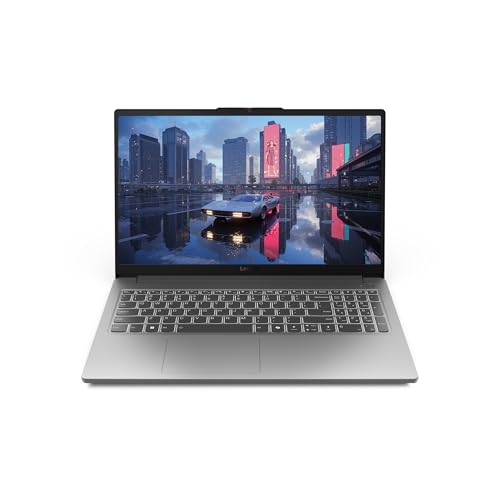
Lenovo LOQ Essential Student Gaming Laptop i5-12450HX 144Hz

CHUWI Gaming Laptop 16inch Ryzen 5 16GB 512GB SSD
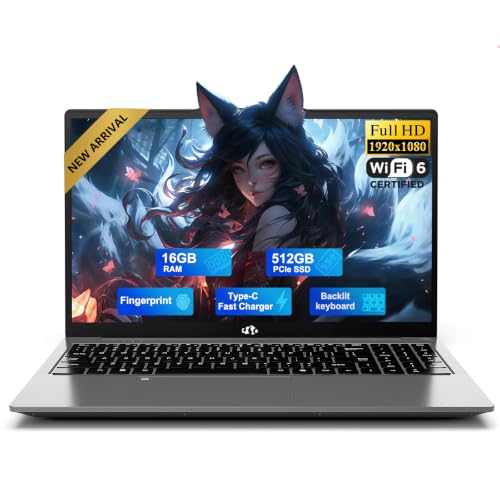
NIMO 15.6 AI Creator Gaming Laptop Ryzen 5 6600H

Lenovo 15 Gaming Laptop Ryzen 5 7535HS 256GB SSD

NIMO 15.6 IPS FHD-Light Gaming Laptop Ryzen 5 6600H

Gaming Laptop Core Processor 16GB RAM 512GB SSD
KAIGERR Gaming Laptop Ryzen 7 5700U 16GB 512GB NVMe SSD
More Details On Our Top Picks
The HP Victus 15 sits in the middle of the pack in a useful way, because the RTX 3050 and Core i5-12500H give you a familiar entry-level gaming formula without pushing into pricier territory. In a shared room or at a kitchen table, the 512 GB SSD helps you keep a few large games installed alongside school files.
The 8 GB memory is the first real constraint, since heavier multitasking can crowd it faster than the storage does. Still, the backlit keyboard and Windows 11 Home make it straightforward for everyday use, and the enhanced thermals point to a chassis built for sustained load rather than a flashy shell.
Strong Points
- RTX 3050 graphics suit modest 1080p gaming without chasing premium pricing.
- Core i5-12500H gives you a stronger base for school apps and game launchers.
- 512 GB SSD leaves room for several modern installs and project files.
- Backlit keys help late-night use in dim dorms or living rooms.
Things To Consider
- 8 GB RAM can feel tight once chat, browser tabs, and a game are open at once.
- The 2022-era platform is sensible, but not the newest path in this group.
Feature Rundown
Who It Suits Best
Students who want a straightforward gaming laptop with dedicated graphics and enough storage for a small game library will get the most from it.
A Better Fit Elsewhere
Lenovo LOQ Essential suits competitive players better, since its RTX 4050 and 144Hz screen give you more headroom for fast-moving games.
The LOQ Essential pushes harder than the Victus 15, mostly because the RTX 4050 and 144Hz IPS panel are tuned for smoother motion in fast-paced games. That 144Hz refresh rate means the screen updates more often than a standard 60Hz panel, so movement looks less smeared when your match gets busy.
For a dorm desk, it makes a strong case as a single machine for study and play, since the 512 GB SSD and 8 GB memory cover the basics without wasting space on extras. The honest read is that the memory is still modest, but the graphics and display combination makes this one feel better suited to esports-style titles than Item 1.
Upsides
- RTX 4050 graphics give you more headroom than the Victus 15.
- 144Hz IPS display helps motion look cleaner in quick-action games.
- HX-class Core i5 is built for heavier sustained workloads.
- 512 GB SSD keeps load times brisk and leaves usable game space.
Softer Spots
- 8 GB memory is workable, but multitasking-heavy setups can feel cramped.
- The sharper gaming focus makes it less plain than the Lenovo 15 below.
At A Glance
Who Will Love This
Competitive players and students who want a sharper screen for fast games will get more out of this Lenovo than the lower-tier RTX 3050 machine.
Where A Sibling Pick Shines
HP Victus 15 makes more sense for a milder budget approach, especially for casual players who do not need a 144Hz panel.
The CHUWI leans on a simpler formula than the RTX-based picks before it, but the 16 GB memory changes the daily experience in a practical way. You can keep a browser, chat app, and a game launcher open without feeling like every extra tab is a negotiation.
Storage sits at 512 GB SSD, which is a comfortable middle ground for a 16-inch machine used for school, media, and a few sizable installs. The Radeon graphics are fine for lighter gaming, though this one makes more sense as a multitasking laptop than a graphics-first machine.
Bright Spots
- 16 GB memory gives you more breathing room than the 8 GB models.
- 512 GB SSD fits a practical mix of apps, files, and games.
- 16-inch size helps with split-screen work and larger text.
- Ryzen 5 platform suits daily use and light creative work.
Minor Gripes
- Graphics are less focused on demanding gaming than the RTX options.
- The 16-inch chassis is less carry-friendly than the smaller Lenovo 15.
Perfect Match For
Students who split time between homework, streaming, and casual games will appreciate the extra memory more than raw graphics muscle.
Skip It When
Lenovo LOQ Essential fits better for fast-action gaming, since its RTX 4050 and 144Hz panel are better suited to that job.
This NIMO stands out for the extras around the core hardware, starting with a metal top cover and a 100W USB-C charger in the box. That makes it feel less barebones than Item 3, especially for anyone who moves between home, campus, and a café desk.
The Ryzen 5 6600H is a six-core chip, so it should handle everyday work and lighter creative tasks with less strain than basic entry processors. The trade-off is that the listing emphasizes usability and support more than display detail, so you’re choosing stability and a cleaner accessory package over a flashy spec sheet.
What We Like
- Metal top cover gives the chassis a sturdier feel on paper.
- 100W USB-C charger makes packing for travel easier.
- Ryzen 5 6600H suits mixed study and gaming use.
- 2-year warranty and 90-day returns add practical reassurance.
- USA support team helps with setup and connection questions.
Areas To Watch
- The listing focuses more on support than gaming display details.
- At 15.6 inches, it offers less workspace than the CHUWI 16-inch model.
Core Details
Built With In Mind
Commuters and students who value practical extras as much as core performance will get the clearest payoff here.
Another Choice May Suit
CHUWI Gaming Laptop 16inch fits better for a bigger screen, especially for split-screen work and long homework sessions.
The Lenovo 15 keeps things pared back, and that restraint matters for dorm rooms, commute bags, and smaller desks. Compared with the NIMO above, you give up the extra creator-friendly flourishes, but you also get a simpler machine that should feel easier to live with day to day.
Its Ryzen 5 7535HS processor and DDR5 memory form a sensible core for light gaming, browsing, and coursework. The 256 GB PCIe SSD is the tightest part of the package, though, so the honest read is that this one suits shoppers who store less and install selectively.
Best Bits
- Ryzen 5 7535HS should handle normal multitasking with less friction.
- DDR5 memory gives the system a more current memory platform.
- Compact format works well for backpacks and crowded desks.
Room For Improvement
- 256 GB SSD fills up fast once a few large games are installed.
- 8 GB memory keeps it in the more modest part of the group.
Who Should Grab It
Students and commuters who mostly want a slim gaming laptop for lighter play and routine work fit this Lenovo well.
Look Elsewhere When
KAIGERR Gaming Laptop makes more sense for a roomier everyday setup, since its Ryzen 7 and larger 512 GB NVMe SSD give you more headroom.
This NIMO feels more complete than the Lenovo 15 because it pairs 16 GB DDR5 memory with a fingerprint reader, backlit keyboard, and 100W Type-C charging. That spread of extras matters in real life, especially for someone who moves from class to work to gaming without wanting a separate machine for each job.
Its 256 GB SSD is still the limiter, so the appeal is speed of access and convenience rather than large local storage. The IPS Full HD screen and Ryzen 5 6600H make it a practical everyday pick, though heavy game libraries will need some discipline.
Highlights
- 16 GB DDR5 memory is the strongest multitasking figure in this compact group.
- Fingerprint login adds a quick unlock step for shared spaces.
- Backlit keyboard helps in low light and late study sessions.
- 100W Type-C charging is handy for smaller travel kits.
Softer Spots
- 256 GB SSD leaves limited room for a large game library.
- The feature set helps daily use more than high-end gaming.
Whose Shelf It Belongs On
Students who want a practical everyday laptop with a few quality-of-life extras will appreciate this one most.
Swap It Out When
HP Victus 15 is the better fit for shoppers who want dedicated graphics first and can accept fewer convenience extras.
The YOZISUAN keeps the pitch straightforward, and that actually helps in a category where many listings lean hard into jargon. With 16 GB RAM and a 512 GB SSD, it lines up well with the kind of day where you bounce between coursework, browsing, and a game after dinner.
WiFi and Bluetooth 5.0 give it the expected wireless basics, which matters more than it sounds for commuters using headsets or campus networks. It is less eye-catching than the RTX options, but that also keeps the focus on general-purpose usefulness rather than a single flashy part.
Positives
- 16 GB memory is generous for routine multitasking.
- 512 GB SSD gives you practical local storage.
- FHD display suits classes, streaming, and casual games.
- WiFi and Bluetooth 5.0 support common accessory setups.
Points To Note
- The processor listing is broad, so the exact chip family deserves a careful look on the product page.
- It does not present the graphics focus of the RTX machines above.
Where Shoppers Go Wrong
People who need clear graphics details for demanding games should look higher up the list, because this one is more about everyday balance.
Reach For A Different Pick When
Lenovo LOQ Essential fits better for fast-motion gaming, thanks to its RTX 4050 and 144Hz screen.
The KAIGERR closes the list with the strongest CPU description in the group, since the Ryzen 7 5700U brings eight cores and sixteen threads to the table. That matters for heavier browser loads, mixed work sessions, and longer ownership stretches where you want a little extra headroom.
Its 16 GB memory and 512 GB NVMe SSD round out a sensible package, while WiFi 6 should suit modern home networks and shared apartment setups. Compared with the YOZISUAN, this one feels more clearly defined, though it still sits closer to a balanced everyday laptop than a pure graphics-first rig.
Reasons To Buy
- Ryzen 7 5700U offers more CPU headroom than the Ryzen 5 models.
- 16 GB memory supports steady multitasking throughout the day.
- 512 GB NVMe SSD keeps storage practical and quick.
- WiFi 6 is a useful match for current home routers.
Small Caveats
- The graphics focus is lighter than the RTX-based Lenovo and HP picks.
- It suits balanced use more than long sessions of demanding gaming.
Right Fit For
Shoppers who want a stronger general-purpose processor and a roomy everyday setup without moving into higher pricing tiers will like this most.
Where Another Pick Suits Better
Lenovo LOQ Essential is the stronger gaming fit, especially for fast-action titles that benefit from RTX 4050 graphics and a 144Hz display.
What Matters Most Before You Choose
Game Performance Starts With The Graphics Pairing
The RTX 4050 in the Lenovo LOQ Essential gives you the clearest route to smoother play in this group, while the RTX 3050 in the HP Victus 15 sits a step below it. Ryzen-only machines can still work well for lighter titles, but they lean more toward general use than stronger gaming headroom.
Memory And Storage Shape Daily Friction
8 GB RAM is enough for basic play and school use, yet it fills quickly once you stack tabs, launchers, and chat apps. 16 GB feels calmer, and a 512 GB SSD is the safer choice for anyone who keeps several large games installed at once.
Screen Size Changes How The Laptop Lives On Your Desk
A 15.6-inch machine fits bags and smaller work surfaces better, while a 16-inch model gives you a little more room for split windows and long writing sessions. That matters as much as the chip for students who spend hours in front of the screen.
Portability Often Beats Spec Sheets In Real Use
Thin, plain machines are easier to carry, but they often give up graphics power or storage space. Heavier-duty builds make more sense for a desk-first setup, so think about where the laptop will live during the week rather than only what the listing headline says.
Small Missteps That Cost You Comfort
Hidden Buying Traps
Many shoppers focus only on the graphics line and ignore memory limits, which leads to slowdowns once the game is open alongside other apps. Storage space causes the same problem, especially on 256 GB models that fill faster than expected.
What The Higher Tier Buys
More money usually goes into a faster display, stronger graphics, and a processor that holds up better under longer sessions. The upgrade makes sense for competitive play or heavier multitasking, but casual use rarely needs that whole jump.
Frequently Asked Questions
Are Inexpensive Gaming Laptops Good For School Too?
Yes, many of them work well for class notes, browser tabs, and streaming between sessions. The smoother models in this list pair gaming parts with enough storage for daily school work.
How Much RAM Makes Sense Here?
16 GB is the calmer choice for gaming plus multitasking. 8 GB still works for lighter use, but it leaves less room once multiple apps stay open.
Is A 144Hz Screen Worth It?
It helps fast motion look cleaner in esports-style games. You notice the difference most in titles where quick camera movement matters.
Should You Prioritize Graphics Or Storage?
Graphics matter more for game performance, while storage determines how many titles you can keep installed. A 512 GB SSD is the safer middle ground for most people here.
Do Ryzen-Based Models Work Well For Gaming?
Yes, especially for lighter games and mixed everyday use. The stronger Ryzen 7 and Ryzen 5 H-series options in this list also handle multitasking more comfortably than basic chips.
