


Swapping a failing hard drive is often the cheapest way to bring an old laptop back from the dead. Whether you’re reviving a hand-me-down notebook, expanding a console’s storage, or building a budget machine, a solid 2.5-inch drive still does honest work. This shortlist covers ten options across different capacities, speeds, and budgets so you can match one to your actual needs instead of guessing.
The Shortlist At A Glance

Seagate ST1000LM035 1TB Laptop HDD (Open Box)

Seagate BarraCuda Pro 500GB Internal Hard Drive (ST500LM034)

WD Blue 1TB Mobile Hard Drive WD10SPZX (Renewed)

MDT 320GB 2.5 Inch SATA Hard Drive

Seagate ST1000LM035 1TB Laptop HDD (Renewed)

Seagate BarraCuda Pro 500GB Hard Drive ST500LM034
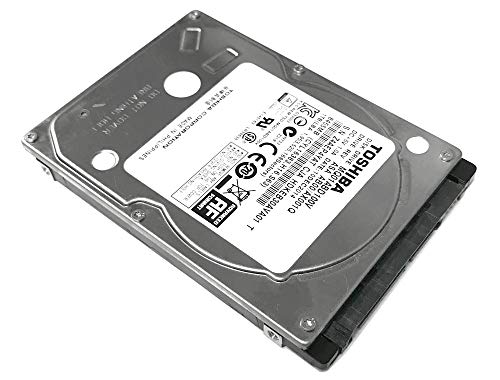
Toshiba MQ01ABD100V 1TB Notebook Hard Drive
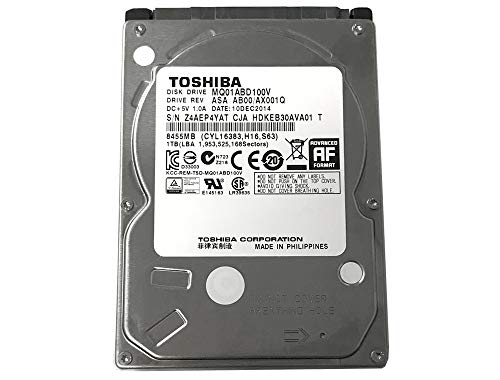
Toshiba 1TB PS3/PS4 Hard Drive
Western Digital 1TB WD Blue Mobile Hard Drive WD10SPZX

Seagate 1TB Mobile HDD ST1000LM035
More Details On Our Top Picks
This is the drive many repair shops reach for first when a customer’s notebook dies. At just 7mm thick with a terabyte of space, it slides into nearly any 2.5-inch bay without fuss, including slimmer chassis that reject thicker 9.5mm drives.
The open-box condition keeps costs down, which matters when you’re already paying for installation or cloning software. Students and remote workers who mostly browse, stream, and edit documents will find the 5400 RPM speed perfectly livable in daily use.
Strong Points
- A full terabyte holds roughly 250,000 photos or a large game library without constant cleanup
- The 7mm profile fits thin ultrabooks where taller drives physically won’t close the case
- 128MB of cache smooths out file transfers compared to older 8MB-cache drives
- Open-box pricing leaves room in the budget for a backup drive
Things To Consider
- Open-box units may show minor handling wear, so inspect contacts before installing
- Mechanical drives are sensitive to drops while powered, something commuters should keep in mind
Who It Suits Best
Anyone reviving a slim older laptop on a tight budget who wants maximum capacity per dollar.
Where A Sibling Pick Shines
The renewed Seagate ST1000LM035 at pick five suits cautious shoppers who prefer professionally inspected units over open-box stock.
Most drives here spin at 5400 RPM; this BarraCuda Pro turns at 7200, and that difference shows up the moment you open a photo library or scrub through audio files. Spindle speed, simply put, is how fast the platters rotate, and faster platters mean quicker access to your data.
The trade-off is capacity: 500GB fills faster than a terabyte, especially with video projects. Creators working in Lightroom, Audacity, or basic video editing get noticeably snappier response than the 5400 RPM picks below can offer.
Highlights
- 7200 RPM spindle cuts load times for media-heavy workflows
- 128MB cache buffers large sequential reads during batch exports
- SATA 6Gb/s interface pairs cleanly with modern laptop controllers
- Backed by a long track record from a major drive maker
Trade Offs
- Half the capacity of the 1TB picks, so large video archives need external storage
- Higher spin speed draws slightly more power, which can trim battery runtime a bit
Key Specs
Made For
Hobbyist editors and music producers who want mechanical-drive speed without paying SSD prices.
Consider Something Else When
If raw space matters more than speed, the WD Blue 1TB at pick nine doubles your capacity for similar money.
WD’s Blue line has been the default replacement drive in countless repair guides for years, and this renewed unit brings that pedigree at a friendlier price point. Renewed means the drive has been inspected and tested to work like new, though cosmetic marks are possible.
In a student laptop that lives in a backpack, the 128MB cache helps when syncing coursework folders or loading a game after class. You give up some peace of mind versus buying new, but the savings are real.
What We Like
- One terabyte covers years of documents, photos, and casual gaming
- 128MB cache keeps everyday file operations feeling responsive
- Renewed pricing undercuts new-stock equivalents considerably
Minor Gripes
- Renewed stock varies between sellers, so check the specific listing’s inspection details
- No manufacturer warranty card in the box, unlike brand-new retail drives
Right Fit For
Students and second-laptop owners who want a known-reliable model without paying new-unit prices.
Another Choice May Suit
The new Western Digital WD10SPZX at pick nine is the better call for anyone who wants factory-sealed packaging and full retail support.
Sometimes you don’t need much space; you just need the machine to turn on again. This 320GB drive exists for exactly that moment, whether it’s an aging PS3 that ate its original disk or a decade-old Dell running light Linux duties.
The smaller 8MB cache and slower seek time mean it won’t feel quick next to the BarraCuda Pro above, but for a console or a spare-room computer, responsiveness matters less than reliability. BIPRA backs it with a one-year warranty, which is generous at this tier.
Upsides
- 320GB comfortably holds a PS3 game collection or a lightweight OS install
- One-year warranty from the seller adds rare protection at this price level
- Standard 2.5-inch SATA form drops into most older laptops and consoles
Softer Spots
- 8MB cache and 12ms seek time trail modern drives noticeably in desktop tasks
- 320GB feels cramped once Windows updates and browsers pile up
At A Glance
Who Will Love This
Retro gamers and tinkerers bringing old hardware back to life on the smallest possible spend.
Look Elsewhere When
Modern laptop owners should step up to the Seagate ST1000LM035 at pick one for triple the space and newer internals.
Same drive as our top pick, different route to market. This renewed ST1000LM035 has been inspected and verified functional, which appeals to shoppers uneasy about open-box handling but still chasing a discount over sealed retail stock.
Spec-wise nothing changes: 5400 RPM, 128MB cache, SATA 6Gb/s, and a 7mm body that fits the thinnest bays. Owners commonly report quiet operation and modest heat, both welcome traits in a laptop you actually carry around.
Bright Spots
- Terabyte of storage handles whole-family photo archives with room left over
- Low idle power draw helps stretch battery life in portable machines
- Renewed inspection process filters out dead-on-arrival units
- Quiet acoustics make it unobtrusive in shared study spaces
Points To Note
- Renewed drives ship without original retail packaging, so store the anti-static bag carefully
- 5400 RPM feels slow next to the 7200 RPM BarraCuda Pro for heavy editing work
Quick Facts
Who Should Grab It
Deal-aware upgraders replacing a failed drive in a family laptop who want inspected stock at a lower cost.
Swap It Out When
Shoppers wanting untouched factory stock should choose the identical new ST1000LM035 at pick ten instead.
This is the bare-drive version of the BarraCuda Pro we covered earlier, sold without retail packaging extras. Functionally it’s the same animal: 500GB, 7200 RPM, 128MB cache, SATA 6Gb/s. What changes is the buying experience and usually the price.
Bare drives suit people doing their own installs who already own cloning cables and mounting caddies. In a small-form-factor build or a secondary slot, the combination of speed and half-terabyte footprint hits a tidy middle ground.
Reasons To Buy
- Identical 7200 RPM performance to the packaged version, often at a lower outlay
- Compact 2.5-inch body works in laptops, consoles, and small enclosures alike
- Large 128MB cache sustains steady transfers during long copy jobs
Small Caveats
- No bundled accessories, so first-time installers need their own SATA cable and tools
- 500GB ceiling limits appeal for anyone hoarding video footage
The Right Fit
Hands-on builders adding a fast secondary drive to a laptop or compact desktop they already service themselves.
Not Your Match When
First-time swappers will find the packaged BarraCuda Pro at pick two easier, thanks to frustration-free packaging and clearer documentation.
Toshiba built the MQ01ABD100V specifically for notebooks, and it shows in the details: high areal density packing a terabyte onto fewer platters, plus a 5400 RPM motor tuned for cool, quiet running rather than outright speed.
For a homework-and-streaming machine, that tuning is exactly right. The 8MB cache is dated next to Seagate’s 128MB offerings, so heavy multitaskers may notice more hesitation when several programs compete for disk access.
Plus Points
- High areal density delivers a full terabyte in a standard-height 2.5-inch shell
- Runs quietly, which matters in lecture halls and shared bedrooms
- One-year seller warranty covers early-life failures
- Wide compatibility across Dell, Acer, ASUS, and Toshiba notebooks
Areas To Watch
- 8MB cache trails the larger buffers on competing 1TB drives
- SATA 3.0Gb/s interface caps peak throughput on newer controllers
Feature Snapshot
Perfect Match For
Owners of older Toshiba, Dell, or Acer notebooks needing a dependable same-spec replacement drive.
Reach For A Different Pick When
Newer laptops benefit from the SATA 6Gb/s WD Blue at pick nine, which removes the interface bottleneck entirely.
Underneath the console branding sits the same MQ01ABD100V platform as the previous pick, but this listing targets PlayStation owners directly and stretches the warranty to three years. That longer coverage is the real story here, since consoles run drives hot and for marathon sessions.
Installation in a PS3 or PS4 is famously simple: one panel, one bracket, four screws. A terabyte transforms how many digital titles you can keep installed at once, ending the delete-and-redownload cycle that plagues 500GB consoles.
Standout Traits
- Three-year warranty triples the protection of most bare drives here
- Drop-in fit for PS3 and PS4 storage bays with no modification needed
- 1TB capacity holds dozens of installed games simultaneously
Honest Caveats
- Consoles generate sustained heat, so ensure ventilation openings stay dust-free after the swap
- Modest 8MB cache means slower load screens than SSD-equipped consoles
Built With In Mind
PlayStation owners whose original drives have filled up or failed and who want long-haul coverage on the replacement.
Where Another Pick Suits Better
General laptop users get better value from the Seagate ST1000LM035 at pick one, which offers a bigger cache for desktop-style workloads.
Here’s the new-retail version of the renewed WD Blue from pick three, and for most shoppers it’s the safest all-around choice on this list. You get the full 1TB, the generous 128MB cache, and a SATA 6Gb/s link, all backed by WD’s mainstream quality reputation.
It slots into notebooks, all-in-one PCs, external enclosures, and even game consoles. Nothing about it is flashy, and that’s the point: it’s the drive you recommend when someone asks what to buy and doesn’t want to think about it further.
Best Bits
- 128MB cache keeps multitasking smoother than 8MB-cache rivals like the Toshiba MQ01ABD100V
- SATA 6Gb/s interface avoids bottlenecks on modern motherboards
- Versatile across laptops, consoles, and enclosure builds
- Factory-new condition with full retail backing
Worth Noting
- 5400 RPM speed won’t satisfy anyone doing regular video editing
- Standard 7mm height excludes a few very old 9.5mm-only bays being the reverse problem, rare but worth measuring first
Core Details
Whose Shelf It Belongs On
Anyone wanting a no-drama, brand-name 1TB replacement for a daily-use laptop or console.
Skip It When
Speed-first users editing media regularly should pay up for the 7200 RPM BarraCuda Pro at pick two instead.
We close with the original retail listing of the ST1000LM035, the drive bookending this roundup in three different conditions. This is the factory-sealed version: no open-box question marks, no renewed inspection stamps, just the standard product straight from distribution.
The 7mm thickness remains its defining trait. Slim notebooks from the last decade often physically cannot accept 9.5mm drives, and this one sidesteps that wall entirely while still delivering a terabyte and a 128MB cache.
Positives
- Sealed retail condition gives the cleanest ownership start among the three ST1000LM035 variants
- Thin 7mm body fits ultrabooks and compact enclosures other drives can’t
- Light weight suits portable machines where every gram counts
Room For Improvement
- Typically carries a higher price than the open-box and renewed versions of the same drive
- 5400 RPM performance is ordinary for demanding creative work
Best Suited To
Owners of genuinely slim laptops who need guaranteed fitment and prefer untouched factory stock.
A Better Fit Elsewhere
Budget-focused shoppers with standard-thickness bays save money with the open-box variant at pick one, which shares identical internals.
Factors To Consider Before Choosing Laptop Hdds
Capacity Versus Real Needs
A terabyte sounds generous until Windows, browsers, and a Steam library move in. Count what you actually store today, then double it. Casual users rarely exceed 500GB, while families pooling photos and videos burn through a terabyte within a couple of years.
Spin Speed And Cache Explained
Rotational speed (measured in RPM) determines how quickly the platters deliver data, and cache is a small memory buffer that smooths repeated reads. A 7200 RPM drive with 128MB of cache, like the BarraCuda Pro, feels meaningfully quicker than an 8MB-cache 5400 RPM unit. The trade-off is slightly higher power draw and heat.
Physical Fit Comes First
Measure before ordering. Most modern laptops accept 7mm drives, but older machines and some consoles expect 9.5mm. A drive that doesn’t fit the bay is useless regardless of its specs, so check your service manual or measure the existing drive.
New, Open-Box, Or Renewed
New stock offers the cleanest experience, while renewed and open-box listings cut costs in exchange for cosmetic uncertainty. All three appear on this list because each serves a different comfort level and budget.
Key Considerations Across These Picks
Traps First Timers Fall Into
The most common mistake is buying on capacity alone and ignoring physical height, then discovering the drive won’t seat in the bay. Another frequent slip is skipping the data-cloning step and losing an operating system install. Always image your old drive first, and keep the anti-static bag until installation is done.
Why Top Tier Costs More
Higher-tier drives pay for faster spindles, larger caches, and tighter manufacturing tolerances. Paying more makes sense for editing work or boot drives; for a storage dump or a console, a budget 5400 RPM unit performs nearly identically in practice.
Frequently Asked Questions
Can I replace my laptop hard drive myself?
Most laptops allow drive access through a single panel or bottom cover using a small Phillips screwdriver. Cloning your existing drive beforehand preserves your operating system and files.
Is a 5400 RPM drive too slow for everyday use?
For browsing, office work, and streaming, 5400 RPM remains perfectly acceptable. Creative workloads and frequent large file transfers benefit from 7200 RPM models.
Will these drives work in a PlayStation?
The 2.5-inch SATA format used by every drive here matches PS3 and PS4 requirements. The Toshiba listing at pick eight is tailored specifically for those consoles.
How long do laptop hard drives typically last?
Mechanical drives commonly serve three to five years of normal use before failure risk rises. Regular backups matter more than any spec sheet.
Do I need special screws or brackets?
Some laptops require a mounting caddy or adapter rails, often reusable from the original drive. Check your model’s teardown guide before ordering hardware.
Closing Remarks
Every drive here solves the same core problem: giving an aging machine dependable storage without spending SSD money. Match the capacity to your habits, confirm the physical fit, and pick the condition that matches your risk tolerance. One careful afternoon of work, and that tired laptop gets a genuine second life.
