


Remote work, online classes, and endless video calls all come down to one small thing: people hearing you clearly. The right headset takes the strain out of long meetings, keeps your voice crisp over keyboard clatter, and stops your ears from aching halfway through the afternoon. This roundup covers ten options spanning wireless over-ears, wired boom-mic headsets, and featherweight USB earbuds, so you can match one to your desk, your budget, and how many hours you actually spend on calls.
The Main Contenders

Poly Blackwire 5220 Wired Headset with Boom Mic

Wireless Bluetooth Headset with Mic for Work

AIAUXAI USB Earbuds for PC with Microphone (Blue)
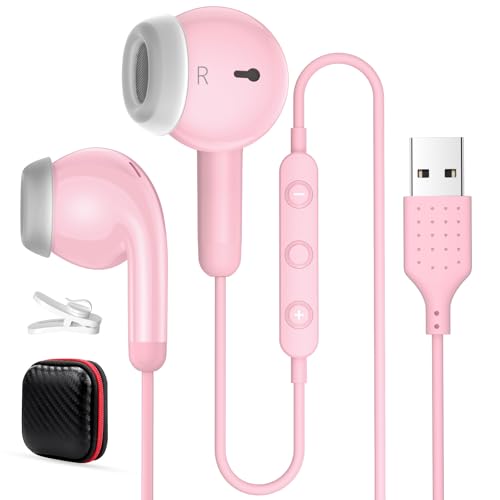
AIAUXAI USB Earbuds for PC with Microphone (Pink)

AIAUXAI USB Earbuds for PC with Microphone (White)

KVIDIO Wired Headphones with Mic, 3.5mm Volume Control

Lenovo USB-A Wired Stereo Headset Gen 2
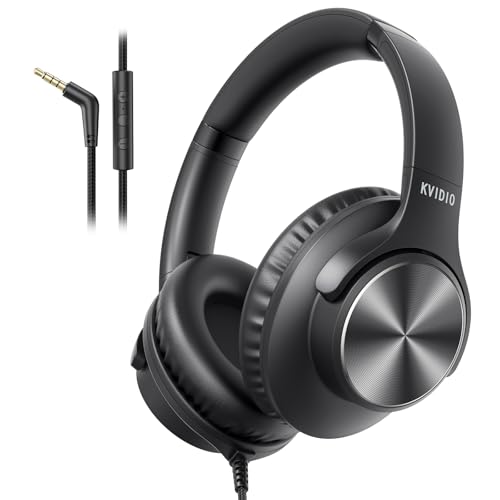
KVIDIO Over-Ear 3.5mm Corded Headphones with Mic

JIAMQISHI USB Headset with Noise Cancelling Mic (Apricot)

JIAMQISHI USB Headset with Noise Cancelling Mic (White)
The Details Behind The Selections
Anyone juggling a work laptop, a personal desktop, and a phone knows the annoyance of swapping cables mid-day. The Poly Blackwire 5220 sidesteps that with three connection paths: USB-C, USB-A, and a standard 3.5mm plug, so one headset covers nearly every device you own. It’s an over-ear design built around a flexible noise-cancelling boom mic, tuned for Teams and Zoom sessions that run back to back.
The ergonomic frame is aimed squarely at eight-hour wear, which matters when your calendar looks like a wall of meetings. Compared with the lighter Lenovo option later in this list, this Poly leans more toward durability and platform certification-style compatibility than minimal weight.
The Upside
- USB-C, USB-A, and 3.5mm inputs mean you can move between laptop, desktop, and phone without buying adapters.
- The flexible boom mic positions close to your mouth, keeping your voice consistent even as you shift posture.
- Noise cancellation on the mic helps mask typing, fans, and household background sounds during calls.
- Over-ear cushions spread pressure around the ear rather than on it, a real difference across a full workday.
- Native Teams and Zoom support reduces setup friction on managed work machines.
Things To Consider
- A wired design means the cable is a permanent companion, so route it away from chair wheels to avoid snags.
- Over-ear cups can run warm in summer or in stuffy home offices.
Key Specs
Made For
Hybrid workers who bounce between multiple devices daily and want one dependable headset for every meeting platform.
Where A Sibling Pick Shines
The Lenovo USB-A Wired Stereo Headset Gen 2 suits corporate users who prefer a noticeably lighter frame and app-adjustable noise processing.
Weight is the quiet factor that decides whether a headset survives a full shift. At roughly 2.56 ounces, this Acer OHR690 Bluetooth model sits among the lightest in its class, and the manufacturer reports hundreds of head-form evaluations behind the fit. Ear cups tilt up to about 8 degrees to follow the shape of your ears instead of pressing flat against them.
Going wireless changes the daily rhythm too: stand up for coffee, grab a notebook, pace during a brainstorm, all while staying connected. Unlike the wired KVIDIO picks further down, there’s no cable to snag, though you’ll want to build a charging habit into your routine.
Why It Works Well
- At about 2.56 oz, neck and temple fatigue stays minimal across marathon meeting days.
- Tilting ear cups conform to different head shapes, so pressure points are less likely to develop.
- Bluetooth freedom lets you leave the desk without dropping off a call.
- Built specifically for calls and meetings, with the mic placement geared toward speech clarity.
Honest Caveats
- Bluetooth pairing occasionally needs re-establishing after sleep mode, something owners of many wireless headsets report.
- You’ll need to keep an eye on charge levels before long call blocks.
Feature Snapshot
Who Will Love This
Remote professionals and customer-support staff who log six-plus hours of calls and hate being tethered to the laptop.
Skip It When
Anyone who wants zero charging maintenance may prefer the JIAMQISHI USB Headset, which draws power straight from the computer.
Not everyone wants a band clamped around their head for two hours of meetings. These AIAUXAI earbuds plug into a USB port and handle both audio and microphone duties through a built-in DAC chip, short for digital-to-analog converter, which processes sound digitally rather than relying on your laptop’s often mediocre audio hardware.
In practice that means clearer call audio than most built-in jacks deliver, plus passive isolation from the snug in-ear fit. They’re far smaller than any over-ear option here, so they vanish into a jacket pocket between classes or meetings.
The Case For It
- The integrated DAC decoder chip bypasses weak onboard laptop audio for cleaner output.
- More compact and lightweight than traditional USB headsets, easy to carry everywhere.
- Passive noise isolation helps you focus in open offices or shared spaces.
- Plug-in operation means nothing to charge and no pairing screens to fight.
Small Caveats
- In-ear buds can cause ear fatigue for some listeners over very long sessions, depending on fit sensitivity.
- The cable still tethers you to the machine, unlike the Bluetooth option earlier in this list.
Right Fit For
Minimalists, students, and hybrid workers who want reliable call audio without headband pressure or extra bulk.
Another Choice May Suit
Listeners who dislike in-ear tips should look at the KVIDIO Over-Ear 3.5mm Corded Headphones, which rest around the ear instead.
Functionally, this pink variant matches the blue AIAUXAI pair reviewed above: same USB connection, same DAC-driven clarity, same lightweight in-ear format. What it adds is personality, which sounds trivial until you’ve fished identical black cables out of a shared drawer for the tenth time.
The distinct color also makes it easier to spot in a backpack or on a crowded desk, and it plays nicely with pastel-toned setups. Performance expectations stay the same, clear voice pickup for online classes and business calls with effective isolation from surrounding noise.
What Works In Its Favor
- Identical DAC-chip audio path to the blue version, so call quality carries over unchanged.
- The pink finish stands out in shared households, cutting down on mix-ups and lost pairs.
- Lightweight body keeps long lectures and meetings comfortable for most ears.
Points To Note
- Only one colorway choice separates this from its siblings, so value comes down to whether the shade matters to you.
- Like any wired bud, gentle handling near the plug joint extends its lifespan considerably.
Who Should Grab It
Style-conscious students and remote workers who want dependable USB call audio in a color that isn’t another black cable.
Swap It Out When
Households needing a neutral look will find the white AIAUXAI USB Earbuds a better visual match for shared spaces.
This white edition rounds out the AIAUXAI trio, and it’s the version that blends into minimalist desks and matching laptop accessories. Underneath the finish sits the same formula: a USB plug, an internal DAC decoder chip for cleaner digital audio, and a microphone suited to office calls, online meetings, and casual gaming.
Because the whole package weighs next to nothing, it earns a permanent spot in a laptop sleeve rather than a desk drawer. Frequent travelers will appreciate that it occupies less space than even the smallest folding headset.
A Few Strong Suits
- DAC-based signal processing delivers clearer playback than typical analog laptop jacks manage.
- Extremely small footprint, ideal for cramped bags and tight tray tables.
- Effective passive isolation helps conversations stay private in coffee shops and lounges.
Less Ideal Details
- White cabling shows grime faster than darker variants, so an occasional wipe-down keeps it presentable.
- Boom-less mic design means voice pickup depends partly on cable position during calls.
Whose Shelf It Belongs On
Commuters and co-working regulars who want a tidy, neutral-looking call solution that lives in their bag full-time.
Look Elsewhere When
Voice-first users who want maximum mic clarity should step up to the Poly Blackwire 5220 with its dedicated noise-cancelling boom arm.
Sometimes the assignment is simple: a cheap, sturdy pair of headphones with a working mic for school laptops and tablets. This KVIDIO model answers with a plain 3.5mm plug, an inline controller for volume and hands-free calls, and an over-ear shape that survives backpack life better than buds do.
One honest catch worth knowing upfront: the inline volume button doesn’t respond on desktop PCs and certain laptops, so you’d adjust sound through the device itself instead. Devices lacking a headphone jack also need a separate adapter.
Good Reasons To Consider
- Works with any device sporting a 3.5mm jack, from school Chromebooks to older phones.
- Inline controls make muting and adjusting quick during lessons or calls where supported.
- Built-in mic handles voice chat and classroom platforms without extra gear.
- Over-ear padding sits gentler on young ears than hard plastic earbuds.
Where It May Fall Short
- The inline volume control is unsupported on desktops and some laptops, a limitation the maker states openly.
- Jack-only connectivity rules out newer portless devices unless you add an adapter.
Built With In Mind
Students and families kitting out homework stations who need dependable basics at a friendly cost.
Consider Something Else When
Users with USB-only laptops will get a smoother experience from the JIAMQISHI USB Headset, which needs no adapter at all.
Corporate IT departments tend to favor Lenovo gear for good reason, and this second-generation USB-A headset fits that world neatly. It weighs just 140 grams, light enough that afternoon calls don’t feel like a workout, and the double-sided boom mic pairs with AI-powered noise cancelling you adjust through a companion app.
Replaceable earcups deserve special mention because they turn a consumable part into a maintenance task instead of a replacement purchase. Inline controls include a mute button, which becomes second nature fast once you’re hopping between calls all day.
Useful Strengths
- At 140g, the frame stays comfortable through consecutive meetings without hot spots.
- Replaceable earcups extend usable life and keep hygiene easy in shared offices.
- App-managed AI noise cancelling adapts filtering to your environment rather than one fixed profile.
- Inline mute gives instant privacy control without hunting for software buttons.
Trade Offs To Consider
- Noise tuning requires installing the companion app, an extra step some locked-down work machines may complicate.
- USB-A only, so modern USB-C-only laptops need a dongle.
Core Details
Best Suited To
Office professionals and enterprise teams standardized on Lenovo hardware who want polished call audio with minimal fuss.
Reach For A Different Pick When
Multi-device users will find the Poly Blackwire 5220 more accommodating thanks to its USB-C, USB-A, and 3.5mm inputs.
Think of this as the sibling KVIDIO pick with a stronger emphasis on listening quality. Its 40mm drivers push balanced stereo with crisp highs and fuller bass, so music, podcasts, and videos sound noticeably richer than the average budget headset manages. The mic and inline controls still cover calls and coursework.
The same caveats apply here as with item six: the inline volume key won’t function on desktops or certain laptops, and jack-less devices require a 3.5mm conversion adapter. For households sharing one pair between homework and entertainment, that trade-off usually feels acceptable.
Notable Upsides
- 40mm drivers deliver detailed, well-rounded sound for both calls and media.
- Over-ear cushioning blocks a fair amount of ambient noise passively, no batteries required.
- Hands-free calling works through the built-in mic on compatible devices.
- One pair serves study sessions and downtime listening equally well.
Details To Watch
- Volume control via the inline button is unsupported on desktops and some laptops, per the manufacturer’s own note.
- Larger drivers mean slightly bulkier cups, which take up more bag space than the AIAUXAI earbuds.
Who It Suits Best
Students and families wanting one affordable over-ear pair that handles video calls, music, and movie nights on any jack-equipped device.
Not Your Match When
Call-heavy professionals prioritizing mic isolation over media sound would be served better by the JIAMQISHI USB Headset’s unidirectional boom.
Ambidextrous headsets are rarer than they should be, and this apricot JIAMQISHI solves the left-or-right question with a 270-degree rotating unidirectional boom. That term means the mic captures sound mainly from one direction, your mouth, while rejecting chatter and fan noise from elsewhere in the room.
Dual USB-plus-3.5mm input adds flexibility across older and newer computers, and the adjustable headband accommodates both adult heads and kids doing remote classes. On-ear pads keep the overall profile slim compared with the Poly’s full over-ear shell.
Useful Highlights
- The 270° swiveling unidirectional boom focuses on your voice and trims background noise effectively.
- Wearable on either side, handy for shared desks or personal preference.
- Adjustable headband spans adult and child sizes, useful for family households.
- USB and 3.5mm inputs cover a wide range of laptops and desktops.
- In-line controls put mute and volume within thumb’s reach.
Potential Sticking Points
- On-ear pads press directly on the ear, which some users find warmer than over-ear designs during summer months.
- Boom arms are the most fragile point on any headset, so avoid yanking the mic sideways when removing it.
Quick Facts
Perfect Match For
Parents managing kids’ online classes alongside their own work calls, especially in homes mixing old and new computers.
A Better Fit Elsewhere
All-day corporate callers who prefer over-ear isolation may favor the Lenovo USB-A Wired Stereo Headset Gen 2 instead.
The white version of the JIAMQISHI headset carries over every strength of the apricot model reviewed just above: the rotating unidirectional boom, the dual USB and 3.5mm inputs, and the adjustable headband sized for grown-ups and students alike. Color is genuinely the deciding variable here.
For video-call-heavy days, the clean white finish photographs well on camera and coordinates with bright desk setups. Everything else, including the in-line controls for home-office calls and Zoom sessions, remains identical.
Reasons It Performs
- Noise-rejecting boom mic keeps your voice front and center on crowded calls.
- Swappable wearing sides suit whichever ear you favor.
- Dual input options eliminate adapter purchases across mixed hardware.
- Light on-ear build slips easily into a drawer or bag between sessions.
Things To Weigh Up
- White surfaces show wear and discoloration sooner, so occasional cleaning preserves the look.
- On-ear isolation trails true over-ear designs in loud environments, a limit worth knowing for busy households.
The Right Fit
Home-office workers and tutors on camera daily who want a neat, light headset tuned primarily for speech.
Where Another Pick Suits Better
Anyone needing richer music playback alongside calls gets more from the KVIDIO Over-Ear 3.5mm Corded Headphones and their 40mm drivers.
What Matters Most Before Choosing Laptop Headphones With Mic
Connection Type Shapes Your Whole Setup
Start by checking your laptop’s ports. Modern ultrabooks often ship USB-C only, which makes the Poly Blackwire 5220’s triple-input design or the AIAUXAI USB earbuds smarter buys than a USB-A-only headset that forces a dongle. Wireless models like the Acer OHR690 sidestep ports entirely but add charging to your routine.
Match the connection to how many devices you touch daily. One laptop, one choice; three devices, prioritize flexibility.
Comfort Is a Function of Hours
Two-hour call days forgive almost any design. Six-hour days punish heavy frames, stiff bands, and in-ear pressure quickly. Weight matters more than padding thickness here, which is why the 140g Lenovo and the 2.56 oz Acer earn their reputations among frequent callers.
Over-ear cups breathe better in warm rooms, while on-ear and in-ear styles stay cooler in short bursts but fatigue faster over marathons.
Mic Style Decides How You’re Heard
Boom microphones sit close to your mouth and reject room noise directionally, making them the strongest option for open-plan homes and shared offices. Inline or earbud mics depend more on your environment staying reasonably quiet. Unidirectional booms, like the JIAMQISHI’s 270-degree arm, go further by capturing mostly what’s in front of them.
Match Features to Your Actual Day
Mute buttons matter enormously for anyone bouncing between calls. App-based noise tuning rewards tech-comfortable users but adds setup steps. Students and families usually value simplicity and durability over advanced processing, so honest self-assessment beats spec-sheet chasing every time.
Key Considerations Across These Picks
Traps First Timers Fall Into
The most common slip is buying for specs instead of ports, then discovering your sleek new laptop has no matching jack or USB-A slot. Read the connection column first, everything else second. Another frequent mistake involves inline controls: several budget models, including both KVIDIO picks, restrict volume buttons on desktops, so confirm compatibility before assuming the dial will work.
Skipping the adapter check causes returns too. Portless phones and tablets need a 3.5mm converter sold separately.
When Paying More Pays Off
Higher-tier headsets justify their cost through three things: lighter frames, tunable noise processing, and replaceable parts. The Lenovo Gen 2 illustrates the pattern well, pairing a 140g build with app-controlled cancelling and swappable earcups that stretch ownership for years.
Entry-level options remain perfectly serviceable for homework and casual calls. The upgrade earns its keep once meetings dominate your calendar or your workspace stays noisy.
Frequently Asked Questions
Do USB headsets work on any laptop?
Any laptop with a free USB-A or USB-C port matching the plug will recognize a USB headset automatically. Operating systems treat them as standard audio devices, so no driver installation is typically required.
Is a boom mic really better than an earbud mic?
Yes, for noisy environments. A boom positions the capsule inches from your mouth and rejects sound arriving from other directions, while earbud mics pick up more room ambience.
Can I use these headphones with my phone?
Models offering a 3.5mm input, such as the Poly Blackwire 5220, connect to phones with a headphone jack directly. Phones without jacks need a USB-C or Lightning adapter.
How long do wired headsets usually last?
With reasonable cable care, a quality wired headset commonly serves three to five years. Replaceable-earcup designs like the Lenovo Gen 2 stretch further since cushions are the first part to wear.
Do wireless headsets add noticeable call delay?
Modern Bluetooth latency is minor for voice calls and rarely disrupts conversation. Video editing or rhythm gaming benefits more from wired connections, where timing stays exact.
Closing Thoughts
Every headset here solves the same core problem, just from different angles. Match the connection to your laptop first, then weigh comfort against your real call hours, and let the mic style settle the rest. The right choice is the one that disappears during your workday, leaving only clear conversations behind.
