


7 Best Laptops For Docking Station for 2026: Clean Desk Setups Made Simple
A good docking station turns a laptop into a steadier desk setup, especially when you juggle monitors, Ethernet, card slots, and charging from one connection. You’ll appreciate that more in a home office, a shared workspace, or a small studio where cable clutter gets old fast. The picks below focus on clear port layouts, monitor support, and practical fit, so you can match the dock to the way you actually work.
Quick Shortlist For Fast Comparison
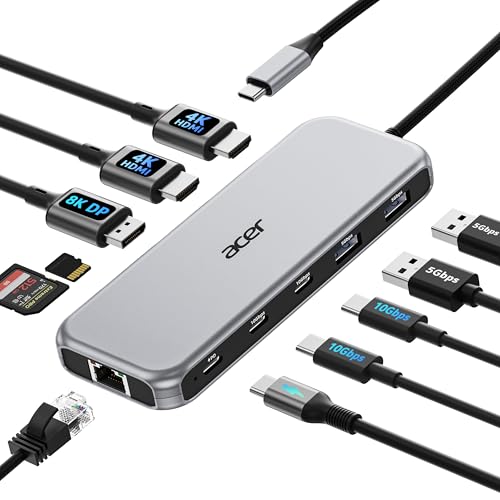
Acer Laptop Docking Station 3 Monitors

Anker Prime Docking Station 14-in-1

Anker Nano Laptop Docking Station 13in1
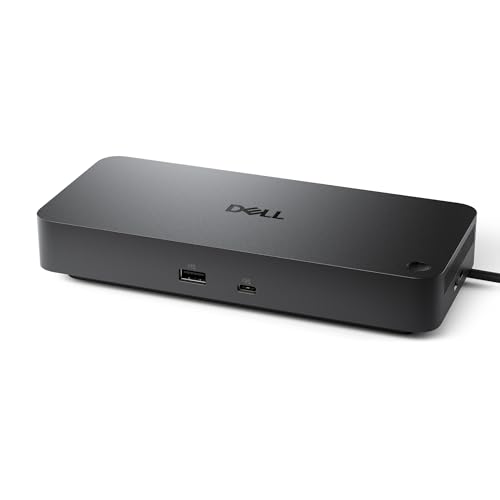
Dell Pro Laptop Docking Station WD25
Anker Nano Laptop Docking Station Dual Monitor 8-in-1

TobenONE 19-in-1 Laptop Docking Station
Docking Station Dual Monitor USB C Hub
More Details On Our Top Picks
Acer’s dock makes sense for a desk that needs screens first and fuss second. Two HDMI ports, one DisplayPort, and wired network support give you a tidy hub for a laptop that spends most of its day parked in one place.
The 100W power delivery rating matters because it can keep many USB-C laptops topped up while the dock handles the rest of the gear. The trade-off is simple, you’ll want to confirm your laptop’s USB-C port supports display output before you count on a three-screen setup.
What We Like
- Three display paths help your desk feel less cramped.
- Ethernet brings a steadier connection than crowded Wi-Fi.
- Two USB-C and two USB-A ports keep newer and older accessories in reach.
- SD and MicroSD slots save you from juggling card adapters.
Points To Note
- Triple-screen use depends on laptop support, so compatibility matters.
- The port mix is broad, but not as dense as the Anker Prime or TobenONE choices.
- The dock is better suited to a fixed desk than to constant packing and unpacking.
Feature Card
Who It Suits Best
Desk-based commuters and home-office workers who want a broad port spread in one cable.
A Better Fit Elsewhere
Anker Prime Docking Station 14-in-1 suits you better if you want a denser port mix and more charging headroom.
The Anker Prime leans hard into a desktop-first setup, and the larger port count shows it. Fourteen connections plus 160W total output make it a strong fit for someone running several devices at the same time, especially in a permanent workstation.
Three USB-C ports with high output and one USB-A charging port give you more breathing room than the Acer dock above. The catch is that all that capability makes more sense on a full desk than in a bag, so you’ll want the extra scale only where it earns its keep.
Upsides
- High total power output helps support a busy laptop-and-accessory setup.
- Three USB-C charging ports are handy for modern devices.
- Fourteen-in-one layout reduces the need for a second hub.
- Dual-monitor support suits workspaces built around two screens.
- Anker’s layout is easy to make sense of once everything is plugged in.
Small Caveats
- The feature set is richer than many home desks need.
- You may find the dock more substantial than a casual travel setup calls for.
- With this much connectivity, cable management matters more than usual.
Who Will Love This
Power users who keep multiple accessories, chargers, and displays attached to one desk.
Look Elsewhere When
Anker Nano Laptop Docking Station 13in1 makes more sense for a hybrid setup that needs a detachable travel hub.
The detachable hub is the hook here, because it gives you a desk dock and a smaller carry-along piece in one package. That split design makes the Anker Nano feel unusually practical for people who split time between a home desk and a client site.
Three-monitor support and a 13-in-1 layout make it broader than a basic travel adapter, while still feeling less committed to one room than the Dell Pro. One thing worth considering is whether you actually need the removable hub, since the extra flexibility only pays off for mixed routines.
Bright Spots
- Detachable 6-in-1 hub adds real carry-friendly flexibility.
- Three external display options suit layered work setups.
- Desktop and travel use cases are covered by one purchase.
- The dock replaces the need for two separate accessories.
Areas To Watch
- The detachable idea is less useful for a permanently parked workstation.
- You’ll want to keep track of the smaller hub during travel.
- The layout is versatile, but not as expansive as the TobenONE unit.
Core Details
Perfect Match For
Hybrid workers and frequent commuters who want one dock that can also travel.
Where A Sibling Pick Shines
Acer Laptop Docking Station 3 Monitors suits a fixed desk better if you care more about direct multi-screen expansion than portability.
Dell keeps this one focused and clean, which suits a desk built around a USB-C laptop and a couple of displays. The WD25 name tells you it’s aimed at a more straightforward station, not a port-heavy hub packed with extras.
100W power delivery, DisplayPort, and HDMI give you the essentials without a lot of clutter. That restraint is useful in corporate or shared-office settings, though it also means you should not expect the broad accessory spread you get from the Anker Prime or TobenONE picks.
Strong Points
- Simple layout keeps a workstation tidy.
- DisplayPort and HDMI cover common monitor setups.
- 100W power delivery supports a single-cable desk routine.
Honest Caveats
- The feature set is narrower than the more expansive docks here.
- Accessory-heavy desks may outgrow it quickly.
- It makes the most sense for users already centered on Dell gear.
Feature Rundown
Whose Shelf It Belongs On
Office workers who want a dependable Dell dock with a clean, company-friendly footprint.
Another Choice May Suit
Anker Prime Docking Station 14-in-1 fits better for you if your desk runs several peripherals at once.
This one is built around the practical middle ground: enough ports for a real desk, but not so many that setup turns into a chore. Dual 4K HDMI output, card slots, and several 10Gbps connections make it a sensible match for Windows users who live in spreadsheets, browser tabs, and shared files.
The macOS note matters here, because the display behavior is different and that changes the whole fit. You may find the 8-in-1 layout ideal for a smaller desk, while users who need more peripherals will probably outgrow it sooner than the TobenONE dock.
Best Bits
- Dual 4K monitor support fits many modern Windows desks.
- 10Gbps data paths help speed up large file transfers.
- Card slots reduce the need for extra adapters.
- The size of the feature set stays manageable for everyday use.
Worth Noting
- Mac users get mirrored display behavior instead of true separate screens.
- The dock is less expandable than the larger 14-in-1 and 19-in-1 options.
- It fits best where the setup stays fairly simple.
Built With In Mind
Windows laptop owners who want a compact dual-monitor dock with useful everyday ports.
Where A Sibling Pick Shines
Anker Prime Docking Station 14-in-1 suits you better if you need more charging room and a wider desktop port mix.
The TobenONE feels like the dock you reach for when the desktop keeps growing. Nineteen ports, twin HDMI outputs, Ethernet, audio, card slots, and a stack of USB connections make it a strong match for a station full of accessories.
That density is useful, but it also means you need a clear plan for cable routing and desk space. Compared with the Dell Pro, this one is far less restrained, so the payoff shows up mainly in busy setups that need many things connected all day.
Highlights
- 19-in-1 layout leaves room for lots of gear.
- Two 4K HDMI outputs support a serious monitor setup.
- Ethernet and audio connections reduce the need for add-ons.
- Ten USB ports suit desks with many peripherals.
- One cable to the laptop keeps the desk simpler than it looks.
Room For Improvement
- The port count can be more than a minimal setup needs.
- Cable organization matters a lot once the dock is fully loaded.
- It is better suited to a fixed workstation than to travel.
Details At A Glance
The Right Fit
Power users with crowded desks and multiple accessories that stay plugged in.
Skip It When
Anker Nano Laptop Docking Station 13in1 makes more sense if you want a smaller setup with a detachable travel hub.
Vicfluxion keeps the formula straightforward, and that can be a good thing for a plain office desk. Two HDMI ports, Ethernet, three USB-A ports, one USB-C data port, a 3.5mm jack, and USB-C power delivery create a compact hub that covers the basics without feeling overbuilt.
It sits in the same practical lane as the Dell Pro, though with a slightly broader mix of everyday connections. The honest read is that this one suits shoppers who want the desk tidied up more than they want a deep bench of specialty ports.
Positives
- Dual HDMI helps keep a two-monitor setup organized.
- Ethernet supports a steadier desk connection.
- Three USB-A ports are useful for common accessories.
- The port mix covers work, calls, and simple storage use.
Minor Gripes
- The feature set is basic beside the larger Anker and TobenONE docks.
- It suits a modest desk more than a heavily loaded workstation.
- Like most slim hubs, cable placement matters for a neat setup.
Whose Shelf It Belongs On
Office workers and remote staff who want a simple dual-monitor dock for daily use.
Where A Sibling Pick Shines
Acer Laptop Docking Station 3 Monitors suits you better if you want more video flexibility and a broader display spread.
What Matters Most Before Choosing Laptops For Docking Station
Port Mix Versus Real Desk Use
A dock can look impressive on paper and still feel wrong at your desk. Start with the ports you actually use, such as HDMI, DisplayPort, Ethernet, USB-C charging, or card slots, then check whether the layout matches your monitor count and peripherals.
Power Delivery And Laptop Compatibility
Power delivery means the dock can send charging power through the same USB-C cable that handles data and displays. That matters for a cleaner setup, but your laptop still has to support the right video output modes, especially for dual or triple screens.
Fixed Desk Or Mixed Routine
A heavier, feature-packed dock suits a permanent workstation, while a smaller unit makes more sense for moving between home, office, and travel. The gap between the Anker Prime and Anker Nano models shows that trade-off clearly.
Key Points Worth Watching
Common Shopping Slip Ups
Many people focus on port count and ignore display support, which leads to disappointment later. Another frequent miss is buying a dock that does not match the laptop’s USB-C behavior, so the screens never behave the way expected.
Where The Extra Money Goes
Higher-tier docks usually add more charging headroom, more data ports, and more flexible display routing. That upgrade earns its keep in crowded workspaces where several devices stay connected all day.
Frequently Asked Questions
Can One Dock Handle Two Or Three Monitors?
Yes, several of these picks are built for dual or triple screens. The real limit comes from your laptop’s USB-C video support, not just the dock itself.
Do You Need Ethernet On A Docking Station?
Ethernet helps when you want a steadier wired connection for work or downloads. It’s less essential for casual use, but it’s handy in busy homes with crowded Wi-Fi.
Is A Detachable Hub Worth It?
A detachable hub makes sense for hybrid work and travel. It adds flexibility, though a fixed desk user may never use that extra piece much.
Why Do Some Docks Include Card Slots?
Card slots are useful for cameras, handheld devices, and quick file transfers. They save you from reaching for a separate adapter.
Should You Choose The Largest Port Count?
Not automatically, because a bigger number can also mean a busier, pricier desk setup. Match the dock to your actual gear, and the better fit usually becomes obvious.
Final Thoughts
You get the best result by matching the dock to your routine, not by chasing the biggest port count. Acer and Vicfluxion suit cleaner everyday desks, while Anker Prime and TobenONE make more sense for busy stations that stay loaded. For a mixed work-and-travel setup, the Anker Nano detachable model stands out for practicality.
