


You want enough speed for games, multitasking, and school or work without paying for hardware you will never use. That means looking past flashy labels and focusing on processor class, memory, storage, graphics, and the kind of screen that stays comfortable during longer sessions.
This roundup keeps the focus on practical value. Some picks lean stronger on memory and storage, some lean on newer chip platforms, and others make more sense for portable use or mixed gaming and creative work.
Quick Shortlist For Fast Comparing

NIMO 15.6″ FHD Light-Gaming-Laptop 32GB LPDDR5 1TB SSD
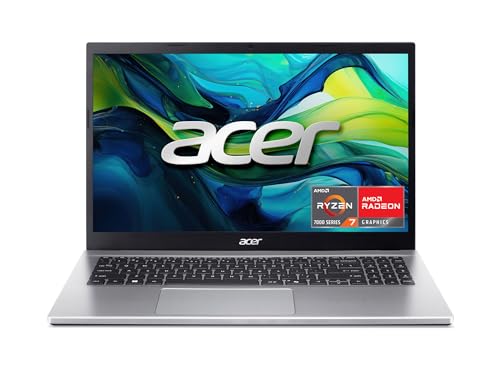
Acer Aspire Go 15 AI Ready Laptop 15.6″ FHD IPS Ryzen 7 7730U
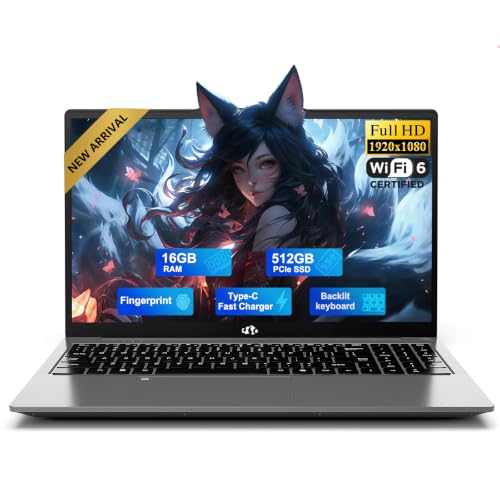
NIMO 15.6″ AI Creator Gaming Laptop 2026 Edition Ryzen 5 6600H

KAIGERR Gaming Laptop 1TB NVMe SSD 16GB RAM Ryzen 7 5825U

Lenovo Gaming Laptop Ryzen 5 7535HS 8GB DDR5 256GB PCIe SSD

Lenovo 15 Gaming Laptop Ryzen 5 7535HS 8GB DDR5 256GB PCIe SSD

NIMO Light Gaming Laptop Ryzen 7 7735HS 8 Core
Light Gaming Laptop Ryzen 7 5700U 16GB RAM 512GB SSD
More Details On Our Top Picks
That much memory and storage changes the feel of a gaming laptop fast. A Ryzen 7 Pro 6850U, 32GB of LPDDR5 memory, and a 1TB SSD point to a machine that can keep game launchers, browser tabs, and background apps open without feeling cramped.
The 15.6-inch FHD IPS display is the sensible middle ground here, especially for dorm desks or a small home setup. The 100W Type-C charging support, backlit keyboard, and fingerprint login add everyday convenience, though the light-gaming label still signals that this is better for casual play than chasing max settings all day.
Strong Points
- 32GB LPDDR5 memory gives you generous room for multitasking.
- 1TB SSD leaves space for a large game library and work files.
- FHD IPS panel is a comfortable match for long sessions.
- Backlit keys help late-night use in dim rooms.
Minor Caveats
- The light-gaming positioning suggests restraint on demanding titles.
- Premium memory and storage can add to the overall cost.
Feature Rundown
Who Will Love This
You benefit most here if you split time between games, coursework, and heavy browser use. It also suits you if storage headroom matters more than chasing a thinner chassis.
A Better Fit Elsewhere
Lenovo Gaming Laptop Ryzen 5 7535HS 8GB DDR5 256GB PCIe SSD suits you better if your budget is tighter and your library stays small.
The Aspire Go 15 lands in the practical middle of this list. A Ryzen 7 7730U, 16GB of DDR4 memory, and a 512GB PCIe Gen4 SSD give you a mix that feels well suited to everyday play, streaming, and normal productivity without pushing into flashy territory.
The 15.6-inch IPS display matters here because panel quality shapes how long you stay comfortable in front of the screen. Acer also keeps the setup straightforward with Wi-Fi 6 and Windows 11 Home, though the DDR4 memory is a little older than the LPDDR5 found on the NIMO model above.
What We Like
- Ryzen 7 7730U brings solid everyday processing headroom.
- 16GB memory suits gaming and normal multitasking.
- 512GB Gen4 SSD helps the system feel responsive.
- IPS panel is a better fit for long desk sessions.
- Wi-Fi 6 supports steadier home network use.
Points To Note
- DDR4 is less current than newer memory types.
- Storage is fine for a moderate library, not a huge one.
Who Should Grab It
You fit this machine best if you want a straightforward 15.6-inch laptop for gaming at modest settings and everyday work. It suits a living room desk or shared household setup very well.
Where A Sibling Pick Shines
NIMO 15.6″ FHD Light-Gaming-Laptop 32GB LPDDR5 1TB SSD makes more sense if you want bigger memory and storage from the start.
Compared with the heavier-memory NIMO above, this one feels more focused on a current CPU platform. The Ryzen 5 6600H is a six-core chip built for responsive everyday work, and that matters for gaming sessions that sit alongside editing, classwork, or content creation.
The included 100W USB-C charger and metal top cover also suggest a laptop built for regular carry, not just desk duty. In most mixed-use setups, that kind of balance beats chasing raw spec numbers, though you may notice the six-core ceiling sooner than on the Ryzen 7 models in this list.
Highlights
- Ryzen 5 6600H keeps everyday responsiveness up.
- Six-core design works well for mixed workloads.
- 100W USB-C charging is travel-friendly.
- Metal top cover adds a sturdier feel for commuting.
Areas To Watch
- Six cores leave less headroom than the Ryzen 7 options.
- Storage and memory details are not fully shown here.
Core Details
Built With In Mind
You suit this pick best if you want one laptop for class, editing, and light-to-moderate gaming. It also fits you well if you carry your machine between rooms or commute with it.
Swap It Out When
KAIGERR Gaming Laptop 1TB NVMe SSD 16GB RAM Ryzen 7 5825U is the better fit when storage space matters more than charger convenience.
Storage is the headline here, and that’s useful in a category where many laptops feel trimmed down. A 1TB NVMe SSD gives you room for larger game installs, media files, and project folders, while the Ryzen 7 5825U and 16GB of RAM keep the rest of the package sensible.
That mix works well for creative work and business tasks too, not just gaming. The trade-off is that the chip is a U-series part, so you get efficiency and general responsiveness rather than the more aggressive performance tuning that comes with some HS-class models.
Bright Spots
- 1TB NVMe SSD is generous for a gaming library.
- 16GB RAM supports smoother everyday multitasking.
- Ryzen 7 5825U handles mixed-use workloads well.
- Wi-Fi 6 is a sensible addition for home networks.
Softer Spots
- The U-series processor favors efficiency over aggressive gaming headroom.
- Storage-heavy setups can still fill up fast with large modern titles.
Right Fit For
You fit this laptop best if you keep a large local game library and work files in one place. It also makes sense for home office use where storage is part of the priority list.
Look Elsewhere When
NIMO Light Gaming Laptop Ryzen 7 7735HS 8 Core is the stronger choice for shoppers who care more about higher-performance CPU tuning than storage capacity.
This Lenovo keeps the formula lean. The Ryzen 5 7535HS, 8GB of DDR5 memory, and 256GB PCIe SSD create a focused baseline for lighter gaming, study work, and day-to-day browsing, with the Radeon 660M handling graphics duties.
The 15-inch FHD IPS screen is a nice fit for a desk that isn’t huge, and Bluetooth 5.3 plus Wi-Fi 6 make the connectivity side feel current. The smaller SSD is the obvious compromise, so you may end up managing installs more often than on the 1TB options in this roundup.
Best Bits
- Ryzen 5 7535HS gives a current-feeling CPU base.
- DDR5 memory is a stronger fit for responsive use.
- FHD IPS panel suits long desk sessions.
- Bluetooth 5.3 and Wi-Fi 6 cover common connections cleanly.
Worth Noting
- 256GB storage fills quickly with modern game files.
- 8GB RAM is serviceable, but not roomy.
The Right Fit
You suit this Lenovo best if you want a modern baseline laptop for casual gaming and everyday tasks in a small space. It also works well for you if portability matters more than a huge local library.
Another Choice May Suit
Lenovo 15 Gaming Laptop Ryzen 5 7535HS 8GB DDR5 256GB PCIe SSD is the cleaner pick for a very similar setup without the extra display and connectivity details.
This version strips the formula down even further, and that clarity helps. You still get the Ryzen 5 7535HS, 8GB of DDR5 memory, and a 256GB PCIe SSD, which is enough for lighter games and daily work without extra hardware clutter.
It’s the sort of machine that makes sense for a dorm desk, a spare-room setup, or anyone moving between classes and home. The trade-off is plain, though, because the smaller storage pool asks you to keep expectations realistic about how many games live on the drive at once.
Positives
- Ryzen 5 7535HS keeps the core platform current.
- DDR5 memory helps the system feel snappy.
- Simple spec set is easy to understand and manage.
Small Caveats
- 256GB storage suits a modest library better than a large one.
- 8GB RAM leaves less room for heavy multitasking.
Who It Suits Best
You fit this one best if you want a no-frills gaming laptop for basic play and general use. It also suits you if you prefer a simple spec sheet over extra extras.
Reach For A Different Pick When
Acer Aspire Go 15 AI Ready Laptop 15.6″ FHD IPS Ryzen 7 7730U makes more sense if you want a larger SSD and a little more all-around balance.
This NIMO sits near the stronger end of the group because the Ryzen 7 7735HS is an 8-core chip with higher clock headroom. That matters for gaming alongside streaming, editing, or other heavier parallel tasks, where a chip like this tends to feel less strained than the Ryzen 5 options above.
The compact 15.6-inch class keeps the footprint manageable, so it still belongs in a backpack or a shared desk setup. The honest read is that this kind of performance focus usually gives you more CPU headroom than storage comfort, so you’ll want to check the rest of the spec sheet before planning a big library.
Reasons To Buy
- Ryzen 7 7735HS offers strong CPU headroom.
- Eight cores help with multitasking and heavier workloads.
- 15.6-inch size stays easier to carry.
- Good fit for gaming plus creative work.
Room For Improvement
- Storage and memory details are not shown in the source.
- Performance-first design can leave other areas less emphasized.
Whose Shelf It Belongs On
You suit this laptop best if you want stronger chiproom for games and creative work in one portable body. It also makes sense for you if you keep several demanding apps open at once.
Skip It When
KAIGERR Gaming Laptop 1TB NVMe SSD 16GB RAM Ryzen 7 5825U is the better fit when storage capacity matters more than processor punch.
This KAIGERR lands as the most straightforward storage-and-memory value play in the group. The Ryzen 7 5700U, 16GB of RAM, and 512GB SSD give you a familiar mix for lighter gaming, everyday work, and a steady amount of local storage.
It’s a sensible choice for routine use in a bedroom setup, small office, or shared household space. Compared with the newer Ryzen 7 7735HS and 6850U models, though, this one sits a step lower in platform freshness, so you are trading some headroom for a simpler spec mix.
Best Bits
- 16GB memory is comfortable for common multitasking.
- 512GB SSD gives you decent everyday storage.
- Ryzen 7 class chip keeps the base performance respectable.
Things To Consider
- Ryzen 7 5700U is older than several rivals here.
- Storage is respectable, but not as roomy as the 1TB options.
Perfect Match For
You fit this laptop best if you want a sensible, no-drama machine for casual gaming and daily chores. It also suits you if you want 16GB memory without chasing a more expensive platform.
Where A Sibling Pick Shines
NIMO Light Gaming Laptop Ryzen 7 7735HS 8 Core is the better choice for shoppers who want stronger CPU headroom in a similar size.
What Matters Most Before Choosing Laptops Under 600 For Gaming
Screen And Memory First
FHD IPS panels stay easier on the eyes than basic low-quality screens, and 15.6-inch models usually hit a useful middle ground for desk comfort. Memory matters just as much, because 16GB gives you more breathing room for launchers, chat apps, and background tasks.
Storage Size Shapes Ownership
256GB fills quickly once modern games start landing on the drive, while 512GB feels more manageable for mixed use. 1TB makes the least fuss in day-to-day ownership, especially for anyone who dislikes uninstalling games.
CPU Class Changes The Feel
HS-class chips usually suit gaming and heavier multitasking better than lower-power U-series processors. The trade-off is often battery or heat tuning, so the right choice depends on how hard you plan to push the machine.
Small Details That Change The Long-Term Fit
Mistakes Worth Dodging
Shoppers often focus on processor names and ignore memory or storage, then run into cramped installs a few months later. Another common miss is treating a gaming label as a promise of top-tier graphics, which these laptops do not make.
When Paying More Pays Off
Higher-tier options usually buy you more RAM, larger SSDs, stronger processor classes, or a sturdier finish. That extra spend makes sense for heavier multitasking, larger game libraries, or a machine that needs to serve more than one role every day.
Frequently Asked Questions
Can Laptops Under 600 Handle Modern Games?
Yes, but the setting target is usually modest rather than maxed out. A stronger CPU and enough memory help the experience feel steadier.
How Much RAM Makes Sense For Gaming?
16GB is the comfortable middle ground for most mixed-use setups. 8GB can work, but it leaves less room for background apps.
Is A 256GB SSD Too Small?
For a small library, it can be workable. For larger installs, 512GB or 1TB is the calmer choice.
Do IPS Displays Matter For Gaming?
They usually help with viewing angles and general screen comfort. That matters most during longer sessions or shared viewing.
Which CPU Type Fits Gaming Best?
HS-class processors often suit gaming and heavier multitasking well. U-series chips make more sense for lighter use and efficiency-focused setups.
