


A dedicated graphics card changes what a laptop can do. Games run smoother, video edits render faster, and design work stops stuttering the moment you open a heavy file. The ten machines below cover the full range, from entry-level GTX power to current-generation RTX performance, so you can match horsepower to how you actually use a computer day to day.
The Choices Worth Comparing

ASUS ROG Strix G16 (2025) RTX 5060 Gaming Laptop

HP Victus 15 RTX 4050 Laptop
ASUS TUF Dash 15 RTX 3060
MSI GF63 GTX 1650 Black

Acer Nitro V ANV15-52-76NK

Acer Nitro V 16S AI RTX 5060

NIMO 15.6″ Ryzen 7 Pro 6850U Laptop

Alienware 16 Aurora RTX 5050


HP Victus 15 RTX 3050 Performance Blue
What Each Pick Brings To The Table
The 16-inch panel here runs at 165Hz with a 3ms response time, which matters most in fast shooters where motion blur costs you kills. Pair that with an RTX 5060 and an Intel Core i7-14650HX, and you have a machine built for competitive play rather than casual browsing.
In a dorm or shared apartment, the esports-style keyboard and Dolby Atmos audio keep late sessions comfortable without external gear. Wi-Fi 7 support also means it’s ready for faster routers as they spread through homes over the next few years.
The Practical Payoff
- The 165Hz/3ms screen keeps fast action readable, so tracking enemies feels smoother than on standard 60Hz panels.
- A 1TB Gen 4 SSD holds several large modern games at once, cutting install juggling to near zero.
- ROG Intelligent Cooling manages heat during long sessions, which owners commonly report helps sustain frame rates.
- Wi-Fi 7 readiness future-proofs your connection for next-generation routers.
Things To Weigh Up
- At 16 inches, it’s a desk machine more than a backpack companion; expect some weight in transit.
- Gaming laptops need regular vent cleaning, and dust buildup in the fans is the most common complaint over years of ownership.
Key Specs
Who It Suits Best
Competitive players and streamers who want current-generation parts and mostly game at a desk.
Where A Sibling Pick Shines
For lighter budgets chasing similar refresh rates, the Acer Nitro V RTX 5050 165Hz delivers a comparable screen experience for less money.
Where the ROG Strix leans hard into gaming identity, this Victus keeps things understated enough for a lecture hall. The RTX 4050 with 6GB of dedicated memory handles modern titles at 1080p comfortably, while the i5-12500H covers coursework and browser-heavy days without complaint.
The full gaming keyboard includes an OMEN Gaming Hub key, so tuning performance profiles takes one press instead of digging through menus. A larger touchpad also makes non-gaming hours less annoying, which matters more than spec sheets admit.
What It Does Well
- The 144Hz FHD display makes everyday scrolling and gameplay noticeably smoother than basic panels.
- 16GB of RAM lets you keep dozens of tabs plus Discord open without slowdown.
- Temporal Noise Reduction on the webcam cleans up dim-room streams and calls.
Small Caveats
- The 512GB SSD fills quickly once two or three large games land on it, so an external drive becomes useful early.
- Plastic construction keeps weight down but won’t feel as premium as aluminum rivals like the Alienware Aurora.
Made For
Students and hybrid workers who want one laptop that games well on weekends and behaves all week.
Another Choice May Suit
Shoppers wanting more storage out of the box will find the Acer Nitro V ANV15-52-76NK’s 1TB SSD a better starting point.
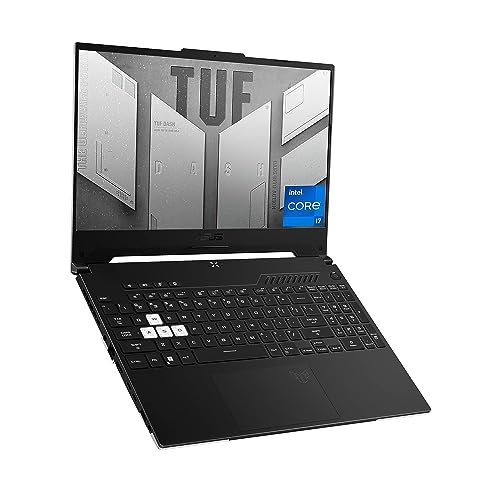
This older TUF Dash still earns its spot because of one feature most budget laptops skip: a MUX Switch. It routes the RTX 3060 directly to the display, bypassing the integrated GPU, and that alone can add meaningful frames in supported games.
The 12th Gen i7-12650H pairs with fast DDR5 memory, so streaming while playing stays realistic. Thunderbolt 4 gives you a single-cable dock option for monitors and peripherals, something none of the cheaper picks here offer.
Practical Pluses
- The MUX Switch squeezes extra performance from the same GPU, a genuine advantage in esports titles.
- Thunderbolt 4 supports high-speed docks and external displays over one cable.
- TUF-series durability reputation suggests it tolerates daily bag life better than flimsier designs.
Points To Note
- Being a 2022 model, it lacks newer GPU features found on the RTX 50-series picks in this list.
- The 512GB SSD is modest by today’s standards; plan on expansion or cleanup routines.
Right Fit For
Enthusiasts hunting maximum frames per dollar who don’t mind last-generation silicon.
Look Elsewhere When
Anyone wanting current-gen ray tracing should step up to the ASUS ROG Strix G16 instead.
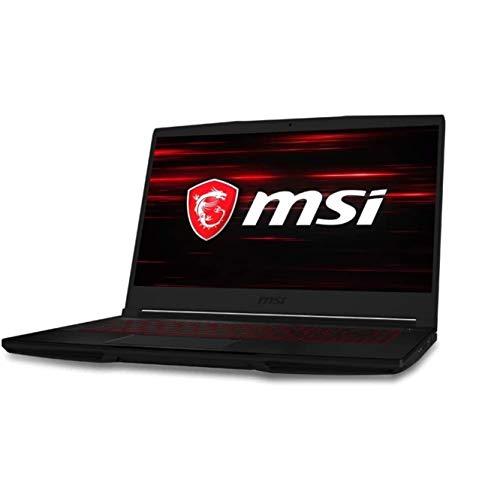
Every list needs an honest entry point, and this is it. The GTX 1650 with roughly 4GB of dedicated video memory plays esports staples like Valorant, Rocket League, and older AAA titles at playable settings, which is exactly what a first gaming laptop needs to do.
The quad-core i5-10300H and 8GB of RAM are dated now, so treat this as a 1080p light-gaming and schoolwork machine rather than a streaming rig. In its favor, the thin GF63 chassis slips into a regular backpack without shouting “gamer.”
The Good Stuff
- Dedicated GTX 1650 graphics deliver far smoother gameplay than any integrated-GPU laptop at this level.
- The slim profile makes it one of the easier gaming laptops to carry daily.
- An IPS panel keeps colors consistent across wide viewing angles, handy for couch gaming.
Honest Caveats
- 8GB of RAM and a 256GB SSD are tight; upgrading memory later is a common owner move.
- Windows 10 ships installed, so expect an update path to a newer OS during ownership.
- Older architecture means no ray tracing or DLSS support for future titles.
Feature Snapshot
Who Should Grab It
First-time buyers and younger players who want dedicated graphics without stretching the budget.
Swap It Out When
Anyone planning to play demanding new releases should look at the HP Victus 15 RTX 4050 Laptop instead.
The Nitro V formula is simple: give people the specs they actually ask about and skip the flashy extras. Here that means an i7-13620H, an RTX 4050, a 165Hz IPS display, and a full terabyte of Gen 4 storage, all in a 15.6-inch body.
Compared with the HP Victus 15 above, you gain double the storage and a higher refresh rate, which adds up for anyone juggling games, footage, and coursework on one drive. The backlit keyboard keeps late-night typing practical too.
Noteworthy Benefits
- The 1TB Gen 4 SSD swallows a serious game library plus project files without constant pruning.
- A 165Hz IPS panel serves both fast gameplay and accurate-enough color for photo editing.
- 16GB of DDR5 keeps heavy multitasking smooth across browsers, editors, and voice chat.
- Wi-Fi 6 delivers stable connections in crowded dorm or apartment networks.
Trade Offs
- Fan noise under load is audible; headphone users won’t care, quiet-room workers might.
- The plastic lid collects fingerprints, so a microfiber cloth lives nearby in most owner bags.
Who Will Love This
College students and hobbyist creators who want one capable machine for games, classes, and light content work.
Not Your Match When
Buyers needing more than 16GB of memory for VMs or heavy production should consider the Acer Nitro V 16S AI below.
Thirty-two gigabytes of DDR5 is the headline here, double what most gaming laptops ship with. That headroom shows up in real scenarios: virtual machines, big Photoshop canvases, or a game running beside a stream dashboard all stay comfortable where 16GB machines start swapping.
The RTX 5060 brings current Blackwell-era features, and AMD’s Ryzen 7 260 keeps the platform efficient. Despite the muscle, the 16S wears a slimmer chassis than typical 16-inch gaming rigs, so it travels better than the ROG Strix G16 does.
Practical Advantages
- 32GB DDR5 handles memory-hungry creative and development workloads without upgrade anxiety.
- An RTX 5060 with strong AI throughput supports modern upscaling and AI-assisted apps.
- The 180Hz WUXGA IPS display offers sharper resolution and higher refresh than the 15-inch Nitro V.
- A slim profile makes it unusually portable for a 16-inch performer.
Details To Watch
- Slimmer bodies leave less room for huge cooling arrays, so sustained loads may run warmer than chunkier rivals.
- AMD-based systems occasionally lag behind Intel in niche software compatibility, worth checking for specialized tools.
Core Details
Best Suited To
Power users, developers, and creators who want desktop-class memory capacity in a portable body.
Reach For A Different Pick When
Shoppers prioritizing raw cooling headroom over portability will prefer the bulkier ASUS ROG Strix G16.
Not every graphics-capable laptop needs a bulky dedicated GPU. This NIMO uses AMD’s Radeon 680M integrated graphics, which punch well above typical onboard solutions and handle light gaming, emulation, and 1080p media work surprisingly well.
The travel story sells it: USB-C charging at up to 100W means one charger can top off your phone, tablet, and laptop alike. Add a fingerprint reader, backlit keyboard, and a genuinely light build, and it fits a commuter bag the way the ROG Strix never could.
Useful Touches
- Radeon 680M graphics make casual and older-title gaming possible without a dedicated card’s weight or heat.
- 32GB of LPDDR5 and a 1TB SSD rival machines costing considerably more.
- 100W USB-C charging consolidates your travel kit into a single brick.
- A fingerprint reader speeds up secure logins on the go.
Things To Consider
- Integrated graphics can’t match the RTX cards elsewhere on this list for demanding new releases.
- NIMO is a smaller brand, so long-term service networks are thinner than ASUS or HP offer.
The Right Fit
Commuters, students, and business travelers who want occasional gaming inside an ultraportable body.
Consider Something Else When
Serious gamers should pass on this and choose the Acer Nitro V RTX 5050 165Hz for true dedicated-GPU power.
Alienware’s Aurora line trades gamer-flash for restraint, and the anodized aluminum lid is the clearest sign. Next to the plastic shells of the Nitro and Victus models, this feels like a laptop built to sit proudly in a living room, not hide in a basement setup.
Inside, the RTX 5050 and Intel Core 7 240H deliver dependable 1080p-to-QHD-class gaming, while the 16-inch WQXGA 120Hz display at 300 nits stays usable near bright windows. It’s a machine for people who value finish as much as frames.
Notable Upsides
- The anodized aluminum lid gives it a premium feel most gaming laptops skip entirely.
- A WQXGA 120Hz panel offers sharper detail than the FHD screens on cheaper picks.
- 300-nit brightness keeps the display legible in sunlit rooms.
Factors To Consider
- The 120Hz refresh trails the 165Hz and 180Hz panels on similarly priced rivals for competitive play.
- Premium materials mean scratches and dents hurt more; a sleeve is a wise first accessory.
Perfect Match For
Style-conscious gamers and professionals who want one polished machine for workdays and weekend sessions.
Skip It When
Esports-focused players chasing maximum refresh should grab the ASUS ROG Strix G16 instead.
Here’s the sweet-spot argument: an RTX 5050 with 8GB of GDDR7 VRAM, a 165Hz IPS screen, and current Windows 11, packaged at a price that undercuts most of this list. For shoppers watching their budget in 2026, few combinations compete.
The i5-13420H won’t match the i7 chips in heavier picks, yet it plays, records, and streams mainstream titles without strain. A bundled mouse pad rounds out a starter kit that gets you gaming the day the box opens.
Why It Works Well
- 8GB of GDDR7 VRAM gives the RTX 5050 breathing room for modern textures at 1080p.
- The 165Hz IPS panel matches pricier rivals for smooth motion.
- Blackwell-architecture features like DLSS stretch frame rates further in supported games.
Room For Improvement
- The 512GB SSD is half the storage of the ANV15-52-76NK sibling, so library management matters sooner.
- An i5 processor limits headroom for heavy streaming or rendering alongside gameplay.
Whose Shelf It Belongs On
Cost-aware gamers upgrading from integrated graphics who want current-gen features without overspending.
A Better Fit Elsewhere
Creators needing more CPU and storage should spend up on the Acer Nitro V ANV15-52-76NK.
The Performance Blue finish says a lot about this laptop’s intent: approachable, not intimidating. Underneath, an RTX 3050 and i5-12450H deliver a gentle introduction to dedicated-GPU gaming, comfortably running popular titles at medium settings on the 144Hz screen.
Windows 11 Pro comes preinstalled, which matters for students joining managed school networks. Compared with the MSI GF63, you get double the RAM, double the storage, and a newer GPU generation, making this the smarter first step for most newcomers.
Useful Highlights
- 16GB of RAM keeps schoolwork, streaming, and light gaming coexisting smoothly.
- The 144Hz display makes even everyday desktop use feel more responsive.
- Windows 11 Pro supports domain join and advanced management features out of the box.
- Backlit keyboard helps with late-night assignments in shared rooms.
What To Weigh
- The RTX 3050 is an older generation, so demanding 2026 releases will need lowered settings.
- 512GB of storage fills fast; an external SSD is a sensible early addition.
Essential Details
Built With In Mind
Students and first-time gaming laptop owners who want a friendly, capable starter machine.
Where Another Pick Suits Better
Players wanting newer GPU architecture should move to the Acer Nitro V RTX 5050 165Hz.
What Matters Most Before Choosing Laptops With Graphics Card
Match The GPU To Your Games
A graphics card’s generation and VRAM (its dedicated video memory) decide which titles run well. Esports classics run fine on a GTX 1650, while current AAA releases want an RTX 4050 or newer with at least 6GB of VRAM. Check the games you actually play before fixating on anything else.
Refresh Rate Beats Resolution For Most Gamers
A 165Hz screen showing 1080p often feels better in fast games than a sharper 60Hz panel. Competitive players should prioritize refresh rate; visual artists and movie watchers may prefer higher resolution and color accuracy instead.
Don’t Undersize Memory And Storage
Eight gigabytes of RAM was acceptable years ago; today 16GB is the realistic floor, and 32GB suits creators and developers. Storage follows the same logic, since modern games routinely exceed 100GB each. A 1TB SSD spares you constant uninstall cycles.
Weight Is A Daily Tax
Every extra inch of screen and every cooling fan adds carry weight. Desk-bound gamers can ignore this; commuters cannot. Decide honestly where the laptop will live most of its life before choosing between a 15-inch and a 16-inch chassis.
Key Considerations Across These Picks
Traps First Timers Fall Into
The classic mistake is buying yesterday’s flagship at today’s midrange money without checking the GPU generation. An old high-end card can trail a newer budget one in features like DLSS. Also watch base configurations: 8GB of RAM or a 256GB SSD forces upgrades almost immediately, erasing apparent savings.
Where The Extra Money Goes
Stepping up a tier buys you three things: a newer GPU generation, more memory, and better cooling. Cooling is the least visible and arguably most valuable, because sustained frame rates depend on it during long sessions. Paying more pays off when you keep a laptop four-plus years; for a two-year horizon, a value pick like the Nitro V RTX 5050 serves most people just fine.
Frequently Asked Questions
Do I really need a dedicated graphics card?
Only for gaming, 3D work, or video editing. Browsing, office apps, and streaming run fine on integrated graphics.
Is more VRAM always better?
More VRAM helps at higher resolutions and texture settings. Beyond 8GB, benefits mainly appear in demanding creative work.
Can I upgrade a laptop GPU later?
No, laptop GPUs are soldered in place. Buy the graphics performance you’ll need for the laptop’s whole life.
How important is the MUX Switch?
It routes the GPU directly to the display, often adding frames in games. It’s a genuine bonus but not essential for casual play.
Do gaming laptops work well for school or office use?
Yes, they handle productivity easily. The trade-offs are weight, battery life, and fan noise compared with ultrabooks.
Closing Thoughts
The right choice comes down to honest self-assessment. Desk-bound competitors should lean toward the ROG Strix G16 or Nitro V 16S, commuters toward the NIMO, and cautious first-timers toward either Victus. Whichever direction fits, buying for the way you actually spend your evenings beats buying for a spec sheet every time.
