


You want playable frame rates, a screen that keeps motion readable, and enough storage to avoid deleting games every week. The eight laptops below cover that territory from lean entry options to stronger midrange hardware, so you can match the machine to school, commuting, or a desk setup without paying for extras you won’t use.
The trade-off is familiar: lower-cost gaming laptops usually save money through smaller SSDs, tighter memory limits, or older graphics tiers. The list below makes those compromises plain, so you can choose the right balance of speed, display quality, and long-term comfort.
Quick Shortlist For Fast Comparison

Acer Nitro V Gaming Laptop ANV15-52-586Z

HP Victus 15 Gaming Laptop 15-fa0025nr

Acer Nitro V 15.6″ FHD IPS 165Hz Gaming Laptop
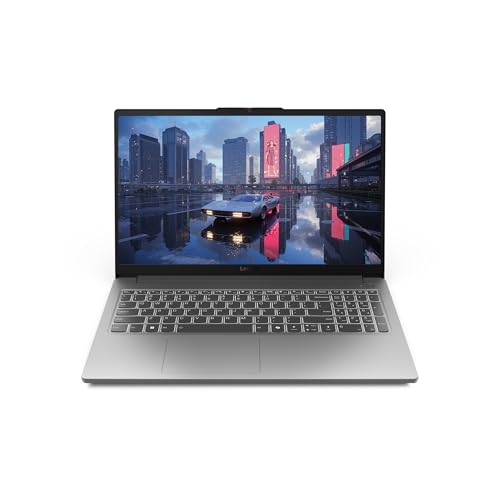
Lenovo LOQ Essential Student Gaming Laptop

HP Victus 15.6″ Full HD 144Hz Gaming Laptop

KAIGERR Gaming Laptop 1TB NVMe SSD

Lenovo Gaming Laptop Ryzen 5 7535HS

Lenovo 15 Gaming Laptop Ryzen 5 7535HS
More Details On Our Top Picks
That RTX 4050 gives this Acer the clearest gaming edge in the set, and the 165Hz IPS panel helps motion stay readable in fast matches. The 15.6-inch Full HD size keeps the footprint sensible for a dorm desk or a kitchen table setup.
The 8GB DDR5 memory and 512GB Gen 4 SSD are enough for a starter library, though heavy multitaskers will feel the ceiling sooner than they would on the 16GB machines below. For most people chasing the strongest graphics tier in this group, that trade-off makes sense.
Strong Points
- RTX 4050 graphics give you more headroom for modern games at 1080p.
- 165Hz display suits fast motion better than the standard 60Hz class.
- Gen 4 SSD speeds up booting and game launches in everyday use.
- 15.6-inch size keeps it manageable on a shared desk or carry bag.
Things To Consider
- 8GB memory is the main limit for heavier multitasking.
- 512GB storage fills sooner once several large titles are installed.
Feature Card
Who It Suits Best
Competitive casual gamers and first-time laptop shoppers get the most from this one, especially in smaller rooms where a desktop would be awkward.
A Better Fit Elsewhere
Lenovo LOQ Essential fits students who want a little more balanced classroom-and-gaming flexibility, especially with its 144Hz panel and RTX 4050 pairing.
The Victus line usually lives in that sensible middle ground, and this one follows the pattern with an RTX 3050, a 12th Gen Core i5, and a 512GB SSD. For everyday play after work or class, that mix feels straightforward rather than flashy.
HP’s enhanced thermal design matters in a compact gaming chassis, because heat management shapes comfort during longer sessions. The honest read is that 8GB RAM keeps it firmly in entry territory, so you get a clean baseline rather than room to grow.
What We Like
- The Core i5-12500H gives you a stronger CPU base than many basic entry systems.
- RTX 3050 graphics handle 1080p gaming with less strain than integrated graphics options.
- 512GB SSD storage keeps the system responsive for daily startup and game loading.
- Enhanced thermals help the chassis make more sense for longer play sessions.
Worth Noting
- 8GB RAM leaves limited room for heavy multitasking and background apps.
- The older GPU tier sits below the stronger RTX 4050 options in this roundup.
- On a busy desk, the single-screen setup works fine, though it’s still a basic configuration.
Who Will Love This
Students and casual gamers who want a familiar, no-drama machine will feel at home here.
Where Another Pick Suits Better
Acer Nitro V Gaming Laptop ANV15-52-586Z suits you better when graphics priority outranks everything else.
This Nitro V updates the formula with RTX 5050 graphics and 8GB of GDDR7 VRAM, so you’re looking at the most forward-leaning graphics setup in the group. The included mouse pad is a small extra, but the real story is the newer GPU tier and the 16GB memory base.
That matters most if you keep game launchers, chat apps, and a browser open at the same time. Compared with the first Acer Nitro V, this one gives you more breathing room before the system feels crowded, and that’s useful on a shared desk.
Highlights
- RTX 5050 graphics and GDDR7 memory point to stronger long-term gaming headroom.
- 16GB RAM is a cleaner fit for multitasking than 8GB machines.
- The 165Hz IPS panel suits fast action and quick camera movement.
- The Intel Core i5-13420H keeps the platform modern and responsive.
- Mouse pad included, which is a handy small touch for a starter setup.
Minor Gripes
- 512GB storage can still feel tight once several large releases are installed.
- The included accessory is nice, though it does not change the core hardware limits.
Feature Rundown
Built With In Mind
Multitaskers who also want a stronger gaming buffer should feel drawn to this one.
Look Elsewhere When
HP Victus 15.6″ Full HD 144Hz Gaming Laptop makes more sense when you want a simpler, older-GPU layout at a gentler hardware level.
Lenovo gives this LOQ a cleaner student-first angle than the more gaming-forward Acer models, and the 144Hz IPS display keeps it in the right zone for mixed use. The RTX 4050 also puts it above basic RTX 3050 systems on graphics headroom.
That combination works well in a dorm, because you can study during the day and play in the evening without hauling a second machine. The 8GB memory is the main limiter, so you’ll want to keep an eye on how many apps stay open.
Upsides
- RTX 4050 graphics are a strong fit for 1080p gaming in this class.
- 144Hz IPS display helps motion stay smooth without pushing the price tier higher.
- The Core i5-12450HX is aimed at balanced study-and-play workloads.
- Luna Grey styling keeps it understated for classroom use.
Areas To Watch
- 8GB memory is workable, but not roomy for heavier multitasking.
- 512GB storage suits a modest library better than a deep one.
Perfect Match For
College setups and homework-heavy schedules fit this laptop especially well.
Swap It Out When
Acer Nitro V Gaming Laptop ANV15-52-586Z is the stronger call when gaming performance matters more than school-friendly styling.
This Victus stands out more for its 16GB RAM than for raw graphics ambition, and that changes the feel right away during normal ownership. You get room for several apps, tabs, and launchers, which makes the laptop easier to live with on busy days.
The RTX 3050 still keeps it in the entry gaming camp, but the 144Hz FHD panel helps motion feel more fluid than a basic 60Hz screen. Compared with the 8GB Victus above, this one is the calmer long-session choice.
Bright Spots
- 16GB RAM gives you more comfortable multitasking headroom.
- 144Hz display makes fast movement easier to follow in games and scrolling.
- 512GB PCIe SSD keeps the system responsive for daily use.
- Wi-Fi 6 supports modern home networks and campus setups.
- Windows 11 Pro suits users who want a more work-friendly software tier.
Small Caveats
- The RTX 3050 is fine for 1080p play, but it trails the RTX 4050 options here.
- Blue finish is tasteful, though it can show fingerprints depending on handling.
Technical Sheet
Made For
Busy desk setups and users who keep several apps open at once fit this HP well.
Reach For A Different Pick When
HP Victus 15 Gaming Laptop 15-fa0025nr suits you better when you want a simpler, slightly leaner version of the same family.
Storage is the headline here, and 1TB goes a long way for anyone who installs a lot of games or keeps large project files nearby. Compared with the RTX-equipped laptops above, this KAIGERR leans harder into capacity and general-use flexibility than raw gaming graphics.
The Ryzen 7 5825U and 16GB RAM make it a sensible fit for work, school, and lighter gaming sessions. In a home office or a travel bag, that kind of balance can feel easier to live with than a more aggressive gaming build.
Standout Traits
- 1TB NVMe SSD gives you much more room for installs and files.
- 16GB RAM supports smoother switching among apps and browser tabs.
- Ryzen 7 5825U brings an 8-core, 16-thread CPU layout.
- Wi-Fi 6 helps with newer wireless routers and shared networks.
Room For Improvement
- Radeon RX Vega 8 graphics sit below the RTX models for demanding games.
- The laptop makes more sense as a general-purpose machine with gaming on the side.
- Large storage is handy, but it doesn’t replace dedicated graphics strength.
Who Should Grab It
People who want a large SSD and a practical work machine with light gaming use will appreciate this most.
Another Choice May Suit
Lenovo LOQ Essential Student Gaming Laptop is the stronger match when gaming graphics matter more than storage size.
This Lenovo keeps the spec sheet lean, and that’s the point. The Ryzen 5 7535HS, 8GB DDR5, and 256GB SSD form a stripped-back starter package that suits lighter games and everyday tasks more than a heavy library.
The 15-inch FHD IPS display gives it a friendlier footprint than some larger gaming notebooks, which helps in dorm rooms and small apartments. You may find the 256GB drive tight sooner than expected, so this one rewards careful game management.
Best Bits
- Ryzen 5 7535HS gives you a current CPU base for basic gaming.
- DDR5 memory supports quicker-feeling everyday responsiveness.
- IPS display is a better fit for mixed viewing than a plain panel.
- Wi-Fi 6 and Bluetooth 5.3 support modern wireless setups.
- Moonlight Grey finish keeps the look restrained.
Points To Note
- 256GB SSD is the clearest constraint for game storage.
- Radeon 660M graphics are better suited to lighter titles than demanding releases.
- 8GB RAM is workable, but not especially roomy for multitasking.
Right Fit For
Minimalist setups and small-room gaming stations suit this Lenovo well.
Where A Sibling Pick Shines
Lenovo 15 Gaming Laptop Ryzen 5 7535HS is the safer option when you want the same basic platform without extra spec clutter.
This is the bare-bones Lenovo in the group, and the simplicity is obvious from the start. Ryzen 5 7535HS, 8GB DDR5, and a 256GB PCIe SSD make it a straightforward entry machine for light gaming and everyday browsing.
It’s the kind of laptop that suits a tight budget and a small desk, especially when you don’t want extra features getting in the way. The catch is obvious too, because storage fills quickly once you install a few modern games.
Positives
- Lean spec list keeps the purchase focused on essentials.
- DDR5 memory helps the system feel current for basic tasks.
- 15-inch class size is easier to place in compact spaces.
- Ryzen 5 7535HS gives you a workable CPU base for casual play.
Softer Spots
- 256GB storage asks for careful game and file management.
- 8GB RAM can feel narrow once several apps stay open.
- Best suited to lighter titles, not demanding modern releases.
Whose Shelf It Belongs On
First-time gaming laptop shoppers who want the leanest practical Lenovo setup should look here.
Skip It When
KAIGERR Gaming Laptop 1TB NVMe SSD makes more sense for anyone who cares more about capacity than simplicity.
What Matters Most Before You Choose
Screen And Graphics Come First
A 144Hz or 165Hz display makes fast motion easier to track than a basic panel, and it pairs best with a real gaming GPU such as RTX 3050, RTX 4050, or RTX 5050. A strong processor matters, but display smoothness and graphics strength shape the first impression every time you launch a game.
Memory And Storage Set The Limits
8GB RAM works for lean play and light multitasking, but 16GB feels calmer when you keep chat, browsers, and launchers open. Storage matters just as much, because a 256GB SSD fills quickly, while 512GB or 1TB gives you more room before cleanup turns into a chore.
Match The Laptop To Your Routine
Students and commuters usually do better with lighter, simpler machines, while home setups can justify larger storage and stronger graphics. Pick the shape of the machine around your day, not around a spec sheet headline.
Quick Corrections Before You Commit
Common Shopping Slip Ups
Shoppers often fixate on the GPU and overlook memory, storage, or screen refresh. That leads to cramped multitasking or a game library that fills before the semester ends.
What The Higher Tier Buys
More expensive laptops usually buy you stronger graphics, more memory, and larger storage. That extra room shows up most clearly in smoother multitasking and better staying power for newer games.
Frequently Asked Questions
What makes a gaming laptop feel genuinely affordable?
You usually see a midrange CPU, an entry or lower-midrange GPU, and a modest SSD. The sweet spot is a machine that plays well without loading you up with extras you won’t use.
Is 8GB RAM enough for gaming?
It works for light gaming and simple multitasking. 16GB is the safer choice when you keep several apps open at once.
Do you need a high refresh display?
A 144Hz or 165Hz panel helps fast movement look smoother. It makes the laptop feel more responsive even outside games.
Which matters more, the GPU or the processor?
The GPU matters more for game visuals and frame delivery. The processor still matters, but it rarely carries the whole load by itself.
How much storage is practical for a gaming laptop?
512GB is a comfortable middle ground for many setups. 1TB makes more sense when you keep several large games installed at once.
