


Low-budget gaming machines live or die on balance, and that matters even more in 2026. You need enough graphics muscle for real play, enough memory to keep tabs open, and enough storage to avoid constant housekeeping. The right pick also has to fit your day, whether that means a dorm desk, a commute bag, or a small home setup.
This roundup focuses on practical trade-offs, not glossy spec sheets. You’ll see where a stronger GPU justifies a tighter SSD, where a lighter chassis makes sense, and where a plain Chromebook belongs in the mix only for lighter gaming-adjacent use.
The Shortlist At A Glance

HP Victus 15 Gaming Laptop RTX 3050 512 GB SSD
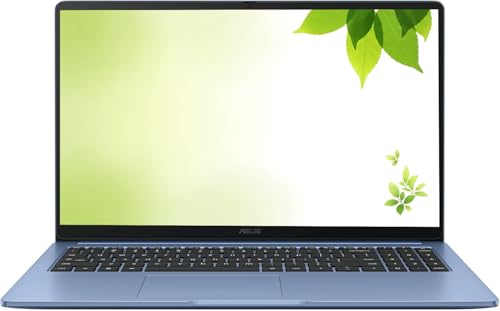
ASUS 2026 15″ FHD IPS Chromebook Pastel Blue
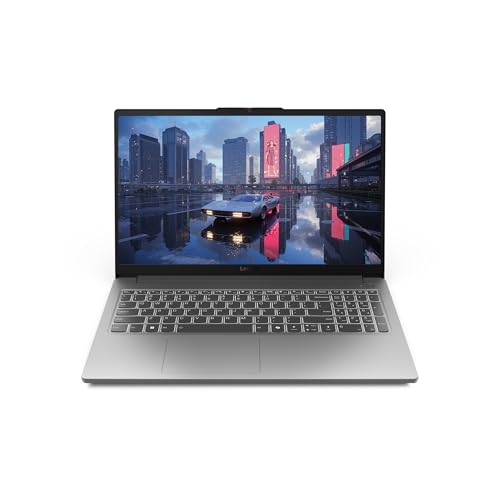
Lenovo LOQ Essential Core i5-12450HX RTX 4050

Lenovo 15 Gaming Laptop Ryzen 5 7535HS

NIMO 15.6″ IPS FHD-Light Gaming Laptop Ryzen 5 6600H

Gaming Laptop Core Processor 16GB RAM 512GB SSD

msi GF63 Thin Gaming Laptop RTX 2050 512GB SSD
KAIGERR Gaming Laptop Ryzen 7 5700U 16GB
More Details On Our Top Picks
The Victus 15 sits in the sweet spot for commuters who game after class or work. An RTX 3050, 12th Gen Core i5-12500H, and 512 GB SSD give you the kind of baseline that feels sensible rather than flashy. The Full HD panel keeps it grounded for 1080p play, and the backlit keyboard helps in dim rooms.
The trade-off is clear enough: 8 GB RAM is fine for light to moderate play, but it leaves less room for heavier multitasking. Enhanced thermals matter here because a gaming chassis can run warm in a backpack-to-desk routine. Compared with the Chromebook below, this HP is in a very different league for game compatibility.
Strong Points
- RTX 3050 graphics give you a real entry point for 1080p gaming.
- 512 GB SSD helps you keep several large installs without constant shuffling.
- Core i5-12500H brings stronger everyday responsiveness than low-power chips.
- Backlit keys help in dorm rooms, late-night study sessions, or travel use.
Things To Consider
- 8 GB RAM is the first part you may outgrow.
- The 2022 platform has a more settled spec profile, not a cutting-edge one.
- For long desk sessions, you may want a cooling pad nearby, depending on room airflow.
Feature Rundown
Who It Suits Best
Students and casual gamers get the most value from this balanced parts list.
A Better Fit Elsewhere
Lenovo LOQ Essential suits you better for stronger graphics headroom and a 144Hz panel.
This Chromebook sits in the list as a lighter, web-first option, not a true gaming machine. A 15-inch FHD IPS screen, HDMI port, and fast WiFi help with school, streaming, and cloud-based play, while the 4 GB memory and 128 GB storage keep the spec sheet modest. In a backpack, that can feel tidy and uncomplicated.
The honest read is that it suits light use far better than local game installs. Compared with the Victus 15, it gives up dedicated graphics entirely, so you’re trading game performance for simplicity and a familiar Chrome OS setup. For everyday browsing and classwork, that trade makes sense.
What We Like
- 15-inch FHD IPS display gives you a comfortable working and viewing size.
- HDMI makes it easier to connect to a larger screen at home or in class.
- WiFi and Bluetooth support everyday wireless use without extra adapters.
- Chrome OS keeps the setup straightforward for web-based tasks.
Softer Spots
- 4 GB memory is tight for heavy multitasking.
- 128 GB storage fills quickly once files and apps start piling up.
- For local gaming, the integrated graphics side is the limiting factor.
Who Will Love This
Light-duty students and cloud-app users who want a simple 15-inch laptop fit this best.
Swap It Out When
HP Victus 15 Gaming Laptop RTX 3050 512 GB SSD is the stronger choice for anyone expecting installed PC games.
The LOQ Essential carries the strongest graphics posture in this group, and that changes the conversation fast. An RTX 4050, Core i5-12450HX, 144Hz IPS panel, 8 GB memory, and 512 GB SSD put it a step above the Victus for smoother-feeling gameplay and a stronger display match. For a student who wants one laptop for class and heavier gaming, that mix lands well.
Still, 8 GB RAM keeps this from feeling limitless, and the term “HX” points to a more performance-focused processor class, which usually comes with a bit more heat and power draw than simpler chips. That’s the trade-off behind the extra speed. Compared with the MSI GF63 Thin, this Lenovo looks more future-ready on graphics.
Highlights
- RTX 4050 gives you the strongest graphics cushion in this roundup.
- 144Hz refresh rate helps motion look smoother in fast-paced games.
- 512 GB SSD offers enough room for a few substantial installs.
- Core i5-12450HX is built for a more demanding workload mix.
- Luna Grey finish keeps the look restrained and easy to live with.
Areas To Watch
- 8 GB RAM is still the part that may limit heavy multitasking.
- A faster class of hardware can mean more fan noise under load.
Feature Snapshot
Best Suited To
Students and casual enthusiasts who want the strongest gaming headroom in this list fit here.
Where A Sibling Pick Shines
HP Victus 15 Gaming Laptop RTX 3050 512 GB SSD makes more sense for a lower-intensity budget target.
This Lenovo keeps the pitch simple: Ryzen 5 7535HS, 8 GB DDR5, and a 256 GB PCIe SSD. DDR5 memory, which is a newer memory standard than DDR4, usually helps responsiveness stay cleaner under everyday load. For a dorm setup or a compact desk, that leaner build makes sense.
The smaller SSD is the obvious compromise, especially beside the Victus 15 and its 512 GB drive. You can live with it for lighter game libraries, but larger installs will ask for more space management. That makes this a good fit for someone who values speed and simplicity more than a huge library.
Positives
- Ryzen 5 7535HS gives you a modern performance base for daily tasks.
- DDR5 memory is a useful step up from older DDR4 setups.
- 256 GB PCIe SSD keeps the machine responsive for quick launches.
- Lean hardware profile suits smaller desks and lighter carry needs.
Points To Note
- 256 GB storage can feel tight once a few large games land on it.
- 8 GB memory is adequate, but not generous for heavy multitasking.
Made For
Minimalist gamers and students who keep their install list short will get the most from this one.
Look Elsewhere When
Lenovo LOQ Essential Core i5-12450HX RTX 4050 is the smarter step up for more demanding gaming.
The NIMO stands out by pairing 16 GB DDR5 with a Ryzen 5 6600H, which gives it more breathing room than several lower-memory picks here. A 15.6-inch FHD IPS panel, 256 GB SSD, fingerprint reader, backlit keyboard, and 100W Type-C charging round out a spec sheet that feels unusually complete for the category. That’s handy for anyone who works and plays on the same machine.
The trade-off is still the 256 GB drive, so the extra memory doesn’t solve storage pressure. Compared with the Lenovo 15 Gaming Laptop Ryzen 5 7535HS, this NIMO feels better equipped out of the box for multitasking. The honest read is that it makes more sense for mixed workloads than for huge game libraries.
Upsides
- 16 GB DDR5 gives you more comfortable multitasking headroom.
- Ryzen 5 6600H is a stronger fit for heavier daily workloads.
- Fingerprint reader adds a quick sign-in option for shared or busy environments.
- Backlit keyboard helps in dim rooms, late study sessions, or travel use.
- 100W Type-C charging is a useful convenience for mixed-device setups.
Small Caveats
- 256 GB storage can still feel cramped for bigger installs.
- The “light gaming” framing fits better than a hard-core gaming brief.
Who Should Grab It
Multitaskers who want extra memory and practical extras will get the best fit here.
Reach For A Different Pick When
HP Victus 15 Gaming Laptop RTX 3050 512 GB SSD suits you better if storage space matters more than extras.
This YOZISUAN model leans toward practical ownership more than flashy gaming claims. The 16 GB RAM and 512 GB SSD combination gives you comfortable room for school files, browser tabs, and a few larger installs, while the 15.6-inch FHD panel keeps the format familiar. WiFi and Bluetooth 5.0 support the sort of desk-and-commute routine many shoppers actually live with.
The catch is that the processor is described only as a Core chip up to 3.40 GHz, so there’s less precision than with the Intel and Ryzen models above. Compared with the NIMO, this one looks better in storage than in feature extras. That makes it a solid plain-spoken choice rather than a spec-sheet showpiece.
Bright Spots
- 16 GB RAM is comfortable for multitasking and routine gaming use.
- 512 GB SSD gives you room for everyday files and several installs.
- 15.6-inch FHD display keeps the layout familiar and easy to live with.
- WiFi and Bluetooth 5.0 cover the basics for modern desk setups.
Areas To Watch
- The processor naming is broad, so performance expectations stay general.
- Feature detail is lighter here than on the better-specified Lenovo and NIMO picks.
Whose Shelf It Belongs On
Students and commuters who want a roomy basic laptop with a gaming angle fit this best.
Another Choice May Suit
msi GF63 Thin Gaming Laptop RTX 2050 512GB SSD is the more defined fit for a thinner gaming-focused build.
The GF63 Thin is the laptop you notice first for how slim it aims to be. An 11th Gen Core i5, RTX 2050, 144Hz 15.6-inch FHD screen, 8 GB DDR4, and 512 GB NVMe SSD make it a more mature-feeling gaming starter than the Chromebook or the broad-spec YOZISUAN. Cooler Boost 5 is the meaningful add-on here, since thermal management matters in a thinner shell.
The compromise is age and memory ceiling. DDR4 is older than the DDR5 found in the NIMO and Lenovo 15 Gaming Laptop, so the platform feels a step behind even though the display refresh rate stays appealing. For a long-haul flight or a small apartment desk, the thinner profile can matter more than raw novelty.
Best Bits
- Thin chassis makes it easier to carry than bulkier gaming laptops.
- RTX 2050 gives you dedicated graphics without pushing the category upward too far.
- 144Hz display keeps motion smoother for fast-paced games.
- 512 GB NVMe SSD helps loads feel snappy.
- Cooler Boost 5 is a useful thermal-minded inclusion for a slim build.
Minor Gripes
- 8 GB DDR4 is the weaker part beside newer DDR5-based picks.
- 11th Gen Intel hardware is less current than the Lenovo LOQ Essential.
Perfect Match For
Travel-minded gamers who want a thinner shell and a 144Hz screen fit this well.
Skip It When
Lenovo LOQ Essential Core i5-12450HX RTX 4050 is the better step up for stronger graphics longevity.
KAIGERR closes the list with a clean, balanced spec mix: Ryzen 7 5700U, 16 GB RAM, 512 GB NVMe SSD, Radeon RX Vega 8 graphics, and WiFi 6. That combination suits everyday use first, gaming second, which is useful for anyone who wants one laptop to cover coursework, browsing, and casual play. The 15.6-inch size keeps it in familiar territory.
Compared with the Lenovo LOQ Essential, this one gives up dedicated RTX graphics, so the gaming ceiling is lower. Still, the stronger memory and solid storage keep it practical, especially for households that need a general-purpose laptop with a bit of gaming flexibility. For most people, that’s enough.
Reasons To Buy
- Ryzen 7 5700U brings a capable 8-core, 16-thread profile.
- 16 GB RAM helps the machine stay comfortable under multitasking.
- 512 GB NVMe SSD gives you sensible room for files and installs.
- WiFi 6 is a welcome touch for modern home networks.
Honest Caveats
- Radeon RX Vega 8 is not in the same graphics class as RTX options.
- The strongest fit is casual play rather than demanding game settings.
Right Fit For
Households and students who want an everyday laptop with light gaming ability fit this nicely.
Where A Sibling Pick Shines
Lenovo LOQ Essential Core i5-12450HX RTX 4050 is the better call for more serious gaming hardware.
What To Weigh Before You Choose A Low Budget Gaming Laptop
Performance, Memory, And Storage
Graphics hardware sets the gaming ceiling, so RTX 4050, RTX 3050, and RTX 2050 chips all land very differently. Memory matters just as much, because 8 GB can feel tight once you game and multitask at the same time. Storage follows the same logic, and 256 GB fills far faster than 512 GB once a few modern titles land on the drive.
Display And Portability
A 144Hz panel helps fast motion look smoother, which matters in shooters and action games. IPS screens usually hold color and viewing angles better than plain panels, so shared desk use feels easier. Thin designs help with carrying, but they often leave less room for cooling headroom.
Use Case Fit
Schoolwork-heavy setups benefit from stronger memory and a roomy SSD more than from a headline graphics chip. Commuters tend to value weight, battery behavior, and a quieter fan profile. Dorm gamers usually want the strongest graphics card they can afford, then a keyboard and display that keep late-night sessions comfortable.
Small But Important Checks
Where Shoppers Go Wrong
Many shoppers fixate on the processor name and ignore the graphics chip. That leaves them with a machine that feels fine for apps but falls short in games.
The Upgrade Payoff
Higher-tier models usually spend more on the graphics side, the display, and the cooling system. That extra spend makes sense when you want smoother frame rates, a better screen, and less compromise under heavier use.
Frequently Asked Questions
How much RAM makes sense for budget gaming?
16 GB gives you more breathing room for modern multitasking. 8 GB still works for lighter gaming, but it leaves less margin.
Is a Chromebook good for gaming?
It fits web-based use, schoolwork, and cloud-style play far better than local PC installs. For downloadable games, a Windows laptop with dedicated graphics is the safer path.
Do you really need a 144Hz screen?
That refresh rate helps fast motion look smoother, especially in action titles. For slower games and general use, a standard FHD panel still gets the job done.
Why does storage size matter so much?
Modern games can eat space quickly, so 512 GB is more comfortable than 256 GB. Smaller drives force you to manage installs more often.
Which spec matters most for gaming performance?
The graphics chip usually matters first, then memory and cooling. A strong processor cannot fully cover for a weak GPU.
