


Low-cost gaming laptops are a balancing act, and this roundup keeps that balance front and center. You get a clear look at machines that can handle school work, lighter game sessions, and daily browsing without turning the desk into a mess of guesswork. The focus stays on practical hardware, usable screens, and the trade-offs that matter once the laptop is out of the box. For commuters, dorm rooms, and small-home setups, that’s the difference between a smart buy and a regret.
The Shortlist At A Glance

HP Victus 15 Gaming Laptop 512 GB SSD

NIMO 15.6″ FHD Light-Gaming-Laptop 32GB 1TB SSD

Lenovo Gaming Laptop Ryzen 5 7535HS
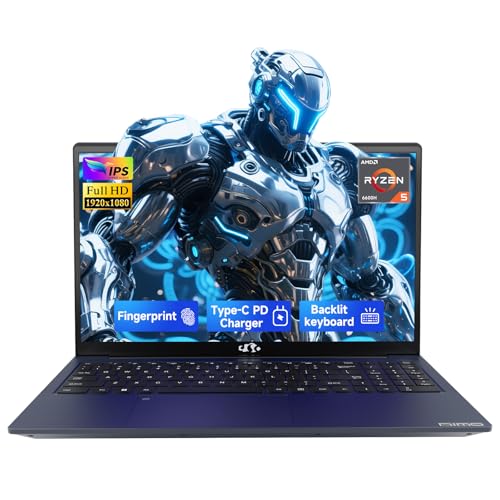
NIMO 15.6″ IPS FHD-Light Gaming-Laptop Ryzen 5 6600H
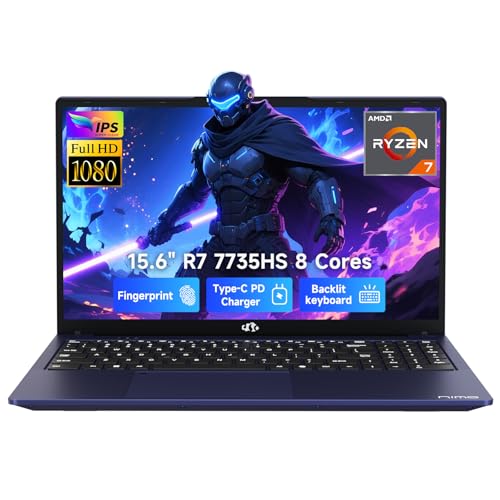
NIMO Thin & Light Gaming Laptop R7 7735HS 16GB 512GB

Lenovo 15 Gaming Laptop Ryzen 5 7535HS

NIMO 15.6″ IPS FHD-Light Gaming-Laptop Ryzen 5 6600H 16GB
KAIGERR Gaming Laptop Ryzen 7 5700U 16GB 512GB
More Details On Our Top Picks
The HP Victus 15 gives you a more traditional gaming-laptop shape, with the kind of parts mix that suits a desk, a dorm, or a couch session. Its RTX 3050 graphics card is the clear lift over the integrated-graphics models below, so you get a better starting point for 1080p play and GPU-backed creative work.
The 12th Gen Core i5-12500H and 512 GB SSD make sense together, especially for a machine you’ll use for games, class files, and a growing library. Eight gigabytes of memory is the main compromise, though, so multitaskers may feel the ceiling sooner than they would on the NIMO 32 GB option.
Strong Points
- RTX 3050 graphics give you more headroom for modern game settings than the integrated-GPU picks.
- 512 GB solid-state storage leaves room for several larger titles plus everyday files.
- Backlit keys help in dim rooms, which matters more than it sounds during late study sessions.
- Enhanced thermals point to steadier heat handling under sustained load.
Things To Consider
- 8 GB memory is workable, but heavy multitasking can feel tight.
- The 2022-era platform is solid, though newer all-in-one value models may feel more generous on RAM.
Feature Card
Who It Suits Best
Students and casual gamers who want a discrete GPU without jumping to a pricier class fit this well.
Where Another Pick Suits Better
NIMO 15.6″ FHD Light-Gaming-Laptop 32GB 1TB SSD suits multitaskers who want far more memory and storage headroom.
This NIMO leans hard into capacity, and that changes the feel right away. With 32 GB of LPDDR5 memory, you can keep more apps open at once, and the 1 TB SSD gives you room for a chunky game library without constant cleanup.
The Ryzen 7 Pro 6850U and Radeon 680M graphics put it in a lighter gaming lane than the Victus, but the trade-off is obvious only if you want a discrete GPU. For business tasks, coursework, and general daily use, the stronger memory pool is the headline.
Highlights
- 32 GB LPDDR5 RAM suits heavy multitasking and lots of browser tabs.
- 1 TB SSD gives you breathing room for games, media, and work files.
- 100W Type-C charging support adds flexibility for mixed-device desks and travel.
- Fingerprint login is handy for quick sign-ins in shared spaces.
- Two-year customer support is a practical comfort for long ownership.
Points To Note
- Integrated Radeon 680M graphics are capable, but they still sit below discrete gaming GPUs.
- The listing leans on broad support language, so the actual ownership experience will depend on the seller setup.
Who Will Love This
Multitaskers, office users, and light gamers who value memory and storage more than raw graphics muscle will get the most from it.
A Better Fit Elsewhere
HP Victus 15 Gaming Laptop 512 GB SSD fits you better if your priority is a discrete RTX graphics card over a large memory pool.
Compared with the HP and NIMO models above, this Lenovo keeps the formula tighter: Ryzen 5 7535HS, 8 GB DDR5, and a 256 GB PCIe SSD. That smaller drive makes it a leaner machine, which works fine for a first gaming laptop or a setup where you keep most files in the cloud.
The 15-inch FHD IPS display should suit long homework sessions and casual play, while Wi-Fi 6 and Bluetooth 5.3 cover modern wireless basics. The modest storage is the trade-off you notice first, so this is better for someone who installs a few favorites instead of a large library.
What We Like
- Ryzen 5 7535HS gives you a solid everyday processor for lighter gaming and school work.
- DDR5 memory helps the system stay responsive during routine multitasking.
- Wi-Fi 6 and Bluetooth 5.3 cover current wireless needs without fuss.
- 15-inch IPS panel is a comfortable size for desk or lap use.
Areas To Watch
- 256 GB storage fills faster than most gaming shoppers expect.
- Radeon 660M graphics are fine for modest gaming, not a substitute for discrete GPU power.
- Owners who keep large libraries local will likely want external storage sooner.
Quick Facts
Made For
You fit this best when you want an entry gaming laptop that stays straightforward and easy to live with.
Look Elsewhere When
KAIGERR Gaming Laptop Ryzen 7 5700U 16GB 512GB suits you better if a larger SSD matters more than a lean starting price.
This one keeps the message simple, and that helps. The Ryzen 5 6600H is a more performance-leaning chip than the 7535HS Lenovo above on paper, so you get a stronger sense of headroom for heavier tabs, class apps, and lighter gaming loads.
The product page also points to DDR5 memory support, which matters for general responsiveness, though the exact memory size is missing here. For a student desk or a compact home setup, the plain 15.6-inch IPS format is easy to live with, even if it does not shout about extras.
Bright Spots
- Ryzen 5 6600H gives you a more performance-focused base than many thin-and-light office machines.
- 15.6-inch IPS display suits everyday browsing, classwork, and casual play.
- The light-gaming framing keeps it flexible for mixed-use households.
Softer Spots
- The listing leaves out key memory and storage numbers, so long-term fit takes extra checking.
- Without those details, it is harder to compare neatly against the fully specced NIMO and Lenovo picks.
The Right Fit
Students and casual gamers who want a straightforward 15.6-inch machine with a stronger processor profile should look here.
Another Choice May Suit
Lenovo Gaming Laptop Ryzen 5 7535HS suits you better if you want a clearer spec sheet and modern wireless details.
Thin-and-light gaming laptops usually ask you to give up a little comfort or power, and this NIMO tries to soften that bargain. The Ryzen 7 7735HS, 16 GB DDR5, and 512 GB SSD form a stronger middle ground than the 8 GB models, which makes day-to-day juggling feel less cramped.
The 180-degree viewing hinge is a small but useful detail for shared desks, study tables, or side-by-side screen viewing. Radeon 680M graphics still sit in the integrated camp, so the honest read is that this suits lighter games and mixed work more than hard-core frame chasing.
Standout Traits
- 16 GB DDR5 memory gives you more breathing room than the 8 GB entries in this roundup.
- 512 GB SSD is a sensible middle point for games, apps, and school files.
- 180-degree hinge supports flatter viewing angles for collaboration or note-sharing.
- Ryzen 7 7735HS is the kind of chip that helps the laptop feel less strained under load.
Worth Noting
- Integrated Radeon 680M graphics are useful, but they still trail discrete gaming GPUs.
- Thin chassis designs can make maintenance and internal upgrades less friendly than bulkier models.
Best Suited To
You fit this best if you want a travel-friendly laptop that still keeps memory and storage at a sensible level.
Where A Sibling Pick Shines
HP Victus 15 Gaming Laptop 512 GB SSD is the better call for you if a discrete RTX 3050 matters more than a slim profile.
Right next to the more complete Lenovo model above, this one feels stripped down on purpose. Ryzen 5 7535HS, 8 GB DDR5, and a 256 GB PCIe SSD make it a plain entry point for gaming without adding clutter you may not need.
That lean setup works well for dorm use, secondary desks, or a first gaming laptop that mostly lives on a charger. The trade-off is storage pressure, because 256 GB disappears quickly once a few modern titles and updates land.
Positives
- Ryzen 5 7535HS gives you a modern baseline for daily tasks and light play.
- DDR5 memory keeps the platform current in a practical way.
- PCIe SSD storage helps with quick boot and launch times.
Minor Gripes
- 256 GB storage is tight for gaming libraries.
- 8 GB RAM leaves less room for multitasking than the 16 GB and 32 GB options here.
Perfect Match For
Budget-conscious shoppers who keep game installs small and value a straightforward Lenovo build fit this best.
Skip It When
NIMO 15.6″ FHD Light-Gaming-Laptop 32GB 1TB SSD suits you better if storage and memory headroom matter more than keeping the system lean.
This NIMO sits in a better balance zone than the bare-bones Lenovo picks, because it combines Ryzen 5 6600H, 16 GB DDR5, and 256 GB SSD storage. That memory bump matters in everyday life, especially for a workday that includes browser tabs, notes, and a launch or two in the background.
The integrated Radeon 660M keeps it in the lighter gaming lane, so the value here comes from smoother multitasking rather than brute-force graphics. A fingerprint reader and 100W Type-C support add convenience that makes sense on a student desk or a compact office setup.
Reasons To Buy
- 16 GB DDR5 is a real step up from the 8 GB models in this roundup.
- Fingerprint login makes quick access easier in shared or busy spaces.
- 100W Type-C charging support is useful for a simpler cable setup.
- Ryzen 5 6600H keeps the machine in a stronger performance lane than basic entry chips.
Room For Improvement
- 256 GB storage is still modest for larger game installs.
- Integrated graphics keep it below discrete-GPU options like the HP Victus.
Who Should Grab It
You fit this best if you want a practical all-rounder that feels better stocked than the cheapest gaming-leaning laptops.
Reach For A Different Pick When
NIMO 15.6″ FHD Light-Gaming-Laptop 32GB 1TB SSD is the better choice for you if storage space and app juggling matter more than a smaller footprint.
The KAIGERR closes the list with a familiar but sensible mix, and it leans more toward everyday balance than flashy gaming claims. Ryzen 7 5700U, 16 GB RAM, and a 512 GB NVMe SSD make it easier to live with than the 8 GB, 256 GB entries, especially for routine use that spills into lighter play.
Radeon RX Vega 8 graphics keep expectations grounded, so this is better for relaxed gaming than demanding titles. In a small apartment or shared room, the 15.6-inch format and Wi-Fi 6 support make it an easy machine to place and keep connected.
Best Bits
- 16 GB memory is far more forgiving than the slimmed-down entry models.
- 512 GB NVMe SSD gives you usable room for core apps and games.
- Wi-Fi 6 is useful for stable home networking and campus setups.
- Ryzen 7 5700U gives you a respectable processor base for mixed workloads.
Small Caveats
- Vega 8 graphics are serviceable, not aggressive.
- The laptop fits casual gaming better than heavier visual loads.
Whose Shelf It Belongs On
You fit this best if you want a simple, roomy laptop for school, browsing, and light gaming without chasing a premium chassis.
Swap It Out When
HP Victus 15 Gaming Laptop 512 GB SSD suits you better if you want discrete graphics ahead of integrated Radeon performance.
What To Weigh Before You Choose A Budget Gaming Laptop
Core Trade-Offs
Memory and storage shape day-to-day comfort more than flashy marketing lines. Eight gigabytes and 256 GB work for light use, but 16 GB or more feels calmer once you open several apps, and larger SSDs keep game installs from crowding everything else.
Graphics Choices
Discrete graphics, like the HP Victus RTX 3050, give you more room for game settings than integrated chips such as Radeon 660M or Vega 8. Integrated graphics still fit lighter gaming and school work, and they usually help keep heat and power demands in a simpler range.
Portability Matters Too
Thin-and-light builds help with carry weight, but they often ask for compromises in cooling, upgrade access, or raw graphics headroom. For campus life or mixed work, that trade can make sense, yet a thicker chassis often gives you a more relaxed long-term setup.
Short Notes On Common Missteps
Common Shopping Slip Ups
Shoppers often fixate on the processor name and ignore the memory ceiling. Another easy miss is storage size, which fills faster than expected once game files and updates stack up.
What The Higher Tier Buys
More money usually goes toward stronger graphics, larger SSDs, and extra RAM. In this category, that upgrade pays off most for multitaskers, heavier game libraries, and anyone who wants the laptop to stay comfortable for longer.
Frequently Asked Questions
How much memory makes sense for low-cost gaming laptops?
16 GB is the smoother starting point for most mixed-use setups. Eight gigabytes still works for lighter gaming, but you’ll feel the limit faster.
Is integrated graphics good enough for casual play?
Yes, for lighter titles and lower settings, integrated graphics can be enough. Discrete graphics still give you more room for demanding games.
Does a 256 GB SSD feel too small?
It feels tight once you install several large games. A 512 GB SSD is easier to live with for most people.
Are thin gaming laptops harder to live with?
They’re easier to carry, and that matters for campus or travel. The trade-off is usually less thermal headroom and fewer upgrade-friendly designs.
Which spec matters most for everyday use?
Memory is often the most noticeable comfort feature after the processor. Storage is close behind because it affects how quickly your library runs out of space.
